

 stephendade
[Feature Request] add option to stream video from IP camera
Good afternoon. It would be interesting to add the ability to stream from the IP camera. Like ZR10 http://en.siyi.biz/en/Gimbal%20Camera/ I try simple IP camera which i have at this moment (https://www.xiongmaitech.com/en/index.php/product/product-detail/185/187/413) with zerotier and get it work. But probably not as beautiful as we would like What i do.
- Connect IP camera over Ethernet cable to ETH port in RPI. IP address camera 192.168.144.25, RPI ETH 192.168.144.1
- Install Zerotier VPN on both sides and add route to 192.168.144.0/24 subnet via Zerotier's address RPI
- sudo sysctl -w net.ipv4.ip_forward=1 on RPI
- now i have access to 192.168.144.25 from Zerotier tunnel
Maybe there is a more elegant solution?

Good afternoon. It would be interesting to add the ability to stream from the IP camera. Like ZR10 http://en.siyi.biz/en/Gimbal%20Camera/ I try simple IP camera which i have at this moment (https://www.xiongmaitech.com/en/index.php/product/product-detail/185/187/413) with zerotier and get it work. But probably not as beautiful as we would like What i do.
- Connect IP camera over Ethernet cable to ETH port in RPI. IP address camera 192.168.144.25, RPI ETH 192.168.144.1
- Install Zerotier VPN on both sides and add route to 192.168.144.0/24 subnet via Zerotier's address RPI
- sudo sysctl -w net.ipv4.ip_forward=1 on RPI
- now i have access to 192.168.144.25 from Zerotier tunnel
This is very interesting. Can you provide the specific command you used at step 2?

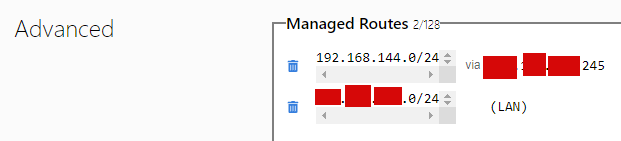 i add route here. And it apply automatically when establishing vpn connection