

 steam3d
When I use two screens, the pop-up is not appeared.

Hi. Does it happen when you restart the MagicPods? When you set animation position to the center of the screen, popup window appears?
- Send screenshot how did you position your displays?
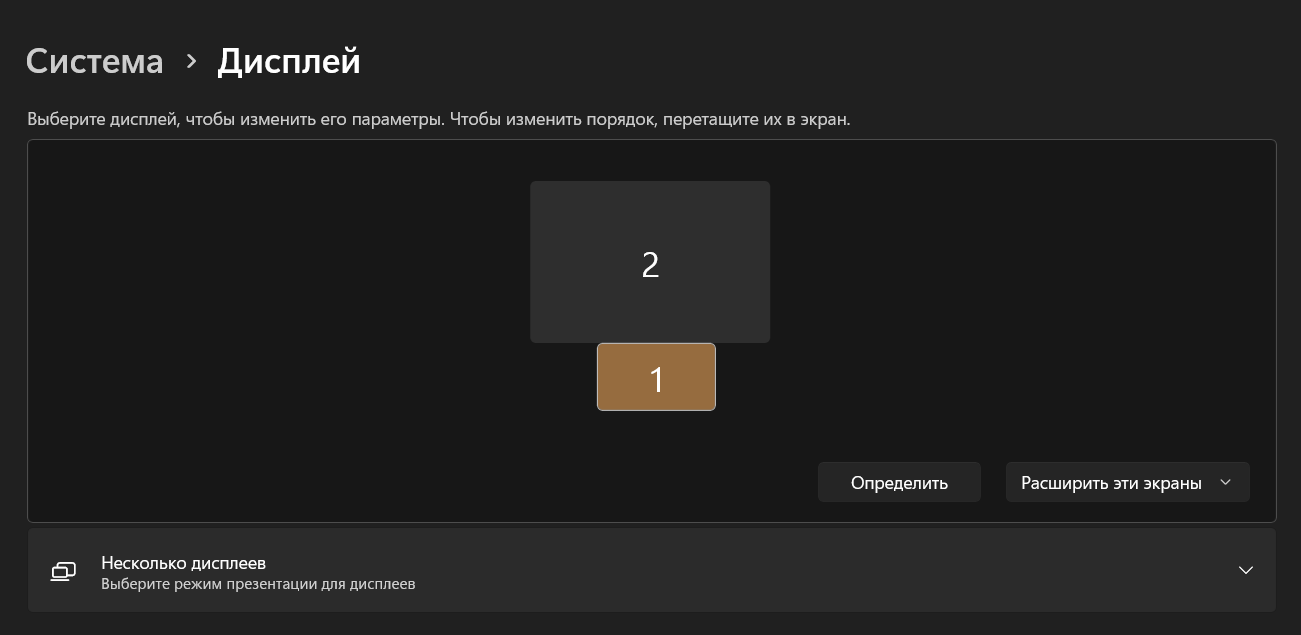
- Which resolution and dpi on Display 1?
- Which resolution and dpi on Display 2?
- Which of two displays is primary?
Enable advanced collect log and use the app while you do not get the same issue:
- Open MagicPods on
Support Page - Click on MagicPods logo 5-10 time, the page will refresh.
- Go to
General Settingsand scroll down, switchLog leveltodebug - Restart MagicPods
When you get the issue upload the log files here

Hi, I try to restart the software but it was unuseful. I set the position of the screens as you present. But the bottom one is smaller than the upper one. The bottom one's resolution is 25601660, another is 19201080, and the bottom is the primary display.
I am sorry but i did not understand what are you talking about. You should provide information about your environment. I requested necessary information above. You do not need to change any system settings.
- I set the position of the screens as you present, but I can't screenshot for you now.
- the dpi on display 1 is 2560 1660
- the dpi on display 2 is 1920 1080
- display 1 is primary. It that clear?
@listentide You should to return displays setting to your own and take screenshot how your monitors positioned. I added screenshot to show what screenshot I need to reconfigure my own environment to try to recreated your issue.
DPI is scale factor. For example my 4k display has 150% scale factor.