

 statianzo
Send Param from Client to Server
I have implemented a C# server with fleck websocket and I am connecting via the java client app desk. Everything works fine but I need to send log parameters to the server. I have searched but I have not found anything regarding the sending of parameters by the client. Can someone upload an example where it show me how to set up the server to receive client parameters? Is it possible to send and receive parameters via a link (OnOpen())?
An exemple java client: session=container.connectToServer(appJavaClient, URI.create("ws://localhost:8080/"+accountKey+");
Thank you...


Maybe I don't understand your question. Can you explain "sending of parameters by the client"? What parameters do you want to send?
If you want to capture it onOpen, then add it to your connection path & then inside onOpen, read the socket.ConnectionInfo.Path property.
Basically, anything extra you add after "ws://localhost:8080" is available in the path property. e.g. "ws://localhost:8080/xxx", you will see "/xxx" in the path property.
You could add query-string parameters if you wanted, like "ws://localhost:8080/xxx?y=zzz"
Have your code filter out what you need based on the structure of your path. You would need to add your own query-string parameter reader if you use a query-string.
Alternatively, you could send the username as a message from the client after connection is complete, then in onMessage you could capture the message and deal with it as you wish.
Great! It was just what I was looking for! Thanks!! I have a second question for you... How can I set the server for accepting multi client indipendet connection? Please look my code: https://pastebin.com/u6WezaYR
I have to open a thread everytime a client connect and close it when the client disconnect. Unfortunaly I'm not C# developer, I'm java. Fleck is a good project because I can connect a java app client!! But I need to do for multi client. Can you help me please?
Not sure if I understand your question, but no, you don't have to open/close threads. Better to use thread safe collections like ConcurrentDictionary or ConcurrentBag. List<T> is not thread safe. Other option for controlling thread access is to use the lock statement.
where can I find some example (multiple clients)? because with my code I have some issue... For example, when client disconnect, server keep to send data and doesn't close the connection. If I have 2 clients, server send always the last while the first be interrupted not receive any data. As if the last connection rewritting the first. For this reason I thinked a thread. One thread, one client. One client close the connection, I close thread... Another client connect, I open another thread. With java if you open a thread you can close easily. But in C# it is not simple. I'm not a C# dev, so I need help to solve this issues. I need set a server for multiple clients (indipendent connection) in C# that it works with java app client! thanks!
Remove code for Threads...you don't need it. Remove line 31...does nothing. Try using ConcurrentBag instead of List. This is thread safe....multiple threads can read/write to the list of connections without conflict. So make List<IWebSocketConnection> allSockets; > ConcurrentBag<IWebSocketConnection> allSockets;
https://msdn.microsoft.com/en-us/library/dd381779(v=vs.110).aspx
Looks like onopen you want to send a message to the opening socket. Instead of this...
id = socket.ConnectionInfo.Id;
thread = new Thread(delegate () { WriteY(true, id); });
thread.Start();
just do socket.Send("your message");
Thank you for you support... So, I modified my class as you suggested. You can find the new code here: https://pastebin.com/aDYs6jXH
Of course, your code is better than mine, but thread or not thread, I have the same problem. I try to explain better with gifs:
1° Step. Lounch the program with first client. The console print input data from while and ID Client... https://gyazo.com/ee7ac36a1e6b4161fc398a39cf096056
2° Step. Connect another client... Now we have 2 client. You can see from different input and ID. https://gyazo.com/4c6753843c90d1ca58f49bfbad2c942c
3° Step. One of the clients disconnect and the server doesn't close the connection. Important! The row 30 "OnClose()" it is not performed. It seems that OnClose doesn't work... https://gyazo.com/b0785bc3d8d61f33c985522f071c6726
https://gyazo.com/45fac7089b5a44be4acffe27a34ea91a
Any suggest? Regards
If onClose is not triggered then there will be an issue with the way your Java client is disconnecting the socket. The client has to inform the server of the disconnection by sending a specific control frame. I can't help you there as I use browser clients that handle that automatically. I don't do Java, but see if this will help you...
https://www.developer.com/java/ent/developing-websocket-clientserver-endpoints.html
Start by getting the client to trigger onClose on the server working correctly, then carry on with the server side development.
The link above has a html client example which you can experiment with to see if that triggers the onClose.
It is not a java problem. My Client endpoint is perfect. Talk with C# websocket! ;) But I saw a little thing.. In your opinion, could it be that client ID generate problems because are different?
In Java OnClose() I have "userSession.close();". Session is like Guid ID (C#). Java OnClose() disconnect a different ID that C# server expects. But I don't know why C# Server see a client only in OnOpen and it doesn't work in the same way in OnClose...
Is There a simple desk app client in C# for a test? Thank you for your great support...
Here is a very simple C# client test to prove onClose is being triggered server side. Add the WebSocket4Net package to your solution, adjust the client socket ip to that of your local pc ip and run it. My test triggers the server side onClose when the client calls websocket.Close()
Client
using System;
using System.Threading.Tasks;
using SuperSocket.ClientEngine;
using WebSocket4Net;

namespace Discovery
{
	class Program
	{
		private static WebSocket websocket = null;

		[STAThread]
		static void Main(string[] args)
		{
			Console.WriteLine("Socket Client");
			Console.WriteLine("====================");

			websocket = new WebSocket("ws://192.168.0.2:2001/"); // change the ip to your local pc ip
			websocket.Opened += new EventHandler(websocket_Opened);
			websocket.Error += new EventHandler<ErrorEventArgs>(websocket_Error);
			websocket.Closed += new EventHandler(websocket_Closed);
			websocket.MessageReceived += new EventHandler<MessageReceivedEventArgs>(websocket_MessageReceived);
			websocket.Open();

			Console.WriteLine("Press any key to exit...");
			Console.ReadKey();
		}

		private static void websocket_MessageReceived(object sender, EventArgs e)
		{
			// server sent a message back...now lets close the connection after 5 seconds
			Task.Delay(5000).ContinueWith(_ => websocket.Close());
		}

		private static void websocket_Closed(object sender, EventArgs e)
		{
		}

		private static void websocket_Opened(object sender, EventArgs e)
		{
			// opened, send message to server
			websocket.Send("Hello server!");
		}

		private static void websocket_Error(object sender, ErrorEventArgs e)
		{
		}
	}
}
Server
using System;
using Fleck;

namespace Discovery
{
	class Program
	{
		[STAThread]
		static void Main(string[] args)
		{
			Console.WriteLine("Socket Server");
			Console.WriteLine("====================");

			WebSocketServer server = new WebSocketServer("ws://0.0.0.0:2001");

			server.Start(socket =>
			{
				socket.OnOpen = () =>
				{
				};

				socket.OnClose = () =>
				{
				};

				socket.OnMessage = message =>
				{
                                        // client sent a message, lets send one back
					socket.Send("Hello client!");
				};

				socket.OnError = exception =>
				{
				};
			});

			Console.WriteLine("Press any key to exit...");
			Console.ReadKey();
		}
	}
}
Hi Adrian... Sorry but, as I supposed, I think the problem is not the client. The problem is the server and I don't understand why... As you can see on the gif, the problem is the same even if we have a client C#. https://gyazo.com/565d057579fefca466d69238096fcf80
There is a difference...with the Java client, you said onClose was not being triggered on the server. In the C# version, your example shows it is being triggered. Here is a more detailed example...
You can send a message from the server to all clients and clients can send a message to the server.
In the client, type close and it will close the connection.
In the server, type close and it will close all client connections.
Client
using System;
using SuperSocket.ClientEngine;
using WebSocket4Net;

namespace Discovery
{
	class Program
	{
		private static WebSocket websocket = null;

		[STAThread]
		static void Main(string[] args)
		{
			Console.WriteLine("Socket Client");
			Console.WriteLine("====================");

			websocket = new WebSocket("ws://172.20.28.21:2001/"); //192.168.0.2
			websocket.Opened += new EventHandler(websocket_Opened);
			websocket.Error += new EventHandler<ErrorEventArgs>(websocket_Error);
			websocket.Closed += new EventHandler(websocket_Closed);
			websocket.MessageReceived += new EventHandler<MessageReceivedEventArgs>(websocket_MessageReceived);
			websocket.Open();

			string input = "";

			while (input != "exit")
			{
				if (input != "")
					websocket.Send(input);

				input = Console.ReadLine();

				if (input == "close")
					websocket.Close();
			}
		}

		private static void websocket_MessageReceived(object sender, MessageReceivedEventArgs e)
		{
			Console.WriteLine($"server says: {e.Message}");

			if (e.Message == "close")
				websocket.Close();
		}

		private static void websocket_Closed(object sender, EventArgs e)
		{
			Console.WriteLine("connection closed!");
		}

		private static void websocket_Opened(object sender, EventArgs e)
		{
			// say hello to server
			websocket.Send("Hello server!");
		}

		private static void websocket_Error(object sender, ErrorEventArgs e)
		{
			Console.WriteLine($"error: {e.Exception.Message}");
		}
	}
}
Server
Note: using ConcurrentDictionary instead of ConcurrentBag ...you decide what you want to use.
using System;
using System.Collections.Concurrent;
using Fleck;

namespace Discovery
{
	class Program
	{
		private static ConcurrentDictionary<Guid, IWebSocketConnection> allSockets = new ConcurrentDictionary<Guid, IWebSocketConnection>();

		[STAThread]
		static void Main(string[] args)
		{
			Console.WriteLine("Socket Server");
			Console.WriteLine("====================");

			WebSocketServer server = new WebSocketServer("ws://0.0.0.0:2001");

			server.Start(socket =>
			{
				socket.OnOpen = () =>
				{
					Console.WriteLine($"{socket.ConnectionInfo.Id} OnOpen()");

					if (allSockets.TryAdd(socket.ConnectionInfo.Id, socket))
					{
						Console.WriteLine($"{socket.ConnectionInfo.Id} added");
						Console.WriteLine($"{allSockets.Count} connections");
					}
					else
						Console.WriteLine($"{socket.ConnectionInfo.Id} add failed");

					// say hello to client
					socket.Send($"Hello client!");
				};

				socket.OnClose = () =>
				{
					Console.WriteLine($"{socket.ConnectionInfo.Id} OnClose()");

					if (allSockets.TryRemove(socket.ConnectionInfo.Id, out IWebSocketConnection removedSocket))
					{
						Console.WriteLine($"{removedSocket.ConnectionInfo.Id} removed");
						Console.WriteLine($"{allSockets.Count} connections");
					}
					else
						Console.WriteLine($"{socket.ConnectionInfo.Id} remove failed");
				};

				socket.OnMessage = message =>
				{
					Console.WriteLine($"{socket.ConnectionInfo.Id} sent message: {message}");
				};

				socket.OnError = exception =>
				{
					Console.WriteLine($"{socket.ConnectionInfo.Id} OnError() {exception.Message}");
				};
			});

			var input = Console.ReadLine();
			while (input != "exit")
			{
				foreach (var item in allSockets)
				{
					item.Value.Send(input);
				}

				input = Console.ReadLine();
			}
		}
	}
}
Doesn't work... It's the same... https://gyazo.com/d8cce753299422f7651d3626f366dfe6
I need work this class, not another class like "socket chat". Server must push data, client receive and when it's disconnecting, server must close and stop send data. Is it difficult work like this?
`using System; using System.Collections.Concurrent; using Fleck; using System.Threading.Tasks; using System.Threading;
namespace ConsoleApp2 { class Program { private static ConcurrentDictionary<Guid, IWebSocketConnection> allSockets = new ConcurrentDictionary<Guid, IWebSocketConnection>(); static Guid id; [STAThread] static void Main(string[] args) { Console.WriteLine("Socket Server"); Console.WriteLine("====================");
            WebSocketServer server = new WebSocketServer("ws://0.0.0.0:4708");

            server.Start(socket =>
            {
                socket.OnOpen = () =>
                {
                    Console.WriteLine($"{socket.ConnectionInfo.Id} OnOpen()");

                    if (allSockets.TryAdd(socket.ConnectionInfo.Id, socket))
                    {
                        Console.WriteLine($"{socket.ConnectionInfo.Id} added");
                        Console.WriteLine($"{allSockets.Count} connections");
                    }
                    else
                        Console.WriteLine($"{socket.ConnectionInfo.Id} add failed");

                    // say hello to client
                    socket.Send($"Hello client!");
                    id = socket.ConnectionInfo.Id;

                    WriteY(socket, true, id);
                };

                socket.OnClose = () =>
                {
                    Console.WriteLine($"{socket.ConnectionInfo.Id} OnClose()");

                    if (allSockets.TryRemove(socket.ConnectionInfo.Id, out IWebSocketConnection removedSocket))
                    {
                        Console.WriteLine($"{removedSocket.ConnectionInfo.Id} removed");
                        Console.WriteLine($"{allSockets.Count} connections");
                        WriteY(socket, false, id);
                    }
                    else
                        Console.WriteLine($"{socket.ConnectionInfo.Id} remove failed");
                };

                socket.OnMessage = message =>
                {
                    Console.WriteLine($"{socket.ConnectionInfo.Id} sent message: {message}");
                };

                socket.OnError = exception =>
                {
                    Console.WriteLine($"{socket.ConnectionInfo.Id} OnError() {exception.Message}");
                };
            });

            var input = Console.ReadLine();
            while (input != "exit")
            {
                foreach (var item in allSockets)
                {
                    item.Value.Send(input);
                }

                input = Console.ReadLine();
            }
        }

    static void SendToSocketById(IWebSocketConnection socket, String input, Guid id)
    {
        Console.WriteLine("input " + input + " " + id);
        socket.Send(input);
    }

    public static void WriteY(IWebSocketConnection socket, bool action, Guid id)
    {
        int i = 0;
        while (action)
        {
            SendToSocketById(socket, "" + i, id);
            i++;
            Thread.Sleep(2000);
        }
    }
}
}`
ok, here you go...
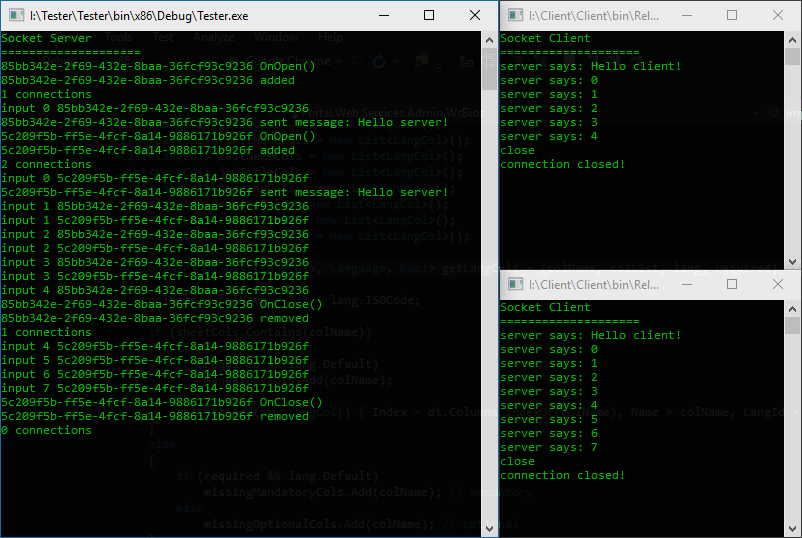
Server
using System;
using System.Collections.Concurrent;
using Fleck;
using System.Threading.Tasks;

namespace ConsoleApp2
{
	class Program
	{
		private static ConcurrentDictionary<Guid, IWebSocketConnection> allSockets = new ConcurrentDictionary<Guid, IWebSocketConnection>();

		[STAThread]
		static void Main(string[] args)
		{
			Console.WriteLine("Socket Server");
			Console.WriteLine("====================");

			WebSocketServer server = new WebSocketServer("ws://0.0.0.0:4708");

			server.Start(socket =>
			{
				socket.OnOpen = () =>
				{
					Console.WriteLine($"{socket.ConnectionInfo.Id} OnOpen()");

					if (allSockets.TryAdd(socket.ConnectionInfo.Id, socket))
					{
						Console.WriteLine($"{socket.ConnectionInfo.Id} added");
						Console.WriteLine($"{allSockets.Count} connections");
					}
					else
						Console.WriteLine($"{socket.ConnectionInfo.Id} add failed");

					socket.Send("Hello client!");

					Task.Run(() => WriteY(socket));
				};

				socket.OnClose = () =>
				{
					Console.WriteLine($"{socket.ConnectionInfo.Id} OnClose()");

					if (allSockets.TryRemove(socket.ConnectionInfo.Id, out IWebSocketConnection removedSocket))
					{
						Console.WriteLine($"{removedSocket.ConnectionInfo.Id} removed");
						Console.WriteLine($"{allSockets.Count} connections");
					}
					else
						Console.WriteLine($"{socket.ConnectionInfo.Id} remove failed");
				};

				socket.OnMessage = message =>
				{
					Console.WriteLine($"{socket.ConnectionInfo.Id} sent message: {message}");
				};

				socket.OnError = exception =>
				{
					Console.WriteLine($"{socket.ConnectionInfo.Id} OnError() {exception.Message}");
				};
			});

			var input = Console.ReadLine();
			while (input != "exit")
			{
				foreach (var item in allSockets)
				{
					item.Value.Send(input);
				}

				input = Console.ReadLine();
			}
		}

		private async static Task WriteY(IWebSocketConnection socket)
		{
			int i = 0;
			while (socket.IsAvailable)
			{
				await Task.Run(() => {
					Console.WriteLine("input " + i + " " + socket.ConnectionInfo.Id);
					socket.Send("" + i);
				});
				await Task.Delay(TimeSpan.FromSeconds(2));
				i++;
			}
		}
	}
}
Note that the collection of sockets allSockets is not required for your example. I kept it in for demonstration purposes.
Excellent work! What was the issue? I don't know if you realize this, but you're the only C# dev who solved this problem... awesome!
Good to hear! :) Would have been sooner if I understood your issue better! The key issue was to check for the socket availability with socket.IsAvailable.
:( unfortunately it does not work. For the example that I did, it work fine, but for my project this last modification does not work. I have the same problem. Server doesn't close the connection. Adrian how can I contact you?
In this comment https://github.com/statianzo/Fleck/issues/215#issuecomment-366776473 (3° Step.), you show that with the Java client the OnClose does not get triggered on the server. So, does OnClose get triggered on the server?
If no, then there is an issue with the way your client is closing the connection. Since it's Java, I can't help there as I don't do Java. Contact the developers of the socket client. The client has to tell the server it is closing.
If yes, then maybe I can help further.
yes, of course, you can help me. Java client works perfectly. The problem is the server, because I changed the server class according to my project, it does not work anymore. I have the same issue. Please send me an Email v6krk80[AT]gmail.com