

 stashapp
MacOS scan does not work, and cleaning attempts to remove entire filesystem
Describe the bug Recent development versions do not scan folders correctly. Logs show an error about dotfiles (even if those are excluded) and the scan does not find any new items. The Clean utility also now attempts to remove the entire root directory.
To Reproduce Steps to reproduce the behavior:
-
Go to Tasks and select Scan
-
New items are not found and the scan shows errors.
-
Go to Tasks and select Clean
-
The entire filesystem root "/" is marked for cleaning.
Screenshots


Stash Version: (from Settings -> About): v0.16.1-67-g00820a87
Desktop (please complete the following information):
- OS: MacOS 13.0
- Browser [all]
Additional context Add any other context about the problem here.

The Folder not in any stash library directories. Marking to clean: "/" message is expected, if a little misleading. During the schema migration process for schema 32, it creates a number of folder entries in the database, all the way up to the root directory, even for those outside the stash library. When clean is first run, it removes these superfluous folder entries because they aren't actually valid. It's not actually removing anything else, otherwise you'd see Marking to clean for all of your other contained files.
I'll amend the migration to be a little smarter so that these folders aren't created in future, but for now there's no problem here.
I will however double-check the exclusion code to see why you're getting those permission denied errors.

As far as I can tell, those permission denied are because .Trashes is a directory. Directories will only be ignored if the path matches both the excluded video and excluded image patterns. If either do not, then the directory will be read, and if there is no read permission then you'll get those errors. Can you confirm that the .Trashes filename matches both exclusion patterns?
Previously, my exclusions were set to ignore dotfiles according to the wiki:
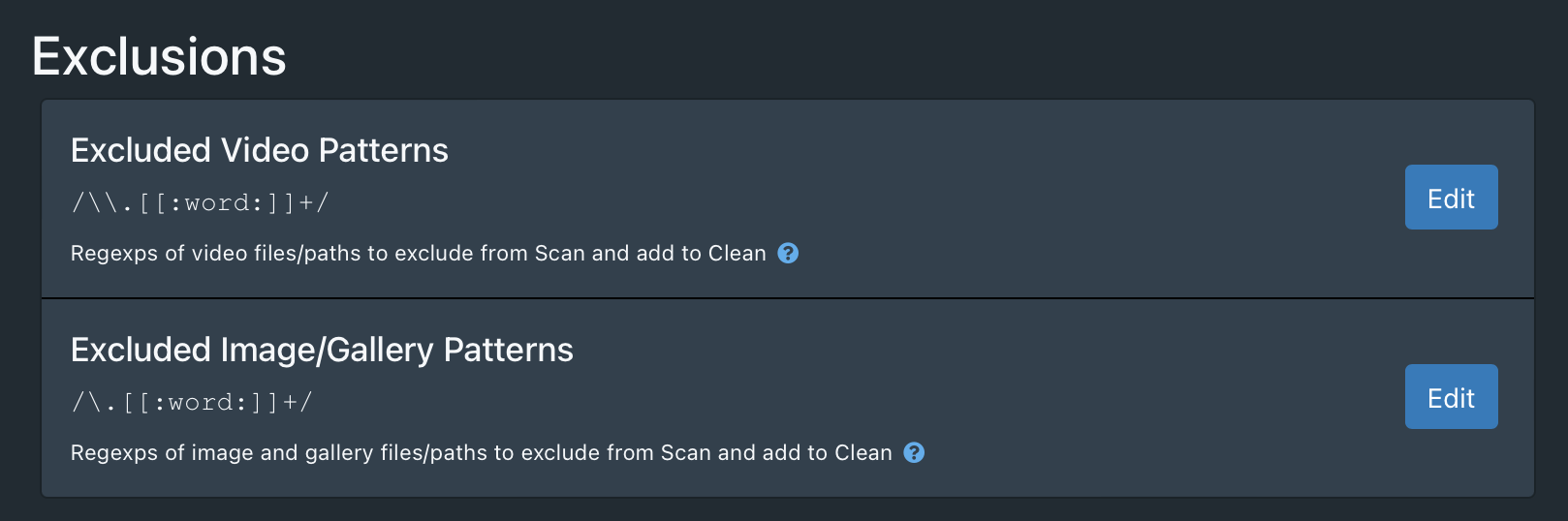
Setting each and every identified file and folder as individual exclusions does work, though.
I think the extra \ character in the video patterns might be causing the issue. It's not present in the image/gallery pattern.