

 stashapp
[Bug Report] Default Player Resolution for HEVC scenes
Describe the bug Currently, when playing HEVC videos, the default selected resolution is incorrect. For a 1080p scene for example, I've noticed "webm low (240p)" being selected by default. This only seems to occur on HEVC videos from what I've noticed. When you play a AVC video, it selects "Direct stream" as default, which isn't available for HEVC which is what I believe to be the cause.
I cannot confirm that this is the same on other codecs such as VP9 or VP8.
To Reproduce Steps to reproduce the behaviour:
- Open a video that uses the HEVC codec
- Play the video
- The video will be played in a lower resolution instead of its full quality (if not, perhaps try a different video)
Expected behaviour The video should always play at its full resolution and not default to a lower quality.
Stash Version: 3fa7b470 (built from develop branch)
Desktop (please complete the following information):
- OS: Windows 10 Version 21H1 (Build 19043.1889)
- Browser: Vivaldi (Chromium browser, however confirmed to exist in Chrome as well)
- Version: 5.4.2753.51 (Stable channel) (64-bit)

Went into my Stash database file to find all the scenes of differing codecs to see which had this issue. The full list is below, but here's a short summary: hevc, flv1, and vp6f are the only 3 not working. I only had flv1 and vp6f videos at 360p and "webm low (240p)" was selected when "webm" should have been selected to get the full quality available. svq3 only had hls available as an option.
hevc is probably the only one worth fixing.
| Codec | Status |
|---|---|
| h264 | Working |
| hevc | Not Working |
| vp8 | Working |
| vp9 | Working |
| av1 | Working |
| wmv3 | Working |
| prores | Working |
| mpeg1video | Working |
| wmv2 | Working |
| mpeg4 | Working |
| vc1 | Working |
| mpeg2video | Working |
| msmpeg4v3 | Working |
| svq3 | hls only |
| flv1 | Not Working |
| dvvideo | Working |
| vp6f | Not Working |
Hevc needs to be transcoded in stash. So that is the reason there is no direct stream. There should be a setting in stash for which transcode resolution it pick's by default. Can't check right now where it is, but I think it should be under system - Transcoding or something like that.

Hevc needs to be transcoded in stash. So that is the reason there is no direct stream. There should be a setting in stash for which transcode resolution it pick's by default. Can't check right now where it is.
I'm aware of the reason for there not being a direct stream option. As for the setting, it doesn't exist. These are the only transcoding options:
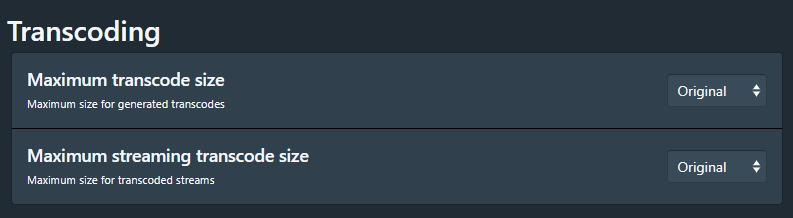
Neither of these set the default resolution that gets picked, if they did, it would stick with the original quality, which it isn't.
did some test seams to be Video Codec: hevc Audio Codec: aac and Video Codec: hevc Audio Codec: mp3 that i have problem with.
Video Codec: hevc Audio Codec: ac3 and Video Codec: hevc Audio Codec: vorbis seams to work for me.
problem exist on develop and latest for me.
Can you look what the audio codecs are of the files where it does not work correctly?
can you also test for one of files if it works when you go back a page and then forward to the video?
did some test seams to be
Video Codec: hevc Audio Codec: aacandVideo Codec: hevc Audio Codec: mp3that i have problem with.Video Codec: hevc Audio Codec: ac3andVideo Codec: hevc Audio Codec: vorbisseams to work for me. problem exist on develop and latest for me. Can you look what the audio codecs are of the files where it does not work correctly?
Haven't pulled in the latest commit yet (will do so shortly). You are right though, it seems to be a combination of hevc for video codec and aac for audio.
I just tried a hevc/ac3 video and it went to "webm full hd (1080p)" by default. The combination of h264/aac seems to still work fine.
can you also test for one of files if it works when you go back a page and then forward to the video?
Strangely enough, it works as it should when I do this.
Unsure if this is a related issue, but for scenes that don't meet a specific option (360p, 540p, etc.), the default selected resolution for these is the highest resolution below the actual resolution of the video. For these, I'd expect "webm", "hls", or some other option that will play them at full resolution to be selected by default.