

 standardnotes
Deleting all local items and extension does not produce expected outcome
Recently, I have misplaced my passcode and unable to retrieve it. At this point of time, I have no other option then to delete the local data on the desktop.
Desktop (please complete the following information):
- OS: Windows 10, 20H2
- Version 3.6.9
To Reproduce
Summary: Clear out your local data from the passcode lock screen.
- Open the Standard Notes
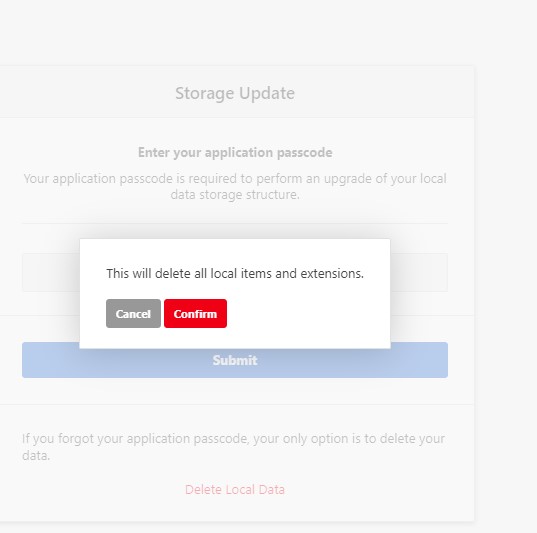
- Clicked on "Forgot your Passcode?" aligned at the base of the dialog box
- Next, it displayed "Delete Local Data"
- Upon Clicking, The statement changes to "This will delete all local items and extensions"
- After position over the confirm button and Clicking it.
- This jumps back to dialog box, without changes or effect being made.
Expected behavior The expected behavior would invoke the action to delete all local data items, including the extensions.
Screenshots
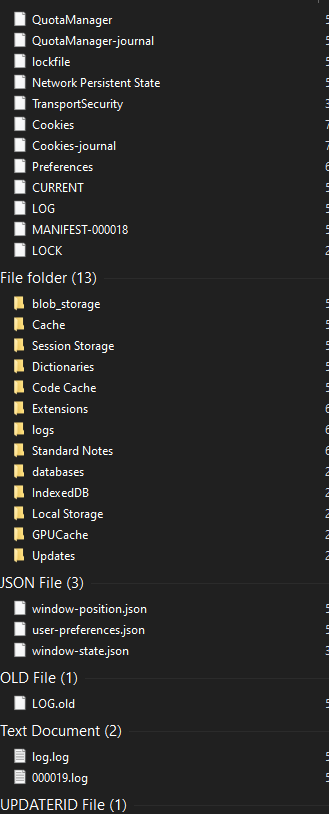

Hi @mehdik7, thank you so much for bringing this issue to our attention. We've addressed this issue for users who are signing out in recent releases. I'll forward this over to the dev team so that the same will be done when deleting data from the lock screen.
Edit: based on the dev team's feedback, we're considering whether it would be a good idea to let someone else delete your data from the lock screen in two clicks.

Hi @mehdik7, here is the official guide by Microsoft on how to uninstall applications (like Standard Notes' desktop app) from Windows 10.