

 squizlabs
How wo exclude a Squiz in a folder?
This works:
<rule ref="WordPress">
	<exclude name="Squiz.Commenting.FileComment.Missing"/>
</rule>
And This works
<rule ref="WordPress.NamingConventions.PrefixAllGlobals.NonPrefixedVariableFound">
	<exclude-pattern>/templates/</exclude-pattern>
</rule>
But I can't combine the 2 and ignore the FileComment in the app/* folder. Like:
<rule ref="WordPress">
	<exclude-pattern name="Squiz.Commenting.FileComment.Missing" >/app/</exclude-pattern>
</rule>
What am I missing?

What am I missing?
@janw-me Nothing. Those two syntaxes cannot be combined, but as you already figured out, you can refer to rules included via a ruleset after the initial inclusion and set excludes for the included rules. Something along the lines of the below.
<rule ref="WordPress"/>

<rule ref="WordPress.NamingConventions.PrefixAllGlobals.NonPrefixedVariableFound">
	<exclude-pattern>/templates/</exclude-pattern>
</rule>
<rule ref="Squiz.Commenting.FileComment.Missing">
	<exclude-pattern>/app/</exclude-pattern>
</rule>

Thanks for the reply, but I tried that and it doesn't work. It still ignores the filecomment that is missing in /templates/
Full phpcs.xml.dist:
<?xml version="1.0"?>
<ruleset name="WordPress Coding Standards based custom ruleset for your plugin">
	<description>Generally-applicable sniffs for WordPress plugins.</description>

	<!-- What to scan -->
	<file>.</file>
	<exclude-pattern>/.git/</exclude-pattern>
	<exclude-pattern>/.githooks/</exclude-pattern>
	<exclude-pattern>/languages/</exclude-pattern>
	<exclude-pattern>/node_modules/</exclude-pattern>
	<exclude-pattern>/vendor/</exclude-pattern>

	<!-- How to scan -->
	<!-- Usage instructions: https://github.com/squizlabs/PHP_CodeSniffer/wiki/Usage -->
	<!-- Annotated ruleset: https://github.com/squizlabs/PHP_CodeSniffer/wiki/Annotated-ruleset.xml -->
	<arg value="sp"/> <!-- Show sniff and progress -->
	<arg name="basepath" value="./"/><!-- Strip the file paths down to the relevant bit -->
	<arg name="colors"/>
	<arg name="extensions" value="php"/>
	<arg name="parallel" value="8"/><!-- Enables parallel processing when available for faster results. -->

	<!-- Rules: Check PHP version compatibility -->
	<!-- https://github.com/PHPCompatibility/PHPCompatibility#sniffing-your-code-for-compatibility-with-specific-php-versions -->
	<config name="testVersion" value="7.4-"/>
	<!-- https://github.com/PHPCompatibility/PHPCompatibilityWP -->
	<rule ref="PHPCompatibilityWP"/>

	<!-- Rules: WordPress Coding Standards -->
	<!-- https://github.com/WordPress-Coding-Standards/WordPress-Coding-Standards -->
	<!-- https://github.com/WordPress-Coding-Standards/WordPress-Coding-Standards/wiki/Customizable-sniff-properties -->
	<config name="minimum_supported_wp_version" value="5.0"/>
	<rule ref="WordPress"/>
	<rule ref="WordPress.NamingConventions.PrefixAllGlobals.NonPrefixedVariableFound">
		<exclude-pattern>/templates/</exclude-pattern>
	</rule>
	<rule ref="Squiz.Commenting.FileComment.Missing">
		<exclude-pattern>/app/</exclude-pattern>
	</rule>
	<rule ref="WordPress.NamingConventions.PrefixAllGlobals">
		<properties>
			<!-- Value: replace the function, class, and variable prefixes used. Separate multiple prefixes with a comma. -->
			<property name="prefixes" type="array" value="klachten_export,kexport"/>
		</properties>
	</rule>
	<rule ref="WordPress.WP.I18n">
		<properties>
			<!-- Value: replace the text domain used. -->
			<property name="text_domain" type="array" value="klachten-export"/>
		</properties>
	</rule>
	<rule ref="WordPress.WhiteSpace.ControlStructureSpacing">
		<properties>
			<property name="blank_line_check" value="true"/>
		</properties>
	</rule>
</ruleset>
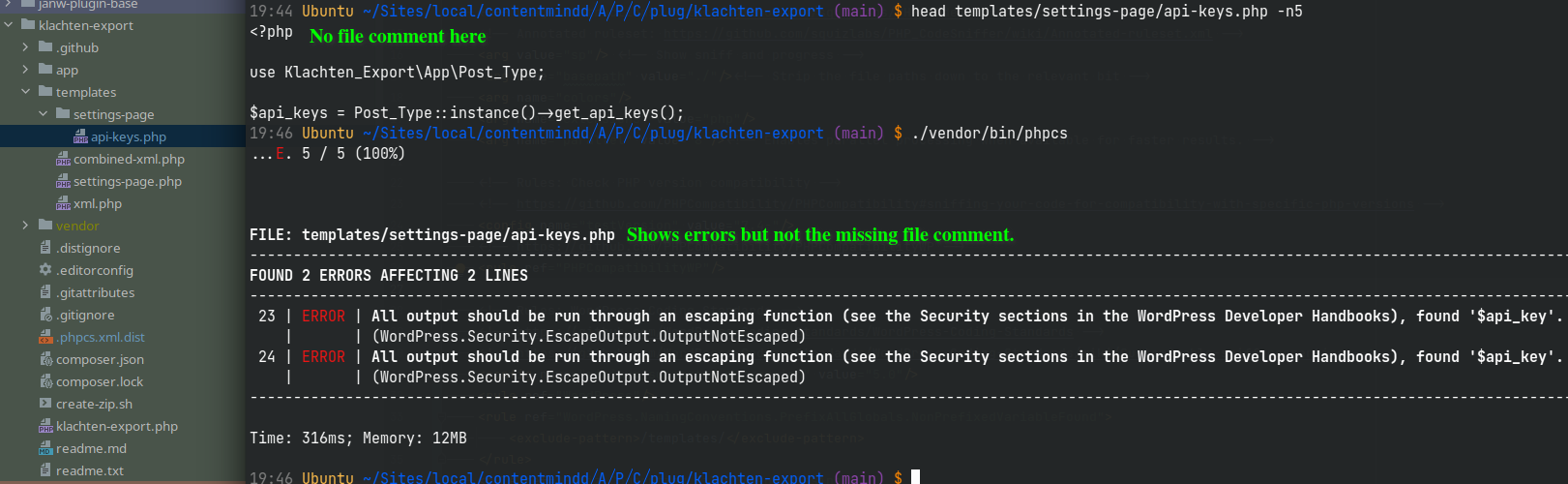
Thanks for the reply, but I tried that and it doesn't work. It still ignores the filecomment that is missing in /templates/
@janw-me Just checking - what is the *full path to the templates directory ?
Sorry I was away for the week. The file structure:
.../plugins/klachten-export/
.../plugins/klachten-export/phpcs.xml.dist
.../plugins/klachten-export/app/
.../plugins/klachten-export/templates/setttings-page/api-keys.php
.../plugins/klachten-export/vendor/bin/phpcs
Packages are updated: composer info
dealerdirect/phpcodesniffer-composer-installer v0.7.2
phpcompatibility/php-compatibility             9.3.5
phpcompatibility/phpcompatibility-paragonie    1.3.1
phpcompatibility/phpcompatibility-wp           2.1.3
squizlabs/php_codesniffer                      3.7.1
wp-coding-standards/wpcs                       2.3.0
@janw-me Sorry, but that still doesn't really answer my question:
what is the full path to the templates directory ?
What I intended to verify with that question is that there is no app subdirectory higher up in the file path, i.e.:
my/documentroot/httpdocs/app/projectA/plugins/klachten-export/templates/
                          ↑
Ahh okay, There is in localwp And it's the default setting and hard to change.
/home/janw/Sites/local/contentmindd/app/public/wp-content/plugins/klachten-export/
                                    ^^^
PS I'm fine if you can point me to more detailed information for me to figure out myself.
@janw-me In that case, I suggest you make the exclude-pattern more specific. Something like:
<rule ref="WordPress"/>

<rule ref="WordPress.NamingConventions.PrefixAllGlobals.NonPrefixedVariableFound">
	<exclude-pattern>/plugins/*/templates/</exclude-pattern>
</rule>
<rule ref="Squiz.Commenting.FileComment.Missing">
	<exclude-pattern>/plugins/*/app/</exclude-pattern>
</rule>
For more information about excluding files/folders, have a look at the wiki: https://github.com/squizlabs/PHP_CodeSniffer/wiki/Advanced-Usage#ignoring-files-and-folders
Also keep in mind that these are basically PCRE regexes with a tiny difference, so you have a lot of flexibility to craft these patterns to your specific situation.
Thank you this solves it. I did chose to use the plugin slug.
<exclude-pattern>/klachten-export/templates/</exclude-pattern>
The advantage is that you don't need an exception for github actions.
Would it make sense to create a {PROJECT_ROOT} variable or something? That is set to the directory of the .phpcs.xml.dist.