

 sqlitebrowser
[Help Wanted] Database to SQL file blob format.
I have a question with how blob types are serialized when exporting via the Database to SQL file... drop down. First a brief description about what I'm trying to achieve; apologies for being vague in places as this a a project for my employer.
I create a database using C# with; https://github.com/praeclarum/sqlite-net, from a dataset. Serializing the whole database when marshaling between C# land and SQL is quite slow. I wanted to see how fast I could get the system to work by recreating the database using raw SQL statements. For this I loaded a fully serialized database in 'DB Browser for SQLite' and exported it via Database to SQL file... option. I then loaded the file and ran each statement through the C# interfaces. I'm unable to create a database with a matching hash.
Upon investigating, I see that most of the blob type entry's are different in my 'raw SQL' created DB. I was thinking this might be a format issue with how I'm reading the exported SQL file. Please can someone tell me if there is any documentations pointing to how blob types are exported to SQL statements and their format? Any additional information on re-creating a database in this manner would be appreciated.
As an example I have this entry from the original DB;
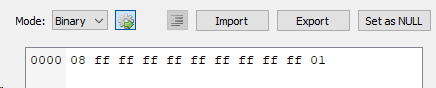
After recreating the DB via SQL statements, the same entry looks like this;

I can try to provide a repro project should it be useful. I am using version 3.11.1 of the browser and using the following export settings;


One observation I have is that if I export to SQL from DB Browser for SQLite and the import that data into a new .db file, the blob typed data doesn't appear to be read in the same. So could this be an export issue perhaps?
Can't really help with BLOBS as I don't tend to use them, but I do use VB .NET with SQLite via the system.data.sqlite SQLite wrapper. https://system.data.sqlite.org/index.html/doc/trunk/www/index.wiki
After writing my own class for each table (which just performs the reading, writing and editing as necessary) it performs blindingly fast.

I have created a set of files that illustrate my problem. Here is a breakdown of the files;
- exportTest.db - The main db file, it has one table and one entry with test data similar to my use case.
- exportTestdb.sql - The SQL export of the above database.
- importTest.db - The database made from importing the above sql file. Notice that the data has changed from the main db file
Perhaps I am missing something here but I feel like the main db should be rebuild-able from the export?
After writing my own class for each table (which just performs the reading, writing and editing as necessary) it performs blindingly fast.
Thanks for the reply chrisjlocke. I will certainly look into making my code more low level, the plugin i'm using should be pretty fast. I'm also looking for a simple way to offer up diffs to take a db from one version to another; SQL execution would also give me this if I can get it to work right.
I'm also looking for a simple way to offer up diffs to take a db from one version to another
What we used in a previous project was a setting in the database holding the current version, then a table holding the SQL commands necessary to upgrade the database as needed. In the end, we used a separate 'upgrades.db' database rather than using the main database, but the concept was the same. So the application would see what version of the database was in use, see what version it should be, then find the necessary statements to run to get it to the next level. Worked well. We didn't have that many updates during 'live' use, but happened a lot during application testing during development.
I've found using my own class gives me more control over the database. I can either get back one record or a multiple, then update those individual records (as they're all classes) as required, then update whichever ones I need. I work on a record at the class level (so just update fields) then when I tell the class to 'save', that creates the necessary one line SQL update statement. If I have to update a bunch of records, I can wrap that in a transaction, so it happens quickly. Development-wise, its quite easy to populate a grid manually (I don't tend to bind controls to datasets, etc). Its easy to populate comboboxes with data from mixed tables (so the ID from one table and the data (lookup value) from another) and get what ID the user selected (so no extra database lookups).
Still none of this helps with your BLOB issue though .... sorry! (Sorry - couldn't edit the above comment with this as GitHub is now broken with Edge...)
One use model for DB4S is prototyping databases manually and executing SQL queries on data within the tables and/or attaching existing db's after the fact. I use all datatypes, including BLOB's and have not had a problem. Be careful using the clipboard or cut and paste actions with binary data. Instead, use the cell editor "import from file" icon. Use the latest nightly.
Side note: I don't understand what you mean by "serialization"? I do not see your SQL statement creating your db? Did you use BLOB or some other affinity?

Thanks for the advice; I will look to try the latest nightly build.
Side note: I don't understand what you mean by "serialization"?
We receive a collection of data in a protocol buffer format, this is read in to create a collection of C# object stored in memory. I have been able to take this data and get it out of memory by storing it in an SQLite DB that we can query and marshal back into the original C# objects. When I say 'serialization' I am referring to the process of creating the DB, and saving it to disc.
I do not see your SQL statement creating your db?
In the C# code I use the API provided here; https://github.com/praeclarum/sqlite-net#synchronous-api. In my example (see below) the SQL export looks like this;
BEGIN TRANSACTION;
DROP TABLE IF EXISTS "TestData";
CREATE TABLE IF NOT EXISTS "TestData" (
	"ID"	INTEGER PRIMARY KEY AUTOINCREMENT,
	"TestField"	BLOB
);
INSERT INTO "TestData" ("ID","TestField") VALUES (1,'��this\is\some\url.webp');
COMMIT;
Did you use BLOB or some other affinity?
You can see above that the example specifies BLOB. In c# when you create an object of type byte[], then the API generates a relevant command that uses BLOB.
While I appreciate my implementation could be different or explained more, I would like to focus on my example that just concerns DB Browser for SQLite here; https://github.com/sqlitebrowser/sqlitebrowser/issues/1797#issuecomment-471561699. Regardless of what binary data I place in a BLOB, shouldn't exporting that to raw SQL and then importing it again recreate the same DB? This seems like a bug to me, but I might not be understanding some part of the process. I would appreciate it if someone could take a look at that comment and reproduce what i'm seeing.
Aside: When using SQLite .dump, the format of the export is different to that of DB Browser for SQLite. Here is the same exportTest.db from my earlier comment. This appears to recreate faithfully when importing into DB Browser for SQLite.
Ok, I see your INSERT is still passing TEXT. That is your issue. Instead, use a SQLite prepare statement to assign the memory holding your BLOB. I don't use C# but the interwebs surely have an example. You must also calculate the number of bytes to transfer. I had to fiddle with my code and dropped the last byte for some reason. I think the trailing empty byte was corrupting my large TEXT BLOB's. Side note: If you drop AUTOINCREMENT, you can eliminate the sqlite_sequence table altogether.
If you drop AUTOINCREMENT, you can eliminate the sqlite_sequence table altogether
Just to expand on this answer. Because the field is defined as 'integer primary key', its an alias for the rowId, so its already an incrementing number. HOWEVER. If you delete a record, SQLite will go back and fill in the missing numbers. So add record 1,2,3 and 4, then delete record 4, then add a new record, it will use number 4 again. If you use the 'AUTOINCREMENT' keyword, this 'feature' won't occur - it will always increment, regardless.
Thanks sky5walk but perhaps I'm not being clear; I'm not looking for a C# solution right now. I'm trying to figure out why SQL statements exported from 'DB Browser for SQLite' don't appear to be in the right format. As you indicate it looks like the INSERT statements are passing text.
The statements I put in my previous comment is the export from DB Browser for SQLite itself. I don't think it is exporting BLOB data correctly or are you saying that File --> Export --> Database to SQL... should not be used for DB's that use BLOB data types?
Please follow these steps to see what I mean;
- Download Zip from my comment; https://github.com/sqlitebrowser/sqlitebrowser/issues/1797#issuecomment-471561699.
- Load exportTest.db in DB Browser for SQLite.
- Select 'File' --> 'Export' --> 'Database to SQL...', save file as exportTest.db.sql
- Open another instance of DB Browser for SQLite.
- Select 'File' --> 'Import' --> 'Database from SQL file...' and select exportTest.db.sql.
- Save the db as importTest.db.
- Observe the data in importTest.db doesn't match that of exportTest.db.
I may have time later but I wonder if you can rethink your strategy? Have you confirmed the SQLite table holds your BLOB data correctly? Once there, why would you dump it? You have a stable, scalable container for your data. Now use it. Query it, expand it, etc. If you must export to another application, a SQLite dump operation does not seem sufficient for all cases. Create a custom query that achieves your export goals.
Shouldn't your INSERT be inserting binary value? Note the x before the quoted string. I don't know what export gives you but I imagine for a blob the export should be using 'x' too.
INSERT INTO "TestData" ("ID","TestField") VALUES (1, x'����this\is\some\url.webp');


I am experiencing the same issue. I need to seed data when creating a new database. All of our PK's are GUIDs. I what OP wants and myself is the same thing: 'Import -> Database from SQL file...' should be the direct inverse of 'Export -> Database to SQL file' But DB Browser mangles the blobs / primary keys. So dropping and recreating the user table changes all of the PK's and breaks any foreign key relationships, such as the ID for our prime/seed user. For now I'll consider this function broken (All of our tables have blob fk's and pk's)
