spyder
 spyder copied to clipboard
 spyder-ide
Window layouts are forgotten in Spyder 5.3
Issue Report Checklist
- [ x] Searched the issues page for similar reports
- [ x] Read the relevant sections of the Spyder Troubleshooting Guide and followed its advice
- [ x] Reproduced the issue after updating with
conda update spyder(orpip, if not using Anaconda) - [ N/A] Could not reproduce inside
jupyter qtconsole(if console-related) - [ x] Tried basic troubleshooting (if a bug/error)
- [x ] Restarted Spyder
- [x ] Reset preferences with
spyder --reset - [x ] Reinstalled the latest version of Anaconda
- [x ] Tried the other applicable steps from the Troubleshooting Guide
- [ x] Completed the Problem Description, Steps to Reproduce and Version sections below
Problem Description
Since upgrading Spyder to version 5.2.2 from conda-forge in Ubuntu 20.04, I've had problems with the Window layouts. It appears it may be related to this stackoverfow question: Location of Spyder window layout file, despite the fact that my installation was via conda and not pip. Changes made to the window layout are not remembered after closing and restarting. Furthermore, when I go to View -> Window layouts, neither the predefined layout options (RStudio, Matlab, Vertical split, Horizontal split), nor my previously saved window layouts appear, the layout preferences option is greyed out and neither the Use next layout or Use previous layout options do anything.
Some related settings are stored in the file ~/.config/spyder-py3/config/transient.ini. Under the heading [quick_layouts] the following parameters (sorry if this is wrong terminology, I don't know anything about ini file syntax and terminology) are set equal to empty lists after a new Spyder 5.2.2 or 5.3.0 instance is opened (not in 5.1.5 or 5.1.1): names, order, active, and ui_names. This appears to be the cause of the behaviour explained above.
The same thing occurs when I upgrade to 5.3.0.
What steps reproduce the problem?
- Create a new conda environment using conda-forge as the channel with strict priority, specifying Spyder version 5.2.2 or 5.3.0. Activate the environment and open Spyder, with
spyder &in bash. - Make any change to the window layout, e.g. resizing, removing one of the panes (such as "history"), adding a new pane (such as "find") or move one of the panes to a new location.
- Close the window.
- Re-open a new Spyder instance as before. The previous Spyder window layout is overridden by the default.
What is the expected output? What do you see instead?
The expected output is that the previously stored window and panes layout would be remembered and that there would be a list of pre-defined window layouts to select from, available from the View menu.
Versions
- Spyder version: 5.2.2 or 5.3.0
- Python version: 3.8, 3.9 or 3.10
- Qt version: 5.12.9
- PyQt version: 5.12.3
- Operating System name/version: Ubuntu 20.04 LTS on Linux 5.13.0-39-generic
Dependencies
# Mandatory:
atomicwrites >=1.2.0          :  1.4.0 (OK)
chardet >=2.0.0               :  4.0.0 (OK)
cloudpickle >=0.5.0           :  2.0.0 (OK)
cookiecutter >=1.6.0          :  1.7.3 (OK)
diff_match_patch >=20181111   :  20200713 (OK)
intervaltree >=3.0.2          :  3.0.2 (OK)
IPython >=7.6.0;<8.0.0        :  7.32.0 (OK)
jedi >=0.17.2;<0.19.0         :  0.18.1 (OK)
jellyfish >=0.7               :  0.9.0 (OK)
jsonschema >=3.2.0            :  4.4.0 (OK)
keyring >=17.0.0              :  23.4.0 (OK)
nbconvert >=4.0               :  6.4.5 (OK)
numpydoc >=0.6.0              :  1.2.1 (OK)
parso >=0.7.0;<0.9.0          :  0.8.3 (OK)
pexpect >=4.4.0               :  4.8.0 (OK)
pickleshare >=0.4             :  0.7.5 (OK)
psutil >=5.3                  :  5.9.0 (OK)
pygments >=2.0                :  2.11.2 (OK)
pylint >=2.5.0                :  2.13.5 (OK)
pyls_spyder >=0.4.0           :  0.4.0 (OK)
pylsp >=1.3.2;<1.4.0          :  1.3.3 (OK)
pylsp_black >=1.0.0           :  1.1.0 (OK)
qdarkstyle =3.0.2             :  3.0.2 (OK)
qstylizer >=0.1.10            :  0.2.1 (OK)
qtawesome >=1.0.2             :  1.1.1 (OK)
qtconsole >=5.2.1;<5.3.0      :  5.2.2 (OK)
qtpy >=1.5.0                  :  2.0.1 (OK)
rtree >=0.9.7                 :  1.0.0 (OK)
setuptools >=49.6.0           :  62.0.0 (OK)
sphinx >=0.6.6                :  4.5.0 (OK)
spyder_kernels >=2.2.1;<2.3.0 :  2.2.1 (OK)
textdistance >=4.2.0          :  4.2.2 (OK)
three_merge >=0.1.1           :  0.1.1 (OK)
watchdog >=0.10.3             :  2.1.7 (OK)
xdg >=0.26                    :  0.27 (OK)
zmq >=17                      :  22.3.0 (OK)

# Optional:
cython >=0.21                 :  None (NOK)
matplotlib >=2.0.0            :  3.5.1 (OK)
numpy >=1.7                   :  1.22.3 (OK)
pandas >=1.1.1                :  1.4.2 (OK)
scipy >=0.17.0                :  1.8.0 (OK)
sympy >=0.7.3                 :  None (NOK)

It seems a work-around for this issue is to select save current layout from View -> Window layouts. Upon opening a new instance of Spyder v5.2.2/5.3.0 thereafter, the predefined options reappear and function as expected, as well as any subsequently defined manually saved layouts.
Hey @Lenticular, thanks for reporting. You said:
Since upgrading Spyder to version 5.2.2 from conda-forge in Ubuntu 20.04, whenever I close a Spyder window I get something like the following error message in the terminal window from which Spyder was opened:
This is a duplicate of issue #17615 and we don't know how to fix it yet.
This may be completely unrelated, but since version 5.2.2 I've also had problems with the Window layouts
This is a totally unrelated problem and it seems a serious one. @dalthviz, could you reproduce it on Windows?
Also, for next time, please don't report two different problems in the same issue (it's better to open two different ones because it's simpler for us to handle that).

@ccordoba12 I'm sorry about the duplicate, I'm not sure how I missed that.
No worries, we receive too many issues per day, so it's hard to keep track of all of them.
Hi @Lenticular thank you for the feedback! By any chance you are running using the same config files different versions of Spyder? Like having Spyder 5.2.2/5.3.0 in one env while also having Spyder 5.1.1/5.1.5 in another and sometimes using one and other the other?
The thing is that when changing versions their is also a layout version correspondance with the Spyder version as shown here:
https://github.com/spyder-ide/spyder/blob/9f292bcd2d6b461dd79c04021fb11111f5644e24/spyder/plugins/layout/plugin.py#L46-L62
If the layout version differs when initializaing Spyder the layout config gets resetted.

@dalthviz. Yes, I had been working on one conda environment which was in v5.1.1 and then switched to two other environments with 5.2.2 and 5.3.0. However, thereafter I had upgraded Spyder in all the environments to at least 5.2.0 and the pre-defined layouts were still not available. I also then tried to run spyder --reset having backed up my configuration files and I was still unable to access any pre-defined layouts. This did not occur when I was running some environments with Spyder 4 and others in Spyder 5.1.1, so the behaviour deviates from what occurred with previous upgrades.
Hope that answers the question?
Oh I see, could you share with us your config files for Spyder (maybe by using them we could reproduce this in our side)? Also, could you share with us some screenshots of how the layouts menu is looking for you (to be sure to get the current behavior you are experiencing even after doing spyder --reset)? And thanks for the previous answer!
I'll try, but it may take a bit of time, since I've already implemented the work around, so I'll have to create a new environment with an older Spyder and then go back to the new one. Will do that tomorrow
I've tried again now and the problem occurs the first time I open a 5.2+ instance after opening a pre-5.2.0 version. However, the second time I open a 5.2+ instance, the Toolbar reappears and changes made to the window layout the second time or later are remembered. So, that means simply closing the window and opening a new instance of Spyder of the same WINDOW_STATE_VERSION would solve the problem. However, I can also confirm that this is not a problem when going from WINDOW_STATE_VERSION = 0 (in my case 4.2.5) to WINDOW_STATE_VERSION = 1 (e.g. version 5.0.1) or back. However, it does also appear to occur in version 5.1.5, either when opening a version 5.1.5 instance after having opened a version 5.0.1 or version 5.2.2 instance, so I'm assuming the problem started with WINDOW_STATE_VERSION = 2. Below I attach screenshots of what the View menu yields when first opening in version 4.2.5 after having closed a version 5.1.1 instance, and then the same menu when opening a version 5.2.2 instance after closing a 5.1.1 instance:
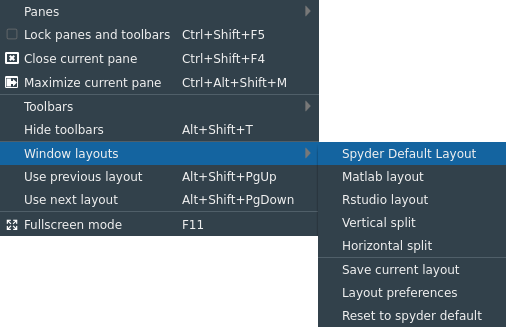

I can't attach the transient.ini file that was produced when first opening a 5.2.2 instance, as I get the message We don't support that file type.
If I run spyder --reset after changing into conda environment with version 5.2+ and I've already closed all running instances of Spyder of version less than 5.2, then the menu seems to work correctly. I think I previously changed the conda environment after running spyder --reset, in which case it doesn't work.
I've verified that this issue still occurs with a single version of spyder on the system. See the update to the linked SO question:
The same issue happens when I install spyder locally in a venv. First I make sure that it is not installed anywhere on my system with
piporapt. Then I run the following:$ sudo apt install python3-venv $ mkdir -p ~/.venv $ python3 -m venv ~/.venv/spyder-test $ source ~/.venv/spyder-test/bin/activate $ pip install spyder $ echo '[Desktop Entry] Version=1.0 Type=Application Name=Spyder GenericName=Spyder Comment=Scientific PYthon Development EnviRonment - Python3 Icon=/home/madphysicist/.venv/spyder-test/share/icons/spyder.png TryExec=/home/madphysicist/.venv/spyder-test/bin/spyder Exec=/home/madphysicist/.venv/spyder-test/bin/spyder %F Categories=Development;Science;IDE;Qt; Terminal=false StartupNotify=true MimeType=text/x-python;' > ~/.local/share/applications/spyder.desktop $ update-desktop-database ~/.local/share/applicationsThis installs spyder and creates an icon for it in the application menu. I am able to start spyder just fine through the icon or through the command line. Any attempt to reopen resets some, but not all of the window layout. The basic pane layout changes. > However, the following two items appear to be reset:
- "Check for updates on startup" check box in the "New Spyder Version" dialog
- The Help pane does not close. If I move it around, its layout is saved correctly. However, the pane is always on when I restart spyder, even when I close it through the bar or through the View->Panes menu.
It appears that some of the layout data is not being saved correctly.
It seems that the layouts are being stored correctly, but the closed or open status only sometimes so.