

 spyder-ide
Console blocks when debugging if using the Tkinter graphics backend on Windows with standalone installer
Issue Report Checklist
- [x ] Searched the issues page for similar reports
- [ ] Read the relevant sections of the Spyder Troubleshooting Guide and followed its advice
- [ x] Reproduced the issue after updating with
conda update spyder(orpip, if not using Anaconda) - [ ] Could not reproduce inside
jupyter qtconsole(if console-related) - [ ] Tried basic troubleshooting (if a bug/error)
- [ x] Restarted Spyder
- [ ] Reset preferences with
spyder --reset - [ ] Reinstalled the latest version of Anaconda
- [ ] Tried the other applicable steps from the Troubleshooting Guide
- [x ] Completed the Problem Description, Steps to Reproduce and Version sections below
Problem Description
when using ctrl-F5 to debug a file , the console blocks
debugfile('D:/code/hyperion_metadata/python_code/untitled4.py', wdir='D:/code/hyperion_metadata/python_code')
d:\code\hyperion_metadata\python_code\untitled4.py(2)
() 1 # -- coding: utf-8 -- ----> 2 """ 3 Created on Tue Mar 22 16:52:09 2022 4 5 @author: RMT7801
IPdb [1]: !continue
I did not find a way to get the console active again.
What steps reproduce the problem?
- create a simple python file
- place a break point
- press ctrl+F5
What is the expected output? What do you see instead?
in previous versions, the console goes trough the file in debug mode and halts on the first breakpoint.
Paste Traceback/Error Below (if applicable)
PASTE TRACEBACK HERE
Versions
- Spyder version: 5.2.2 None
- Python version: 3.7.9 64-bit
- Qt version: 5.12.10
- PyQt5 version: 5.12.3
- Operating System: Windows 10
Dependencies
# Mandatory:
atomicwrites >=1.2.0          :  1.4.0 (OK)
chardet >=2.0.0               :  4.0.0 (OK)
cloudpickle >=0.5.0           :  2.0.0 (OK)
cookiecutter >=1.6.0          :  1.7.3 (OK)
diff_match_patch >=20181111   :  20200713 (OK)
intervaltree                  :  None (OK)
IPython >=7.6.0;<8.0.0        :  7.31.1 (OK)
jedi >=0.17.2;<0.19.0         :  0.18.1 (OK)
jellyfish >=0.7               :  0.9.0 (OK)
jsonschema >=3.2.0            :  4.4.0 (OK)
keyring >=17.0.0              :  23.5.0 (OK)
nbconvert >=4.0               :  6.4.0 (OK)
numpydoc >=0.6.0              :  1.1.0 (OK)
paramiko >=2.4.0              :  2.9.2 (OK)
parso >=0.7.0;<0.9.0          :  0.8.3 (OK)
pexpect >=4.4.0               :  4.8.0 (OK)
pickleshare >=0.4             :  0.7.5 (OK)
psutil >=5.3                  :  5.9.0 (OK)
pygments >=2.0                :  2.11.2 (OK)
pylint >=2.5.0                :  2.12.2 (OK)
pyls_spyder >=0.4.0           :  0.4.0 (OK)
pylsp >=1.3.2;<1.4.0          :  1.3.3 (OK)
pylsp_black >=1.0.0           :  1.0.1 (OK)
qdarkstyle =3.0.2             :  3.0.2 (OK)
qstylizer >=0.1.10            :  0.2.1 (OK)
qtawesome >=1.0.2             :  1.1.1 (OK)
qtconsole >=5.2.1;<5.3.0      :  5.2.2 (OK)
qtpy >=1.5.0                  :  2.0.0 (OK)
rtree >=0.9.7                 :  0.9.7 (OK)
setuptools >=49.6.0           :  60.5.0 (OK)
sphinx >=0.6.6                :  4.3.2 (OK)
spyder_kernels >=2.2.1;<2.3.0 :  2.2.1 (OK)
textdistance >=4.2.0          :  4.2.2 (OK)
three_merge >=0.1.1           :  0.1.1 (OK)
watchdog                      :  2.1.6 (OK)
zmq >=17                      :  22.3.0 (OK)

# Optional:
cython >=0.21                 :  0.29.26 (OK)
matplotlib >=2.0.0            :  3.5.1 (OK)
numpy >=1.7                   :  1.19.3 (OK)
pandas >=1.1.1                :  1.3.5 (OK)
scipy >=0.17.0                :  1.7.3 (OK)
sympy >=0.7.3                 :  1.9 (OK)

might be dupli with #17519, but as I was not sure, I submitted a separate ticket


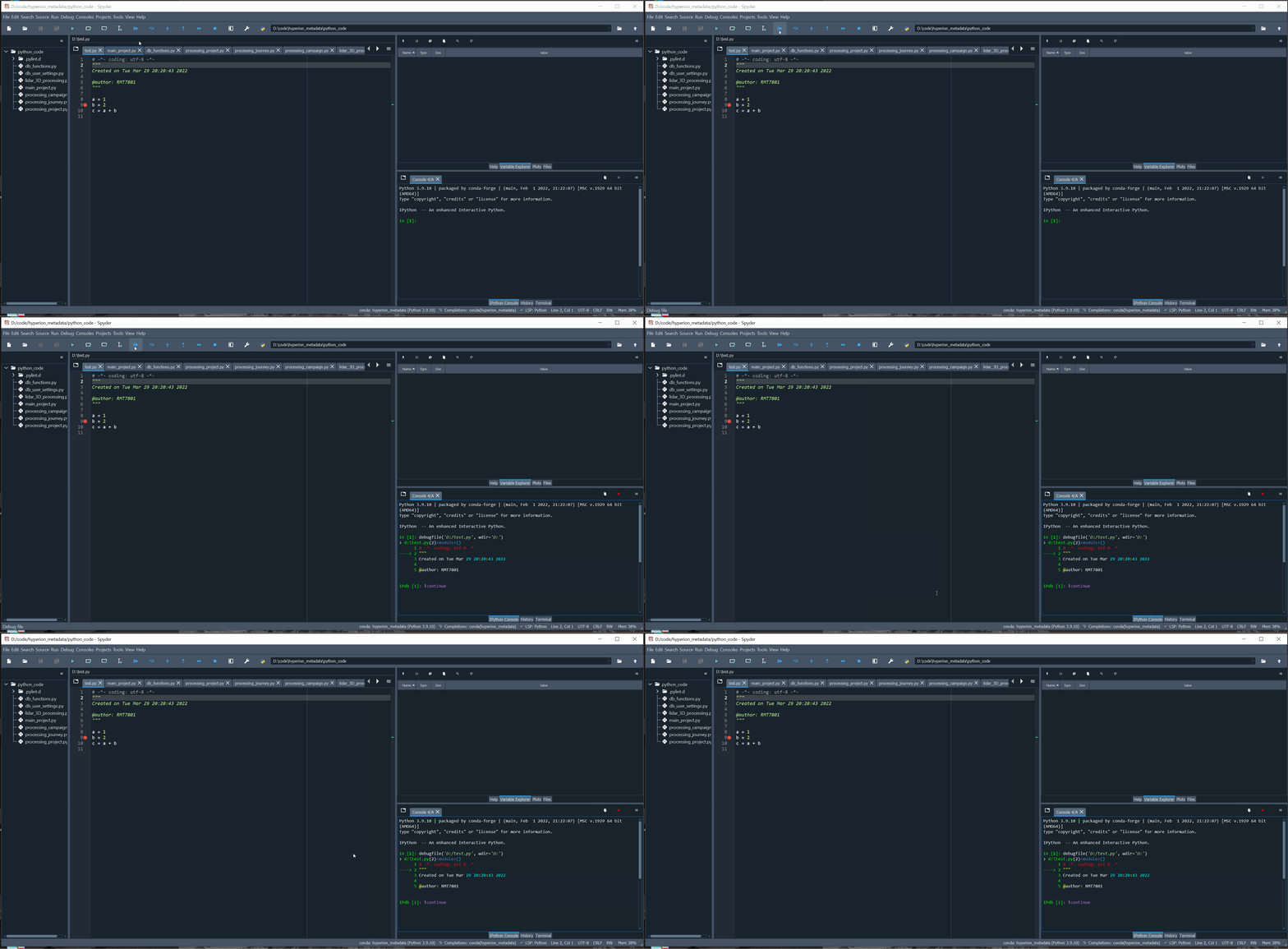
Hi, I have looked carefully at the question #17519. But it doesn't match this question. When start the debug mode, all buttons can not work as normal as follows.

Since both @Rabijns and @LiGengLei seems to be using our Windows installer, I'd like to ask @dalthviz if he sees the same problem with it.
Checked locally and seems like the debug funtionality with the buttons is working for me:
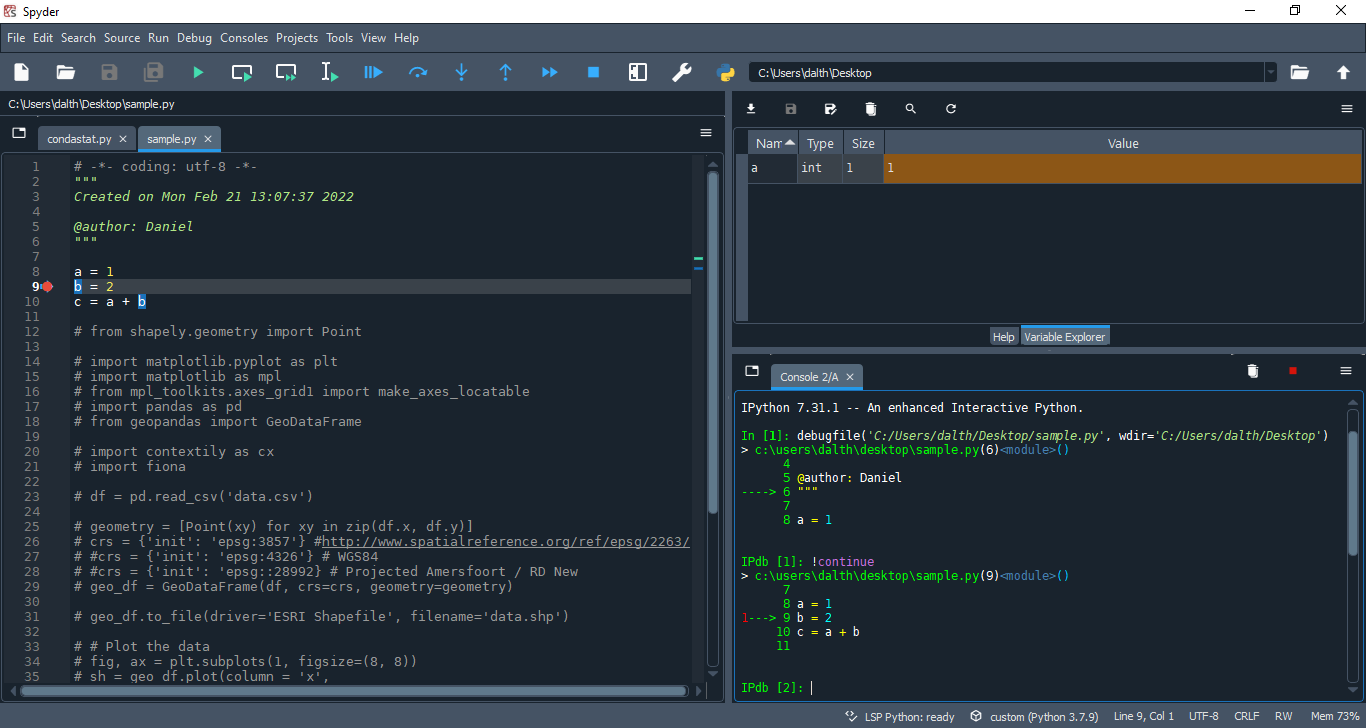
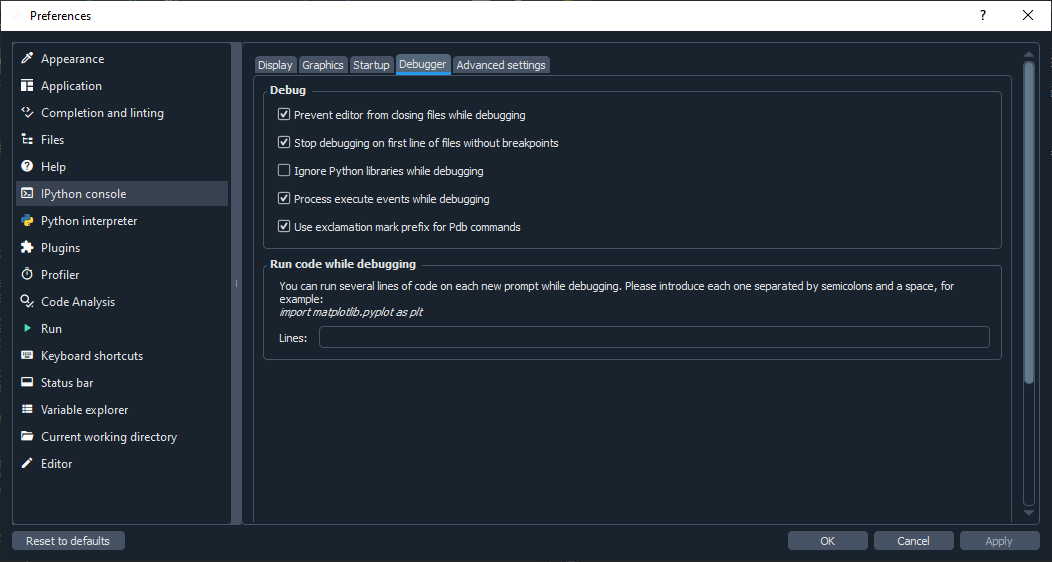
However I noted some differences in the execution of commands from the buttons. Could you share your debugger config @LiGengLei ? These are the ones I'm using:

First of all, thank you for the investigations. I checked a few more things on my side, they might or might not be helpful for your analysis.
In a first step, I tried to recreate the exact same behaviour as in the gif above. It is not identical, even if the differences are subtle. For instance, I have an exclamation mark before the continue command, which I do not see in the gif of @LiGengLei LiGengLei
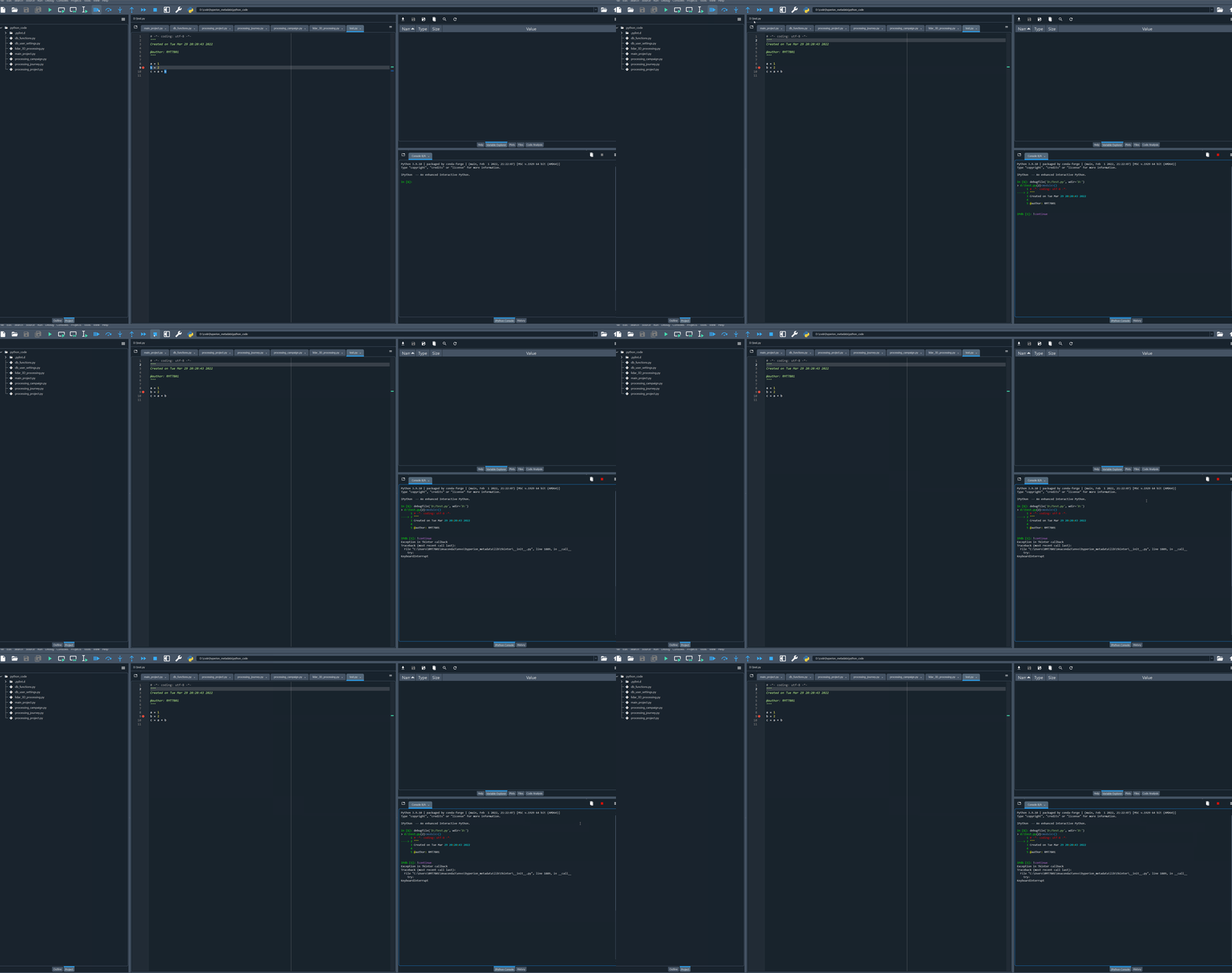
Second observation: The console is using an anaconda environment with python3.9.10. So I switched to the base environment (had to update spyder-kernels) and tried again. The base environment is in python 3.8.5. The behaviour seems different.
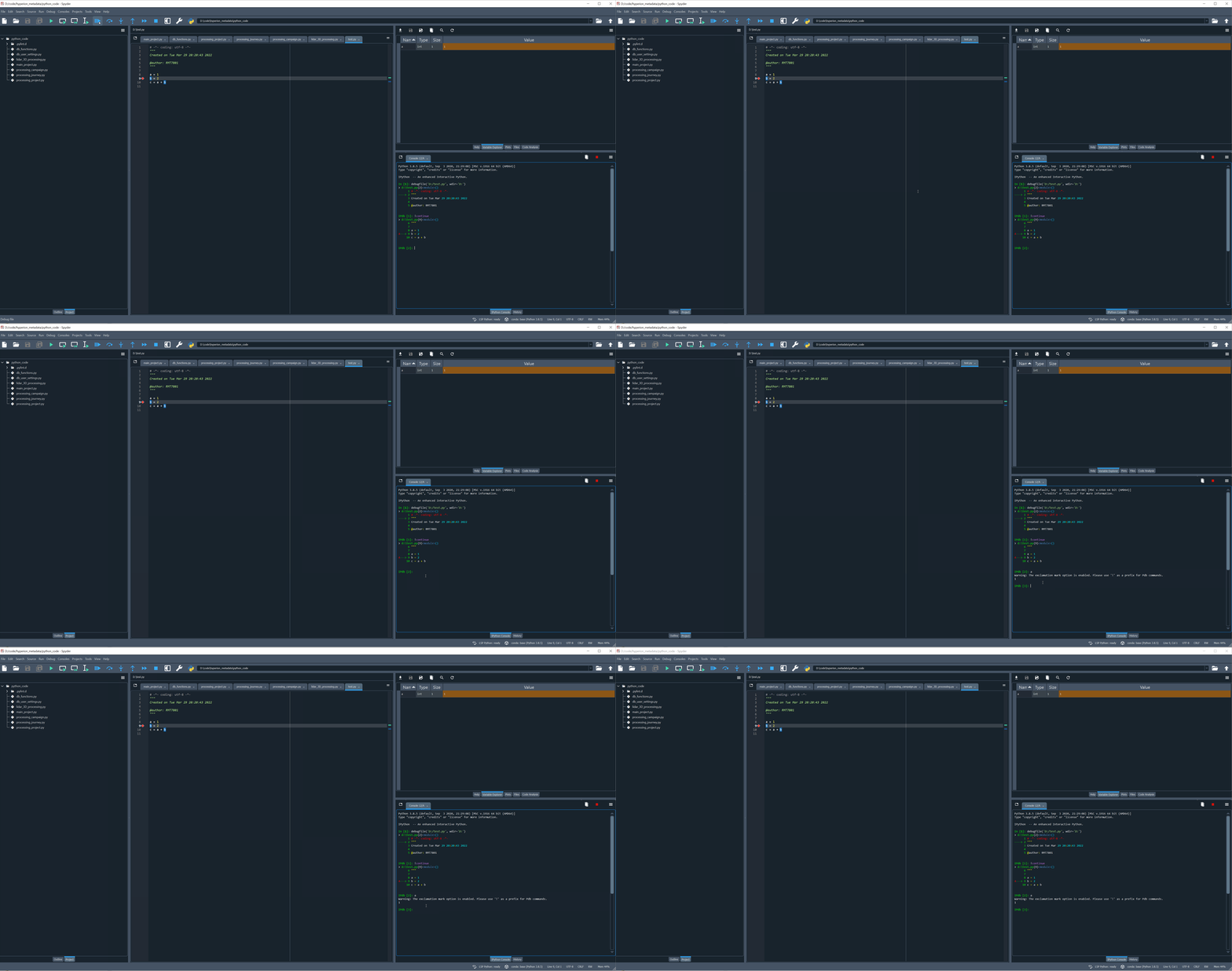
Finally, I switched to Default (i.e. same as Spyder's), which gave the following:

Forgot to add: Debugger settings on my installation seem identical to to those posted by @dalthviz
As @ccordoba12 said, I use the Windows installer, the version is 5.2.2. And my debugger setting is identical to those posted by @dalthviz . yet when I click "consoles->restart kernel", the Ipython consoles always show as below, I have to close spyder and reopen.

@LiGengLei @Rabijns could you restart Spyder in debug mode an post here the spyder-debug.log file generated (should be located in the spyder config folder .spyder-py3) after trying to debug?
To restart Spyder in debug mode you can go to Files > Restart in debug mode and then select the Verbose option
Today I opened spyder and received an update reminder for version 5.3.0, I tried to upgrade to the new version. Everything is fine now. Thanks for your work and responses!
I did two tests, you can find the log files for both below. The first one was spyder with the environment set to default(same as spyder), the second one with an anaconda environment with python 3.9. for the second one, the timing is as follows: 08:19:29: I click on the red stop button at the top of the console 08:20:29: As the console is blocked, I click on the 'close' x of the console tab
spyder-debug - default interpreter.log spyder-debug - python9 env.log
As 5.3.0 might solve the issue, I'll do an install and report back.
I'm less lucky: spyder 5.3.0 did not solve the issue. Just to be sure, I also did a 'reset to factory default', but no change. You can find an extra log file below, now made in 3.5.0. There are 3 actions:
- test debug by using the icon in the menu bar
- test debug by using ctrl+F5
- stop debugging using the 'interrupt kernel' button in the console. Then I closed spyder, so as to ensure the log file is not locked.
spyder-debug -python9- spyder5.3.0.log
just ot show the exact behaviour in 5.3.0, please find hereafter a gif.

Checking the log from the custom env with Python 3.9 and Spyder 5.2.2 from @Rabijns seems like an issue with Tkinter raises when using the Interrupt kernel button since it raises a KeyboardInterrupt:
2022-03-31 08:19:50,041 [DEBUG] [traitlets] -> stream: {'name': 'stderr', 'text': 'Exception in Tkinter callback\nTraceback (most recent call last):\n File "C:\\Users\\RMT7801\\Anaconda3\\envs\\hyperion_metadata\\lib\\tkinter\\__init__.py", line 1889, in __call__\n try:\nKeyboardInterrupt\n'}
Checking the log generated with Spyder 5.3.0 another type of error raises but not sure if related with this same issue since in the gif seems like the debugging is working (or maybe the gif is missing the part where the Interrupt kernel button is pressed and triggers the logged traceback in this case?):
2022-03-31 09:16:02,869 [ERROR] [root] -> Exception in callback AddThreadSelectorEventLoop._handle_select([5300], [])
handle: <Handle AddThreadSelectorEventLoop._handle_select([5300], [])>
Traceback (most recent call last):
  File "asyncio\events.py", line 81, in _run
  File "C:\Program Files\Spyder\pkgs\tornado\platform\asyncio.py", line 579, in _handle_select
    self._handle_event(r, self._readers)
  File "C:\Program Files\Spyder\pkgs\tornado\platform\asyncio.py", line 591, in _handle_event
    callback()
  File "C:\Program Files\Spyder\pkgs\tornado\platform\asyncio.py", line 189, in _handle_events
    handler_func(fileobj, events)
  File "C:\Program Files\Spyder\pkgs\zmq\eventloop\zmqstream.py", line 445, in _handle_events
    zmq_events = self.socket.EVENTS
  File "C:\Program Files\Spyder\pkgs\zmq\sugar\attrsettr.py", line 51, in __getattr__
    return self._get_attr_opt(upper_key, opt)
  File "C:\Program Files\Spyder\pkgs\zmq\sugar\attrsettr.py", line 63, in _get_attr_opt
    return self.get(opt)
  File "C:\Program Files\Spyder\pkgs\zmq\_future.py", line 215, in get
    result = super(_AsyncSocket, self).get(key)
  File "zmq\backend\cython\socket.pyx", line 464, in zmq.backend.cython.socket.Socket.get
  File "zmq\backend\cython\socket.pyx", line 135, in zmq.backend.cython.socket._check_closed
zmq.error.ZMQError: not a socket
@Rabijns, the error shown by @dalthviz above could be caused if you installed pyzmq (or a package that depends on it) with pip --user.
I'm not 100% sure how to check this, but:
- normally, I actively avoid pip and only use conda. But I'm not sure if it might have arrived on my computer with something else using python (eg qgis).
- if in the ipython console, with the conda environment active, I try to do
import pyzmq as test, I get a messageModuleNotFoundError: No module named 'pyzmq' - If I go to preferences, set the interpeter to use the default (i.e. the same as spyder) interpreter, start a new console and do the same, I also get the message that pyzmq is not found.
- when I open the anaconda prompt, and I do
conda list(in base environment), pyzmq is not listed.
So I would guess it is not installed at all. Are these checks enough to confirm the absence or should I do something more?
ps: I forgot to confirm this before, but I did indeed install spyder via the windows installer.
thanks @dalthviz for pointing out that in the last gif, debug is working. I completely missed that, I probably need some sleep :-)
So, I rechecked with the python 3.9.10 environment called hyperion_metadata, and there, debugging is still not working in spyder 3.5.0 (same behaviour: hangs at beginning)
However, building further on the feedback of @ccordoba12, I made some checks on that environment. This is the content:
# packages in environment at C:\Users\RMT7801\Anaconda3\envs\hyperion_metadata:
#
# Name Version Build Channel
attrs 21.4.0 pyhd8ed1ab_0 conda-forge
backcall 0.2.0 pyh9f0ad1d_0 conda-forge
backports 1.0 py_2 conda-forge
backports.functools_lru_cache 1.6.4 pyhd8ed1ab_0 conda-forge
blosc 1.21.0 h0e60522_0 conda-forge
boost-cpp 1.74.0 h9f4b32c_7 conda-forge
branca 0.4.2 pyhd8ed1ab_0 conda-forge
brotli 1.0.9 h8ffe710_6 conda-forge
brotli-bin 1.0.9 h8ffe710_6 conda-forge
brotlipy 0.7.0 py39hb82d6ee_1003 conda-forge
bzip2 1.0.8 h8ffe710_4 conda-forge
ca-certificates 2021.10.8 h5b45459_0 conda-forge
cairo 1.16.0 h15b3021_1010 conda-forge
certifi 2021.10.8 py39hcbf5309_2 conda-forge
cffi 1.15.0 py39h0878f49_0 conda-forge
cfitsio 4.0.0 hd67004f_0 conda-forge
charset-normalizer 2.0.12 pyhd8ed1ab_0 conda-forge
click 8.0.4 py39hcbf5309_0 conda-forge
click-plugins 1.1.1 py_0 conda-forge
cligj 0.7.2 pyhd8ed1ab_1 conda-forge
cloudpickle 2.0.0 pyhd8ed1ab_0 conda-forge
colorama 0.4.4 pyh9f0ad1d_0 conda-forge
cryptography 36.0.1 py39h7bc7c5c_0 conda-forge
curl 7.82.0 h789b8ee_0 conda-forge
cycler 0.11.0 pyhd8ed1ab_0 conda-forge
debugpy 1.5.1 py39h415ef7b_0 conda-forge
decorator 5.1.1 pyhd8ed1ab_0 conda-forge
draco 1.5.2 h5362a0b_0 conda-forge
eigen 3.4.0 h2d74725_0 conda-forge
entrypoints 0.4 pyhd8ed1ab_0 conda-forge
expat 2.4.7 h39d44d4_0 conda-forge
fiona 1.8.21 py39hd99abff_0 conda-forge
folium 0.12.1.post1 pyhd8ed1ab_1 conda-forge
font-ttf-dejavu-sans-mono 2.37 hab24e00_0 conda-forge
font-ttf-inconsolata 3.000 h77eed37_0 conda-forge
font-ttf-source-code-pro 2.038 h77eed37_0 conda-forge
font-ttf-ubuntu 0.83 hab24e00_0 conda-forge
fontconfig 2.13.96 hce3cb01_2 conda-forge
fonts-conda-ecosystem 1 0 conda-forge
fonts-conda-forge 1 0 conda-forge
fonttools 4.31.1 py39hb82d6ee_0 conda-forge
freetype 2.10.4 h546665d_1 conda-forge
freexl 1.0.6 ha8e266a_0 conda-forge
gdal 3.4.1 py39h3f5efd6_4 conda-forge
geoalchemy2 0.6.3 py_0 conda-forge
geopandas 0.10.2 pyhd8ed1ab_1 conda-forge
geopandas-base 0.10.2 pyha770c72_1 conda-forge
geos 3.10.2 h39d44d4_0 conda-forge
geotiff 1.7.0 h144821f_6 conda-forge
gettext 0.19.8.1 ha2e2712_1008 conda-forge
greenlet 1.1.2 py39h415ef7b_1 conda-forge
hdf4 4.2.15 h0e5069d_3 conda-forge
hdf5 1.12.1 nompi_h2a0e4a3_104 conda-forge
icu 69.1 h0e60522_0 conda-forge
idna 3.3 pyhd8ed1ab_0 conda-forge
intel-openmp 2022.0.0 h57928b3_3663 conda-forge
ipykernel 6.9.2 py39h832f523_0 conda-forge
ipython 7.32.0 py39hcbf5309_0 conda-forge
jbig 2.1 h8d14728_2003 conda-forge
jedi 0.18.1 py39hcbf5309_0 conda-forge
jinja2 3.0.3 pyhd8ed1ab_0 conda-forge
joblib 1.1.0 pyhd8ed1ab_0 conda-forge
jpeg 9e h8ffe710_0 conda-forge
jupyter_client 7.1.2 pyhd8ed1ab_0 conda-forge
jupyter_core 4.9.2 py39hcbf5309_0 conda-forge
kealib 1.4.14 h8995ca9_3 conda-forge
kiwisolver 1.4.0 py39h2e07f2f_0 conda-forge
krb5 1.19.3 h1176d77_0 conda-forge
laszip 3.4.3 h6538335_1 conda-forge
laz-perf 3.0.0 h2d74725_0 conda-forge
lcms2 2.12 h2a16943_0 conda-forge
lerc 3.0 h0e60522_0 conda-forge
libblas 3.9.0 13_win64_mkl conda-forge
libbrotlicommon 1.0.9 h8ffe710_6 conda-forge
libbrotlidec 1.0.9 h8ffe710_6 conda-forge
libbrotlienc 1.0.9 h8ffe710_6 conda-forge
libcblas 3.9.0 13_win64_mkl conda-forge
libcurl 7.82.0 h789b8ee_0 conda-forge
libdeflate 1.10 h8ffe710_0 conda-forge
libffi 3.4.2 h8ffe710_5 conda-forge
libgdal 3.4.1 h6b2b983_4 conda-forge
libglib 2.70.2 h3be07f2_4 conda-forge
libiconv 1.16 he774522_0 conda-forge
libkml 1.3.0 h9859afa_1014 conda-forge
liblapack 3.9.0 13_win64_mkl conda-forge
libnetcdf 4.8.1 nompi_h1cc8e9d_101 conda-forge
libpng 1.6.37 h1d00b33_2 conda-forge
libpq 14.2 hfcc5ef8_0 conda-forge
librttopo 1.1.0 hb1df466_9 conda-forge
libsodium 1.0.18 h8d14728_1 conda-forge
libspatialindex 1.9.3 h39d44d4_4 conda-forge
libspatialite 5.0.1 hc2703d3_14 conda-forge
libssh2 1.10.0 h680486a_2 conda-forge
libtiff 4.3.0 hc4061b1_3 conda-forge
libwebp 1.2.2 h57928b3_0 conda-forge
libwebp-base 1.2.2 h8ffe710_1 conda-forge
libxcb 1.13 hcd874cb_1004 conda-forge
libxml2 2.9.12 hf5bbc77_1 conda-forge
libxslt 1.1.33 h65864e5_3 conda-forge
libzip 1.8.0 hfed4ece_1 conda-forge
libzlib 1.2.11 h8ffe710_1013 conda-forge
lxml 4.8.0 py39h4fd7cdf_0 conda-forge
lz4-c 1.9.3 h8ffe710_1 conda-forge
m2w64-gcc-libgfortran 5.3.0 6 conda-forge
m2w64-gcc-libs 5.3.0 7 conda-forge
m2w64-gcc-libs-core 5.3.0 7 conda-forge
m2w64-gmp 6.1.0 2 conda-forge
m2w64-libwinpthread-git 5.0.0.4634.697f757 2 conda-forge
mapclassify 2.4.3 pyhd8ed1ab_0 conda-forge
markupsafe 2.1.1 py39hb82d6ee_0 conda-forge
matplotlib-base 3.5.1 py39h581301d_0 conda-forge
matplotlib-inline 0.1.3 pyhd8ed1ab_0 conda-forge
mkl 2022.0.0 h0e2418a_796 conda-forge
msys2-conda-epoch 20160418 1 conda-forge
munch 2.5.0 py_0 conda-forge
munkres 1.1.4 pyh9f0ad1d_0 conda-forge
nest-asyncio 1.5.4 pyhd8ed1ab_0 conda-forge
networkx 2.7.1 pyhd8ed1ab_0 conda-forge
nitro 2.7.dev6 h39d44d4_4 conda-forge
numpy 1.22.3 py39h6331f09_0 conda-forge
openjpeg 2.4.0 hb211442_1 conda-forge
openssl 1.1.1n h8ffe710_0 conda-forge
packaging 21.3 pyhd8ed1ab_0 conda-forge
pandas 1.4.1 py39h2e25243_0 conda-forge
parso 0.8.3 pyhd8ed1ab_0 conda-forge
pcre 8.45 h0e60522_0 conda-forge
pdal 2.3.0 h8c3116a_27 conda-forge
pickleshare 0.7.5 py_1003 conda-forge
pillow 9.0.1 py39ha53f419_2 conda-forge
pip 22.0.4 pyhd8ed1ab_0 conda-forge
pixman 0.40.0 h8ffe710_0 conda-forge
poppler 22.01.0 h24fffdf_1 conda-forge
poppler-data 0.4.11 hd8ed1ab_0 conda-forge
postgresql 14.2 h1c22c4f_0 conda-forge
proj 8.2.1 h1cfcee9_0 conda-forge
prompt-toolkit 3.0.27 pyha770c72_0 conda-forge
psutil 5.9.0 py39hb82d6ee_0 conda-forge
psycopg2 2.9.3 py39h0878f49_0 conda-forge
pthread-stubs 0.4 hcd874cb_1001 conda-forge
pycparser 2.21 pyhd8ed1ab_0 conda-forge
pygments 2.11.2 pyhd8ed1ab_0 conda-forge
pyopenssl 22.0.0 pyhd8ed1ab_0 conda-forge
pyparsing 3.0.7 pyhd8ed1ab_0 conda-forge
pyproj 3.3.0 py39h0610821_1 conda-forge
pysocks 1.7.1 py39hcbf5309_4 conda-forge
python 3.9.10 h9a09f29_2_cpython conda-forge
python-dateutil 2.8.2 pyhd8ed1ab_0 conda-forge
python-pdal 3.0.2 py39h66837cb_3 conda-forge
python_abi 3.9 2_cp39 conda-forge
pytz 2021.3 pyhd8ed1ab_0 conda-forge
pywin32 303 py39hb82d6ee_0 conda-forge
pyzmq 22.3.0 py39he46f08e_1 conda-forge
requests 2.27.1 pyhd8ed1ab_0 conda-forge
rtree 0.9.7 py39h09fdee3_3 conda-forge
scikit-learn 1.0.2 py39he931e04_0 conda-forge
scipy 1.8.0 py39hc0c34ad_1 conda-forge
setuptools 60.10.0 py39hcbf5309_0 conda-forge
shapely 1.8.0 py39hf063a39_5 conda-forge
six 1.16.0 pyh6c4a22f_0 conda-forge
spyder-kernels 2.3.0 py39hcbf5309_0 conda-forge
sqlalchemy 1.4.32 py39hb82d6ee_0 conda-forge
sqlite 3.37.1 h8ffe710_0 conda-forge
tbb 2021.5.0 h2d74725_0 conda-forge
threadpoolctl 3.1.0 pyh8a188c0_0 conda-forge
tiledb 2.6.4 h95dad36_0 conda-forge
tk 8.6.12 h8ffe710_0 conda-forge
tornado 6.1 py39hb82d6ee_2 conda-forge
traitlets 5.1.1 pyhd8ed1ab_0 conda-forge
tzdata 2022a h191b570_0 conda-forge
ucrt 10.0.20348.0 h57928b3_0 conda-forge
unicodedata2 14.0.0 py39hb82d6ee_0 conda-forge
urllib3 1.26.9 pyhd8ed1ab_0 conda-forge
vc 14.2 hb210afc_6 conda-forge
vs2015_runtime 14.29.30037 h902a5da_6 conda-forge
wcwidth 0.2.5 pyh9f0ad1d_2 conda-forge
wheel 0.37.1 pyhd8ed1ab_0 conda-forge
win_inet_pton 1.1.0 py39hcbf5309_3 conda-forge
xerces-c 3.2.3 h0e60522_4 conda-forge
xorg-libxau 1.0.9 hcd874cb_0 conda-forge
xorg-libxdmcp 1.1.3 hcd874cb_0 conda-forge
xyzservices 2022.3.0 pyhd8ed1ab_0 conda-forge
xz 5.2.5 h62dcd97_1 conda-forge
zeromq 4.3.4 h0e60522_1 conda-forge
zlib 1.2.11 h8ffe710_1013 conda-forge
zstd 1.5.2 h6255e5f_0 conda-forge
pyzmq is installed, but via conda-forge, not via pip.
I missed that originally, because, for a reason unknown to me , import pyzmq does not work, but that might be my python knowledge lacking in that area.

Anyhow, do you have any ideas on what I could do to solve this or help you debugging?
I think that to import pyzmq you need to use something like import zmq @Rabijns Also, checking your conda list output, the pyzmq version installed seems like is 22.3.0 which seems ok I think (maybe @ccordoba12 has more input on that aspect). However seems like ipykernel have had a couple of release in the past week so maybe updating it could help. Could you try to update ipykernel @Rabijns and check if the debugging situation changes when you are using a custom interpreter? Let us know!
An update to ipython 7.32.0 does not solve the problem. An update to ipython 8.2 demands an update of spyder-kernels to a version not supported by spyder.
@Rabijns I suggested updating ipykernel (seems like you have version 6.9.2 and currently the latest version is 6.12.1 ) no ipython (you already had version 7.32.0 in the conda list output).
Checking the Windows installer, it comes with ipykernel 6.10.0 so maybe updating to that version in you customn interpreter env could help. Also, seems like for the zmq.error.ZMQError: not a socket error getting jupyter_client 7.1.0 or 7.2.0 can help as mentioned in https://github.com/spyder-ide/spyder/issues/17615
I did the following steps:
- upgraded ipykernel from 6.9.2 to 6.12.1. This did not resolve the issue.
- upgraded jupyter_client from 7.1.2 to 7.2.0: issue still present.
- downgraded ipykernel from 6.12.1 to 6.10.0, to be on the same version as the windows installer: problem still there.
-
conda update --all --channel conda-forgenot a solution, as it upgrades jupyter_client to 7.2.1, so it triggers the bug you linked to. - downgrade jupyter_client to 7.2.0: no luck.
I will not be able to test further the coming days, but end of next week, I'll try to create a new environment with python 3.8 instead of 3.9. After all, the issue seems related to my env. I'll keep you informed. Anyhow, your help is appreciated.
Just in case this adds information, debugging doesn't work for me any more either.
I have experimented a little:
Creating a new environment with conda new -n newEnv spyder=5.1.5 results in a spyder version with the above error.
The resulting environment is
* Spyder version: 5.1.5 None
* Python version: 3.9.12 64-bit
* Qt version: 5.9.7
* PyQt5 version: 5.9.2
* Operating System: Linux 3.10.0-1160.31.1.el7.x86_64```

# Mandatory:
atomicwrites >=1.2.0          :  1.4.0 (OK)
chardet >=2.0.0               :  4.0.0 (OK)
cloudpickle >=0.5.0           :  2.0.0 (OK)
cookiecutter >=1.6.0          :  1.7.3 (OK)
diff_match_patch >=20181111   :  20200713 (OK)
intervaltree >=3.0.2          :  3.1.0 (OK)
IPython >=7.6.0               :  8.2.0 (OK)
jedi >=0.17.2;<0.19.0         :  0.18.1 (OK)
jsonschema >=3.2.0            :  3.2.0 (OK)
keyring >=17.0.0              :  23.4.0 (OK)
nbconvert >=4.0               :  6.3.0 (OK)
numpydoc >=0.6.0              :  1.2 (OK)
parso >=0.7.0;<0.9.0          :  0.8.3 (OK)
pexpect >=4.4.0               :  4.8.0 (OK)
pickleshare >=0.4             :  0.7.5 (OK)
psutil >=5.3                  :  5.8.0 (OK)
pygments >=2.0                :  2.11.2 (OK)
pylint >=2.5.0;<2.10.0        :  2.9.6 (OK)
pyls_spyder >=0.4.0           :  0.4.0 (OK)
pylsp >=1.2.2;<1.3.0          :  1.2.4 (OK)
pylsp_black >=1.0.0           :  None (OK)
qdarkstyle =3.0.2             :  3.0.2 (OK)
qstylizer >=0.1.10            :  0.1.10 (OK)
qtawesome >=1.0.2             :  1.0.3 (OK)
qtconsole >=5.1.0             :  5.3.0 (OK)
qtpy >=1.5.0                  :  2.0.1 (OK)
rtree >=0.9.7                 :  0.9.7 (OK)
setuptools >=49.6.0           :  58.0.4 (OK)
sphinx >=0.6.6                :  4.4.0 (OK)
spyder_kernels >=2.1.1;<2.2.0 :  2.1.3 (OK)
textdistance >=4.2.0          :  4.2.1 (OK)
three_merge >=0.1.1           :  0.1.1 (OK)
watchdog >=0.10.3             :  2.1.6 (OK)
xdg >=0.26                    :  0.27 (OK)
zmq >=17                      :  22.3.0 (OK)

# Optional:
cython >=0.21                 :  None (OK)
matplotlib >=2.0.0            :  None (OK)
numpy >=1.7                   :  None (OK)
pandas >=1.1.1                :  None (OK)
scipy >=0.17.0                :  None (OK)
sympy >=0.7.3                 :  None (OK)
However, when I use conda new -n newEnv -c conda-forge spyder=5.1.5 will not cause this bug to appear.
Resulting env:
* Spyder version: 5.1.5 None
* Python version: 3.9.7 64-bit
* Qt version: 5.9.7
* PyQt5 version: 5.9.2
* Operating System: Linux 3.10.0-1160.31.1.el7.x86_64


# Mandatory:
atomicwrites >=1.2.0          :  1.4.0 (OK)
chardet >=2.0.0               :  4.0.0 (OK)
cloudpickle >=0.5.0           :  2.0.0 (OK)
cookiecutter >=1.6.0          :  1.7.3 (OK)
diff_match_patch >=20181111   :  20200713 (OK)
intervaltree >=3.0.2          :  3.0.2 (OK)
IPython >=7.6.0               :  8.2.0 (OK)
jedi >=0.17.2;<0.19.0         :  0.18.1 (OK)
jsonschema >=3.2.0            :  4.4.0 (OK)
keyring >=17.0.0              :  23.4.0 (OK)
nbconvert >=4.0               :  6.4.5 (OK)
numpydoc >=0.6.0              :  1.2.1 (OK)
parso >=0.7.0;<0.9.0          :  0.8.3 (OK)
pexpect >=4.4.0               :  4.8.0 (OK)
pickleshare >=0.4             :  0.7.5 (OK)
psutil >=5.3                  :  5.9.0 (OK)
pygments >=2.0                :  2.11.2 (OK)
pylint >=2.5.0;<2.10.0        :  2.9.6 (OK)
pyls_spyder >=0.4.0           :  0.4.0 (OK)
pylsp >=1.2.2;<1.3.0          :  1.2.4 (OK)
pylsp_black >=1.0.0           :  None (OK)
qdarkstyle =3.0.2             :  3.0.2 (OK)
qstylizer >=0.1.10            :  0.2.1 (OK)
qtawesome >=1.0.2             :  1.1.1 (OK)
qtconsole >=5.1.0             :  5.1.1 (OK)
qtpy >=1.5.0                  :  2.0.1 (OK)
rtree >=0.9.7                 :  1.0.0 (OK)
setuptools >=49.6.0           :  62.0.0 (OK)
sphinx >=0.6.6                :  4.5.0 (OK)
spyder_kernels >=2.1.1;<2.2.0 :  2.1.3 (OK)
textdistance >=4.2.0          :  4.2.2 (OK)
three_merge >=0.1.1           :  0.1.1 (OK)
watchdog >=0.10.3             :  2.1.7 (OK)
xdg >=0.26                    :  0.27 (OK)
zmq >=17                      :  22.3.0 (OK)

# Optional:
cython >=0.21                 :  None (OK)
matplotlib >=2.0.0            :  3.4.3 (OK)
numpy >=1.7                   :  1.21.2 (OK)
pandas >=1.1.1                :  None (OK)
scipy >=0.17.0                :  None (OK)
sympy >=0.7.3                 :  None (OK)

@daharn, debugging is broken in Spyder 5.1.5. We have let users know about that a lot during the last months.
That error is already fixed in our latest version (5.3.0). Since it's still not available in Anaconda, you have two options:
-
Use our Windows installer, which you can find here.
-
Create a new environment with conda-forge packages. For that, please close Spyder, open the Anaconda Prompt and run the following commands there:
 conda create -n spyder-cf -c conda-forge spyder
 conda activate spyder-cf
 spyder
Given that this doesn't add anything to the discussion taking place here, I'm going to hide your comment as well as mine. For next time, please open a new issue instead of posting in an unrelated one.
As promised, I created a new environment, with python 3.10 instead of 3.9. In this new env, ipykernel is at 6.13.0. The issue remains present.
I did some more testing. Instead of creating the complete environment all at once, I started with a minimal version (python3.9+spyder-kernels) and added one by one the libraries, each time testing if the debugger worked in spyder.
All tests below are done with conda-forge as channel.
step 1:
- python 3.9 + spyder-kernels : ok
- added lxml : ok
- added sqlalchemy: ok
- added python-pdal : ok
- added pandas: ok
- added geopandas: no longer ok
step 2: As adding geopandas loads a lot of packages, I decided to add them one by one. Starting from the previous env, I went back one revision (so without geopandas) and started adding the packages normally installed together with geopandas one by one.
- added fonttools: ok
- added pillow : ok
- added shapely : ok
- added gdal: ok
- added rtree: ok
- added scipy: ok
- added fiona (including shapely): ok
- added folium: ok
- added matplotlib-base: ok
- added pyproj : no longer ok
step 3: Assuming the issue is related to pyproj, I created a new environment, with only python3.9, spyder-kernels.
- added pyproj. Strangely enough, this environment works.
- added geopandas: ok
- added sqlalchemy: no longer ok
- go back one revision: no longer ok This is weird, as it used to work...
- go back to revision 0: no longer works
I repeated this test a second time, just to be sure, arriving at the same conclusions.
step 4: The original issue was discovered with my environment called hyperion_metadata. For testing purposes, I loaded pycharm community edition on my system. There, I have no issues with my environment , including for debugging with breakpoints in ipython.
Thank you for the new info @Rabijns ! Could you export the conda env you have the debug issue with something like conda env export > environment.yml and submit here the environment.yml file? Maybe with that we will be able to reproduce this in our side. If you get any other info let us now and thanks again for all the testing!
You can find the export in attachment. I added .txt as extension, because github does not accept .yml files.
@Rabijns thanks for the .yml file! However, checking it seems like I'm not being able to create the env with it due to poppler (not totally sure why 🤔 ). This is what I'm getting:
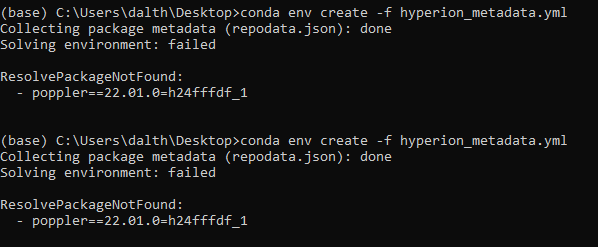
Collecting package metadata (repodata.json): done
Solving environment: failed

ResolvePackageNotFound:
  - poppler==22.01.0=h24fffdf_1
@dalthviz I'm not a conda specialist, so I cannot really help you with poppler.
What you culd try as an alternative, is to create the environment using:
conda create --name test --channel conda-forge python=3.9 spyder-kernels==2.3 geopandas lxml sqlalchemy python-pdal
I did this just now, and the resulting environment does have the debugging issue in spyder.
Note that I do get a warning on the size of one download when I create this env. This env does contain poppler, but with anoter number at the end (conda-forge/win-64::poppler-22.01.0-h24fffdf_2).
I now have access to a second machine, which allows me to confirm two things:
- I also have the message from poppler
- If I create the environment as described in the previous post, I still have the debug issue.
@dalthviz As the yml file does not allow to recreate the environment, I used the explanation on conda docs and created a spec-file.txt.
With this file, I'm able to create the environment on my second machine, without the poppler library causing problems. In that environment, the debug issue is still present. Maybe this can help you...
Thanks for the new info @Rabijns ! With your comment at https://github.com/spyder-ide/spyder/issues/17523#issuecomment-1104763657 I was able to reproduce this!
Checking around the IPython console plugin preferences I make the debugging work by changing the graphics backend to inline (Preferences > IPython Console > Graphics > Graphics backend), deactivating the option Activate support (Preferences > IPython Console > Graphics > Support for graphics (Matplotlib)) or changing the graphics backend to Qt5. With the Qt5 I can use the debugger but I also got a message regarding being unable to find a qt binding:

If I set the graphics backend to Automatic or Tkinter I get the console blocked when entering debug mode and I get a Tkinter error message when trying to interrupt it:

So I think the problem is debugging while having selected the Tkinter backend
I tested your explanation above and confirm your observations. Thanks a lot for your support.
I think this problem only happens on Windows (I can't reproduce it on Linux). Also, perhaps the only way to fix it is by automatically switching to the Inline backend before entering the debugger and re-enable the Tkinter one afterwards.
@dalthviz, I think we need to update the Tkinter binaries packaged with the installer to be the same ones used in the Python 3.8.10 version that we're using to build it now (it seems we're still packaging the ones for Python 3.7).
If after that this problem persists, then I'd suggest to show a message in the console saying that debugging doesn't work with the Tkinter backend and that users need to switch to a different one.