

 spyder-ide
Debug cell seems to ignore breakpoints in Spyder 5.2.2
Issue Report Checklist
- [x] Searched the issues page for similar reports
- [ ] Read the relevant sections of the Spyder Troubleshooting Guide and followed its advice
- [x] Reproduced the issue after updating with
conda update spyder(orpip, if not using Anaconda) - [x] Tried basic troubleshooting (if a bug/error)
- [x] Restarted Spyder
- [ ] Reset preferences with
spyder --reset - [ ] Reinstalled the latest version of Anaconda
- [ ] Tried the other applicable steps from the Troubleshooting Guide
- [x] Completed the Problem Description, Steps to Reproduce and Version sections below
Problem Description
Hi, I'm having problems with "Debug -> Debug cell", which in my case seems to ignore breakpoints and immediately returns results. Both breakpoints in the cell and in the functions used within the cell are ignored. Normal debugging works fine. (I'll try some more steps from the checklist later, for example resetting the preferences, and update this report)
What steps reproduce the problem?
- create a simple script with a code cell and some code in it (for example
import numpy as np; x = np.arange(10) - set a breakpoint in the cell by clicking on the left editor gutter at the relevant line
- run
Debug -> Debug celloption from the top menu - the cell immediately returns without entering into debug mode
What is the expected output? What do you see instead?
expected: the console turns into debug mode actual: the code immediately returns, the console does not enter debug mode
Versions
- Spyder version: 5.2.2
- Python version: 3.7.12
- Qt version: 5.9.7
- PyQt version: 5.9.2
- Operating System name/version: Windows 10
Dependencies
# Mandatory:
atomicwrites >=1.2.0          :  1.4.0 (OK)
chardet >=2.0.0               :  4.0.0 (OK)
cloudpickle >=0.5.0           :  2.0.0 (OK)
cookiecutter >=1.6.0          :  1.7.0 (OK)
diff_match_patch >=20181111   :  20200713 (OK)
intervaltree >=3.0.2          :  3.1.0 (OK)
IPython >=7.6.0;<8.0.0        :  7.31.1 (OK)
jedi >=0.17.2;<0.19.0         :  0.17.2 (OK)
jellyfish >=0.7               :  0.9.0 (OK)
jsonschema >=3.2.0            :  4.4.0 (OK)
keyring >=17.0.0              :  23.4.0 (OK)
nbconvert >=4.0               :  6.4.1 (OK)
numpydoc >=0.6.0              :  1.2 (OK)
paramiko >=2.4.0              :  2.9.2 (OK)
parso >=0.7.0;<0.9.0          :  0.7.0 (OK)
pexpect >=4.4.0               :  4.8.0 (OK)
pickleshare >=0.4             :  0.7.5 (OK)
psutil >=5.3                  :  5.9.0 (OK)
pygments >=2.0                :  2.11.2 (OK)
pylint >=2.5.0                :  2.12.2 (OK)
pyls_spyder >=0.4.0           :  0.4.0 (OK)
pylsp >=1.3.2;<1.4.0          :  1.3.3 (OK)
pylsp_black >=1.0.0           :  1.1.0 (OK)
qdarkstyle =3.0.2             :  3.0.2 (OK)
qstylizer >=0.1.10            :  0.2.1 (OK)
qtawesome >=1.0.2             :  1.1.1 (OK)
qtconsole >=5.2.1;<5.3.0      :  5.2.2 (OK)
qtpy >=1.5.0                  :  2.0.0 (OK)
rtree >=0.9.7                 :  0.9.7 (OK)
setuptools >=49.6.0           :  59.8.0 (OK)
sphinx >=0.6.6                :  4.3.2 (OK)
spyder_kernels >=2.2.1;<2.3.0 :  2.2.1 (OK)
textdistance >=4.2.0          :  4.2.2 (OK)
three_merge >=0.1.1           :  0.1.1 (OK)
watchdog >=0.10.3             :  1.0.2 (OK)
zmq >=17                      :  22.3.0 (OK)

# Optional:
cython >=0.21                 :  0.29.27 (OK)
matplotlib >=2.0.0            :  3.5.1 (OK)
numpy >=1.7                   :  1.21.5 (OK)
pandas >=1.1.1                :  1.3.5 (OK)
scipy >=0.17.0                :  1.7.3 (OK)
sympy >=0.7.3                 :  None (NOK)

Hi @mmagnuski,
Can you please post here a gif or video to see the behavior to see if I can have the same bug on my end?

@steff456
Sure, this is the actual behavior:
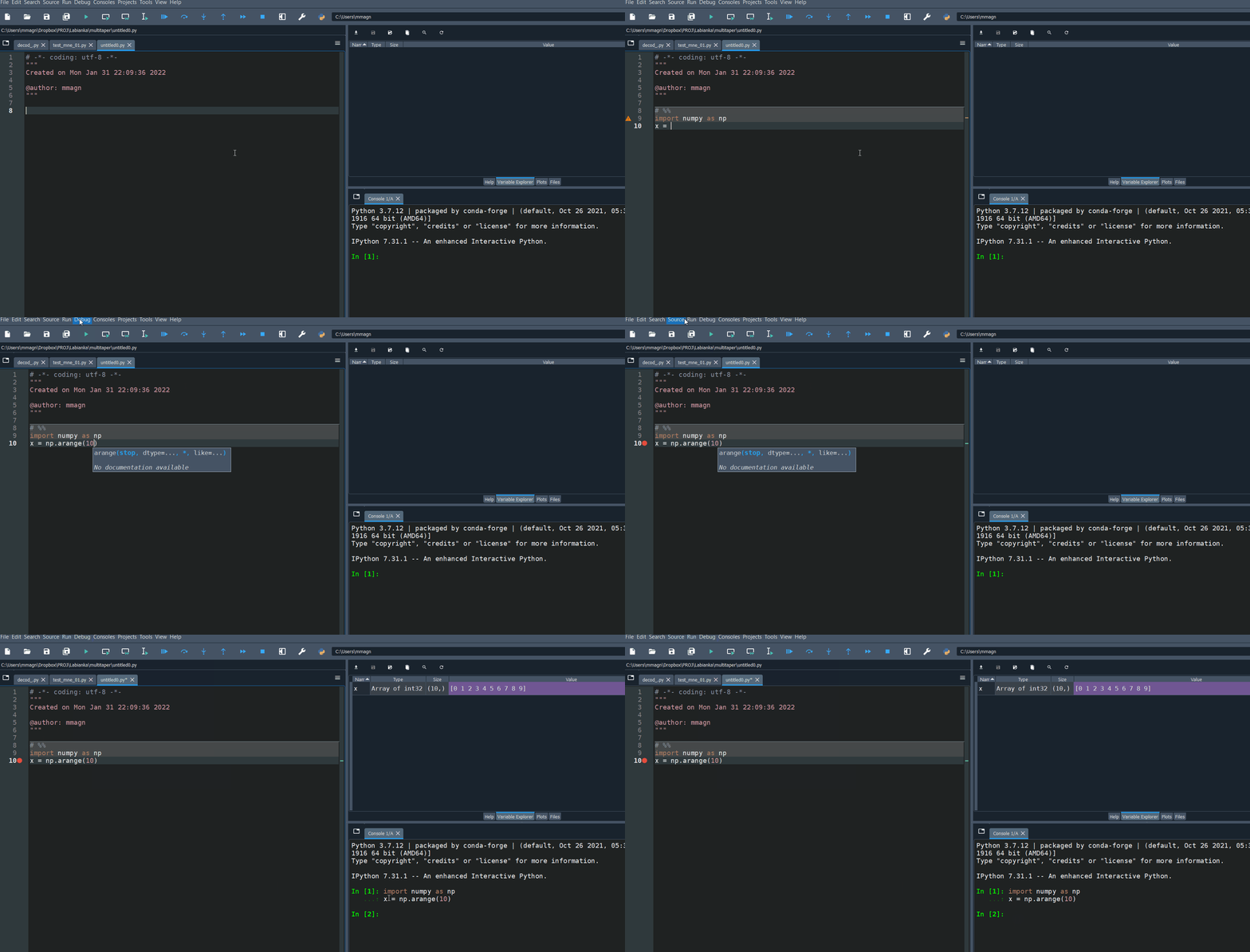
the expected behavior is what happens when I call "Debug" (not "Debug cell"):


looks like "Copy full cell contents to the console when running code cells"doesn't play nice with debug cell

Ok, that's good to know. Should we post a message in the console saying that that option is incompatible with Debug cell?
I mean, we could show that message when people attempt to debug cells and have that option activated.
Just a thought from a user perspective: I would prefer that "copy cell contents" would be selectively deactivated when debugging if it doesn't work well with it. By selectively I mean that I would not have to change anything in the settings myself if I want to debug a cell or would not have to switch "copy cell contents" back on after debugging.
That's a good idea too, thanks @mmagnuski!
@impact27, what do you think?