
deluge-autoremoveplus
 deluge-autoremoveplus copied to clipboard
 springjools
Settings clarification
How does the Media Server tab work? As I understand in the text there, it says:
"If the corresponding server is enabled, removing a torrent from deluge will also blacklist it from the upstream server, so that it's not downloaded again"
So when Sonarr/Radarr successfully completes a download it doesn't remove it from Deluge for seeding. Once autoremoveplus removes it, it blacklists it from Sonarr? Even though it technically is a valid download and that the only reason it was removed from Deluge is because it already met the criteria set in the autoremoveplus settings? I'm confused with this new feature.
Additional questions:
- What happens when you have the "remove torrents" and "pause torrents" both checked? Why can you check them in the first place? Aren't they contradictory to each other? It should only be one or the other.
- How do you disable "pause after seedtime"? It doesn't accept the 0 value. What if I don't want to ever pause my torrents?
- There is a "remove after seedtime" checkbox now but you can also set the Seed Time parameter in the conditions. Why? This is redundant, the way I see it.
- What is the difference between "remove torrent data" and "remove torrent data also for completed downloads"? What is the use case of using one vs the other?

Why is there only one server URL field if there are three fields for the api keys for Sonarr, Radarr, and Lidar?
How do I set the conditions so that a torrent is removed if it reaches a ratio of 1.5? I'm confused now because the first condition is now under and the second condition is over. So do I disable the first condition and put the ratio=1.5 (over) in the second condition field?
As I understand it, if I put the ratio condition in the 1st field, then all torrents that will have ratio "under" 1.5 (which is basically everything when you start downloading a torrent") will get removed. So how does this really work? It is very confusing after all these changes.
Ok, you have a lot of questions so some answers:
First of all, you don't need to use the blacklisting option. Just uncheck all 'servers' (technically sonarr is a media organiser). The blacklisting is a function in sonarr/radarr/lidarr whereby in addition to remove the torrent from the download client, it also blacklists it so that you don't download the exact same release again. Blacklisting is only done for unfinished, 'stuck' torrents. Not for completed ones (except if you use the context menu manually).
- If you check both pause and remove, the plugin first pauses the torrent and then removes it.
There's a problem with the removal if done via lidarr and radarr, it causes deluge to crash, because for some reason deluge tries to remove the same torrent twice, and when it tries to remove a torrent it can't find it crashes. So that's why I added the option to just pause torrents. Paused torrents don't take up slots and appear as paused in sonarr, so you can remove (and blacklist them) manually from there. It also gives more control.
-
uncheck the 'pause torrent's checkbox
-
Conditions don't affect completed (seeding) torrents as of now. This should probably be fixed in the future.
-
Remove data works for unfinished torrents and "remove torrent data also for completed downloads" works for completed downloads.

Why is there only one server URL field if there are three fields for the api keys for Sonarr, Radarr, and Lidar
It is assumed that the same server will host all of these PVR:s.
Ok, you have a lot of questions so some answers:
Thanks for the answers. Sorry for all the questions, I just want to make sure this plugin is configured correctly for my environment.
First of all, you don't need to use the blacklisting option. Just uncheck all 'servers' (technically sonarr is a media organiser). The blacklisting is a function in sonarr/radarr/lidarr whereby in addition to remove the torrent from the download client, it also blacklists it so that you don't download the exact same release again. Blacklisting is only done for unfinished, 'stuck' torrents. Not for completed ones (except if you use the context menu manually).
Yes, I'm familiar on what blacklisting does in Sonarr/Radarr/Lidarr. I was just kinda curious on how the media server feature works in this plugin. So if I understand correctly, the blacklisting feature of the plugin only works when manually triggered in the context menu, right?
1. If you check both pause and remove, the plugin first pauses the torrent and then removes it.
I see. So if you check both these options, then the pause (before the remove) is practically useless?
There's a problem with the removal if done via lidarr and radarr, it causes deluge to crash, because for some reason deluge tries to remove the same torrent twice, and when it tries to remove a torrent it can't find it crashes. So that's why I added the option to just pause torrents. Paused torrents don't take up slots and appear as paused in sonarr, so you can remove (and blacklist them) manually from there. It also gives more control.
Is this issue not present in Sonarr? Only in Radarr and Lidarr?
2. uncheck the 'pause torrent's checkbox
3. Conditions don't affect completed (seeding) torrents as of now. This should probably be fixed in the future.
If they don't apply for completed torrents, where are conditions used? Only for unfinished torrents?
Are you saying the "Ratio" and "Seeding Time" conditions don't work at all? That's weird because in an older version of the plugin, I had these settings and the conditions apply just fine on seeding torrents:
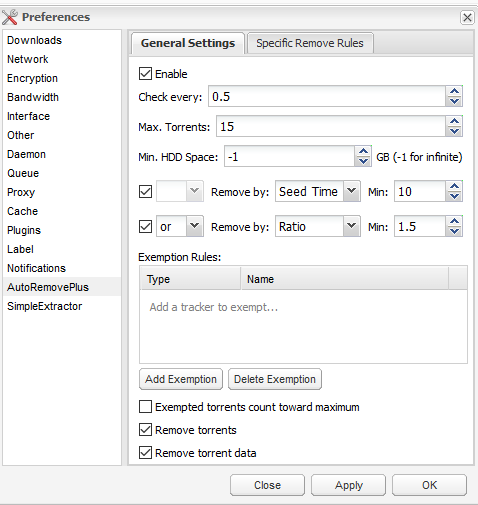
Any idea why they worked before?
4. Remove data works for unfinished torrents and "remove torrent data also for completed downloads" works for completed downloads.
Ok. In an older version, it was only "remove torrent data" and this also applied for completed downloads. What was the reason why these two options were separated?
Why is there only one server URL field if there are three fields for the api keys for Sonarr, Radarr, and Lidar
It is assumed that the same server will host all of these PVR:s.
Oh ok. So that means you just need the server FQDN in the URL there and not the socket (FQDN + port)? Does the plugin assume the default ports for Sonarr, Radarr, and Lidarr? Does it support both http and https?
Lastly, and ideas on my question here?
So if I understand correctly, the blacklisting feature of the plugin only works when manually triggered in the context menu, right? No, it also works automatically for sonarr version 3. Lidarr and radarr are a little behind on implementing the new api so it will work for them too in maybe a couple of months/half a year.
The reason is that originally I implemented the removal+blacklisting through sonarr api, but that caused deluge to crash. So now the blacklisting is implemented separately and removal is done internally with a call to torrentmanager (deluge). But this is not yet possible for lidarr and radarr. Additionally I'm not really sure anybody wants this.
If they don't apply for completed torrents, where are conditions used? Only for unfinished torrents? Yes. Abiroid changed the plugin to only work for unfinished torrents and I used that version to make it compatible with python3. Then I added to seed time removal only based on time to work with removal of seeding torrents. The whole plugin should probably be rewritten or maybe split into two plugins. But there was a hurry to get this working last autumn because it didn't work at all.
I see. So if you check both these options, then the pause (before the remove) is practically useless? Yes. Except that when the removal doesn't work, then pause at least works.
Ok. In an older version, it was only "remove torrent data" and this also applied for completed downloads. What was the reason why these two options were separated? The older version only worked for completed torrents.
Oh ok. So that means you just need the server FQDN in the URL there and not the socket (FQDN + port)? Does the plugin assume the default ports for Sonarr, Radarr, and Lidarr? Does it support both http and https?
It needs the FQDN, which can be server or ip. It then adds the endpoint which is currently hardcoded as '/sonarr/api/v3' for sonarr and similar for the others. So you can use '192.168.1.1:8989' or 'https://192.168.1.1:8989' or' www.myserver.com ' If you use a reverse proxy you won't have the port anyway.
I guess that means that the base url needs to be configured as sonarr also in sonarr settings, so I should probably add more options for this too.
https://abiroid.com/deluge/deluge-modify-autoremoveplus-plugin-delete-dead-torrents-based-availability
Sorry, what do you mean it also works automatically in Sonarr v3 (which is the version I use)? I mean, Sonarr automatic blacklisting was a feature from the very beginning even in v2. How does the the blacklisting "in Deluge" work "automatically" with Sonarr v3? I understand the manual part already (remove+blacklist in the context menu) but not the automatic part.
What happens if you have both pause and remove checked but the pause seedtime is greater than the remove seedtime? And what if both times are equal?
What specific version is the old version that worked for completed torrents? I only want this plugin to work for completed torrents. I have no use case for unfinished torrents management since the media managers already do that for me.
FYI, FQDN is not IP. FQDN is fully qualified domain name which is always the hostname + the domain/subdomain record. I still don't understand how you can differentiate Sonarr/Radarr/Lidarr with one URL. They use different ports. I understand it uses the default base URL but does it also hardcode the default ports? Because if so, then you do not need to put the ports there. www.myserver.com is not a URL too. So if we are being technical, the accepted values should be:
http://sonarr.example.com https://sonarr.example.com
Right, so at least http://sonarr.example.com works and also http://127.0.0.1 too. The port is handled in the reverse proxy if you use that.
In case you don't use a reverse proxy, use this form:
http(s)://127.0.0.1:8989 or whatever ip/port you have set up in sonarr general settings.
The makes a call to 'server' + 'endpoint', where this first part is called server (although it technically isn't), and the endpoint is coded as '/sonarr/api/v3', although there should probably be an option for this too.
You can test it from command line: python .\mediaserver.py sonarr queue (or python3 if you use linux).
Ok. But if you hardcode 8989 there, then it would only work for Sonarr. What about Radarr and Lidarr?
Hmmm, I see. The port isn't hardcoded but it needs to be supplied together with the 'server' parameter, and in case you don't use a reverse proxy that will differ. I'll try to invent a fix for this.
Yeah, I don't really use a reverse proxy so this feature won't work. Thanks for working on this.
Yes, but there's still a lot to do until this is fully working as everyone wants.
Yeah, so in summary the server field only works for one of the three programs (Sonarr, Radarr, Lidarr) if you don't use a reverse proxy, correct? And this is because you need to include the listening port of the service in the URL. After re-reading you response, I can see how the blacklisting is useful for when torrents are not progressing with their downloads. With NZB, it's very easily implemented because the download almost always fails instantly and Sonarr/Radarr/Lidarr knows about the status with ease. I realized that it's a bit different with torrents because Deluge, alone, cannot determine if the torrent downloads needs to fail or not. That's where this plugin becomes useful.
As for my pending questions on the stetings, what happens if you have both pause and remove checked but the pause seedtime is greater than the remove seedtime? And what if both times are equal?
https://github.com/springjools/deluge-autoremoveplus/blob/master/autoremoveplus/core.py#L692
It first checks for the remove condition and then the pause condition. So the torrent will get removed.
Since they are in the same if clause: if the remove condition is true it will not check for pause at all. This is easy to change if someone wants it.
Got it, thanks! Or better yet, you can modify it to just allow pause OR remove. I don't see a use case where one wants to use both pause and remove unless I'm missing something?
As for the conditions, how do seeding time and ratio work for unfinished torrents? I guess they don't work at all, right?
If you set "ratio under 1.0", that means that ALL unfinished torrents will probably be removed during the check interval, right?
Conversely, if you set "ratio over 1.0", that practically means no unfinished torrents will ever be removed during the check interval, correct? Because unfinished torrents most probably won't go above 1.0.
In that case, is there any workaround to remove a torrent when it reaches a certain ratio?
I gueess, but why use ratio? I use these criteria for stalled torrent detection: 1 Availability < 1 2 Time since last seen complete > 20 h
or something like that.
Yeah, well since I use TorrentDay as my sole private tracker for Sonarr/Radarr, I rarely get unhealthy torrents. So I'm trying to set it like before wherein the Ratio condition is applicable for completed torrents so that in the rare condition that the ratio hits the target of 1.5 before it reaches the seeding time, then it will remove the torrent.