

 spring-projects
IDLE time of ImapIdleChannelAdapterSpec can be manually configured
5.5.13.RELEASE

Expected Behavior
The amount of time IDLE is idle can be manually controlled instead of the fixed 15 minute timeout. The cancelIdleInterval method should stop the IDLE state.
Current Behavior
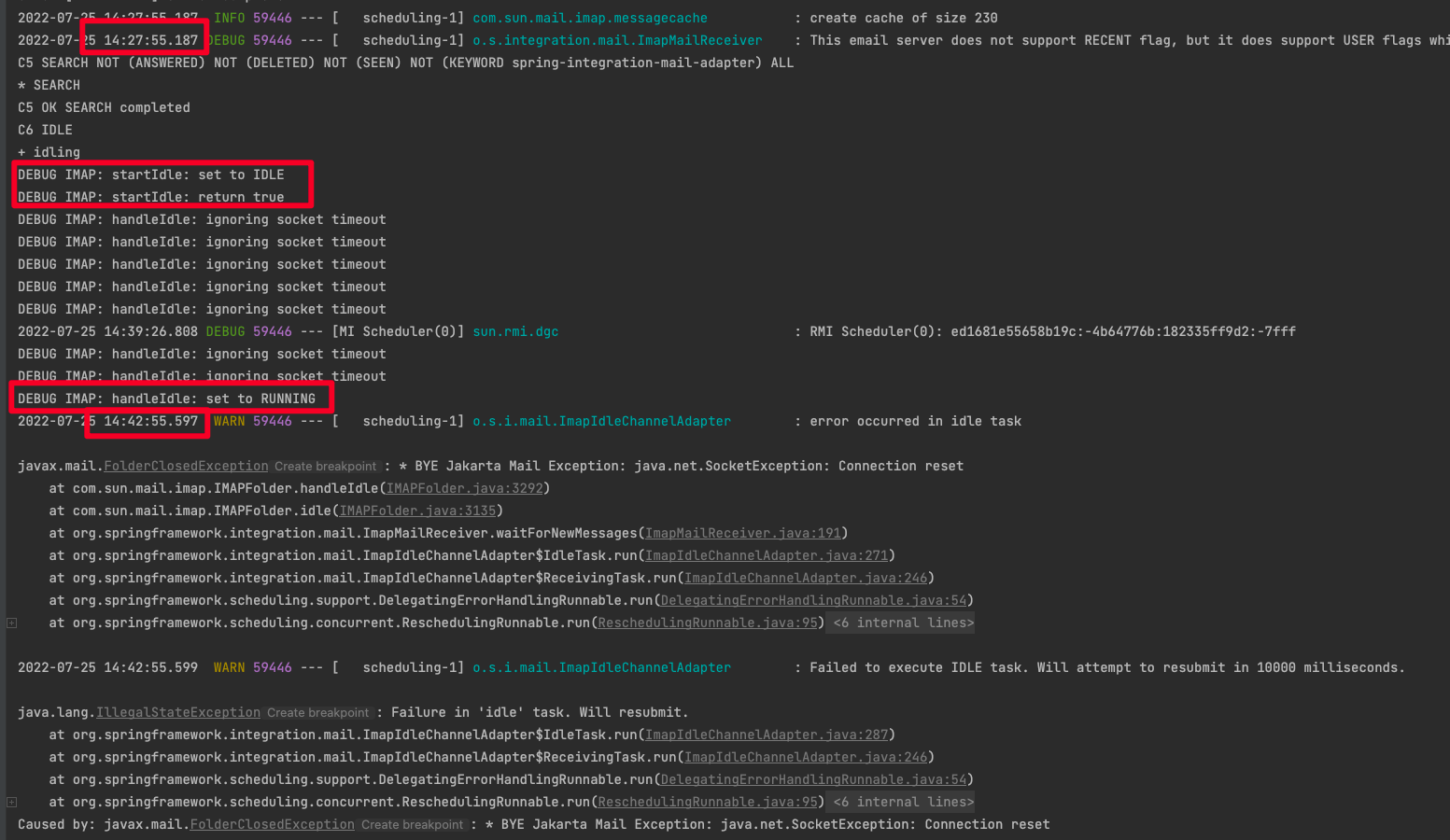
I use ImapIdleChannelAdapterSpec to receive emails, but I found that after working for a few minutes, there will be a fixed 15 minutes of IDLE time that does not work at all. After turning on the debug mode, I noticed a command handleIdle: set to RUNNING, I want to know if it is possible to configure the IDLE time, because 15 minutes is too long to wait.
Context
I tried the cancelIdleInterval(70) method mentioned in the documentation, but it didn't work, IDLE still lasted for 15 minutes.
    @Bean
    fun integrationFlow() = IntegrationFlows.from(mailInboundChannelAdapterSpec())
        .handle(MailMessageHandler())
        .get()

    private fun mailInboundChannelAdapterSpec() =
        Mail.imapIdleAdapter("imaps://user:[email protected]:993/INBOX")
            .autoStartup(true)
            .shouldReconnectAutomatically(true)
            .simpleContent(false)
            .autoCloseFolder(false)
            .embeddedPartsAsBytes(false)
            .shouldDeleteMessages(false)
            .shouldMarkMessagesAsRead(true)
            .selectorExpression("subject matches '(?i).*Test.*'")
            .cancelIdleInterval(70)
            .headerMapper(DefaultMailHeaderMapper())
            .javaMailProperties {
                it.put("mail.debug", "true")
            }

The "idle canceler" works only in this case:
	if (imapFolder.hasNewMessages()) {
			return;
		}
		else if (!folder.getPermanentFlags().contains(Flags.Flag.RECENT) && searchForNewMessages().length > 0) {
			return;
		}
		try {
			this.pingTask =
					this.scheduler.schedule(this.idleCanceler, Instant.now().plusMillis(this.cancelIdleInterval));
			if (imapFolder.isOpen()) {
				imapFolder.idle(true);
			}
		}
So, we go to the pingTask only if imapFolder returns "no new messages".
Otherwise as you said we are blocked in the IDLE waiting for reply from the server.
Doesn't look like there is the way to have that idle interval configurable.
Would you mind, please, elaborate more what you mean with that manual configuration? Do you see any option in Java Mail how to customize IMAP Idle functionality in Java Mail?

If the mail server does not reply to the set running command during the idle period, we can set the maximum waiting time. After the waiting time is exceeded, actively stop the idle state, and then pull the mail again.
I found this described in the api documentation might be a good way to interrupt the idle state:
When another thread (e.g., the listener thread) needs to issue an IMAP comand for this folder, the idle mode will be terminated and this method will return. Typically the caller will invoke this method in a loop.
FYI:
- https://jakarta.ee/specifications/mail/1.6/apidocs/com/sun/mail/imap/imapfolder#idle--
- https://stackoverflow.com/questions/1326014/how-can-i-interrupt-imaps-idle
And I found that .NET client has a StopIdle() method that actively stops IDLE state. https://www.limilabs.com/blog/imap-idle
I will investigate tomorrow the links you provide, but probably it would be great if you can contribute the fix as you see it. I still cannot determine the place where a desired timeout can be set for IDLE command …
According to IMAPFolder source code and your log's screenshot, we end up here:
  if (ex instanceof SocketTimeoutException) {
				logger.finest(
				    "handleIdle: ignoring socket timeout");
				r = null;	// repeat do/while loop
 } else {
...
}
 continue;
And somehow we cannot enter to the keepConnectionAlive(boolean keepStoreAlive) to initiate a waitIfIdle(); and protocol.noop();, since there is no any message in your logs like: logger.finest("waitIfIdle: request IdleManager to abort");...
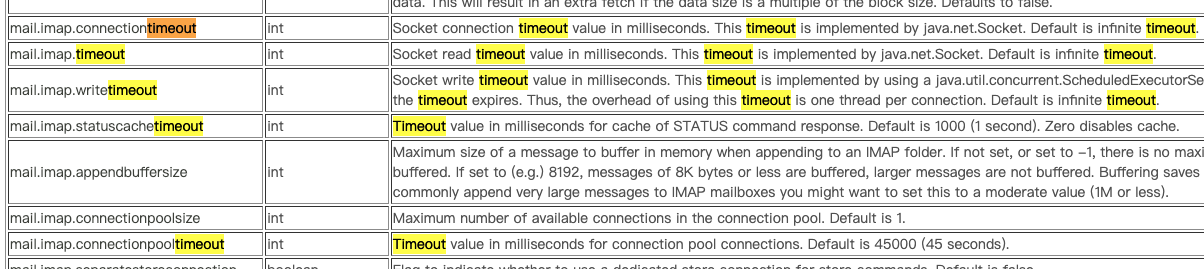
Yes, I manually added some timeout properties in Java mail properties, uniformly set it to 2 minutes, I want to test whether it can interrupt the idle state, but unfortunately it doesn't work. Regardless of whether it is set or not, the idle will continue until the server reply running.
Hi @XhstormR !
Do we still need to do anything here? According to our both investigation doesn't look like there is a solution for your request.
Will close this eventually as Invalid