

 spinnaker
clouddriver-ecs: applications search very slow
Running /search?pageSize=500&q=foobar&type=applications with ecs.enabled = true results in very slow response times (10-20+ seconds), occasionally timing out. Doubling both the instance (from 1cpu/3GB to 2cpu/4GB) or the DB (cpu + RAM) does not lower the response time.
However, when I disable ecs again (e.g. only aws anymore enabled), then the search is almost instant again.
Two things I noticed:
- When I have ecs disabled, the search is just exactly 1 query (which is what I would expect):
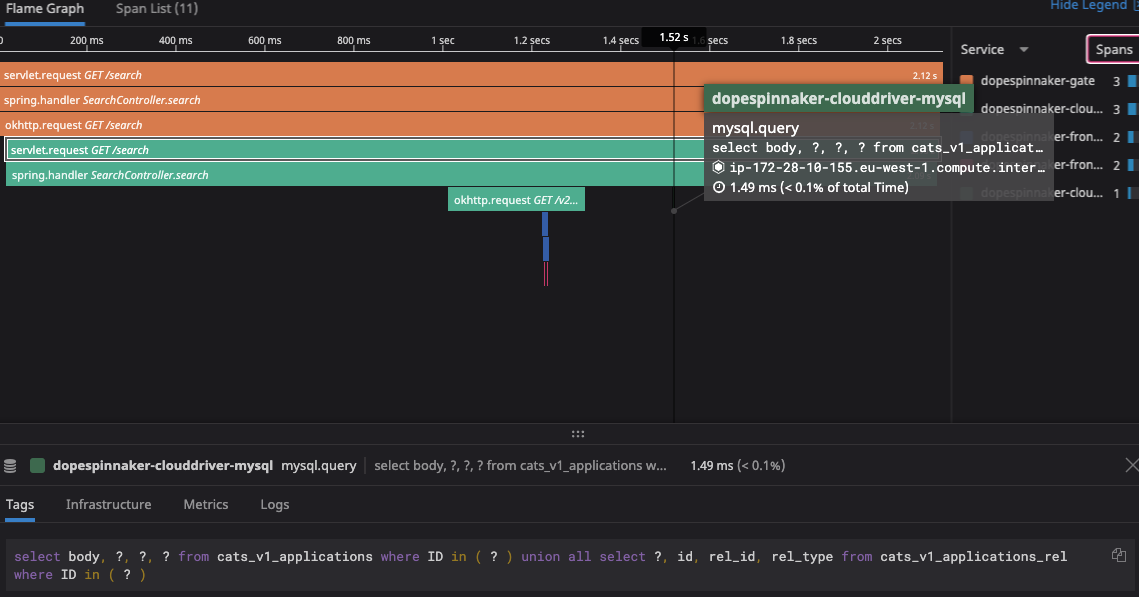
however, when I enable ecs, it is doing over 3k SQL queries per search request:

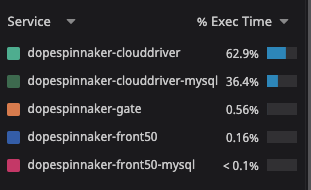
With many queries being done against alarms (??), taskDefinitions, services, etc.:

- I noticed that the "application" column is empty in many of the ecs tables:

And also ecs services are missing from cats_v1_applications
This is with Spinnaker version: 1.22.1, 1.23.1 - we definitely had the issue though earlier (e.g. the search with ecs never worked), and also had it when using redis as database for clouddriver. It is only now that we gained visibility after adding datadog-apm.


Also happening on ApplicationsController.get

I think at this point it is safe to assume that most calls within clouddriver-ecs are affected 😞

Oops forgot to mention, adding to the description as well @akshayabd: 1.22.1
Hi @lifeofguenter, I want to apologize for the delay, and say thanks for the initial investigation! It definitely helps us in narrowing down where the issue might be.
Would you be able to provide us with a bit more information how many applications do you have? (aws vs ecs applications) When you disable ecs, are you still returned a list of ECS applications?

@piradeepk I would not concentrate too much on the search because it is not a search only problem. When I disable ecs, then it will not show any ecs application.
My guess it has something to do with how it looks-up entries via the cache layer (in our case it happens to be sql, but I am sure the same issue will happen on redis as well). I tried comparing different provider implementations but my Java knowledge is too minimal to spot what is causing the massive increase of queries (maybe it is populating each application object with extra data = extra queries?)
We have approx 50 ECS applications. I think it would be possible to provide you with a dump if required :)
@lifeofguenter thanks for the details. Just to clarify, you only have ecs applications (no aws provider applications)?
I don't think we'll need a data dump just yet :) I'm trying to replicate your spinnaker setup so all of the information that you've provided will help!
@lifeofguenter, thanks for providing some context earlier, I had a couple more questions.
Are you seeing any rate limiting errors from AWS in your Clouddriver log (you can also see these errors in your AWS CloudTrail logs)? Of those 3600 requests, are you able to break it down by how many are reads vs writes being made to the sql database?
Do you know what your polling interval is in your cache configuration or are you using the default polling interval? A couple links that might help: Configure Clouddriver to Use MySQL and Configure Infrastructure Caching
How many ECS accounts do you have configured to be used in Spinnaker with Halyard and what (or how many different) regions do you deploy Amazon ECS services in?
Roughly how many Amazon ECS services do you have in those accounts, not just services deployed by Spinnaker (you can look at your AWS console to get the total count)?
Roughly how many different server groups, target groups and load balancers do you have in Spinnaker?
I was also wondering if you could provide some more screenshots: Would you be able to enable the ecs provider and provide me with a request count after 5 - 10 minutes of the provider being enabled (prior to making a search), and then do a search immediately after and provide me with the request count after?
Depending on the number of resources in your AWS accounts and the number of regions that you're deploying to, this could be a reasonable number of requests being made to your sql database if it's accounts for total reads and writes.
Also, have you tried Horizontally Scaling Clouddriver to see if this helps with the your search timing out?
@piradeepk just to give some context on our setup:
- we are running spinnaker on fargate, for more context/info on that you can check my blog post about it: https://www.lifeofguenter.de/2020/10/running-spinnaker-on-ecsfargate.html
- this means, we have a separate aurora-mysql just for clouddriver (serverless: 64 ACU - overscaled to compensate for the performance issues)
- the clouddriver tasks themselves scale between 2 and 10 depending on CPU usage (2048 cpu / 4096 mem)
- the issues and the APM graphs you are seeing are not from the overall mysql usage - we do understand that clouddriver itself will run agents that will do a lot of aws-sdk requests, these APM graphs are per API call. These are not total reads or writes of the mysql server
Are you seeing any rate limiting errors from AWS in your Clouddriver log (you can also see these errors in your AWS CloudTrail logs)? Of those 3600 requests, are you able to break it down by how many are reads vs writes being made to the sql database?
No rate limiting happening. 100% SELECT queries.
How many ECS accounts do you have configured to be used in Spinnaker with Halyard and what (or how many different) regions do you deploy Amazon ECS services in?
6 ECS accounts. Mainly us-east-1, but 1/2 accounts are on eu-west-1 as well
Roughly how many different server groups, target groups and load balancers do you have in Spinnaker?
~ 500 of each I would say
Depending on the number of resources in your AWS accounts and the number of regions that you're deploying to, this could be a reasonable number of requests being made to your sql database if it's accounts for total reads and writes.
This is totally clear to me, however:
- it should not require 3600 sql queries to do a search
- this issue does not exist with aws-only :)
I think we definitely need to move the focus away from search. I think it is too distracting on the underlaying issue. I have an easier way to replicate the issue:
- https://spinnaker-gate.xxxx/applications/foobar -> always super slow with >3k sql queries (but only if resources exist, I think clusters, but maybe something like a sgroup or alb is sufficient as well - e.g. a complete empty application will not have any issues, but a aws application will cause issue if ecs is enabled)
- https://spinnaker-gate.xxxx/applications/foobar?expand=false -> always nearly instant (it does only 2 queries against front-50 - no matter if its aws or ecs, e.g. it does not even touch clouddriver)
When using spin-cli, by default, expand is false. As is when browsing applications with deck.
But it seems that other areas in deck/gate do not set expand=false which makes it very slow. One of them is the search, but also happens when going into a project (via deck).
Not sure the context of "expand" but I am guessing that while it might be slower when enabled, it should still not launch over 3k SQL queries on each request :)
This issue hasn't been updated in 45 days, so we are tagging it as 'stale'. If you want to remove this label, comment:
@spinnakerbot remove-label stale

Re-opening on account of https://github.com/spinnaker/clouddriver/pull/5335 . The plan is to do additional validation testing before re-merging a fix into master. Please let us know if you're effected by this issue or whether you're interested in trying out the proposed fix.

Re-opening as this was mistakenly closed with the merge of https://github.com/spinnaker/clouddriver/pull/5375 (which was one part of a potential fix which is still not totally merged)
I think we should separate these out into different issues. The Open PR resolves this particular issue (the application search), but the alarm search, load balancer search, and any other resource type searches, should be considered separate issues.
Re-opening as this was mistakenly closed with the merge of spinnaker/clouddriver#5375 (which was one part of a potential fix which is still not totally merged)
This information probably belongs on this issue https://github.com/spinnaker/clouddriver/pull/5377#issuecomment-861047796
As a side note, while poking at the clouddriver-ecs module I noticed that the ECSProvider searches alarms by default. Is there a reason to include those in the default search? It might be specific to our use case, but we've got a lot of alarms that aren't related to ECS services and from what I can see, searching across all the alarms is expensive.

Testing this out again it looks like it is just the "application" search that is the problem for us. The other search types (projects, serverGroups, instances, loadbalancers, and securityGroups) all return within a reasonable time frame.
If there's not matches the search results are instant as well so that suggests there performance issue is related to constructing the results if a match is found.
One thing that makes this a bit worse is that Deck keeps retrying the search for applications when it times out after 10 seconds. So a single search from the front page expands out to dozens of searches for a while compounding the issue.
Some more digging it looks like this call https://github.com/spinnaker/clouddriver/blob/master/clouddriver-ecs/src/main/java/com/netflix/spinnaker/clouddriver/ecs/provider/view/EcsServerClusterProvider.java#L373 which calls to https://github.com/spinnaker/clouddriver/blob/master/clouddriver-ecs/src/main/java/com/netflix/spinnaker/clouddriver/ecs/cache/client/EcsCloudWatchAlarmCacheClient.java#L76 is really expensive for us as it iterates every alarm to figure out if it has an action associated with the service.
@lifeofguenter how did you get Spinnaker instrumented by Datadog's APM? We are facing a similar issue with Clouddriver RO, it it taking an awfully long time to respond to Application/get requests (like when instantiating a pipeline template) and APM would definitely help pinpoint the problem.

@ScOut3R: https://docs.datadoghq.com/tracing/setup_overview/setup/java/?tab=containers
So in our case we do the following:
ARG spinnaker_version

FROM us-docker.pkg.dev/spinnaker-community/docker/clouddriver:spinnaker-${spinnaker_version}

ENV JAVA_OPTS="-XX:InitialRAMPercentage=50.0 -XX:MinRAMPercentage=50.0 -XX:MaxRAMPercentage=70.0 -javaagent:/opt/datadog.jar"

USER root

RUN set -ex && \
    apk add --no-progress --no-cache \
      curl && \
    curl -fsSLo /opt/datadog.jar https://dtdg.co/latest-java-tracer

USER spinnaker

... (mainly copying over config files)
@ScOut3R: https://docs.datadoghq.com/tracing/setup_overview/setup/java/?tab=containers
So in our case we do the following:
ARG spinnaker_version

FROM us-docker.pkg.dev/spinnaker-community/docker/clouddriver:spinnaker-${spinnaker_version}

ENV JAVA_OPTS="-XX:InitialRAMPercentage=50.0 -XX:MinRAMPercentage=50.0 -XX:MaxRAMPercentage=70.0 -javaagent:/opt/datadog.jar"

USER root

RUN set -ex && \
    apk add --no-progress --no-cache \
      curl && \
    curl -fsSLo /opt/datadog.jar https://dtdg.co/latest-java-tracer

USER spinnaker

... (mainly copying over config files)
That is ingenious @lifeofguenter, thank you! Now I just need to figure out how to use custom docker images with Halyard and Kubernetes. :)
@ScOut3R we decided against Halyard for this reason, and also rather deployed to ECS/Fargate which made it a lot less operational troublesome for us. I wrote a high-level article on it here: https://www.lifeofguenter.de/2020/10/running-spinnaker-on-ecsfargate.html
@ScOut3R we decided against Halyard for this reason, and also rather deployed to ECS/Fargate which made it a lot less operational troublesome for us. I wrote a high-level article on it here: https://www.lifeofguenter.de/2020/10/running-spinnaker-on-ecsfargate.html
Thanks @lifeofguenter, will have a look!
You can simplify your Dockerfile by using
ADD https://dtdg.co/latest-java-tracer /opt/datadog.jar
instead of adding and calling curl.
Digging in to this again I think the issue with search might just be as simple as implementing this https://github.com/spinnaker/clouddriver/blob/master/clouddriver-ecs/src/main/java/com/netflix/spinnaker/clouddriver/ecs/provider/view/EcsServerClusterProvider.java#L576 in the provider.
The root cause of the issue seems to be the cost of populating the ECS cluster details for every application in every region and account combination just to surface a few bits of information in the search results. By implementing the logic for supportsMinimalClusters() that would cut down on the data being queried, built, and returned.
@deverton we have ~12 AWS accounts (1 region each), with 1 ECS cluster in each and about a ~100 ECS services in each cluster. Clouddriver is struggling to execute the Application/get controller when we are instantiating a pipeline from a template, that call takes ~2 mins to return. Could this be related as well?
Overall Clouddriver is performing really slow when querying for information, like loading server groups (30+ seconds), or loading the information page of a server group. We run Clouddriver in HA and used an Aurora cluster (3 x r5a.xlarge) and now switched back to Redis (3 x m6g.large) which seems to be slightly faster.
As per @lifeofguenter's suggestion I was able to enable Datadog tracing but the resulting trace was so huge the browser couldn't load it.
I'd be happy to provide further details about our setup if it helps with your investigation.
It could be related. The lookup logic in the clouddriver-ecs module does seem to be written in a "get all the data and then filter" style which gets expensive as we add more accounts, regions, clusters, and services.
We're at a similar scale though not actively using the ECS provider yet so most of the impact for us is just having it enabled for search results.
@deverton
Digging in to this again I think the issue with search might just be as simple as implementing this https://github.com/spinnaker/clouddriver/blob/master/clouddriver-ecs/src/main/java/com/netflix/spinnaker/clouddriver/ecs/provider/view/EcsServerClusterProvider.java#L576 in the provider.
Nice find! It looks like that might just be a matter of returning true if ECS server groups contain the required elements. Though the only place I've found that ends up calling this method is here:
https://github.com/spinnaker/clouddriver/blob/master/clouddriver-web/src/main/groovy/com/netflix/spinnaker/clouddriver/controllers/ClusterController.groovy#L183
...do you know if this controller method is called during the app search / soon enough to help? If so, then re: getting the required info we seem to have it all by this point (though it's after the super long metrics call you pointed out earlier :/)
From what I can tell (though I haven't tested this) the issue is that getClusterSummaries() is returning the full data set when it should be just returning summary data. That flag is then used during the search results to pull in details of matching server groups.
So there's kind of two issues:
- The summary data fetching methods are pulling in far too much data for what's asked and doing it in an inefficient way. They basically get a list of applications from Front50, then check every cluster and every alarm, lb, etc to see if they match the one of the applications.
- It's possible to speed up the search even more by just returning some summary stub data and if that flag is true, the search logic will query each server group it needs more data on.
The AWS provider has a bit of optimisation around this that I'm trying to understand how to map to how the ECS provider does things.