
SOPIA

SOPIA copied to clipboard
Published
2 weeks ago
•
 sopia-bot
sopia-bot
Create broadcast with high sound quality like android emulator.
- Create rtmp server.
async function createLive() {
  const user = getUser();
  const req = await sopia.api.lives.create({
    data: {
      "is_adult":false,
      "is_save":false,
      "donation":0,
      "title":"테스트",
      "type":0,
      "welcome_message":"말이 없삼\n회사임\n채팅쳐도 못 볼 가능성 큼",
      "invite_member_ids":[],
      "tags":["1"],
      "categories":["daily"],
      "engine":{"name":"sori","host":""},
      "is_live_call":false,
      "device_unique_id":sopia.deviceUUID,
      "spoon_aim":[]
    },
  });
  const live = req.res.results[0];
  console.log('live', live);

  const host_address = ((live as any).host_address as string);
  const port = 5021;

  const res = await axios({
    url: `http://${host_address}:${port}/sori/4/publish/${live.stream_name}`,
    method: 'post',
    headers: {
      'authorization': `Bearer ${user.token}`,
      'x-live-authorization': live.jwt,
    },
    data: {
      media: {
        type: 'audio',
        protocol: 'rtmp',
        format: 'aac',
      },
      reason: {
        code: 50000,
        message: 'unknown',
      },
      props: {
        country: sopia.country,
        stage: 'prod',
        live_id: live.id.toString(),
        user_id: user.id.toString(),
        user_tag: user.tag,
        platform: 'sopia',
        os: 'Linux',
      },
    },
  });
  console.log('live publish', res);
  await live.join(live.jwt);
  console.log(`${res.data.publish.rtmp.url}/${res.data.publish.rtmp.name}`);
}
- Connect rtmp session
ffmpeg -re -f mp3 -i sound.mp3 -c:v libx264 -c:a aac -vn -strict experimental -f flv [url]
- Join live room
live.join(live.jwt)

recording audio file to blobevent
ctx = new AudioContext()
ctx.decodeAudioData(test.buffer).then((r) => window.tttt = r)
src = ctx.createBufferSource()
src.buffer = tttt;
dest = ctx.createMediaStreamDestination()
recorder = new MediaRecorder(dest.stream)
recorder.ondataavailable = (evt) => {
    console.log('receive data', evt);
}
src.connect(dest)
recorder.start(5000 /* time slice */)
src.start()
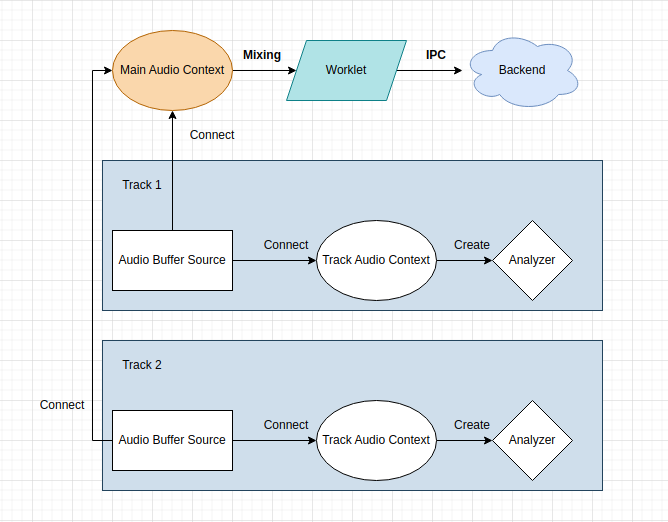
The structure of SOPIA handling audio is as follows.
- Connect AudioContext for Visual Analyzer for each track.
- Buffers for actual broadcasting are all connected to Main AudioContext and mixed.
If you want to record audio from the desktop, you must first loopback the playback device. (Using wasapi or virtual cable, etc.)
Loopback example (but not perfact): Use fmedia command https://github.com/stsaz/fmedia
.\fmedia.exe --dev-loopback=1 --rate=48000 --channels=2 --format=int32 --record -o "@stdout.mp3" -y
ffmpeg
-i - -c:a aac -vn -strict experimental -f flv
sox
-b ${bitDepth} -e unsigned-integer -r ${sampleRate} -c ${channels} -t waveaudio ${deviceName} --clobber -p