

 sonosaurus
Installer only offers x86 version on Win11/Arm64 system, even though x64 emulation is available
When installing Sonobus on my Surface Pro X, it only offers the 32 bit x86 versions for installation. Can we get the installer to offer the x64 version as well, or better yet an ARM64EC version?

The installer itself is 32bit, but the application and plugins available to install from it (once you run it) are both the 64 and 32 bit intel builds of SonoBus. I haven't made an ARM64 build for windows yet, so that's going to be your main issue on an Arm64 system. Thanks for the request.

No that is not the case, when i ran it on my Surface Pro X, it only offered the 32 bit versions for installation.
This presumably is a result of the 32bit installer seeing the x86 emulation environment and not being aware that x64 emulation is also available.
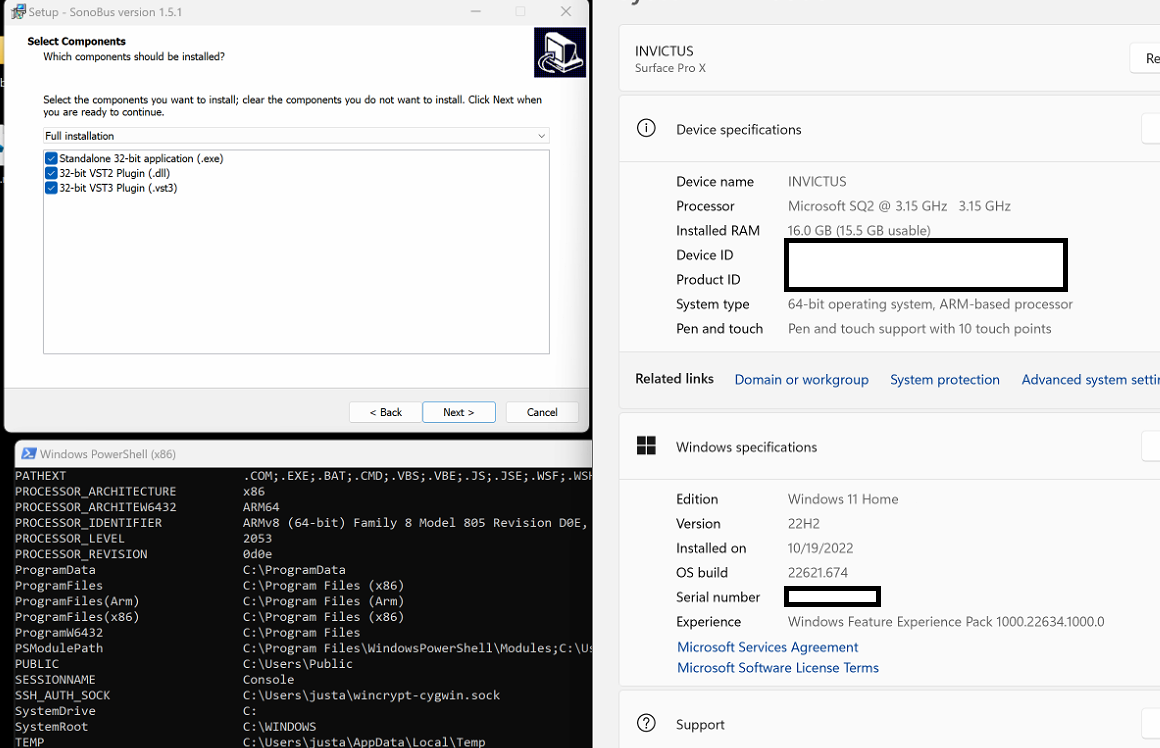
it might just need arm64 added to ArchitecturesInstallIn64BitMode to give us the x64 binaries on arm64 systems at least, but i'm having some trouble getting it to build myself...
https://github.com/sonosaurus/sonobus/blob/main/release/wininstaller.iss#L12
Any idea when this might happen? would be really nice to have the right bitness version available on the laptop! (And the x64 emulation is significantly more efficient than the x86 emulation, as I understand it, so it would run better too!)