

 sonic2kk
⚠ Steam flatpak support
Currently there is no easy way to stl use in flatpaked version of Steam. That shouldn't be hard, here is example of other addon: https://github.com/flathub/com.valvesoftware.Steam.Utility.protontricks

Sorry, I'm personally not interested in flatpak, so I won't spend my time on it, but if you could contribute a pull request if you want.

Yes, wondering how difficult this would be... I'd like to take a look, but might be a while until I can investigate. I'll report back anything I do find.

I created a manifest, available at https://github.com/TheEvilSkeleton/flatpaks/tree/com.valvesoftware.Steam.Utility.steamtinkerlaunch.
Adding steamtinkerlaunch %command% as a launch option executes the game itself, but the steamtinkerlaunch script fails in the middle with the following error:
/app/utils/bin/steamtinkerlaunch: line 7994: : command not found
Line 7994 is the following:
"$YAD" --f1-action="$F1ACTION" --image "$SHOWPIC" --image-on-top --window-icon="$STLICON" --form --center --on-top "$WINDECO" \

That's odd. It's the first thing I build: https://github.com/TheEvilSkeleton/flatpaks/blob/7665a7234da1a4b1ee7080f6876332bf4dd56280/com.valvesoftware.Steam.Utility.steamtinkerlaunch.yaml#L16
Just chipping in to try and help, is this syntax correct? https://github.com/TheEvilSkeleton/flatpaks/blob/7665a7234da1a4b1ee7080f6876332bf4dd56280/com.valvesoftware.Steam.Utility.steamtinkerlaunch.yaml#L23
It seems like another modules block is being defined? At least I can't see that syntax elsewhere in the file.

Thanks for trying to help @sonic2kk
Can't help with flatpak. Assuming the yaml installed yad correctly, I would have suggested to check if the $PATH is valid
Generally starting steamtinkerlaunch without yad being installed it should already warn/error our before and not fail with some broken line (here 7994) so if it is possible to get a log out of the wip flatpak it might help as well.
Just chipping in to try and help, is this syntax correct? https://github.com/TheEvilSkeleton/flatpaks/blob/7665a7234da1a4b1ee7080f6876332bf4dd56280/com.valvesoftware.Steam.Utility.steamtinkerlaunch.yaml#L23
It seems like another modules block is being defined? At least I can't see that syntax elsewhere in the file.
That's normal. Everything residing under modules builds first. Essentially, the intltool module builds prior to building the yad module.
If I type which yad in the Steam Flatpak container, I get this:
TheEvilSkeleton@TheMainDesktop ~> flatpak run --command=bash com.valvesoftware.Steam
[📦 com.valvesoftware.Steam ~]$ which yad
/app/utils/bin/yad
Which means yad actually exists and is in PATH.
Running yad within the container shows this:

I'm guessing everything looks fine on yad's side?
Ah, /app/utils/bin/yad is interesting here. I guess this might require a little addition directly in steamtinkerlaunch.
Could you please test what currently
grep YAD ~/.config/steamtinkerlaunch/global.conf returns?
likely it is
YAD="/usr/bin/yad"
but apparently should be
YAD="/app/utils/bin/yad"
on your side.
Would be also good to know if you change it manually in the config.
(logs should have initially revealed it as well btw - f.e. /dev/shm/steamtinkerlaunch/steamtinkerlaunch.log)
stdout of $PATH within steamtinkerlaunch might be interesting as well - if possible when started from steam (would help to see if it basically is sane and your path needs to be added or if it is removed from somewhere)
likely it is
YAD="/usr/bin/yad"
Not even. It's empty:
[📦 com.valvesoftware.Steam ~]$ grep YAD ~/.config/steamtinkerlaunch/global.conf
YAD=""
Flatpak remaps $XDG_CONFIG_HOME to ~/.var/app/$APP_ID/config. In this case it's ~/.var/app/com.valvesoftware.Steam/config/global.conf. However, upon checking that, it's empty as well:
[📦 com.valvesoftware.Steam ~]$ grep YAD $XDG_CONFIG_HOME/steamtinkerlaunch/global.conf
YAD=""
I manually appended /app/utils/bin/yad in YAD, and steamtinkerlaunch launched! However, it crashed after a second.
Here's the log when starting Jurassic World Evolution 2:
Click to expand
Tue Apr 19 12:53:47 EDT 2022 INFO - initAID - Set AID from STEAM_COMPAT_APP_ID to '1244460'
Tue Apr 19 12:53:47 EDT 2022 INFO - initAID - Set OSCDP to STEAM_COMPAT_DATA_PATH '/run/media/TheEvilSkeleton/DATA/Steam Games/steamapps/compatdata/1244460'
Tue Apr 19 12:53:47 EDT 2022 INFO - loadLangFile - Loading system wide /app/utils/steamtinkerlaunch/share/steamtinkerlaunch/lang//english.txt
Tue Apr 19 12:53:47 EDT 2022 INFO - getCurrentCommandline - Found Proton in command line arguments '/var/home/TheEvilSkeleton/.var/app/com.valvesoftware.Steam/.local/share/Steam/ubuntu12_32/reaper SteamLaunch AppId=1244460 -- /app/share/steam/compatibilitytools.d/Proton-GE/proton waitforexitandrun /run/media/TheEvilSkeleton/DATA/Steam Games/steamapps/common/Jurassic World Evolution 2/JWE2.exe'
Tue Apr 19 12:53:47 EDT 2022 INFO - saveOrgVars - Storing some original variables to restore them later
Tue 19 Apr 2022 12:53:47 PM EDT INFO - emptyVars - Emptied some original variables as they slowdown several system calls when started from steam
Tue 19 Apr 2022 12:53:47 PM EDT INFO - emptyVars - Set $PATH to '/app/bin:/app/utils/bin:/usr/bin:'
Tue 19 Apr 2022 12:53:47 PM EDT START - ######### Initializing Game Launch 1244460 using SteamTinkerLaunch v9.2 #########
Tue 19 Apr 2022 12:53:47 PM EDT INFO - main - Starting with a clean log
Tue 19 Apr 2022 12:53:47 PM EDT INFO - main - Start creating default configs
Tue 19 Apr 2022 12:53:47 PM EDT INFO - createDefaultCfgs - START
Tue 19 Apr 2022 12:53:48 PM EDT INFO - loadLanguage - First load the default language to make sure all variables are filled
Tue 19 Apr 2022 12:53:48 PM EDT INFO - loadLangFile - Loading system wide /app/utils/steamtinkerlaunch/share/steamtinkerlaunch/lang//english.txt
Tue 19 Apr 2022 12:53:48 PM EDT WARN - updateEditor - 'xdg-open' selected as editor or configured editor not found - trying to find an installed editor installed
Tue 19 Apr 2022 12:53:48 PM EDT SKIP - updateEditor - No valid editor found - leaving 'xdg-open'
Tue 19 Apr 2022 12:53:48 PM EDT INFO - createDefaultCfgs - setSteamPaths:
Tue 19 Apr 2022 12:53:48 PM EDT INFO - setSteamPaths - Reading Steam Path variables from '/dev/shm/steamtinkerlaunch/steampaths.txt'
Tue 19 Apr 2022 12:53:48 PM EDT WARN - updateEditor - 'xdg-open' selected as editor or configured editor not found - trying to find an installed editor installed
Tue 19 Apr 2022 12:53:48 PM EDT SKIP - updateEditor - No valid editor found - leaving 'xdg-open'
Tue 19 Apr 2022 12:53:48 PM EDT INFO - getGameOS - Starting game OS detection
Tue 19 Apr 2022 12:53:48 PM EDT INFO - getGameOS - STEAM_COMPAT_DATA_PATH is defined - This is no longer necessarily a reliable indication that this is a Windows game.
Tue 19 Apr 2022 12:53:48 PM EDT INFO - getGameOS - Making some more checks on '/run/media/TheEvilSkeleton/DATA/Steam Games/steamapps/common/Jurassic World Evolution 2/JWE2.exe' to determine the OS version of the game
Tue 19 Apr 2022 12:53:48 PM EDT INFO - getGameOS - Looks like this is a Windows game!
Tue 19 Apr 2022 12:53:48 PM EDT INFO - setWin - 'JWE2' determined to be a Windows Game
Tue 19 Apr 2022 12:53:48 PM EDT INFO - createProtonList - Looking for available Proton versions
Tue 19 Apr 2022 12:53:48 PM EDT INFO - getAvailableProtonVersions - Initially creating an array with available Proton versions
Tue 19 Apr 2022 12:53:48 PM EDT INFO - getAvailableProtonVersions - Adding Proton versions found in STEAMCOMPATOOLS '/var/home/TheEvilSkeleton/.var/app/com.valvesoftware.Steam/.local/share/Steam/compatibilitytools.d'
Tue 19 Apr 2022 12:53:48 PM EDT SKIP - getAvailableProtonVersions - Directory SYSSTEAMCOMPATOOLS '/usr/share/steam/compatibilitytools.d' not found - skipping
Tue 19 Apr 2022 12:53:48 PM EDT INFO - getAvailableProtonVersions - Adding Proton versions found in additional SteamLibrary Paths
Tue 19 Apr 2022 12:53:49 PM EDT INFO - listAllSettingsEntries - '/dev/shm/steamtinkerlaunch/setentries.txt' already exists - nothing to do
Tue 19 Apr 2022 12:53:49 PM EDT INFO - createDefaultCfgs - STOP
Tue 19 Apr 2022 12:53:49 PM EDT INFO - main - Checking internal dependencies:
Tue 19 Apr 2022 12:53:49 PM EDT INFO - setAwkBin - Found 'gawk' as an 'awk' variant. It should work without any issues, because 'gawk' was tested completely
Tue 19 Apr 2022 12:53:49 PM EDT INFO - checkIntDeps - Result of version check for yad binary '/app/utils/bin/yad' is '10.1'
Tue 19 Apr 2022 12:53:49 PM EDT INFO - main - Initializing first Proton:
Tue 19 Apr 2022 12:53:49 PM EDT INFO - initFirstProton - skipping function, because Proton version is provided by commandline (steamtinkerlaunch used via 'Steam Launch Option')
Tue 19 Apr 2022 12:53:49 PM EDT INFO - main - Initializing default window resolution
Tue 19 Apr 2022 12:53:49 PM EDT INFO - setInitWinXY - Using '1920x1080' from config '/dev/shm/steamtinkerlaunch/defres.txt'
Tue 19 Apr 2022 12:53:49 PM EDT INFO - main - Checking command line: incoming arguments '/var/home/TheEvilSkeleton/.var/app/com.valvesoftware.Steam/.local/share/Steam/ubuntu12_32/reaper SteamLaunch AppId=1244460 -- /app/share/steam/compatibilitytools.d/Proton-GE/proton waitforexitandrun /run/media/TheEvilSkeleton/DATA/Steam Games/steamapps/common/Jurassic World Evolution 2/JWE2.exe'
Tue 19 Apr 2022 12:53:49 PM EDT SKIP - getGameOS - ISGAME is already set to '2' - nothing to determine
Tue 19 Apr 2022 12:53:49 PM EDT INFO - linkLog - Symlink '/var/home/TheEvilSkeleton/.var/app/com.valvesoftware.Steam/config/steamtinkerlaunch/logs/steamtinkerlaunch/title/Jurassic World Evolution 2.log' already exists
Tue 19 Apr 2022 12:53:50 PM EDT WARN - updateEditor - 'xdg-open' selected as editor or configured editor not found - trying to find an installed editor installed
Tue 19 Apr 2022 12:53:50 PM EDT SKIP - updateEditor - No valid editor found - leaving 'xdg-open'
Tue 19 Apr 2022 12:53:50 PM EDT START - ######### Game Launch: Jurassic World Evolution 2 (1244460) #########
Tue 19 Apr 2022 12:53:50 PM EDT INFO - prepareLaunch - Game launch args '/run/media/TheEvilSkeleton/DATA/Steam Games/steamapps/common/Jurassic World Evolution 2/JWE2.exe'
Tue 19 Apr 2022 12:53:50 PM EDT INFO - prepareLaunch - Gamedir '/run/media/TheEvilSkeleton/DATA/Steam Games/steamapps/common/Jurassic World Evolution 2'
Tue 19 Apr 2022 12:53:50 PM EDT INFO - prepareLaunch - Proton wineprefix '/run/media/TheEvilSkeleton/DATA/Steam Games/steamapps/compatdata/1244460/pfx'
Tue 19 Apr 2022 12:53:50 PM EDT INFO - prepareLaunch -------------------
Tue 19 Apr 2022 12:53:50 PM EDT INFO - prepareLaunch - CreateGameCfg:
Tue 19 Apr 2022 12:53:50 PM EDT SKIP - updateConfigFile - Config file '/var/home/TheEvilSkeleton/.var/app/com.valvesoftware.Steam/config/steamtinkerlaunch/gamecfgs/id/1244460.conf' already at version 'v9.2'
Tue 19 Apr 2022 12:53:50 PM EDT INFO - linkGameCfg - Symlink '/var/home/TheEvilSkeleton/.var/app/com.valvesoftware.Steam/config/steamtinkerlaunch/gamecfgs/title/Jurassic World Evolution 2.conf' already exists
Tue 19 Apr 2022 12:53:50 PM EDT INFO - prepareLaunch - First LoadCfg: /var/home/TheEvilSkeleton/.var/app/com.valvesoftware.Steam/config/steamtinkerlaunch/gamecfgs/id/1244460.conf
Tue 19 Apr 2022 12:53:50 PM EDT INFO - loadCfg - '/var/home/TheEvilSkeleton/.var/app/com.valvesoftware.Steam/config/steamtinkerlaunch/gamecfgs/id/1244460.conf' START
Tue 19 Apr 2022 12:53:50 PM EDT INFO - loadCfg - Loading game config '/var/home/TheEvilSkeleton/.var/app/com.valvesoftware.Steam/config/steamtinkerlaunch/gamecfgs/id/1244460.conf'
Tue 19 Apr 2022 12:53:50 PM EDT INFO - loadCfg - '/var/home/TheEvilSkeleton/.var/app/com.valvesoftware.Steam/config/steamtinkerlaunch/gamecfgs/id/1244460.conf' STOP
Tue 19 Apr 2022 12:53:50 PM EDT INFO - prepareLaunch - OpenTrayIcon:
Tue 19 Apr 2022 12:53:50 PM EDT INFO - autoCategorySettings - Searching categories for game '1244460' in 'sharedconfig.vdf'
Tue 19 Apr 2022 12:53:50 PM EDT SKIP - autoCategorySettings - Config '/app/utils/steamtinkerlaunch/share/steamtinkerlaunch/categories/.conf' not found - skipping
Tue 19 Apr 2022 12:53:50 PM EDT SKIP - autoCategorySettings - Config '/var/home/TheEvilSkeleton/.var/app/com.valvesoftware.Steam/config/steamtinkerlaunch/categories/.conf' not found - skipping
Tue 19 Apr 2022 12:53:50 PM EDT INFO - setFullGameExePath - Using the base game directory '/run/media/TheEvilSkeleton/DATA/Steam Games/steamapps/common/Jurassic World Evolution 2' as absolute game exe path
Tue 19 Apr 2022 12:53:50 PM EDT INFO - openTrayIcon - Opening trayIcon:
Tue 19 Apr 2022 12:53:50 PM EDT INFO - setRunWineServer - Initiated from 'TrayIconExports'
Tue 19 Apr 2022 12:53:50 PM EDT INFO - setRunWineServer - Set the wine binary for proton in path '/app/share/steam/compatibilitytools.d/Proton-GE/proton'
Tue 19 Apr 2022 12:53:50 PM EDT INFO - setRunWineServer - to '/app/share/steam/compatibilitytools.d/Proton-GE/dist/bin/wine'
Tue 19 Apr 2022 12:53:50 PM EDT INFO - setRunWineServer - and wineserver to '/app/share/steam/compatibilitytools.d/Proton-GE/dist/bin/wineserver'
Tue 19 Apr 2022 12:53:50 PM EDT INFO - prepareLaunch - sortGameArgs:
Tue 19 Apr 2022 12:53:50 PM EDT SKIP - sortGameArgs - Sorting the game arguments is disabled
Tue 19 Apr 2022 12:53:50 PM EDT INFO - prepareLaunch - AskSettings:
Tue 19 Apr 2022 12:53:50 PM EDT INFO - askSettings - Using game specific requester timeout '2'
Tue 19 Apr 2022 12:53:50 PM EDT INFO - askSettings - Opening Requester with timeout '2'
Tue 19 Apr 2022 12:53:50 PM EDT INFO - getGameTextFiles - Searching for at least one editable textfile in '/run/media/TheEvilSkeleton/DATA/Steam Games/steamapps/compatdata/1244460/pfx/drive_c/users/steamuser'
Tue 19 Apr 2022 12:53:50 PM EDT INFO - getRes - Detected screen resolution '2560x1440'
Tue 19 Apr 2022 12:53:50 PM EDT INFO - pollWinRes - Using GEOM '--geometry=1440x810+0+0' from '/var/home/TheEvilSkeleton/.var/app/com.valvesoftware.Steam/config/steamtinkerlaunch/guicfgs/2560x1440/1244460/SteamTinkerLaunch-OpenSettings.conf'
Tue 19 Apr 2022 12:53:50 PM EDT INFO - setShowPic - Determining game picture
Tue 19 Apr 2022 12:53:50 PM EDT INFO - updateWinRes - Starting resolution-poll for '/var/home/TheEvilSkeleton/.var/app/com.valvesoftware.Steam/config/steamtinkerlaunch/guicfgs/2560x1440/1244460/SteamTinkerLaunch-OpenSettings.conf' with incoming '1440x810'
Tue 19 Apr 2022 12:53:50 PM EDT INFO - setShowPic - Using '/var/home/TheEvilSkeleton/.var/app/com.valvesoftware.Steam/config/steamtinkerlaunch/games/header/1244460.jpg' as game picture
Tue 19 Apr 2022 12:53:50 PM EDT INFO - updateWinRes - Waiting for Window 'SteamTinkerLaunch-OpenSettings'
Tue 19 Apr 2022 12:53:51 PM EDT INFO - updateWinRes - Waiting for Window 'SteamTinkerLaunch-OpenSettings'
Tue 19 Apr 2022 12:53:52 PM EDT INFO - updateWinRes - Waiting for Window 'SteamTinkerLaunch-OpenSettings'
Tue 19 Apr 2022 12:53:53 PM EDT SKIP - updateWinRes - Timeout waiting for Window 'SteamTinkerLaunch-OpenSettings'
Tue 19 Apr 2022 12:53:54 PM EDT INFO - askSettings - TIMEOUT - Starting game without opening the Settings Menu
Tue 19 Apr 2022 12:53:54 PM EDT INFO - prepareLaunch - Second LoadCfg after menus: /var/home/TheEvilSkeleton/.var/app/com.valvesoftware.Steam/config/steamtinkerlaunch/gamecfgs/id/1244460.conf
Tue 19 Apr 2022 12:53:54 PM EDT INFO - loadCfg - '/var/home/TheEvilSkeleton/.var/app/com.valvesoftware.Steam/config/steamtinkerlaunch/gamecfgs/id/1244460.conf' START
Tue 19 Apr 2022 12:53:54 PM EDT INFO - loadCfg - Loading game config '/var/home/TheEvilSkeleton/.var/app/com.valvesoftware.Steam/config/steamtinkerlaunch/gamecfgs/id/1244460.conf'
Tue 19 Apr 2022 12:53:54 PM EDT INFO - loadCfg - '/var/home/TheEvilSkeleton/.var/app/com.valvesoftware.Steam/config/steamtinkerlaunch/gamecfgs/id/1244460.conf' STOP
Tue 19 Apr 2022 12:53:54 PM EDT INFO - autoCategorySettings - Searching categories for game '1244460' in 'sharedconfig.vdf'
Tue 19 Apr 2022 12:53:54 PM EDT SKIP - autoCategorySettings - Config '/app/utils/steamtinkerlaunch/share/steamtinkerlaunch/categories/.conf' not found - skipping
Tue 19 Apr 2022 12:53:54 PM EDT SKIP - autoCategorySettings - Config '/var/home/TheEvilSkeleton/.var/app/com.valvesoftware.Steam/config/steamtinkerlaunch/categories/.conf' not found - skipping
Tue 19 Apr 2022 12:53:54 PM EDT INFO - prepareLaunch - sortGameArgs again, in case something changed above:
Tue 19 Apr 2022 12:53:54 PM EDT SKIP - sortGameArgs - Sorting the game arguments is disabled
Tue 19 Apr 2022 12:53:54 PM EDT INFO - prepareLaunch - symlinkSteamUser:
Tue 19 Apr 2022 12:53:54 PM EDT SKIP - symlinkSteamUser - Symlinking steamuser is disabled - Checking if a symlink needs to be reverted
Tue 19 Apr 2022 12:53:54 PM EDT SKIP - symlinkSteamUser - '/run/media/TheEvilSkeleton/DATA/Steam Games/steamapps/compatdata/1244460/pfx/drive_c/users/steamuser' is no symlink - nothing to do
Tue 19 Apr 2022 12:53:54 PM EDT INFO - prepareLaunch - restoreSteamUser:
Tue 19 Apr 2022 12:53:54 PM EDT INFO - restoreSteamUser - Using configured value 'none' for RESTORESTEAMUSER
Tue 19 Apr 2022 12:53:54 PM EDT INFO - restoreSteamUser - Restoration of steamuser data is disabled with RESTORESTEAMUSER being 'none
Tue 19 Apr 2022 12:53:54 PM EDT INFO - prepareLaunch - prepareProton:
Tue 19 Apr 2022 12:53:54 PM EDT INFO - getProtPathFromCSV - Creating '/dev/shm/steamtinkerlaunch/ProtonCSV.txt'
Tue 19 Apr 2022 12:53:54 PM EDT INFO - getAvailableProtonVersions - Initially creating an array with available Proton versions
Tue 19 Apr 2022 12:53:54 PM EDT INFO - getAvailableProtonVersions - Adding Proton versions found in STEAMCOMPATOOLS '/var/home/TheEvilSkeleton/.var/app/com.valvesoftware.Steam/.local/share/Steam/compatibilitytools.d'
Tue 19 Apr 2022 12:53:54 PM EDT INFO - setProtonPathVersion - Using directly known 'Proton-GE GE-Proton7-8 (build 1646648409)' as Proton Version for ''
Tue 19 Apr 2022 12:53:54 PM EDT SKIP - getAvailableProtonVersions - Directory SYSSTEAMCOMPATOOLS '/usr/share/steam/compatibilitytools.d' not found - skipping
Tue 19 Apr 2022 12:53:54 PM EDT INFO - getAvailableProtonVersions - Adding Proton versions found in additional SteamLibrary Paths
Tue 19 Apr 2022 12:53:54 PM EDT INFO - prepareProton - Checking the Proton version is not required, because Steam Launch Option is used. Proton version set in Steam is 'Proton-GE GE-Proton7-8 (build 1646648409)'
Tue 19 Apr 2022 12:53:54 PM EDT INFO - prepareLaunch -setLinGameVals :
Tue 19 Apr 2022 12:53:54 PM EDT INFO - prepareLaunch - CheckTweakLaunch:
Tue 19 Apr 2022 12:53:54 PM EDT INFO - prepareLaunch - checkXliveless:
Tue 19 Apr 2022 12:53:54 PM EDT INFO - prepareLaunch - chooseWinetricks:
Tue 19 Apr 2022 12:53:54 PM EDT INFO - prepareLaunch - checkExtDeps:
Tue 19 Apr 2022 12:53:54 PM EDT WARN - checkDep - Disabling 'HAVEINNO' because 'innoextract' is missing
Tue 19 Apr 2022 12:53:54 PM EDT INFO - prepareLaunch - setWineVars:
Tue 19 Apr 2022 12:53:54 PM EDT INFO - prepareLaunch - CheckWinetricksLaunch:
Tue 19 Apr 2022 12:53:54 PM EDT INFO - prepareLaunch - CheckWineCfgLaunch:
Tue 19 Apr 2022 12:53:54 PM EDT INFO - prepareLaunch - CustomRegs:
Tue 19 Apr 2022 12:53:54 PM EDT INFO - prepareLaunch - TogWindows:
Tue 19 Apr 2022 12:53:54 PM EDT INFO - prepareLaunch - StateSteamWebHelper:
Tue 19 Apr 2022 12:53:54 PM EDT INFO - prepareLaunch - InstallReshade:
Tue 19 Apr 2022 12:53:54 PM EDT INFO - prepareLaunch - installDepth3DReshade:
Tue 19 Apr 2022 12:53:54 PM EDT INFO - prepareLaunch - checkReshade:
Tue 19 Apr 2022 12:53:54 PM EDT INFO - autoCategorySettings - Searching categories for game '1244460' in 'sharedconfig.vdf'
Tue 19 Apr 2022 12:53:54 PM EDT SKIP - autoCategorySettings - Config '/app/utils/steamtinkerlaunch/share/steamtinkerlaunch/categories/.conf' not found - skipping
Tue 19 Apr 2022 12:53:54 PM EDT SKIP - autoCategorySettings - Config '/var/home/TheEvilSkeleton/.var/app/com.valvesoftware.Steam/config/steamtinkerlaunch/categories/.conf' not found - skipping
Tue 19 Apr 2022 12:53:54 PM EDT INFO - setFullGameExePath - Using the base game directory '/run/media/TheEvilSkeleton/DATA/Steam Games/steamapps/common/Jurassic World Evolution 2' as absolute game exe path
Tue 19 Apr 2022 12:53:54 PM EDT INFO - prepareLaunch - useSpecialK:
Tue 19 Apr 2022 12:53:54 PM EDT INFO - setFullGameExePath - Using the base game directory '/run/media/TheEvilSkeleton/DATA/Steam Games/steamapps/common/Jurassic World Evolution 2' as absolute game exe path
Tue 19 Apr 2022 12:53:54 PM EDT INFO - prepareLaunch - ChooseShaders:
Tue 19 Apr 2022 12:53:54 PM EDT INFO - prepareLaunch - UseNyrnaz:
Tue 19 Apr 2022 12:53:54 PM EDT INFO - prepareLaunch - UseReplay:
Tue 19 Apr 2022 12:53:54 PM EDT INFO - prepareLaunch - CheckSBSVRLaunch:
Tue 19 Apr 2022 12:53:54 PM EDT INFO - prepareLaunch - checkMO2:
Tue 19 Apr 2022 12:53:54 PM EDT INFO - prepareLaunch - setNewRes:
Tue 19 Apr 2022 12:53:54 PM EDT INFO - getRes - Detected screen resolution '2560x1440'
Tue 19 Apr 2022 12:53:54 PM EDT INFO - prepareLaunch - customUserScriptStart:
Tue 19 Apr 2022 12:53:54 PM EDT INFO - prepareLaunch - redirectSCDP:
Tue 19 Apr 2022 12:53:54 PM EDT INFO - redirectSCDP - Using Proton version with minor version fix 'Proton-GE GE-Proton7-8 (build 1646648409)' for compatdata directory name
Tue 19 Apr 2022 12:53:54 PM EDT INFO - redirectSCDP - Using regular compatdata '/run/media/TheEvilSkeleton/DATA/Steam Games/steamapps/compatdata/1244460'
Tue 19 Apr 2022 12:53:54 PM EDT INFO - prepareLaunch - checkIGCSInjector:
Tue 19 Apr 2022 12:53:54 PM EDT INFO - prepareLaunch - checkOpenVRFSR:
Tue 19 Apr 2022 12:53:54 PM EDT INFO - prepareLaunch - CheckFWS:
Tue 19 Apr 2022 12:53:54 PM EDT INFO - prepareLaunch - CheckCustomLaunch:
Tue 19 Apr 2022 12:53:54 PM EDT INFO - prepareLaunch - checkUUUPatchLaunch:
Tue 19 Apr 2022 12:53:54 PM EDT INFO - prepareLaunch - CheckStraceLaunch:
Tue 19 Apr 2022 12:53:54 PM EDT INFO - prepareLaunch - CheckNetMonLaunch:
Tue 19 Apr 2022 12:53:54 PM EDT INFO - prepareLaunch - checkGamConLaunch:
Tue 19 Apr 2022 12:53:54 PM EDT INFO - prepareLaunch - checkCheatEngineLaunch:
Tue 19 Apr 2022 12:53:54 PM EDT INFO - prepareLaunch - checkPulse:
Tue 19 Apr 2022 12:53:54 PM EDT INFO - prepareLaunch - checkSteamAppIDFile:
Tue 19 Apr 2022 12:53:54 PM EDT INFO - checkSteamAppIDFile - STEAMAPPIDFILE is disabled and there's no '/run/media/TheEvilSkeleton/DATA/Steam Games/steamapps/common/Jurassic World Evolution 2/steam_appid.txt' - nothing to do
Tue 19 Apr 2022 12:53:54 PM EDT INFO - prepareLaunch - setCompatDataTitle:
Tue 19 Apr 2022 12:53:54 PM EDT INFO - setCompatDataTitle - Symlink /var/home/TheEvilSkeleton/.var/app/com.valvesoftware.Steam/config/steamtinkerlaunch/compatdata/Jurassic World Evolution 2 already exists
Tue 19 Apr 2022 12:53:54 PM EDT INFO - setCompatDataTitle - Symlink '/var/home/TheEvilSkeleton/.var/app/com.valvesoftware.Steam/config/steamtinkerlaunch/compatdata/Jurassic World Evolution 2' already points to the correct directory '/run/media/TheEvilSkeleton/DATA/Steam Games/steamapps/compatdata/1244460'
Tue 19 Apr 2022 12:53:54 PM EDT INFO - prepareLaunch -launchSteamGame:
Tue 19 Apr 2022 12:53:54 PM EDT INFO - gameArgs - Game doesn't use any command line arguments
Tue 19 Apr 2022 12:53:54 PM EDT INFO - launchSteamGame - GAMESTARTCMD is '/run/media/TheEvilSkeleton/DATA/Steam Games/steamapps/common/Jurassic World Evolution 2/JWE2.exe'
Tue 19 Apr 2022 12:53:54 PM EDT INFO - launchSteamGame - Not overriding Proton and using Proton provided by steam commandline '/app/share/steam/compatibilitytools.d/Proton-GE/proton'
Tue 19 Apr 2022 12:53:54 PM EDT INFO - setProtonPathVersion - Using directly known 'Proton-GE GE-Proton7-8 (build 1646648409)' as Proton Version for '/app/share/steam/compatibilitytools.d/Proton-GE/proton'
Tue 19 Apr 2022 12:53:54 PM EDT INFO - launchSteamGame - Starting 'Jurassic World Evolution 2 (1244460)' with Proton: 'Proton-GE GE-Proton7-8 (build 1646648409)'
Tue 19 Apr 2022 12:53:54 PM EDT INFO - launchSteamGame - Full start command is '/app/share/steam/compatibilitytools.d/Proton-GE/proton waitforexitandrun /run/media/TheEvilSkeleton/DATA/Steam Games/steamapps/common/Jurassic World Evolution 2/JWE2.exe'
Tue 19 Apr 2022 12:53:55 PM EDT INFO - loadCfg - '/var/home/TheEvilSkeleton/.var/app/com.valvesoftware.Steam/config/steamtinkerlaunch/meta/id/general/1244460.conf' START
Tue 19 Apr 2022 12:53:55 PM EDT INFO - loadCfg - '/var/home/TheEvilSkeleton/.var/app/com.valvesoftware.Steam/config/steamtinkerlaunch/meta/id/general/1244460.conf' STOP
Tue 19 Apr 2022 12:53:55 PM EDT INFO - startGame - Getting the Game Window name:
Tue 19 Apr 2022 12:53:55 PM EDT INFO - getGameWindowName - No gamewindow name stored in metadata '/var/home/TheEvilSkeleton/.var/app/com.valvesoftware.Steam/config/steamtinkerlaunch/meta/id/general/1244460.conf' yet. Trying to find it now
Tue 19 Apr 2022 12:53:55 PM EDT SKIP - startGame - No SLR was provided via command line, so configuration USESLR '1' is ignored '' 0
Tue 19 Apr 2022 12:53:55 PM EDT INFO - startGame - ## reaper command is enabled via USEREAP=1 - prepending to the current launch command
Tue 19 Apr 2022 12:53:55 PM EDT INFO - startGame - Rebuilding STEAM_COMPAT_TOOL_PATHS variable:
Tue 19 Apr 2022 12:53:55 PM EDT INFO - startGame - Adding RUNPROTON '/app/share/steam/compatibilitytools.d/Proton-GE'
Tue 19 Apr 2022 12:53:55 PM EDT SKIP - getGameWindowPID - ERROR - timeout waiting for '/run/media/TheEvilSkeleton/DATA/Steam Games/steamapps/common/Jurassic World Evolution 2' window
Tue 19 Apr 2022 12:53:55 PM EDT INFO - startGame - Adding '' because USESLR is enabled
Tue 19 Apr 2022 12:53:55 PM EDT SKIP - getGameWindowName - No valid game window PID found
Tue 19 Apr 2022 12:53:55 PM EDT INFO - startGame - Result: Set STEAM_COMPAT_TOOL_PATHS from '/app/share/steam/compatibilitytools.d/Proton-GE' to '/app/share/steam/compatibilitytools.d/Proton-GE:'
Tue 19 Apr 2022 12:53:55 PM EDT INFO - startGame - ## ORIGINAL INCOMING LAUNCH COMMAND: '/var/home/TheEvilSkeleton/.var/app/com.valvesoftware.Steam/.local/share/Steam/ubuntu12_32/reaper SteamLaunch AppId=1244460 -- /app/share/steam/compatibilitytools.d/Proton-GE/proton waitforexitandrun /run/media/TheEvilSkeleton/DATA/Steam Games/steamapps/common/Jurassic World Evolution 2/JWE2.exe'
Tue 19 Apr 2022 12:53:55 PM EDT INFO - startGame - ## STL LAUNCH COMMAND: '/var/home/TheEvilSkeleton/.var/app/com.valvesoftware.Steam/.local/share/Steam/ubuntu12_32/reaper SteamLaunch AppId=1244460 -- /app/share/steam/compatibilitytools.d/Proton-GE/proton waitforexitandrun /run/media/TheEvilSkeleton/DATA/Steam Games/steamapps/common/Jurassic World Evolution 2/JWE2.exe'
Tue 19 Apr 2022 12:53:55 PM EDT INFO - startGame - ## GAMESTART HERE ###
Tue 19 Apr 2022 12:53:55 PM EDT INFO - restoreOrgVars - Restoring previously cleared Variables
Tue 19 Apr 2022 12:53:56 PM EDT INFO - startGame - ## GAMESTOP after '1' seconds playtime
Tue 19 Apr 2022 12:53:56 PM EDT STOP - ######### SteamTinkerLaunch v9.2 #########
Tue 19 Apr 2022 12:53:56 PM EDT STOP - ######### CLEANUP #########
Tue 19 Apr 2022 12:53:56 PM EDT INFO - closeSTL - closing STL
Tue 19 Apr 2022 12:53:56 PM EDT INFO - updateConfigEntry - Emptying 'CUSTOMCMD' for '/var/home/TheEvilSkeleton/.var/app/com.valvesoftware.Steam/config/steamtinkerlaunch/default_template.conf'
Tue 19 Apr 2022 12:53:56 PM EDT INFO - closeSTL - Creating '/dev/shm/steamtinkerlaunch/steamtinkerlaunch-closing.tmp'
Tue 19 Apr 2022 12:53:56 PM EDT INFO - checkPlayTime - The game was not started via 'steamtinkerlaunch' but directly from Steam - skipping Crash Requester
Tue 19 Apr 2022 12:53:56 PM EDT INFO - closeSTL - Game 'Jurassic World Evolution 2 (1244460)' exited - cleaning up custom processes if necessary
Tue 19 Apr 2022 12:53:56 PM EDT INFO - closeTrayIcon - Closing TrayIcon '9683'
Tue 19 Apr 2022 12:53:57 PM EDT INFO - closeSTL - Removing '/dev/shm/steamtinkerlaunch/steamtinkerlaunch-closing.tmp'
Tue 19 Apr 2022 12:53:57 PM EDT STOP - ######### closeSTL SteamTinkerLaunch v9.2 #########
Tue 19 Apr 2022 12:53:57 PM EDT INFO - writeLastRun - Recreating /var/home/TheEvilSkeleton/.var/app/com.valvesoftware.Steam/config/steamtinkerlaunch/logs/steamtinkerlaunch/lastrun.txt
Tue 19 Apr 2022 12:53:57 PM EDT INFO - storeMetaData - Saving metadata for game 'Jurassic World Evolution 2 (1244460)'
Tue 19 Apr 2022 12:53:57 PM EDT INFO - getArch - Architecture for '/run/media/TheEvilSkeleton/DATA/Steam Games/steamapps/common/Jurassic World Evolution 2/JWE2.exe' is 64bit
Tue 19 Apr 2022 12:53:57 PM EDT INFO - storeMetaData - '/var/home/TheEvilSkeleton/.var/app/com.valvesoftware.Steam/config/steamtinkerlaunch/meta/eval/id/evaluatorscript_1244460.vdf' does not exists
Granted, I'm launching the game from another drive.
this is what I meant in the previous post. steamtinkerlaunch initially checks multiple dependencies, including yad and write the corresponding path into a auto-created config. for unknown reasons your configs were filled with empty vars (I guess either distro or flatpak related, because this was fixed/improved several times already). Hard to tell how this can even happen without logs.
Either way I just pushed a commit, which expands PATH with "/app/utils/bin/" if the directory exists.
please re-test with a completely clean ~/.config/steamtinkerlaunch/
~/.config/steamtinkerlaunch/ doesn't exist since Steam doesn't have access to it. Everything reside under ~/.var/app/com.valvesoftware.Steam/config/steamtinkerlaunch/ due to it remapping. I'll empty that directory.
Okay, it looks like emptying that directory did make it work and launch, but steamtinkerlaunch still crashes within a second.
I checked through the terminal output, I get the following error:
/app/utils/bin/steamtinkerlaunch: line 3828: xdg-mime: command not found
I checked if xdg-mime was present, and turns out, it wasn't:
[📦 com.valvesoftware.Steam ~]$ xdg-
xdg-email             xdg-open              xdg-user-dir          xdg-user-dirs-update
Oops, I forgot to update the manifest. Let me try it with the latest commit.
either way, xdg-mime should be a dependency (and needs a better check in function updateEditor),
so good find! 👍
xdg-utils (both xdg-mime and xdg-open) should be treated optionally now: https://github.com/frostworx/steamtinkerlaunch/issues/455
Awesome! The error is gone, but the app still crashes within seconds with the following errors:
ERROR: ld.so: object '/var/home/TheEvilSkeleton/.var/app/com.valvesoftware.Steam/.local/share/Steam/ubuntu12_64/gameoverlayrenderer.so' from LD_PRELOAD cannot be preloaded (wrong ELF class: ELFCLASS64): ignored.
ERROR: ld.so: object '/var/home/TheEvilSkeleton/.var/app/com.valvesoftware.Steam/.local/share/Steam/ubuntu12_32/gameoverlayrenderer.so' from LD_PRELOAD cannot be preloaded (wrong ELF class: ELFCLASS32): ignored.
These get spammed on the terminal and there are probably >25 of these errors. I'm not sure what causes this issue.
great! thanks for testing :) unfortunately steam causes that spam. it is not steamtinkerlaunch related. should be cosmetical-only though
I see. I'm not sure why it crashes within seconds then. I checked everything in the terminal that match err, but I can't find an error worth investigating since all of them are about LD_PRELOAD.
Looking at the log file, I get the following error:
Tue 19 Apr 2022 02:13:23 PM EDT SKIP - getGameWindowPID - ERROR - timeout waiting for '/run/media/TheEvilSkeleton/DATA/Steam Games/steamapps/common/Jurassic World Evolution 2' window
Ironically the game launches without a problem.
I think it works...? I pressed "Main Menu" when the steamtinkerlaunch window popped up and now the window is persistent. Is it by design?

Hhm, would you mind appending the steamtinkerlaunch logfile? maybe something else is conflicting and the steam spam are just in the way(?).
I could as well think of the following possibility:
steam (or better the steam linux runtime) is sometimes picky when it comes to executing 2rd party commands, which leads f.e. to some commands requiring much longer to execute than regularly. steamtinkerlauch workarounds this, by temporarily (re-)setting some variables (see function emptyVars - f.e. LC_ALL, LD_LIBRARY_PATH, LD_PRELOAD)
This issue has been fixerd for a long time and I haven't touched it since, but maybe flatpak depends on some variables, which get wiped. If you want you could simply
dump env at the beginning and the end of emptyVars into separate files and check if something important is missing.
Looking at the log file, I get the following error:
Tue 19 Apr 2022 02:13:23 PM EDT SKIP - getGameWindowPID - ERROR - timeout waiting for '/run/media/TheEvilSkeleton/DATA/Steam Games/steamapps/common/Jurassic World Evolution 2' windowIronically the game launches without a problem.
that is not unusual. not all game windows are detected. It might be possible to enhance that function, but it is optional anyway so I never checked this.
edit: I should recheck though, if I introduced a new bug though somewhere, as I could reproduce this with the first random game just right now... so maybe another good find! 👍 😀
edit: rechecked and it needs indeed a fix. no idea when I broke this, but it must have been a while. noted for later
edit: should be fixed with https://github.com/frostworx/steamtinkerlaunch/commit/108595754bb4b380631fd61e92ce3dd351b59680 but I don't have much time for testing (just in a break from RL work)
I think it works...? I pressed "Main Menu" when the steamtinkerlaunch window popped up and now the window is persistent. Is it by design?
Not sure if I understand you correctly. Did you use steamtinkerlaunch before? (serious question :D). Yeah, when you press Main Menu you get the option to configure all tweaks/mods/configs for the game you started, Choose Play in that menu to continue. When you save your changes and start the game the next time, you can simply let the first "Wait Requester" timeout and the game starts directly with all settings you configured for the game before.
Not sure if I understand you correctly. Did you use steamtinkerlaunch before? (serious question :D).
No, I forgot to mention that at the beginning :sweat_smile:, sorry! I stumbled upon this issue and figured I should write and test the manifest and learn this tool at the same time. I really like the program so far.
I thought that the SteamTinkerLaunch-OpenSettings window was supposed to stay persistent until the user manually clicks "MAIN MENU" or "CANCEL", but it looks like the program launches the game within a couple of seconds of not interacting with the window (good UX decision, though! I just didn't expect it since I was testing the program at the same time and never used the program beforehand.)
Anyway, it looks like it is at least launching and navigating properly!
https://user-images.githubusercontent.com/50847364/164070810-8eee19ee-b770-4b5c-b243-30b05fef9389.mp4
Wow, then thank you very much even more! It doesn't often happen to see a contributor to an unknown project :D The video already looks pretty good, but I noticed that you use steamtinkerlaunch as command line option. This is not wrong at all, but I'd recommend using it as compatibility tool instead - it is easier to setup (even for all games at once ;) and also generally more tested.). Personally I only use it as command line option when starting native linux games (as steam would download the windows version of the game automatically when using steamtinkerlaunch as compatibility tool)
edit: sorry last but not least: thanks for the positive feedback as well :) I do not like every gui decision I made, but was often forced into one direction through yad (still imho by far the best tool for creating guis for bash programs)
The video already looks pretty good, but I noticed that you use steamtinkerlaunch as command line option. This is not wrong at all, but I'd recommend using it as compatibility tool instead - it is easier to setup (even for all games at once ;) and also generally more tested.). Personally I only use it as command line option when starting native linux games (as steam would download the windows version of the game automatically when using steamtinkerlaunch as compatibility tool)
That's super cool! Although, there seems to be two blockers at the moment. I changed the extension point from com.valvesoftware.Steam.Utility.steamtinkerlaunch to com.valvesoftware.Steam.CompatibilityTool.steamtinkerlaunch to make it support compatibility tools. The first blocker is that the steamtinkerlaunch script cannot be added in PATH anymore (that's a *.CompatibilityTool.* extension point issue I'm guessing), so we have to manually change the permissions of Flatpak and add it to the file. This is unintuitive.
Secondly, I'm not exactly sure how I can go about configuring the compatibility.vdf file (so we can see steamtinkerlaunch in the Compatibility list). Here's what I wrote:
"compatibilitytools"
{
  "compat_tools"
  {
    "steamtinkerlaunch"
    {
      "display_name" "SteamTinkerLaunch"
      "from_oslist"  "windows"
      "to_oslist"    "linux"
      "install_path" "/app/share/steam/compatibilitytools.d/steamtinkerlaunch"
    }
  }
}
It seems like it fails to launch altogether:

I tried "install_path" ".", but no luck either.
I'm going to ask in the Flatpak Matrix for help.
I think it'd be better if we have it as a launch option, at least for Flatpak.
Adding steamtinkerlaunch as compatibility tool can be done via command line. The "compatibility tool" created is basically some files and a symlink pointing to your installed steamtinkerlaunch script (so I guess /app/utils/bin/steamtinkerlaunch) When the absolute path to steamtinkerlaunch changes, that symlink needs to be updated
You have to restart Steam generally to see any compatibility tool in the steam compat list!
Sorry, I don't understand why renaming the extension point should break steamtinkerlaunch in $PATH.
is this a flatpak thing, or do you need any changes on my end.
Thanks. In that case we can do something like:
TheEvilSkeleton@TheMainDesktop ~> flatpak run --command=bash com.valvesoftware.Steam
[📦 com.valvesoftware.Steam ~]$ steamtinkerlaunch compat add
Wed 20 Apr 2022 12:43:47 PM EDT INFO - CompatTool - Creating symlink '/var/home/TheEvilSkeleton/.var/app/com.valvesoftware.Steam/.local/share/Steam/compatibilitytools.d/SteamTinkerLaunch/steamtinkerlaunch' pointing to '/app/utils/bin/steamtinkerlaunch'
IMO that's an ugly workaround. I'm not sure if there's a better way to implement it. I don't want the end user to resort to CLI, let alone tell them to open bash in the container and run the command.
I'm afraid I can't help with any flatpak problems. But when using steamtinkerlaunch command line arguments within flatpak is generally not possible we have a problem anyway. Not only the general command line options, but literally every button in the main settings menu (besides the row at the bottom) makes an external "command line" call to steamtinkerlaunch (the reason for that is internal yad functionality)
I don't think I understand. Does that mean that steamtinkerlaunch is better suited for CLI?
I don't think I understand. Does that mean that steamtinkerlaunch is better suited for CLI?
I think @frostworx means that under the hood everything in steamtinkerlaunch is done as a bash command (steamtinkerlaunch is really one giant bash script with YAD as a frontend). I don't think that's a problem for packaging it as a flatpak though. But what @TheEvilSkeleton is saying is that its a little non user-friendly to have to open a command prompt to add steamtinkerlaunch as a compat tool especially when you have to do special flatpak stuff to run it in a commandline within the container
So the solution I see is either the flatpak on install automatically runs that command to add it as a compat tool (I think you can do that with flatpaks ?) or add a GUI option to add steamtinkerlaunch as a compat tool
EDIT: looking at some flatpak manifests it seems like there is a "post-install": [command here] you can do . maybe steamtinkerlaunch can be added as a compat tool here?

thanks for clarification, @zany130! Yeah, a gui option would probably solve that. The problem is that this is a command, which you would usually require only once. It would be ugly to have it permanently in the settings menu for nothing. What could be done as well though, would be an automatic compatibility tool configuration on start triggered automatically
- by a configuration option (maybe even enable by default?)
- when the absolute path of steamtinkerlaunch is
/app/utils/bin/steamtinkerlaunch(or any other possible indicator we're in a flatpak)
what do you think?
that's another idea though ideally I think this should be resolved within the flatpak instead of writing code to accommodate it.
Like I said above in my edit taking a quick look at some example flatpak manifests I did find "post-install": [command here]
could be misunderstanding but I don't see why something like this couldn't be done in the manifest
"post-install": [
steamtinkerlaunch compat add
]
I was thinking of suggesting that, however if the user decides to remove steamtinkerlaunch later (flatpak remove steamtinkerlaunch or via a GUI software store), the compatibility tool directory (i.e. everything inside ~/.var/app/com.valvesoftware.Steam/.local/share/Steam/compatibilitytools.d/SteamTinkerLaunch) will remain there and the compatibility tool will still be available as an option on Steam, but won't work. The user will have to manually delete ~/.var/app/com.valvesoftware.Steam/.local/share/Steam/compatibilitytools.d/SteamTinkerLaunch so the compatibility tool is removed from Steam.
Unfortunately there's no "post-remove" in Flatpak. This will have to be manually done.
true that is an issue if you install from the aur for example aswell don't know if much can be done about that other than warning the user. I don't think you can run custom stuff on uninstall of a flatpak right?
haven't used regular compatibility tools for a while, but don't you have to remove them anyway manually? either way it would be pretty simply to add the function mentioned above. If there's a better way to test if we're in a flatpak, it would be nice to know.
well FWIW I don't think having a broken link to steamtinkerlaunch really messes much up other than not being able to run it as long as its uninstalled. once you reinstall i think it starts working again on its own otherwise another steamtinkerlaunch compat add would fix it
EDIT: so yeah its a little messy but i dont think its really a problem to have left over symlinks to steamtinkerlaunch same thing happens if you install proton-ge or any other compat tool from the aur I believe
haven't used regular compatibility tools for a while, but don't you have to remove them anyway manually? either way it would be pretty simply to add the function mentioned above. If there's a better way to test if we're in a flatpak, it would be nice to know.
With Flatpak, the CompatibilityTool extension point automates the installation and removal of compatibility tools. So, changing the extension from com.valvesoftware.Steam.Utility.steamtinkerlaunch (like it is right now) to com.valvesoftware.Steam.CompatibilityTool.steamtinkerlaunch fixes that issue because the extension point automates. However, since steamtinkerlaunch has the launch option as well, we need the Utility extension point so it gets added in the PATH. It's a double-edged sword.
ahh i think I'm seeing the problem if we package it with .CompatibilityTool it handles that automatically I imagine that's on proton-ge works on flathub? (Don't really use flathub as you can probably tell lol) would having two packages be an option? hmm maybe not ...
Having Utility and CompatibilityTool extension points is an option but IMO an ugly one on the maintainer's end. The maintainer will have to maintain two packages
further complicating things is as @frostworx I think mentioned the compat tool only works for non-linux games as steam (at least how it is now) always downloads and uses the windows version of a game (even if it has a linux version) when you use a compat tool. So what may end up happening is that users would need both packages anyway (actually don't even know if that would work out)
Not directly. Adding steamtinklerlaunch as compatibility tool only makes it available as such. The user still has to choose it either per game or for all games inside steam.
I'd suggest using the flatpak Utility extension and I'll add a function, which automatically creates the required compatibility tools if missing on launch. Is checking the absolute path for /app/utils/bin/steamtinkerlaunch valid enough for flatpak?
It should be valid enough. I'm not sure how it will be implemented, though.
again not to familiar with flatpak but won't that be dependent if the flatpak is installed system-wide or for the user only?
No, it shouldn't. I think the main problem is how the script is going to run if we implement a checker.
again I don't know anything about flatpak, but my assumption is/was the following: with a built-in function to add/update steamtinkerlaunch as compatibility tool automatically on (every) launch there is no need to create two flatpak packages (would be ugly indeed) and flatpak does not even have to care for compatibility tool (you could still add it as "post-install" like @zany130 suggested, so it is available at once) also the user still has the option to remove steamtinkerlaunch as compatibility tool using the command line.
is there anything I'm missing?
IMO I don't see how implementing the check is any better than just adding
"post-install": [
steamtinkerlaunch compat add
]
to the com.valvesoftware.Steam.Utility.steamtinkerlaunch both ways the user will have a broken symlink if steamtinker is removed (which again dont really see the issue)
EDIT: yea
Looks like post-install doesn't work:
Wed Apr 20 14:24:21 EDT 2022 WARN - setSteamPaths - Steam 'userdata' directory not found, other variables depend on it - Expect problems
grep: : No such file or directory
grep: : No such file or directory
I'm guessing it uses the build's environments?
maybe it looking for the system steam instead of the flatpak steam I was thinking that might be an issue and that function might have to be updated to check for the flatpak steam
all steam internal paths are based on those two core paths:
HSR="$HOME/.steam/root"
HSS="$HOME/.steam/steam"
in function setSteamPath
so likely we need a flatpak specific check for the valid flatpak-steam paths if they are different there(?)
Hard to tell which variables are missing in post-install without logs, but steam internal variables are used as well, which might be required here.
We also should consider people who have never launched Steam, i.e. the Steam directory was never created. If we run a script that quickly assumes that Steam directories exist, we can encounter bugs.
Unrelated to the compatibility tool, I get this error:
Fri 22 Apr 2022 06:37:01 PM EDT ERROR - loadLanguage - ###############################
Fri 22 Apr 2022 06:37:01 PM EDT ERROR - loadLanguage - No language file could be loaded! For the initial setup at least one file (default english) is required
Fri 22 Apr 2022 06:37:01 PM EDT ERROR - loadLanguage - You can ether copy a valid file to '/var/home/TheEvilSkeleton/.var/app/com.valvesoftware.Steam/.config/steamtinkerlaunch/lang' or '/app/utils/steamtinkerlaunch/share/steamtinkerlaunch/lang' or provide an absolute path via command line using the lang= option
The files are correctly located in that directory:
[📦 com.valvesoftware.Steam ~]$ ls /app/utils/steamtinkerlaunch/share/steamtinkerlaunch/
categories  eval  guicfgs  lang  misc
[📦 com.valvesoftware.Steam ~]$ ls /app/utils/steamtinkerlaunch/share/steamtinkerlaunch/lang/
dutch.txt  english.txt	englishUK.txt  french.txt  german.txt  italian.txt  polish.txt	russian.txt
Thanks. This fixed the issue, however, there's a new issue now. Submenus don't render any text or icons:
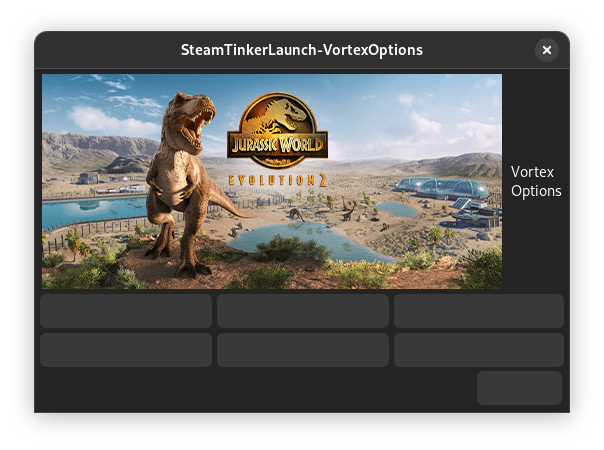
This happens on other submenus too, not just Vortex.
no idea where this comes from, but I doubt it it has anything to do with steamtinkerlaunch or above fix (at least not directly).
did you update yad or some of its dependencies?
might be also worth to remove all temporary files in /dev/shm/steamtinkerlaunch/ (I don't think this helps, but it is an easy test)
I just updated all possible dependencies, but I still have this issue. I removed everything inside /dev/shm/steamtinkerlaunch, but no luck.
just reverted above fix, because it was correct before. should fix your missing fonts (not the fonts were missing, but all strings were empty because your language file wasn't found. they worked though in your previous posts apparently)
means I'm afraid I need a complete log for the loadLanguage error.
Sure, here you go:
Click to expand
Sun 24 Apr 2022 09:52:58 AM EDT INFO - initAID - Set AID from STEAM_COMPAT_APP_ID to '1244460'
Sun 24 Apr 2022 09:52:58 AM EDT INFO - initAID - Set OSCDP to STEAM_COMPAT_DATA_PATH '/run/media/TheEvilSkeleton/DATA/Steam Games/steamapps/compatdata/1244460'
Sun 24 Apr 2022 09:52:58 AM EDT ERROR - loadLangFile - Language file '/app/share/steam/compatibilitytools.d/steamtinkerlaunch/share/steamtinkerlaunch/lang/english.txt' missing
Sun 24 Apr 2022 09:52:58 AM EDT INFO - getCurrentCommandline - No Proton in command line arguments 'vortex gui'
Sun 24 Apr 2022 09:52:58 AM EDT INFO - saveOrgVars - Storing some original variables to restore them later
Sun 24 Apr 2022 09:52:58 AM EDT INFO - emptyVars - Emptied some original variables as they slowdown several system calls when started from steam
Sun 24 Apr 2022 09:52:58 AM EDT INFO - emptyVars - Set $PATH to '/app/bin:/app/utils/bin:/usr/bin:/usr/lib/extensions/vulkan/MangoHud/bin:/usr/lib/extensions/vulkan/vkBasalt/bin::/app/utils/bin/::/app/utils/bin/'
Sun 24 Apr 2022 09:52:58 AM EDT START - ######### Initializing Game Launch 1244460 using SteamTinkerLaunch v9.3.20220423 #########
Sun 24 Apr 2022 09:52:58 AM EDT INFO - main - Starting with a clean log
Sun 24 Apr 2022 09:52:58 AM EDT INFO - main - Start creating default configs
Sun 24 Apr 2022 09:52:58 AM EDT INFO - createDefaultCfgs - START
Sun 24 Apr 2022 09:52:59 AM EDT INFO - loadLanguage - First load the default language to make sure all variables are filled
Sun 24 Apr 2022 09:52:59 AM EDT ERROR - loadLangFile - Language file '/app/share/steam/compatibilitytools.d/steamtinkerlaunch/share/steamtinkerlaunch/lang/english.txt' missing
Sun 24 Apr 2022 09:52:59 AM EDT WARN - updateEditor - 'xdg-open' selected as editor or configured editor not found - trying to find an installed editor installed
Sun 24 Apr 2022 09:52:59 AM EDT SKIP - updateEditor - No valid editor found - leaving 'xdg-open'
Sun 24 Apr 2022 09:52:59 AM EDT ERROR - loadLanguage - ###############################
Sun 24 Apr 2022 09:52:59 AM EDT ERROR - loadLanguage - No language file could be loaded! For the initial setup at least one file (default english) is required
Sun 24 Apr 2022 09:52:59 AM EDT ERROR - loadLanguage - You can ether copy a valid file to '/var/home/TheEvilSkeleton/.var/app/com.valvesoftware.Steam/.config/steamtinkerlaunch/lang' or '/app/utils/steamtinkerlaunch/share/steamtinkerlaunch/lang' or provide an absolute path via command line using the lang= option
Sun 24 Apr 2022 09:52:59 AM EDT ERROR - loadLanguage - ###############################
Sun 24 Apr 2022 09:53:35 AM EDT INFO - MainMenu - Clicked '0' - 'EXIT'
Sun 24 Apr 2022 09:53:35 AM EDT INFO - MainMenu - exiting 'Settings Menu' and opening 'Exit'
Sun 24 Apr 2022 09:53:35 AM EDT INFO - closeSTL - closing STL
Sun 24 Apr 2022 09:53:35 AM EDT INFO - updateConfigEntry - Emptying 'CUSTOMCMD' for '/var/home/TheEvilSkeleton/.var/app/com.valvesoftware.Steam/.config/steamtinkerlaunch/default_template.conf'
Sun 24 Apr 2022 09:53:35 AM EDT INFO - closeSTL - Creating '/dev/shm/steamtinkerlaunch/steamtinkerlaunch-closing.tmp'
Sun 24 Apr 2022 09:53:35 AM EDT INFO - checkPlayTime - The game was not started via 'steamtinkerlaunch' but directly from Steam - skipping Crash Requester
Sun 24 Apr 2022 09:53:35 AM EDT INFO - closeSTL - Game 'Jurassic World Evolution 2 (1244460)' exited - cleaning up custom processes if necessary
Sun 24 Apr 2022 09:53:35 AM EDT INFO - closeTrayIcon - Closing TrayIcon '2814'
Sun 24 Apr 2022 09:53:36 AM EDT INFO - closeSTL - Removing '/dev/shm/steamtinkerlaunch/steamtinkerlaunch-closing.tmp'
Sun 24 Apr 2022 09:53:36 AM EDT STOP - ######### closeSTL SteamTinkerLaunch v9.3.20220423 #########
Sun 24 Apr 2022 09:53:36 AM EDT INFO - writeLastRun - Recreating /var/home/TheEvilSkeleton/.var/app/com.valvesoftware.Steam/.config/steamtinkerlaunch/logs/steamtinkerlaunch/lastrun.txt
Sun 24 Apr 2022 09:53:36 AM EDT INFO - storeMetaData - Saving metadata for game 'Jurassic World Evolution 2 (1244460)'
Sun 24 Apr 2022 09:53:36 AM EDT INFO - getArch - Architecture for '/run/media/TheEvilSkeleton/DATA/Steam Games/steamapps/common/Jurassic World Evolution 2/JWE2.exe' is 64bit
Sun 24 Apr 2022 09:53:36 AM EDT INFO - storeMetaData - '/var/home/TheEvilSkeleton/.var/app/com.valvesoftware.Steam/.config/steamtinkerlaunch/meta/eval/id/evaluatorscript_1244460.vdf' does not exists
Hm, there haven't been language file problems for a longer time, so it might be possible that this is flatpak related.
I'm not sure yet where there initial requested
/app/share/steam/compatibilitytools.d/steamtinkerlaunch/share/steamtinkerlaunch/lang/english.txt
comes from. Is this correct?
I think the follow up error you pasted first is a follow up error.
Either way I just added a few log messages which hopefully bring some light into the problem.
edit: updated some of the logs
Please retest.
I'm not sure yet where there initial requested
/app/share/steam/compatibilitytools.d/steamtinkerlaunch/share/steamtinkerlaunch/lang/english.txt
No, it's requesting /app/utils/steamtinkerlaunch/share/steamtinkerlaunch/lang. I manually checked if the directory exists, and it does, so do the files:
[📦 com.valvesoftware.Steam lang]$ pwd
/app/utils/steamtinkerlaunch/share/steamtinkerlaunch/lang
[📦 com.valvesoftware.Steam lang]$ ls
dutch.txt  english.txt	englishUK.txt  french.txt  german.txt  italian.txt  polish.txt	russian.txt
Here's the new log:
Click to expand
Mon 25 Apr 2022 12:36:26 PM EDT INFO - initAID - Set AID from STEAM_COMPAT_APP_ID to '1244460'
Mon 25 Apr 2022 12:36:26 PM EDT INFO - initAID - Set OSCDP to STEAM_COMPAT_DATA_PATH '/run/media/TheEvilSkeleton/DATA/Steam Games/steamapps/compatdata/1244460'
Mon 25 Apr 2022 12:36:26 PM EDT ERROR - loadLangFile - Language file '/app/share/steam/compatibilitytools.d/steamtinkerlaunch/share/steamtinkerlaunch/lang/english.txt' missing
Mon 25 Apr 2022 12:36:26 PM EDT INFO - getCurrentCommandline - No Proton in command line arguments 'vortex gui'
Mon 25 Apr 2022 12:36:26 PM EDT INFO - saveOrgVars - Storing some original variables to restore them later
Mon 25 Apr 2022 12:36:26 PM EDT INFO - emptyVars - Emptied some original variables as they slowdown several system calls when started from steam
Mon 25 Apr 2022 12:36:26 PM EDT INFO - emptyVars - Set $PATH to '/app/bin:/app/utils/bin:/usr/bin:/usr/lib/extensions/vulkan/MangoHud/bin:/usr/lib/extensions/vulkan/vkBasalt/bin::/app/utils/bin/::/app/utils/bin/'
Mon 25 Apr 2022 12:36:26 PM EDT START - ######### Initializing Game Launch 1244460 using SteamTinkerLaunch v9.3.20220423 #########
Mon 25 Apr 2022 12:36:26 PM EDT INFO - main - Starting with a clean log
Mon 25 Apr 2022 12:36:26 PM EDT INFO - main - Start creating default configs
Mon 25 Apr 2022 12:36:26 PM EDT INFO - createDefaultCfgs - START
Mon 25 Apr 2022 12:36:27 PM EDT INFO - loadLanguage - First load the default language to make sure all variables are filled
Mon 25 Apr 2022 12:36:27 PM EDT ERROR - loadLangFile - Language file '/app/share/steam/compatibilitytools.d/steamtinkerlaunch/share/steamtinkerlaunch/lang/english.txt' missing
Mon 25 Apr 2022 12:36:27 PM EDT WARN - updateEditor - 'xdg-open' selected as editor or configured editor not found - trying to find an installed editor installed
Mon 25 Apr 2022 12:36:27 PM EDT SKIP - updateEditor - No valid editor found - leaving 'xdg-open'
Mon 25 Apr 2022 12:36:27 PM EDT ERROR - loadLanguage - ###############################
Mon 25 Apr 2022 12:36:27 PM EDT ERROR - loadLanguage - No language file could be loaded! For the initial setup at least one file (default english) is required
Mon 25 Apr 2022 12:36:27 PM EDT ERROR - loadLanguage - You can ether copy a valid file to '/var/home/TheEvilSkeleton/.var/app/com.valvesoftware.Steam/.config/steamtinkerlaunch/lang' or '/app/utils/steamtinkerlaunch/share/steamtinkerlaunch/lang' or provide an absolute path via command line using the lang= option
Mon 25 Apr 2022 12:36:27 PM EDT ERROR - loadLanguage - ###############################
Mon 25 Apr 2022 12:36:39 PM EDT INFO - MainMenu - Clicked '0' - 'EXIT'
Mon 25 Apr 2022 12:36:39 PM EDT INFO - MainMenu - exiting 'Settings Menu' and opening 'Exit'
Mon 25 Apr 2022 12:36:39 PM EDT INFO - closeSTL - closing STL
Mon 25 Apr 2022 12:36:39 PM EDT INFO - updateConfigEntry - Emptying 'CUSTOMCMD' for '/var/home/TheEvilSkeleton/.var/app/com.valvesoftware.Steam/.config/steamtinkerlaunch/default_template.conf'
Mon 25 Apr 2022 12:36:39 PM EDT INFO - closeSTL - Creating '/dev/shm/steamtinkerlaunch/steamtinkerlaunch-closing.tmp'
Mon 25 Apr 2022 12:36:39 PM EDT INFO - checkPlayTime - The game was not started via 'steamtinkerlaunch' but directly from Steam - skipping Crash Requester
Mon 25 Apr 2022 12:36:39 PM EDT INFO - closeSTL - Game 'Jurassic World Evolution 2 (1244460)' exited - cleaning up custom processes if necessary
Mon 25 Apr 2022 12:36:39 PM EDT INFO - closeTrayIcon - Closing TrayIcon '6265'
Mon 25 Apr 2022 12:36:39 PM EDT INFO - updateWinRes - The Window 'SteamTinkerLaunch-MainMenu' was closed - the resolution didn't change - nothing to do
Mon 25 Apr 2022 12:36:40 PM EDT INFO - closeSTL - Removing '/dev/shm/steamtinkerlaunch/steamtinkerlaunch-closing.tmp'
Mon 25 Apr 2022 12:36:40 PM EDT STOP - ######### closeSTL SteamTinkerLaunch v9.3.20220423 #########
Mon 25 Apr 2022 12:36:40 PM EDT INFO - writeLastRun - Recreating /var/home/TheEvilSkeleton/.var/app/com.valvesoftware.Steam/.config/steamtinkerlaunch/logs/steamtinkerlaunch/lastrun.txt
Mon 25 Apr 2022 12:36:40 PM EDT INFO - storeMetaData - Saving metadata for game 'Jurassic World Evolution 2 (1244460)'
Mon 25 Apr 2022 12:36:40 PM EDT INFO - getArch - Architecture for '/run/media/TheEvilSkeleton/DATA/Steam Games/steamapps/common/Jurassic World Evolution 2/JWE2.exe' is 64bit
Mon 25 Apr 2022 12:36:40 PM EDT INFO - storeMetaData - '/var/home/TheEvilSkeleton/.var/app/com.valvesoftware.Steam/.config/steamtinkerlaunch/meta/eval/id/evaluatorscript_1244460.vdf' does not exists
I heavily doubt it's an issue from Flatpak. The directory /app/utils/steamtinkerlaunch/share/steamtinkerlaunch/lang indeed exists, and so do its text files. These text files have the necessary translations too.
No it is initially requesting '/app/share/steam/compatibilitytools.d/steamtinkerlaunch/share/steamtinkerlaunch/lang/english.txt' edit: also seems like your log above is not from latest git master. the added loglines are missing.
Nice catch. I didn't notice about compatibilitytools.d and the commit.
It looks like it's still asking for compatibilitytools.d.
Click to expand
Mon 25 Apr 2022 05:56:15 PM EDT INFO - initAID - Set AID from STEAM_COMPAT_APP_ID to '1244460'
Mon 25 Apr 2022 05:56:15 PM EDT INFO - initAID - Set OSCDP to STEAM_COMPAT_DATA_PATH '/run/media/TheEvilSkeleton/DATA/Steam Games/steamapps/compatdata/1244460'
Mon 25 Apr 2022 05:56:15 PM EDT INFO - loadLangFile - Language from command line is 'english'
Mon 25 Apr 2022 05:56:15 PM EDT INFO - loadLangFile - Command line language 'english' is no file - trying to find its absolute path
Mon 25 Apr 2022 05:56:15 PM EDT ERROR - loadLangFile - Language file '/app/share/steam/compatibilitytools.d/steamtinkerlaunch/share/steamtinkerlaunch/lang/english.txt' could not be found
Mon 25 Apr 2022 05:56:15 PM EDT INFO - getCurrentCommandline - No Proton in command line arguments 'vortex gui'
Mon 25 Apr 2022 05:56:15 PM EDT INFO - saveOrgVars - Storing some original variables to restore them later
Mon 25 Apr 2022 05:56:16 PM EDT INFO - emptyVars - Emptied some original variables as they slowdown several system calls when started from steam
Mon 25 Apr 2022 05:56:16 PM EDT INFO - emptyVars - Set $PATH to '/app/bin:/app/utils/bin:/usr/bin:/usr/lib/extensions/vulkan/MangoHud/bin:/usr/lib/extensions/vulkan/vkBasalt/bin::/app/utils/bin/::/app/utils/bin/'
Mon 25 Apr 2022 05:56:16 PM EDT START - ######### Initializing Game Launch 1244460 using SteamTinkerLaunch v9.3.20220425 #########
Mon 25 Apr 2022 05:56:16 PM EDT INFO - main - Starting with a clean log
Mon 25 Apr 2022 05:56:16 PM EDT INFO - main - Start creating default configs
Mon 25 Apr 2022 05:56:16 PM EDT INFO - createDefaultCfgs - START
Mon 25 Apr 2022 05:56:16 PM EDT INFO - loadLanguage - First load the default language 'english' to make sure all variables are filled
Mon 25 Apr 2022 05:56:16 PM EDT INFO - loadLangFile - Language from command line is 'english'
Mon 25 Apr 2022 05:56:16 PM EDT INFO - loadLangFile - Command line language 'english' is no file - trying to find its absolute path
Mon 25 Apr 2022 05:56:16 PM EDT ERROR - loadLangFile - Language file '/app/share/steam/compatibilitytools.d/steamtinkerlaunch/share/steamtinkerlaunch/lang/english.txt' could not be found
Mon 25 Apr 2022 05:56:16 PM EDT WARN - updateEditor - 'xdg-open' selected as editor or configured editor not found - trying to find an installed editor installed
Mon 25 Apr 2022 05:56:16 PM EDT SKIP - updateEditor - No valid editor found - leaving 'xdg-open'
Mon 25 Apr 2022 05:56:16 PM EDT INFO - loadLanguage - Loading STLLANG from '/var/home/TheEvilSkeleton/.var/app/com.valvesoftware.Steam/.config/steamtinkerlaunch/global.conf'
Mon 25 Apr 2022 05:56:16 PM EDT INFO - loadLanguage - STLLANG from '/var/home/TheEvilSkeleton/.var/app/com.valvesoftware.Steam/.config/steamtinkerlaunch/global.conf' is 'english'
Mon 25 Apr 2022 05:56:16 PM EDT ERROR - loadLanguage - ###############################
Mon 25 Apr 2022 05:56:16 PM EDT ERROR - loadLanguage - No language file could be loaded! For the initial setup at least one file (default english) is required
Mon 25 Apr 2022 05:56:16 PM EDT ERROR - loadLanguage - You can ether copy a valid file to '/var/home/TheEvilSkeleton/.var/app/com.valvesoftware.Steam/.config/steamtinkerlaunch/lang' or '/app/utils/steamtinkerlaunch/share/steamtinkerlaunch/lang' or provide an absolute path via command line using the lang= option
Mon 25 Apr 2022 05:56:16 PM EDT ERROR - loadLanguage - ###############################
Mon 25 Apr 2022 05:56:35 PM EDT INFO - MainMenu - Clicked '0' - 'EXIT'
Mon 25 Apr 2022 05:56:35 PM EDT INFO - MainMenu - exiting 'Settings Menu' and opening 'Exit'
Mon 25 Apr 2022 05:56:35 PM EDT INFO - closeSTL - closing STL
Mon 25 Apr 2022 05:56:35 PM EDT INFO - updateConfigEntry - Emptying 'CUSTOMCMD' for '/var/home/TheEvilSkeleton/.var/app/com.valvesoftware.Steam/.config/steamtinkerlaunch/default_template.conf'
Mon 25 Apr 2022 05:56:35 PM EDT INFO - closeSTL - Creating '/dev/shm/steamtinkerlaunch/steamtinkerlaunch-closing.tmp'
Mon 25 Apr 2022 05:56:35 PM EDT INFO - checkPlayTime - The game was not started via 'steamtinkerlaunch' but directly from Steam - skipping Crash Requester
Mon 25 Apr 2022 05:56:35 PM EDT INFO - closeSTL - Game 'Jurassic World Evolution 2 (1244460)' exited - cleaning up custom processes if necessary
Mon 25 Apr 2022 05:56:35 PM EDT INFO - closeTrayIcon - Closing TrayIcon '5181'
Mon 25 Apr 2022 05:56:36 PM EDT INFO - updateWinRes - The Window 'SteamTinkerLaunch-MainMenu' was closed - the resolution didn't change - nothing to do
Mon 25 Apr 2022 05:56:37 PM EDT INFO - closeSTL - Removing '/dev/shm/steamtinkerlaunch/steamtinkerlaunch-closing.tmp'
Mon 25 Apr 2022 05:56:37 PM EDT STOP - ######### closeSTL SteamTinkerLaunch v9.3.20220425 #########
Mon 25 Apr 2022 05:56:37 PM EDT INFO - writeLastRun - Recreating /var/home/TheEvilSkeleton/.var/app/com.valvesoftware.Steam/.config/steamtinkerlaunch/logs/steamtinkerlaunch/lastrun.txt
Mon 25 Apr 2022 05:56:37 PM EDT INFO - storeMetaData - Saving metadata for game 'Jurassic World Evolution 2 (1244460)'
Mon 25 Apr 2022 05:56:37 PM EDT INFO - getArch - Architecture for '/run/media/TheEvilSkeleton/DATA/Steam Games/steamapps/common/Jurassic World Evolution 2/JWE2.exe' is 64bit
Mon 25 Apr 2022 05:56:37 PM EDT INFO - storeMetaData - '/var/home/TheEvilSkeleton/.var/app/com.valvesoftware.Steam/.config/steamtinkerlaunch/meta/eval/id/evaluatorscript_1244460.vdf' does not exists
sure it is still asking for it, I only added logfiles :)
The problem is likely a wrong path variable (based on the installed PREFIX)
The steamtinkerlaunch in compatibilitytools.d is only tested as symlink, a copy might conflict here too.
Just added more debug log lines, which should help. please retest
Here you go. I'm going to uninstall Steam and remove all its data in the mean time and see if it works or not:
Click to expand
Tue 26 Apr 2022 11:12:38 AM EDT INFO - initAID - Set AID from STEAM_COMPAT_APP_ID to '1244460'
Tue 26 Apr 2022 11:12:38 AM EDT INFO - initAID - Set OSCDP to STEAM_COMPAT_DATA_PATH '/run/media/TheEvilSkeleton/DATA/Steam Games/steamapps/compatdata/1244460'
Tue 26 Apr 2022 11:12:38 AM EDT INFO - loadLangFile - Language from command line is 'english'
Tue 26 Apr 2022 11:12:38 AM EDT DEBUG - loadLangFile - GLOBALSTLLANGDIR is '/app/share/steam/compatibilitytools.d/steamtinkerlaunch/share/steamtinkerlaunch/lang'
Tue 26 Apr 2022 11:12:38 AM EDT INFO - loadLangFile - Command line language 'english' is no file - trying to find its absolute path
Tue 26 Apr 2022 11:12:38 AM EDT DEBUG - loadLangFile - STLLANGDIR is '/var/home/TheEvilSkeleton/.var/app/com.valvesoftware.Steam/.config/steamtinkerlaunch/lang'; LAFI is '/var/home/TheEvilSkeleton/.var/app/com.valvesoftware.Steam/.config/steamtinkerlaunch/lang/english.txt'
Tue 26 Apr 2022 11:12:38 AM EDT DEBUG - loadLangFile - GLOBLANG is '/app/share/steam/compatibilitytools.d/steamtinkerlaunch/share/steamtinkerlaunch/lang'; LAFI is '/app/share/steam/compatibilitytools.d/steamtinkerlaunch/share/steamtinkerlaunch/lang/english.txt'
Tue 26 Apr 2022 11:12:38 AM EDT ERROR - loadLangFile - Language file '/app/share/steam/compatibilitytools.d/steamtinkerlaunch/share/steamtinkerlaunch/lang/english.txt' could not be found
Tue 26 Apr 2022 11:12:38 AM EDT INFO - getCurrentCommandline - No Proton in command line arguments 'vortex gui'
Tue 26 Apr 2022 11:12:38 AM EDT INFO - saveOrgVars - Storing some original variables to restore them later
Tue 26 Apr 2022 11:12:38 AM EDT INFO - emptyVars - Emptied some original variables as they slowdown several system calls when started from steam
Tue 26 Apr 2022 11:12:38 AM EDT INFO - emptyVars - Set $PATH to '/app/bin:/app/utils/bin:/usr/bin:/usr/lib/extensions/vulkan/MangoHud/bin:/usr/lib/extensions/vulkan/vkBasalt/bin::/app/utils/bin/::/app/utils/bin/'
Tue 26 Apr 2022 11:12:38 AM EDT START - ######### Initializing Game Launch 1244460 using SteamTinkerLaunch v9.3.20220426 #########
Tue 26 Apr 2022 11:12:38 AM EDT INFO - main - Starting with a clean log
Tue 26 Apr 2022 11:12:38 AM EDT INFO - main - Start creating default configs
Tue 26 Apr 2022 11:12:38 AM EDT INFO - createDefaultCfgs - START
Tue 26 Apr 2022 11:12:39 AM EDT INFO - loadLanguage - First load the default language 'english' to make sure all variables are filled
Tue 26 Apr 2022 11:12:39 AM EDT INFO - loadLangFile - Language from command line is 'english'
Tue 26 Apr 2022 11:12:39 AM EDT DEBUG - loadLangFile - GLOBALSTLLANGDIR is '/app/share/steam/compatibilitytools.d/steamtinkerlaunch/share/steamtinkerlaunch/lang'
Tue 26 Apr 2022 11:12:39 AM EDT INFO - loadLangFile - Command line language 'english' is no file - trying to find its absolute path
Tue 26 Apr 2022 11:12:39 AM EDT DEBUG - loadLangFile - STLLANGDIR is '/var/home/TheEvilSkeleton/.var/app/com.valvesoftware.Steam/.config/steamtinkerlaunch/lang'; LAFI is '/var/home/TheEvilSkeleton/.var/app/com.valvesoftware.Steam/.config/steamtinkerlaunch/lang/english.txt'
Tue 26 Apr 2022 11:12:39 AM EDT DEBUG - loadLangFile - GLOBLANG is '/app/share/steam/compatibilitytools.d/steamtinkerlaunch/share/steamtinkerlaunch/lang'; LAFI is '/app/share/steam/compatibilitytools.d/steamtinkerlaunch/share/steamtinkerlaunch/lang/english.txt'
Tue 26 Apr 2022 11:12:39 AM EDT ERROR - loadLangFile - Language file '/app/share/steam/compatibilitytools.d/steamtinkerlaunch/share/steamtinkerlaunch/lang/english.txt' could not be found
Tue 26 Apr 2022 11:12:39 AM EDT WARN - updateEditor - 'xdg-open' selected as editor or configured editor not found - trying to find an installed editor installed
Tue 26 Apr 2022 11:12:39 AM EDT SKIP - updateEditor - No valid editor found - leaving 'xdg-open'
Tue 26 Apr 2022 11:12:39 AM EDT INFO - loadLanguage - Loading STLLANG from '/var/home/TheEvilSkeleton/.var/app/com.valvesoftware.Steam/.config/steamtinkerlaunch/global.conf'
Tue 26 Apr 2022 11:12:39 AM EDT INFO - loadLanguage - STLLANG from '/var/home/TheEvilSkeleton/.var/app/com.valvesoftware.Steam/.config/steamtinkerlaunch/global.conf' is 'english'
Tue 26 Apr 2022 11:12:39 AM EDT ERROR - loadLanguage - ###############################
Tue 26 Apr 2022 11:12:39 AM EDT ERROR - loadLanguage - No language file could be loaded! For the initial setup at least one file (default english) is required
Tue 26 Apr 2022 11:12:39 AM EDT ERROR - loadLanguage - You can ether copy a valid file to '/var/home/TheEvilSkeleton/.var/app/com.valvesoftware.Steam/.config/steamtinkerlaunch/lang' or '/app/utils/steamtinkerlaunch/share/steamtinkerlaunch/lang' or provide an absolute path via command line using the lang= option
Tue 26 Apr 2022 11:12:39 AM EDT ERROR - loadLanguage - ###############################
Tue 26 Apr 2022 11:12:45 AM EDT INFO - MainMenu - Clicked '0' - 'EXIT'
Tue 26 Apr 2022 11:12:45 AM EDT INFO - MainMenu - exiting 'Settings Menu' and opening 'Exit'
Tue 26 Apr 2022 11:12:45 AM EDT INFO - closeSTL - closing STL
Tue 26 Apr 2022 11:12:45 AM EDT INFO - updateConfigEntry - Emptying 'CUSTOMCMD' for '/var/home/TheEvilSkeleton/.var/app/com.valvesoftware.Steam/.config/steamtinkerlaunch/default_template.conf'
Tue 26 Apr 2022 11:12:45 AM EDT INFO - closeSTL - Creating '/dev/shm/steamtinkerlaunch/steamtinkerlaunch-closing.tmp'
Tue 26 Apr 2022 11:12:45 AM EDT INFO - checkPlayTime - The game was not started via 'steamtinkerlaunch' but directly from Steam - skipping Crash Requester
Tue 26 Apr 2022 11:12:45 AM EDT INFO - closeSTL - Game 'Jurassic World Evolution 2 (1244460)' exited - cleaning up custom processes if necessary
Tue 26 Apr 2022 11:12:45 AM EDT INFO - closeTrayIcon - Closing TrayIcon '7024'
Tue 26 Apr 2022 11:12:45 AM EDT INFO - updateWinRes - The Window 'SteamTinkerLaunch-MainMenu' was closed - the resolution didn't change - nothing to do
Tue 26 Apr 2022 11:12:46 AM EDT INFO - closeSTL - Removing '/dev/shm/steamtinkerlaunch/steamtinkerlaunch-closing.tmp'
Tue 26 Apr 2022 11:12:46 AM EDT STOP - ######### closeSTL SteamTinkerLaunch v9.3.20220426 #########
Tue 26 Apr 2022 11:12:46 AM EDT INFO - writeLastRun - Recreating /var/home/TheEvilSkeleton/.var/app/com.valvesoftware.Steam/.config/steamtinkerlaunch/logs/steamtinkerlaunch/lastrun.txt
Tue 26 Apr 2022 11:12:46 AM EDT INFO - storeMetaData - Saving metadata for game 'Jurassic World Evolution 2 (1244460)'
Tue 26 Apr 2022 11:12:46 AM EDT INFO - getArch - Architecture for '/run/media/TheEvilSkeleton/DATA/Steam Games/steamapps/common/Jurassic World Evolution 2/JWE2.exe' is 64bit
Tue 26 Apr 2022 11:12:46 AM EDT INFO - storeMetaData - '/var/home/TheEvilSkeleton/.var/app/com.valvesoftware.Steam/.config/steamtinkerlaunch/meta/eval/id/evaluatorscript_1244460.vdf' does not exists

  Click to expand
@frostworx so, apparently the problem was the current install. I wiped everything related to Steam, excluding game data and now it launches everything correctly without any issues with translations.
Thanks for testing! Glad to hear this is no longer an issue.
This is what I wanted to see:
GLOBALSTLLANGDIR is '/app/share/steam/compatibilitytools.d/steamtinkerlaunch/share/steamtinkerlaunch/lang'
The default GLOBALSTLLANGDIR is created from "$SYSTEMSTLCFGDIR/lang"
and written to the global.conf
I guess that config entry broke somewhere while testing/writing the flatpak.
I'll remove some of the DEBUG lines again.
I just tested ARK and Jurassic World Evolution 2 with Gamescope and everything works well.
For anybody who would be kind enough to test the steamtinkerlaunch Flatpak for me. Please follow the following instructions:
- Install the Steam Flatpak if you haven't. Unfortunately, this will only work with the Steam Flatpak.
- Open the terminal.
- Run
git clone https://github.com/TheEvilSkeleton/flatpaks.git -b com.valvesoftware.Steam.Utility.steamtinkerlaunchin the terminal. - Run
cd flatpaks - Run
wget https://raw.githubusercontent.com/TheEvilSkeleton/fp-build/switch-to-test-branch/fp-build.sh. Feel free to look at the script before running. - Run
chmod +x fp-build.sh. - Run
./fp-build.sh com.valvesoftware.Steam.Utility.steamtinkerlaunch.yaml. You can safely ignore the AppID and 128x128 icon checks in the output.
If the utility fails to install, you likely don't have Flathub added for your user specifically. Runflatpak remote-add --user --if-not-exists flathub https://flathub.org/repo/flathub.flatpakrepoif that is the case.
- Run
flatpak list --user | grep steamtinkerlaunchto double check that it is installed. - Open the Steam Flatpak. You can run it from the application menu or by running
flatpak run com.valvesoftware.Steamin the terminal. - Right click the game you want to test, then click "Properties". Afterwards change the launch option to strictly the following:
steamtinkerlaunch %command%. - Launch the game, and you should see the steamtinkerlaunch menu. Press "MAIN MENU" to look at the menu.
Please carefully test everything you can. I only tested Gamescope and that part seems to work well. If you want to test out Gamescope, please install com.valvesoftware.Steam.Utility.gamescope: flatpak install com.valvesoftware.Steam.Utility.gamescope.
If you want to revert everything, do the following:
- Run
flatpak remove com.valvesoftware.Steam.Utility.steamtinkerlaunch. - Click "Properties" on any game, and clear the launch option.
- Run
flatpak remote-delete --user flathub. This will remove the Flathub remote from the user.
On another note, @frostworx steamtinkerlaunch should check if a program is installed or not and gray it out accordingly. For example, I was able to change the settings of Gamescope despite not having it installed. This made the game launch without Gamescope, even though I told it to use Gamescope. It can lead to confusion from a user standpoint because they might think that it's using Gamescope when it's not.
thanks for your work on flatpak. Of course it would be nice to grey out unavailable functions from the menu. But the question is how to implement it properly and how to bring up more time for this - so it is easier to simply expect the users to install a program, when they want to use it ;)
so it is easier to simply expect the users to install a program, when they want to use it ;)
That's true, but I also think it's going to confuse users. The menu "works" and is enabled as well, giving the impression that the utility is available there. The utility is unavailable and thus cannot work, therefore confusing the user because it doesn't work as intended.
I can imagine myself wondering why something like Gamescope isn't working even though I enabled it. There is simply no feedback, unless I run it in the terminal, and IMO it's a bad UX to simply not tell the user that the utility they have enabled is unavailable.
As to how we will implement it: here are my suggestions, at least for Gamescope specifically:
- A. anything that is unavailable and requires the user to manually install and be grayed out. When the user hovers on it, a little message appears and says that the option they are trying to access is unavailable and therefore will not work. They can install the utility by going to, e.g. GNOME Software and install the utility from there, or by running x commands in the terminal (although resorting the terminal is bad UX but at least it's a universal approach). Here's what I mean by "message":

- B. we can have a popup menu that appears with a warning when the user is trying to access the menu. The message can be exactly the same as A., the only difference is that A. expects the user to hover over the menu for the message to appear, whereas B. opens a window or menu instead.
The question is not how to design it, but which possibilities you have with yad. edit: fyi: related problem description
No, unfortunately there isn't. Maybe it might be possible to add such a filter to the "flexible menu" functions (adding beginner/advanced/expert guis might be possible here as well), but this would require lots of time. Maybe I'll make an effort next winter.
As you explained, yad is too limited for complex GUIs and it will likely be a maintenance burden, I don't want to dictate/change the direction of the project, but if we want to make steamtinkerlaunch do a lot more than it does, perhaps we might need to rewrite it and use GTK/Qt? I'm not sure though.
Agreed, but If I knew earlier how big steamtinkerlaunch will become, I would not even have started it with bash, but with cpp using a qt gui, but that train left long ago. (from above description)
someone reported here that the full vim git project is being fetched. Maybe this could be replaced with downloading standalone xxd directly (like in the AUR pkgbuild)?
This shouldn't cause any issues whatsoever. It fetches vim but only installs xxd.
https://github.com/TheEvilSkeleton/flatpaks/blob/5f1d2e267d7b297b3a1bda86d785c3f3de0b6562/com.valvesoftware.Steam.Utility.steamtinkerlaunch.yaml#L80-L81
yes, I know. It was (at least from my side) just a suggestion to save some bandwidth
I'm personally not really a fan of this. As an alternative we'll have to download multiple files, build them each time, and then update the checksum if there's a new commit. vim is a tiny program so pulling the repo isn't a big deal, at least in my opinion. However, if it gets on Flathub, you are free to change it.
Thanks @TheEvilSkeleton for the flatpak support. It seems to be working for me so far (not that I've gone at it very hard yet).
However, I was curious if I there was an easy way to get STL in to the Proton selection menu, as I like to use it as a global thing instead of messing with every game's launch commands.
At first I took the run at the whole massive build (which I think you tried, as I spied the branch in your flatpaks), but then thought... why? STL by default when installed to the menu is light, so why can't the flatpak way be light, too.
So I made a very small extra flatpak that extends com.valvesoftware.Steam.Utility.steamtinkerlaunch (I think that's the correct way to rely on things in flatpak?).
All it does is have the necessary vdf's (copied from how stl does it normally) and it makes a symlink to the bash file in com.valvesoftware.Steam bin (again like normal stl).
I'm not sure if this way of doing things is good or what, but it works, and it means the Utlity is the only flatpak that really needs to be maintained.
Anyway, I'll just throw the zip up of the flatpak folder: stl-compat-flatpak.zip
It installs similarly to the Utility:
./fp-build.sh com.valvesoftware.Steam.CompatibilityTool.steamtinkerlaunch.yaml
Feel free to re-host and fiddle with it.

Thanks for collaboration, @HanPrower Not sure if I understand you correctly, but you can use STL globally for all Steam games as compatibility tool. I only tested this on a "regular" Linux installation, but Steam Deck has that option as well. I noticed that you use steamtinkerlaunch 9.2 in your metadata. Later git and current v10.0 have specific Steam Deck related functions, which improve Steam Deck functionality (and behave differently than 9.2 in several functions)
I wonder where all the people are who showed flatpak support previously btw.
Oh, my zip is just built off of what @TheEvilSkeleton posted. I guess it's on an old commit/version and I just didn't think to update that specific part. I guess I could rebuild it for v10 I assume the actual build chain/tools hasn't actually changed?
And what I meant about using it as a tool was getting it in to the actual Steam Play list in Steam (i.e. what I posted is doing similar to this: https://github.com/frostworx/steamtinkerlaunch/wiki/Steam-Compatibility-Tool ) as opposed to setting steamtinkerlaunch %command% on every game 🙂
Ah ic. Nice, so you already found the corresponding wiki :) What I meant is that there's no need to set steamtinkerlaunch for every single game generally (no matter as compatibility tool or as %command%). Instead you can set it as compatibility tool globally from within Steam. I guess you knew this, but just to make sure we understood correctly each other :)
Yea, probably confused you due to my random babbling, it's fine xD
Anyway, I rebuilt the Utility for v10 and it seems to work fine.
If anyone wants to test all you need to do whilst following the install guide is during step 4 edit com.valvesoftware.Steam.Utility.steamtinkerlaunch.yaml and change Line 99 and Line 100 to read:
        tag: v10.0
        # commit: 39bacab0c2bf1a9338e7385b4035753c0a197907
You may also want to edit com.valvesoftware.Steam.Utility.steamtinkerlaunch.metainfo.xml and change Line 12 to:
<release version="10.0" date="2022-04-29"/>
You can also change Line 12 in com.valvesoftware.Steam.CompatibilityTool.steamtinkerlaunch.metainfo.xml from my previously posted zip to:
<release version="10.0" date="2022-04-29"/>