

 sojamo
Slider2D as float range does not show decimal
Slider2D range when set to float has an issue with displaying current value decimal.
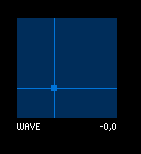
Here's an edited example with the issue `/**
- ControlP5 Slider2D
- find a list of public methods available for the Slider2D Controller
- at the bottom of this sketch.
- by Andreas Schlegel, 2012
- www.sojamo.de/libraries/controlp5
*/
import controlP5.*;
ControlP5 cp5;
Slider2D s;
void setup() { size(700,400); cp5 = new ControlP5(this); s = cp5.addSlider2D("wave") .setPosition(30,40) .setSize(100,100) .setMinMax(-0.25,0.25,-0.25,0.25) .setValue(0.0,0.0) //.disableCrosshair() ;
smooth(); }
float cnt; void draw() { background(0); pushMatrix(); translate(160,140); noStroke(); fill(50); rect(0, -100, 400,200); strokeWeight(1); line(0,0,200, 0); stroke(255);
for(int i=1;i<400;i++) { float y0 = cos(map(i-1,0,s.getArrayValue()[0],-PI,PI)) * s.getArrayValue()[1]; float y1 = cos(map(i,0,s.getArrayValue()[0],-PI,PI)) * s.getArrayValue()[1]; line((i-1),y0,i,y1); }
popMatrix(); } `

Turns out it's because of this line in the source code:
_myValueLabel.set( adjustValue( _myArrayValue[ 0 ] , 0 ) + _myValueLabelSeparator + adjustValue( _myArrayValue[ 1 ] , 0 ) );
adjustValue( final float theValue , final int theFloatPrecision ) is a function in the Controller class that Slider2D uses to set the float precision in the value label to 0 — as in, not show any decimal places.
To show decimal places, a solution could be to force it in the corresponding function. For example, if your slider is named "wave", you could have a corresponding function also called "wave" that is automatically linked to the slider. In this function, you could get the slider values and manually set the value label to the precision you want. The %.1f in the example below will show values to 1 decimal place; change it to %.2f for 2 decimal places and so on.
void wave() {
  String x = String.format("%.1f", s.getArrayValue()[0]);
  String y = String.format("%.1f", s.getArrayValue()[1]);
  s.setValueLabel(x + "," + y);
}
P.S. I think the bullet points in your post messed up the code formatting, but if you wrap the code with three backticks (```) at each end instead of just one (`) it should format correctly as a code block!
