

 software-mansion
Increasing hitSlop does not increase touch area
Description
I added hitSlop to buttons on iOS and it works perfectly, but the touch area isn't increased on Android.
It seems to be an issue with react-native-gesture-handler: We're using a BorderlessButton, but when I replace it with TouchableOpactiy from react-native it works just fine. Using RNGH's TouchableOpacity once again doesn't work, and besides that it seems to calculate different touch areas.
Screenshots
 This is what the touch area looks like using TouchableOpacity from RN, or using BorderlessButton from RNGH. When using TouchableOpacity from RN the touch area indicated here works. When using BorderlessButton only the red area (padding) is touchable.
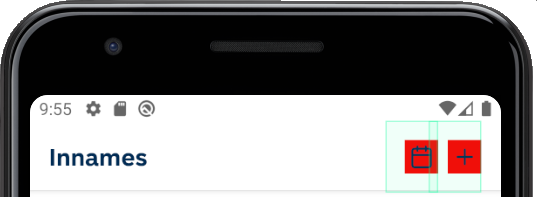 This is what the touch area looks like using TouchableOpacity from RNGH
Snack or minimal code example
    <TouchableOpacity    // or BorderlessButton
      ...
      hitSlop={{top: 16, bottom: 16, left: 8, right: 0}}>
      ...
    </TouchableOpacity>
Package versions
- React: 16.13.1
- React Native: 0.63.3
- React Native Gesture Handler: 1.9.0


Same issue - this seems to work correctly for RN's implementation of TouchableOpacity, but not RNGH in Android.
