snipe
snipe
Custom Fields on Asset Labels
Snipe-IT Version
5.3.7 build 6587 (gcf14a0222)
Operating System
Debian 11
Web Server
Apache2
PHP Version
7.4.25
Is your feature request related to a problem? Please describe. A clear and concise description of what the problem is. Ex. I'm always frustrated when [...]
I'm not able to add our Custom Fields to Asset Labels
Describe the solution you'd like A clear and concise description of what you want to happen.
Provide a choice to add a Custom Field to the Asset Label
Describe alternatives you've considered A clear and concise description of any alternative solutions or features you've considered.
No response
Additional context Add any other context or screenshots about the feature request here.
No response

👋 Thanks for opening your first issue here! If you're reporting a 🐞 bug, please make sure you include steps to reproduce it. We get a lot of issues on this repo, so please be patient and we will get back to you as soon as we can.
![welcome[bot] avatar](https://avatars.githubusercontent.com/in/4141?v=4 "Published by a pub.dev verified publisher")
There are existing issues about this here, and my thoughts haven't changed a lot. We already have such a hard time getting people sorted with labels (too big, too small, text cut off, etc) that I'm not exactly jazzed by this idea. I'll try to find the other related issues and link them here.

I fail to see how people are in need of help with labels in general, just pick up the tape-measure. The ability to change size, spacing, margins, etc. are all there. It's quite nice actually. Great work!
The request is based on not wanting to have two labels on each device, where I have to make the second one myself.
Our need is the IPv4 address when we deploy switches, firewalls, printers and other equipment with a static IP. We really would love to add this to the label. And I'm sure other sys-admins have other uses for the label as well.
In my opinion, custom fileds on labels would add great value to an already bang-up system!
you could do your own fork and change the code a little bit. Lets say you dont need the option to print the company name on your labels, you could change company-name to the value of your custom field. this would be a quick and easy (and a bit dirty) solution.

YES!
We print our logo on the label, so printing the company name as well is redundant.
I would trade the company name field for a custom field on the label in a heartbeat.
First of all you need to look up the "DB-Field"-name of your custom-field. Go to your customfield settings and change the visible columns to display the "DB Field" as described here https://snipe-it.readme.io/reference/updating-custom-fields
The DB Field name of your customfield you want to print on your label should look something like this "_snipeit_xxxxx_yy".
Now you are ready to modify the labels.blade.php-file in your snipeit-folder (snipeit/resources/views/hardware/labels.blade.php) but first do a backup of this file.
Open the labels.blade.php file with an editor of your choice and find these lines: (line 132 with v 5.3.8)
@if (($settings->labels_display_company_name=='1') && ($asset->company))
     <div class="pull-left">
         C: {{ $asset->company->name }}
    </div>
@endif
If you now change these lines to the example below, save changes and hit the checkbox for the company name in your label settings it should print the value of your custom field.
@if (($settings->labels_display_company_name=='1') && ($asset->_snipeit_xxxxx_yy!='')
    <div class="pull-left">
         IP: {{ $asset->_snipeit_xxxxx_yy }}
    </div>
@endif
be aware that these changes may lead to problems if you want to upgrade your snipeit to a newer version. i have done it myself and until now there was no problem with merging the master build to my own fork/branch. If you get a server 500 error after changing some lines you have done something wrong, just restore the original state and it runs fine again.
Oh, I misunderstood you.
I thought you meant that this should be a field you could interchange in Snipe-IT as a feature. In other words: something thay can consider.
Your solution is a nice way to get it to work. So thanks for that! But I like to run my installations from the master branch all the time.
Hello @FG-Lars @Xiayu8 how I can still show company name and beside is | the custom field value, like:
AZ Company | HR
(HR, Admin, Sales are my custom file list)

Any update on this?
We have a custom field Service Tag which we need to print on our label for each and every PC.
I can modify the code but additional functionality would be preferred for updating snipeit.
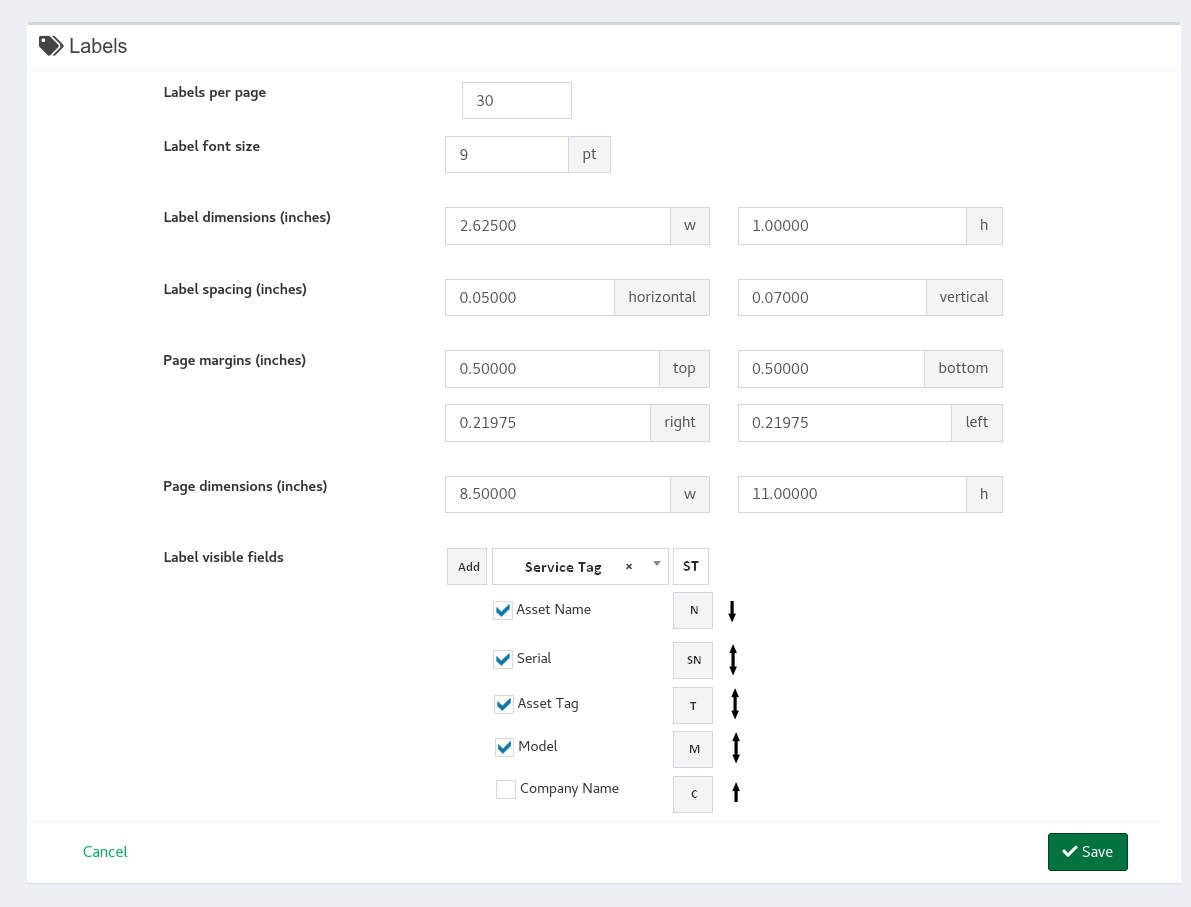
Label Settings are fine now, but I would do 2 changes for "Visible fields" part of the setting.
1) Selecting own fields.
Right now, there are fields: Asset Name, Serial, Asset Tag, Model, Company Name with hard-coded letters as keys (C, T, ...)
My proposition would be to have a "listbox?" where I can choose from all existing fields (including custom ones) and even specify key so if I have Service Tag, I would specify ST key.
2) Possibility to reorder fields.
Make the field draggable (or have an arrow) for reordering. What if I need to have the Serial at the bottom, or the Model second.