
zelda3
 zelda3 copied to clipboard
 snesrev
Windows Building with MSYS haven't icon
Describe your bug here. And how to reproduce it.
Hi,
Thanks a lot for all your work
I just finish to compile the Windows 64 version using MSYS MINGW64 and run make, a exe file was created and works fine, but the exe file have not icon, shows the windows default one and no details are on the file.
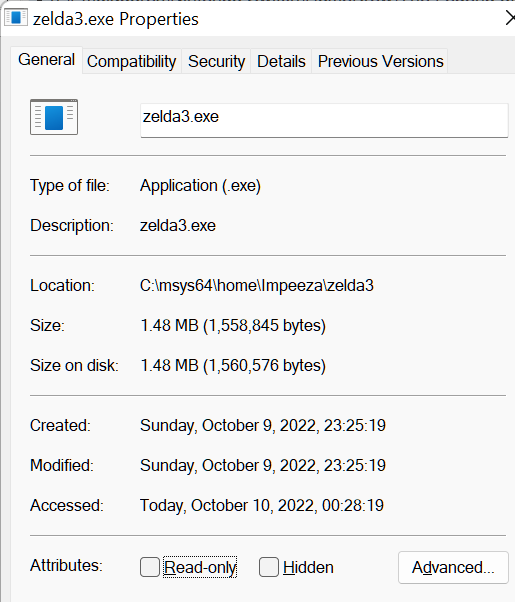

There are any additional steps to use the resource.h, triforce.ico & zelda3.rc files on zelda3\platform\win32 folder?
What is your build target?
Windows

If someone wants to fix this please make a PR, I don't have an msys environment set up.

Hello there, I am not the most skilled but was able to compile Windows executable with icon using MSYS
the additional steps was:
- compile the platform/win32/zelda3.rc using the command
windres platform/win32/zelda3.rc -O coff -o Zelda.res - Then when compiling executable add the filename Zelda.res as parameter by example:
cc ancilla.o ... snes/tracing.o -o zelda3 Zelda.res -LC:/msys64/mingw64/lib -lmingw32 -mwindows -lSDL2main -lSDL2
So try to tweak the Makefile and add the next commands:
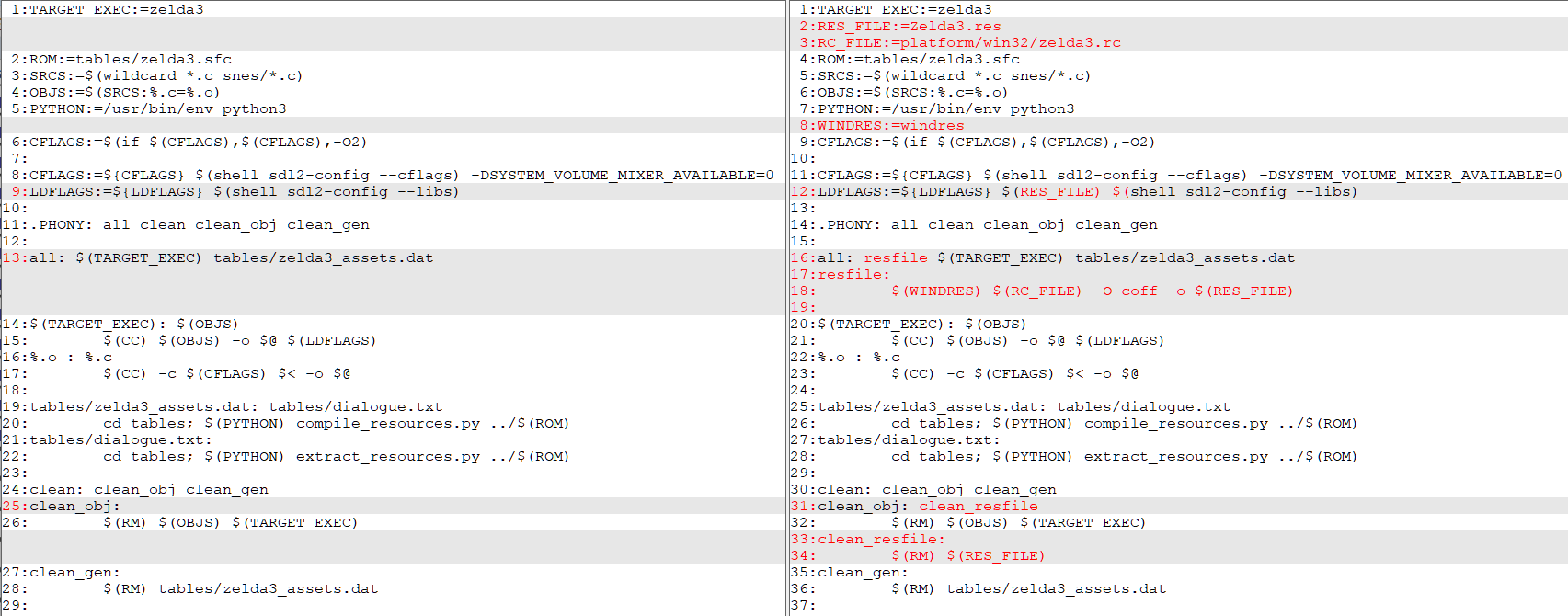
left file is original one and right one is the edited by me.
The new makefile is:
TARGET_EXEC:=zelda3
RES_FILE:=Zelda3.res
RC_FILE:=platform/win32/zelda3.rc
ROM:=tables/zelda3.sfc
SRCS:=$(wildcard *.c snes/*.c)
OBJS:=$(SRCS:%.c=%.o)
PYTHON:=/usr/bin/env python3
WINDRES:=windres
CFLAGS:=$(if $(CFLAGS),$(CFLAGS),-O2)

CFLAGS:=${CFLAGS} $(shell sdl2-config --cflags) -DSYSTEM_VOLUME_MIXER_AVAILABLE=0
LDFLAGS:=${LDFLAGS} $(RES_FILE) $(shell sdl2-config --libs)

.PHONY: all clean clean_obj clean_gen

all: resfile $(TARGET_EXEC) tables/zelda3_assets.dat
resfile:
	$(WINDRES) $(RC_FILE) -O coff -o $(RES_FILE)

$(TARGET_EXEC): $(OBJS)
	$(CC) $(OBJS) -o $@ $(LDFLAGS)
%.o : %.c
	$(CC) -c $(CFLAGS) $< -o $@

tables/zelda3_assets.dat: tables/dialogue.txt
	cd tables; $(PYTHON) compile_resources.py ../$(ROM)
tables/dialogue.txt:
	cd tables; $(PYTHON) extract_resources.py ../$(ROM)

clean: clean_obj clean_gen
clean_obj: clean_resfile
	$(RM) $(OBJS) $(TARGET_EXEC)
clean_resfile:
	$(RM) $(RES_FILE)
clean_gen:
	$(RM) tables/zelda3_assets.dat
I don't know if some of the names/command should be managed by variables, need your help, also still no learn how to create PRs if somebody help me will thank you lot.
Another perk I found, the MSYS compilation doesn't copy SDL2.dll to the output folder, but the TCC and VC does.
Humm, I see, then could we use a target section for win and other for linux, something like:
ifeq ($(WINDOWS_BUILD),1)
else
	ifeq ($(OS),Windows_NT)
		WINDOWS_BUILD := 1
	else
		WINDOWS_BUILD := 0
	endif
end if


ifeq ($(WINDOWS_BUILD),1)
	TARGET_EXEC := $(TARGET_EXEC).exe
	......  #windows specific steps
else # Linux builds/binary namer
	......  #LINUX specific steps
endif

... #common steps
then you can run make on a windows and additional steps are executed, or you can run make WINDOWS_BUILD=1 to generate Windows executable on linux.
What do you think?
I'm not very good with makefiles.. Please give me a version that I can test on Linux
Well, the next makefile works fine on linux debian 11 and Windows 10/11 (MSYS).
Just setup a Virtual machine with debian, and my current MSYS setup, tested several times, make clean, make -j and works perfect.
Just compile linux executable and windows exe with icon 😸
Basically, just add the windows variables and a if block to execute a target with windows commands
TARGET_EXEC:=zelda3
ROM:=tables/zelda3.sfc
SRCS:=$(wildcard *.c snes/*.c)
OBJS:=$(SRCS:%.c=%.o)
PYTHON:=/usr/bin/env python3
CFLAGS:=$(if $(CFLAGS),$(CFLAGS),-O2)
CFLAGS:=${CFLAGS} $(shell sdl2-config --cflags) -DSYSTEM_VOLUME_MIXER_AVAILABLE=0
LDFLAGS:=${LDFLAGS} $(shell sdl2-config --libs)

WINDRES:=windres
RES_FILE:=Zelda3.res
RC_FILE:=platform/win32/zelda3.rc


#If run on a Windows Setup, build Windows Executable, unless expressed with argument WINDOWS_BUILD=0 of make
ifeq ($(OS),Windows_NT)
	WINDOWS_BUILD := 1
else
	WINDOWS_BUILD := 0
endif

#set environment for Windows build, add icon to executable
ifeq ($(WINDOWS_BUILD),1)
LDFLAGS:=${LDFLAGS} $(RES_FILE) $(shell sdl2-config --libs)
all: win $(TARGET_EXEC) tables/zelda3_assets.dat
endif


.PHONY: all clean clean_obj clean_resfile clean_gen

all: $(TARGET_EXEC) tables/zelda3_assets.dat
$(TARGET_EXEC): $(OBJS)
	$(CC) $(OBJS) -o $@ $(LDFLAGS)
%.o : %.c
	$(CC) -c $(CFLAGS) $< -o $@

tables/zelda3_assets.dat: tables/dialogue.txt
	cd tables; $(PYTHON) compile_resources.py ../$(ROM)
tables/dialogue.txt:
	cd tables; $(PYTHON) extract_resources.py ../$(ROM)

win:
	$(WINDRES) $(RC_FILE) -O coff -o $(RES_FILE)
	cp ${MINGW_PREFIX}/bin/SDL2.dll ./

clean: clean_obj clean_gen clean_resfile
clean_obj: clean_resfile
	$(RM) $(OBJS) $(TARGET_EXEC)
	$(RM) SDL2.dll
clean_resfile:
	$(RM) $(RES_FILE)
clean_gen:
	$(RM) tables/zelda3_assets.dat
Hope somebody could help us to test and if all is correct could be merged on the next release.
On Arch Linux, the Linux executable compiles perfectly; however, make WINDOWS_BUILD=1 results in errors. WINDRES:=windres had to be changed to WINDRES:=x86_64-w64-mingw32-windres, but resulted in:
x86_64-w64-mingw32-windres platform/win32/zelda3.rc -O coff -o Zelda3.res
x86_64-w64-mingw32-windres: can't open icon file `platform\win32\triforce.ico': No such file or directory
make: *** [Makefile:45: win] Error 1

Cool, I am looking how to set the prerequisites to compile Windows executable on Windows. windres is one of them.
Thanks.
OK, seems you need MSYS on linux, so is not the target, could remove the use of external WINDOWS_BUILD=1 and leave only the code what autodetect windows, so the windows executable is only created under windows and under linux always create the linux executable :D
I don't like all this windows specific stuff in the shared Makefile
Can some parts be moved out to a makefile in ports/win32/ somehow?
Yes could be a better solution. Like the switch one when i will able to compile again try new makefile
The merged PR https://github.com/snesrev/zelda3/pull/164 solve all problems thanks to @hgdagon