

 smokejohn
Traceback (most recent call last): Error
Hello! I am getting this error with Blender 2.83, Blender 2.91 and Blender 2.92 and I fail to understand what I could be doing wrong.
Traceback (most recent call last): File"C:\Users\Ryannessence\AppData\Roaming\Blender Foundation\Blender\2.83\scripts\addons\SKkeeper-master_init_.py", line 235, in execute receiver.data.shape_keys.key_blocks[i].name = sk_names[i] AttributeError: 'NoneType' object has no attribute 'key_blocks'
location: <unknown location:-1
I have a high poly mesh with shape keys (350 shapekeys) and I was hoping to use the Decimate modifier to keep the shapekeys and have a low poly version of it. The addon only makes a copy of the first shapekey and then displays this error.
Here is what I have tried. I tried different blender versions, I tried to remove the armature modifier keeping only the decimate modifier. I also made it the top modifier. I tried removing some shapekeys. I also tried the three options you have in the addon and they all led me to that error. Any ideas?


I need a example file to reproduce the error to be able to fix it. If you can supply one i might be able to take a look. Just attach it to a comment, please supply:
- file with setup that fails (simple as possible)
- Version of SKKeeper you used
I also have to say, that i can't alot as much time as i used to to this project, but i will try to fix the open issues with an update.

Also having this issue
Unable to provide a simple sample, but I have some more logs if it's of any use - currently using skkeeper v1.6
bpy.data.window_managers["WinMan"].(null) = True
bpy.data.window_managers["WinMan"].(null) = True
bpy.data.window_managers["WinMan"].(null) = True
bpy.ops.object.modifier_apply(modifier="Mirror")
bpy.ops.object.modifier_apply(modifier="Subdivision")
bpy.ops.object.modifier_apply(modifier="Triangulate")
bpy.ops.object.modifier_apply(modifier="Mirror")
bpy.ops.object.modifier_apply(modifier="Subdivision")
bpy.ops.object.modifier_apply(modifier="Triangulate")
bpy.ops.sk.apply_mods_choice_sk(resource_list=[{"name":"Mirror", "selected":True}, {"name":"Subdivision", "selected":True}, {"name":"Triangulate", "selected":True}, {"name":"Armature", "selected":False}])
Python: Traceback (most recent call last):
  File "C:\Users\Jacob\AppData\Roaming\Blender Foundation\Blender\3.0\scripts\addons\SKkeeper\__init__.py", line 433, in execute
    receiver.data.shape_keys.key_blocks[i].name = sk_names[i]
AttributeError: 'NoneType' object has no attribute 'key_blocks'

location: <unknown location>:-1

so I'm digging around the code and in the execute function I wrapped the offending line in a try-except and logged these exceptions without raising it
            # restore the shapekey name
            try:
                receiver.data.shape_keys.key_blocks[i].name = sk_names[i]
            except Exception as e:
                print("Warning! receiver.data.shape_keys {}".format(e))
Running the function like this doesn't result in any further failures, and the shape keys seem to be applied correctly afterwords - they're just missing their proper names
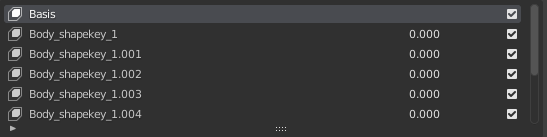 Here are the resulting logs:
<SKkeeper 12:12> Applying chosen modifier
<SKkeeper 12:12> <bpy_struct, Object("sk_receiver") at 0x000001FC5E508F08>
<SKkeeper 12:12> Applying chosen modifier
<SKkeeper 12:12> <bpy_struct, Object("sk_receiver") at 0x000001FC5E508F08>
<SKkeeper 12:12> Applying chosen modifier
<SKkeeper 12:12> <bpy_struct, Object("sk_receiver") at 0x000001FC5E508F08>
<SKkeeper 12:12> Mirror
<SKkeeper 12:12> Applying chosen modifier
<SKkeeper 12:12> <bpy_struct, Object("Body_shapekey_1") at 0x000001FC5E846B08>
<SKkeeper 12:12> Subdivision
<SKkeeper 12:12> Applying chosen modifier
<SKkeeper 12:12> <bpy_struct, Object("Body_shapekey_1") at 0x000001FC5E846B08>
<SKkeeper 12:12> Triangulate
<SKkeeper 12:12> Applying chosen modifier
<SKkeeper 12:12> <bpy_struct, Object("Body_shapekey_1") at 0x000001FC5E846B08>
Warning: Selected meshes must have equal numbers of vertices
Warning! receiver.data.shape_keys 'NoneType' object has no attribute 'key_blocks'
<SKkeeper 12:12> Mirror
<SKkeeper 12:12> Applying chosen modifier
<SKkeeper 12:12> <bpy_struct, Object("Body_shapekey_1") at 0x000001FC672E9608>
<SKkeeper 12:12> Subdivision
<SKkeeper 12:12> Applying chosen modifier
<SKkeeper 12:12> <bpy_struct, Object("Body_shapekey_1") at 0x000001FC672E9608>
<SKkeeper 12:12> Triangulate
<SKkeeper 12:12> Applying chosen modifier
<SKkeeper 12:12> <bpy_struct, Object("Body_shapekey_1") at 0x000001FC672E9608>
Warning! receiver.data.shape_keys bpy_prop_collection[index]: index 2 out of range, size 2
<SKkeeper 12:12> Mirror
<SKkeeper 12:12> Applying chosen modifier
<SKkeeper 12:12> <bpy_struct, Object("Body_shapekey_1") at 0x000001FC177F5608>
<SKkeeper 12:12> Subdivision
<SKkeeper 12:12> Applying chosen modifier
<SKkeeper 12:12> <bpy_struct, Object("Body_shapekey_1") at 0x000001FC177F5608>
<SKkeeper 12:12> Triangulate
<SKkeeper 12:12> Applying chosen modifier
<SKkeeper 12:12> <bpy_struct, Object("Body_shapekey_1") at 0x000001FC177F5608>
Warning! receiver.data.shape_keys bpy_prop_collection[index]: index 3 out of range, size 3
<SKkeeper 12:12> Mirror
<SKkeeper 12:12> Applying chosen modifier
<SKkeeper 12:12> <bpy_struct, Object("Body_shapekey_1") at 0x000001FC177F5608>
<SKkeeper 12:12> Subdivision
<SKkeeper 12:12> Applying chosen modifier
<SKkeeper 12:12> <bpy_struct, Object("Body_shapekey_1") at 0x000001FC177F5608>
<SKkeeper 12:12> Triangulate
<SKkeeper 12:12> Applying chosen modifier
<SKkeeper 12:12> <bpy_struct, Object("Body_shapekey_1") at 0x000001FC177F5608>
Warning! receiver.data.shape_keys bpy_prop_collection[index]: index 4 out of range, size 4
<SKkeeper 12:12> Mirror
<SKkeeper 12:12> Applying chosen modifier
<SKkeeper 12:12> <bpy_struct, Object("Body_shapekey_1") at 0x000001FC177F5608>
<SKkeeper 12:12> Subdivision
<SKkeeper 12:12> Applying chosen modifier
<SKkeeper 12:12> <bpy_struct, Object("Body_shapekey_1") at 0x000001FC177F5608>
<SKkeeper 12:12> Triangulate
<SKkeeper 12:12> Applying chosen modifier
<SKkeeper 12:12> <bpy_struct, Object("Body_shapekey_1") at 0x000001FC177F5608>
Warning! receiver.data.shape_keys bpy_prop_collection[index]: index 5 out of range, size 5
<SKkeeper 12:12> Mirror
<SKkeeper 12:12> Applying chosen modifier
<SKkeeper 12:12> <bpy_struct, Object("Body_shapekey_1") at 0x000001FC177F5608>
<SKkeeper 12:12> Subdivision
<SKkeeper 12:12> Applying chosen modifier
<SKkeeper 12:12> <bpy_struct, Object("Body_shapekey_1") at 0x000001FC177F5608>
<SKkeeper 12:12> Triangulate
<SKkeeper 12:12> Applying chosen modifier
<SKkeeper 12:12> <bpy_struct, Object("Body_shapekey_1") at 0x000001FC177F5608>
Warning! receiver.data.shape_keys bpy_prop_collection[index]: index 6 out of range, size 6
<SKkeeper 12:12> Mirror
<SKkeeper 12:12> Applying chosen modifier
<SKkeeper 12:12> <bpy_struct, Object("Body_shapekey_1") at 0x000001FC177F5608>
<SKkeeper 12:12> Subdivision
<SKkeeper 12:12> Applying chosen modifier
<SKkeeper 12:12> <bpy_struct, Object("Body_shapekey_1") at 0x000001FC177F5608>
<SKkeeper 12:12> Triangulate
<SKkeeper 12:12> Applying chosen modifier
<SKkeeper 12:12> <bpy_struct, Object("Body_shapekey_1") at 0x000001FC177F5608>
Warning! receiver.data.shape_keys bpy_prop_collection[index]: index 7 out of range, size 7
<SKkeeper 12:12> Mirror
<SKkeeper 12:12> Applying chosen modifier
<SKkeeper 12:12> <bpy_struct, Object("Body_shapekey_1") at 0x000001FC672E9608>
<SKkeeper 12:12> Subdivision
<SKkeeper 12:12> Applying chosen modifier
<SKkeeper 12:12> <bpy_struct, Object("Body_shapekey_1") at 0x000001FC672E9608>
<SKkeeper 12:12> Triangulate
<SKkeeper 12:12> Applying chosen modifier
<SKkeeper 12:12> <bpy_struct, Object("Body_shapekey_1") at 0x000001FC672E9608>
Warning! receiver.data.shape_keys bpy_prop_collection[index]: index 8 out of range, size 8
<SKkeeper 12:12> Mirror
<SKkeeper 12:12> Applying chosen modifier
<SKkeeper 12:12> <bpy_struct, Object("Body_shapekey_1") at 0x000001FC177F6408>
<SKkeeper 12:12> Subdivision
<SKkeeper 12:12> Applying chosen modifier
<SKkeeper 12:12> <bpy_struct, Object("Body_shapekey_1") at 0x000001FC177F6408>
<SKkeeper 12:12> Triangulate
<SKkeeper 12:12> Applying chosen modifier
<SKkeeper 12:12> <bpy_struct, Object("Body_shapekey_1") at 0x000001FC177F6408>
Warning! receiver.data.shape_keys bpy_prop_collection[index]: index 9 out of range, size 9
<SKkeeper 12:12> Mirror
<SKkeeper 12:12> Applying chosen modifier
<SKkeeper 12:12> <bpy_struct, Object("Body_shapekey_1") at 0x000001FC177F6408>
<SKkeeper 12:12> Subdivision
<SKkeeper 12:12> Applying chosen modifier
<SKkeeper 12:12> <bpy_struct, Object("Body_shapekey_1") at 0x000001FC177F6408>
<SKkeeper 12:12> Triangulate
<SKkeeper 12:12> Applying chosen modifier
<SKkeeper 12:12> <bpy_struct, Object("Body_shapekey_1") at 0x000001FC177F6408>
Warning! receiver.data.shape_keys bpy_prop_collection[index]: index 10 out of range, size 10
Looks like changing the offending line to this seems to have fixed it for me
receiver.data.shape_keys.key_blocks[i-1].name = sk_names[i]
assuming this is some mismatch between one being 0 indexes and the other starting at 1? Not sure why it worked before this fix and not after - I think it has something to do with editing the mesh or shape keys after creating several shape keys
- Correction: looks like this can result in mismatched names/blend shapes 😅
getting a similar error
By the way, for anyone having an "index out range error", I have a solution :v The problem is that you probably don't have the same number of vertices between your shape keys due to mirror modifier merging vertices at the center. So check if there's any center vertex that's not properly positioned according to your mirror modifier and retry :v Probably need to catch that in the code and add a warning for the possibility of that issue.

omg that worked!!! @smokejohn should definitely put that in the description - when apply mirror modifier always uncheck the merge (because of possible vertices that will mess up the final mesh) thousand thanks to @TarkanV

omg that worked!!! @smokejohn should definitely put that in the description - when apply mirror modifier always uncheck the merge (because of possible vertices that will mess up the final mesh) thousand thanks to @TarkanV
Lol no problem. Another solution, if you want to keep your vertices merged, is to just check if any of the shape keys are not properly positioned on the mirror axis ( for example their x position is not equal 0) to be able to merge in the first place, so positioning them back to 0 so they can merge as they should fixes the problem too.