

 smartavionics
Unnecessary (entirely) travel moves during only one layer - looks like firmware crashed
Application version Master from last month or so
Platform Windows 10
Printer Customized Malyan M180
Reproduction steps
- Open my project
- Check out the travel moves that do absolutely nothing sensible on layer 15
Screenshot(s)
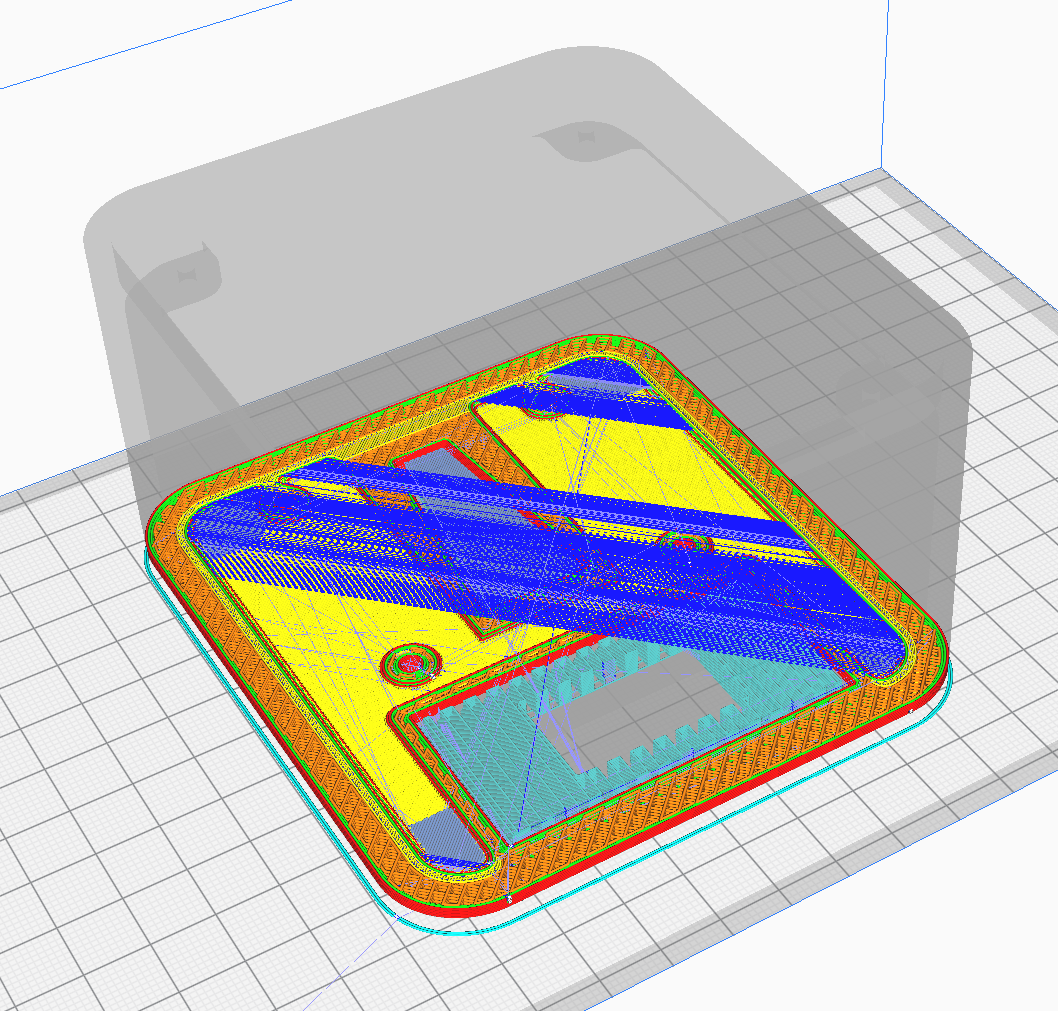
Actual results Travel moves that should not be there. The head just moves like crazy back and forth with no extrusion.
Expected results Not have those travel moves.
Project file CFFFP_0.4liter volume - Odd Travel Moves.zip
Log file cura.zip
Additional information (Extra information relevant to the issue.)

I think it's the Monotonic Ironing Order setting that is causing that, if I disable it, the travels go away. Incidently, that setting is not of my doing, it's a UM addition.

What's happening there is that due to the shape of your model, there's some very narrow skin areas that are being ironed. The buggy UM monotonic ironing is causing the extraneous travels but, anyway, the areas being ironed are so narrow that it would be better if it didn't try to iron them at all, irrespective of whether they are ironed with monotonic ordering or not.
So I am going to make a change for my future builds that will stop areas that are narrower than 2 skin line widths from being ironed.
BTW, I notice that you use coasting and that causes little gaps to appear in the first layer Hilbert pattern. Would it be useful to have an option to stop that? How about being able to disable coasting for skin lines?
Hey again, thanks for the quick response! There is just no way UM would be that responsive. :)
I'm somewhat glad it's not an issue in your code but that also means it's much less likely to be fixed any time soon. However, I think adding an option to not iron super thin areas is a very good idea. Plus, ironing, at least in my case, only looks good when the nozzle is at a certain speed. I set my acceleration to 2000mm/s2 and that's not enough to even iron 5mm strips so that they actually appear flat. Too much time is spent accelerating and decelerating. Larger areas look amazing and almost injection molded where the ironing speed is being met.
Yes, I do use coasting to get make the seams less visible. I tuned it such that the ends of the perimeter essentially falls into itself after coasting. I had not thought of an issue with hilbert patterns. I use hilbert to be able to print without raft. Without hilbert patterns, the zigzag lines of the first layer just curl up when the nozzle passes them during the next line, causing the print to look nasty and also peal off the bed during printing. Hilbert is perfectly solid, too, and looks MUCH better than anything I have tried before. Having said that, the little gaps you mentioned are invisible in the real world - probably dependent on how close one is printing to the surface.
Hi, OK, I'll not worry about the coasting then if it doesn't actually cause visual defects in the skin.
I haven't been using the Cura 5 release so it may be that they have actually fixed the extra travels already. If not, I recommend that you post a similar issue to this one on the UM Cura repo and maybe even suggest that they don't iron the very thin skin regions.
I was also struggling with this issue on Cura 5.2.0 using monotonic ordering. I found that the default value for Minimum Feature Size was "wall_line_width_0 / 4". Changing this to "machine_nozzle_size * 0.5" made all the difference. However, I don't see that setting in this fork.

Hi @bob-anthony , that setting was introduced with the Arachne feature in Cura 5. My fork is based on Cura 4 so it doesn't provide that setting.