

 smartavionics
Cannot Run Cura on Raspberry Pi 4
Application version Cura-mb-master-armhf-20210629.AppImage
Platform Raspberry Pi 4 - 4gb running latest raspberry pi build and desktop
Reproduction steps
- Installed libgles-dev package
- Reboot Pi
- From Chromium browser on Pi desktop, download Cura-mb-master-armhf-20210629.AppImage from release page
- Right click, properties, change Execute to All Users
- Double click and select execute, nothing happens.
- Double click and select execute in terminal and get error message (see screenshot
Screenshot(s)
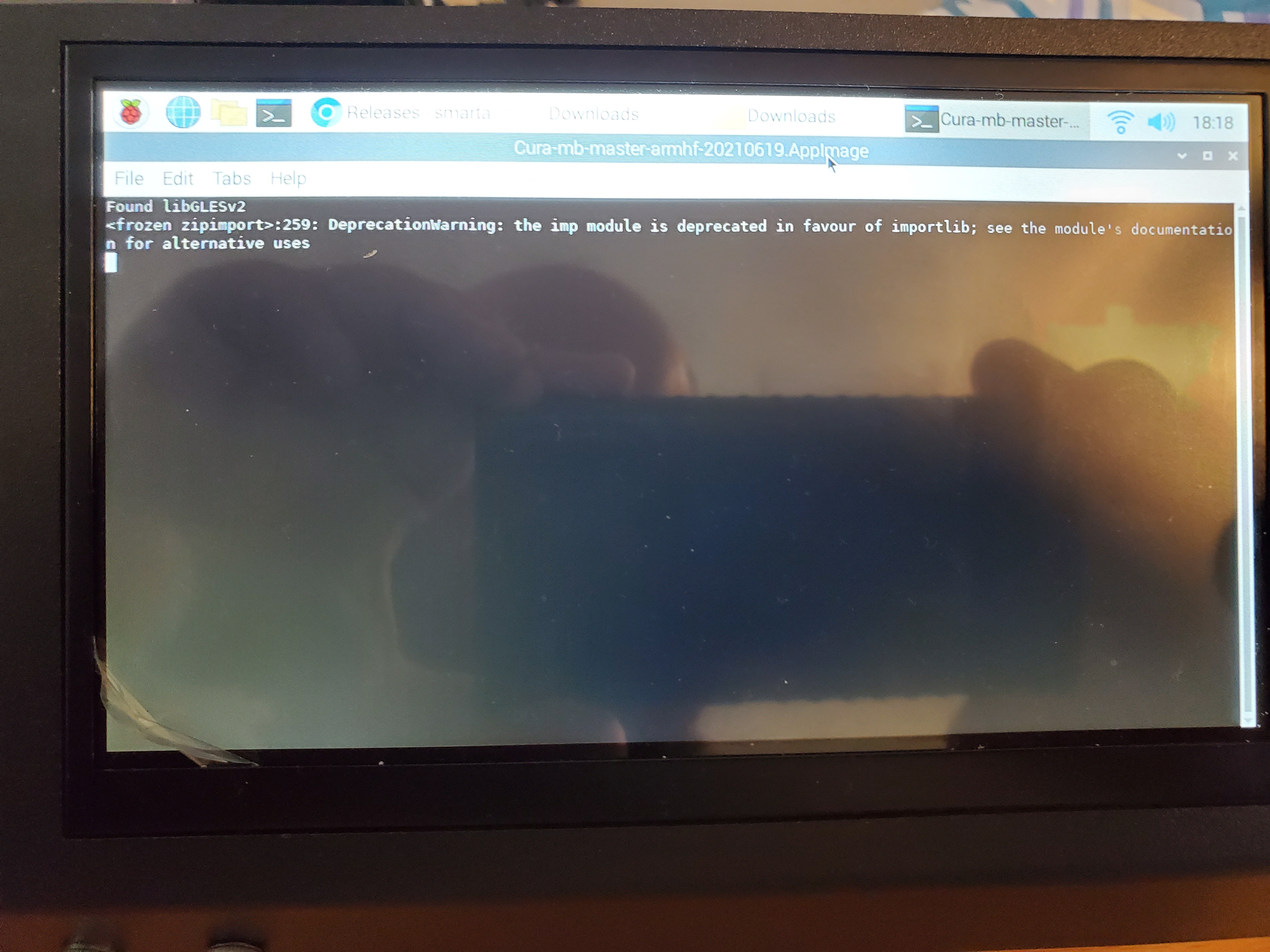
Actual results Error in terminal displays for 3 seconds then terminal closes. Cura never opens.
Additional information Have searched and searched online but cannot find solution to this issue.

Hi, I don't know what's going wrong here. Please see if there are files called stdout.log and stderr.log that are located in ~/.local/share/cura and cura.log that is in ~/.local/share/cura/master. Please post the content of those files. Thanks.

I don't see a local folder at all using the file explorer, nor do I see any folders or files labeled cura, except for the Appimage file itself. Am I supposed to install in Appimage some other way? From my research I should be able to just change the execute options to all users and then simply execute the Appimage (essentailly it works like an .exe file for windows). I'm new to the raspberry Pi OS so I'm sorry if I'm missing something simple. I greatly appreciate the help.
I just thought of something that may be the problem. I used an Octoprint Image and not the Raspberry OS image to set this up. I installed the desktop manually through the Octoprint terminal. Could this be the reason the Appimage isn't executing since I didn't use the actual OS Image?
It's not "local" but ".local". You may find that your file explorer is hiding the files/directories that start with ".". So, you would be better of just using a command shell and typing commands like "ls -l ~/.local/share/cura/master".
I just thought of something that may be the problem. I used an Octoprint Image and not the Raspberry OS image to set this up. I installed the desktop manually through the Octoprint terminal. Could this be the reason the Appimage isn't executing since I didn't use the actual OS Image?
Maybe, but until I see some log files, I can't say for sure.
Thanks for your help, completely forgot .local would be hidden (still new to a lot of this stuff).
I located the log files under ~/.local/shared/cura but when I open them, they are both blank. I also tried to attach them but I get a message that says "The file is 0 bytes so it will not be attached." There is no ~/.local/shared/cura/master folder so there is no cura.log.
Thoughts? Again I appreciate all your help and for your past help in getting Cura running on Raspberry Pi.
OK, what do you get in the terminal window if you run the AppImage from the command line? i.e just cd to the directory containing the AppImage and type its name.
Very confused by the results. If I dir in the download folder it clearly shows the file is there. When I try to run it, it tells me the file isn't there. I even went and downloaded a fresh copy of the latest release and did chmod +x instead of properties to make it executable. Here is a screenshot of everything I did and the results, including the dir.
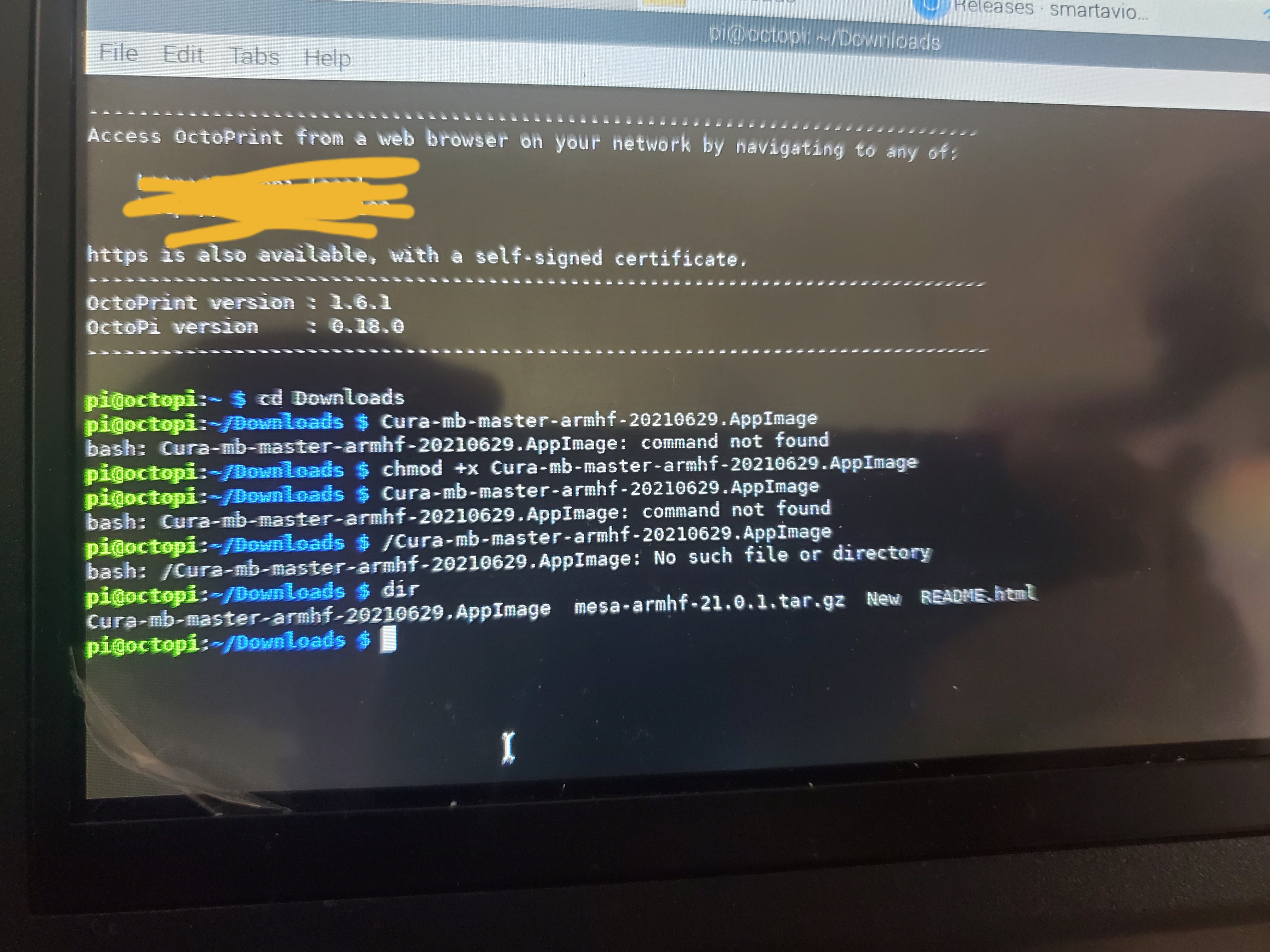
its in the current directory which isn't included in PATH by default so you need to prefix it with ./ so type ./Cura-mb-master-armhf-20210629.AppImage
Sorry for the delay in response. I ran the AppImage through terminal and this the message I got:
Found libGLESv2
Available platform plugins are: minimal, offscreen, vnc, webgl, xcb.
/tmp/.mount_Cura-mWKuKxB/usr/bin//cura.sh: line 40: 5076 Aborted cura "$@"
I went back into the Cura folder to see if anything was different with the logs. There is still no cura.log at all, and the stdout.log is still blank, but the stderr.log now contains this information:
Fatal Python error: Aborted
Current thread 0xb6f47c10 (most recent call first):
File "/home/markb/cura/cura-build/build/inst/lib/python3/dist-packages/UM/Qt/QtApplication.py", line 99 in init
File "/home/markb/cura/cura-build/build/inst/lib/python3/dist-packages/cura/CuraApplication.py", line 153 in init
File "/home/markb/cura/cura-build/build/inst/bin/cura", line 268 in
OK, that's useful info. It's probably missing a library. Do the following...
Run the AppImage supplying the --appimage-mount flag like this (I'm using the 64 bit version but the same can be done with the 32 bit version):
./Cura-mb-master-aarch64-20210629.AppImage --appimage-mount
It should report a line like this..
/tmp/.mount_Cura-muf9gwg
The letters after Cura- will differ from my example, just use what it reports.
Now open another terminal window and find the name of the libqxcb.so file that's being used by entering a line like this...
find /tmp/.mount_Cura-muf9gwg -name libqxcb.so
It should report a line like this...
/tmp/.mount_Cura-muf9gwg/usr/bin/qt/plugins/platforms/libqxcb.so
Now run ldd on that file by entering a line like this..
ldd /tmp/.mount_Cura-muf9gwg/usr/bin/qt/plugins/platforms/libqxcb.so
It should then print lots of lines...
	linux-vdso.so.1 (0x0000007f8d31d000)
	libQt5XcbQpa.so.5 => /tmp/.mount_Cura-muf9gwg/usr/bin/qt/plugins/platforms/libQt5XcbQpa.so.5 (0x0000007f8d16d000)
	libfontconfig.so.1 => /tmp/.mount_Cura-muf9gwg/usr/bin/qt/plugins/platforms/libfontconfig.so.1 (0x0000007f8d115000)
	libfreetype.so.6 => /usr/lib/aarch64-linux-gnu/libfreetype.so.6 (0x0000007f8d03c000)
	libz.so.1 => /lib/aarch64-linux-gnu/libz.so.1 (0x0000007f8d00f000)
	libQt5Gui.so.5 => /usr/lib/aarch64-linux-gnu/libQt5Gui.so.5 (0x0000007f8caa4000)
	libQt5DBus.so.5 => /usr/lib/aarch64-linux-gnu/libQt5DBus.so.5 (0x0000007f8c9fb000)
	libQt5Core.so.5 => /usr/lib/aarch64-linux-gnu/libQt5Core.so.5 (0x0000007f8c4e9000)
	libGLESv2.so.2 => /usr/lib/aarch64-linux-gnu/libGLESv2.so.2 (0x0000007f8c4b4000)
	libpthread.so.0 => /lib/aarch64-linux-gnu/libpthread.so.0 (0x0000007f8c485000)
	libX11-xcb.so.1 => /usr/lib/aarch64-linux-gnu/libX11-xcb.so.1 (0x0000007f8c473000)
	libxcb-icccm.so.4 => /usr/lib/aarch64-linux-gnu/libxcb-icccm.so.4 (0x0000007f8c45e000)
	libxcb-image.so.0 => /usr/lib/aarch64-linux-gnu/libxcb-image.so.0 (0x0000007f8c44a000)
	libxcb-shm.so.0 => /usr/lib/aarch64-linux-gnu/libxcb-shm.so.0 (0x0000007f8c436000)
	libxcb-util.so.0 => /usr/lib/aarch64-linux-gnu/libxcb-util.so.0 (0x0000007f8c41f000)
	libxcb-keysyms.so.1 => /usr/lib/aarch64-linux-gnu/libxcb-keysyms.so.1 (0x0000007f8c40c000)
	libxcb-randr.so.0 => /usr/lib/aarch64-linux-gnu/libxcb-randr.so.0 (0x0000007f8c3ec000)
	libxcb-render-util.so.0 => /usr/lib/aarch64-linux-gnu/libxcb-render-util.so.0 (0x0000007f8c3d8000)
	libxcb-render.so.0 => /usr/lib/aarch64-linux-gnu/libxcb-render.so.0 (0x0000007f8c3bb000)
	libxcb-shape.so.0 => /usr/lib/aarch64-linux-gnu/libxcb-shape.so.0 (0x0000007f8c3a7000)
	libxcb-sync.so.1 => /usr/lib/aarch64-linux-gnu/libxcb-sync.so.1 (0x0000007f8c390000)
	libxcb-xfixes.so.0 => /usr/lib/aarch64-linux-gnu/libxcb-xfixes.so.0 (0x0000007f8c378000)
	libxcb-xinerama.so.0 => /usr/lib/aarch64-linux-gnu/libxcb-xinerama.so.0 (0x0000007f8c365000)
	libxcb-xkb.so.1 => /usr/lib/aarch64-linux-gnu/libxcb-xkb.so.1 (0x0000007f8c33a000)
	libxcb.so.1 => /usr/lib/aarch64-linux-gnu/libxcb.so.1 (0x0000007f8c303000)
	libXext.so.6 => /usr/lib/aarch64-linux-gnu/libXext.so.6 (0x0000007f8c2e3000)
	libX11.so.6 => /usr/lib/aarch64-linux-gnu/libX11.so.6 (0x0000007f8c198000)
	libxkbcommon-x11.so.0 => /usr/lib/aarch64-linux-gnu/libxkbcommon-x11.so.0 (0x0000007f8c180000)
	libxkbcommon.so.0 => /usr/lib/aarch64-linux-gnu/libxkbcommon.so.0 (0x0000007f8c131000)
	libdl.so.2 => /lib/aarch64-linux-gnu/libdl.so.2 (0x0000007f8c11d000)
	libstdc++.so.6 => /usr/lib/aarch64-linux-gnu/libstdc++.so.6 (0x0000007f8bf92000)
	libm.so.6 => /lib/aarch64-linux-gnu/libm.so.6 (0x0000007f8bed5000)
	libgcc_s.so.1 => /lib/aarch64-linux-gnu/libgcc_s.so.1 (0x0000007f8beb1000)
	libc.so.6 => /lib/aarch64-linux-gnu/libc.so.6 (0x0000007f8bd3f000)
	libexpat.so.1 => /lib/aarch64-linux-gnu/libexpat.so.1 (0x0000007f8bd00000)
	libuuid.so.1 => /tmp/.mount_Cura-muf9gwg/usr/bin/qt/plugins/platforms/libuuid.so.1 (0x0000007f8bce5000)
	/lib/ld-linux-aarch64.so.1 (0x0000007f8d2ef000)
	libpng16.so.16 => /usr/lib/aarch64-linux-gnu/libpng16.so.16 (0x0000007f8bca0000)
	libGL.so.1 => /usr/lib/aarch64-linux-gnu/libGL.so.1 (0x0000007f8bbaa000)
	libharfbuzz.so.0 => /usr/lib/aarch64-linux-gnu/libharfbuzz.so.0 (0x0000007f8baac000)
	libdbus-1.so.3 => /lib/aarch64-linux-gnu/libdbus-1.so.3 (0x0000007f8ba49000)
	libicui18n.so.63 => /usr/lib/aarch64-linux-gnu/libicui18n.so.63 (0x0000007f8b774000)
	libicuuc.so.63 => /usr/lib/aarch64-linux-gnu/libicuuc.so.63 (0x0000007f8b599000)
	libpcre2-16.so.0 => /usr/lib/aarch64-linux-gnu/libpcre2-16.so.0 (0x0000007f8b51f000)
	libdouble-conversion.so.1 => /usr/lib/aarch64-linux-gnu/libdouble-conversion.so.1 (0x0000007f8b4fb000)
	libglib-2.0.so.0 => /usr/lib/aarch64-linux-gnu/libglib-2.0.so.0 (0x0000007f8b3c9000)
	libGLdispatch.so.0 => /usr/lib/aarch64-linux-gnu/libGLdispatch.so.0 (0x0000007f8b23e000)
	libXau.so.6 => /usr/lib/aarch64-linux-gnu/libXau.so.6 (0x0000007f8b229000)
	libXdmcp.so.6 => /usr/lib/aarch64-linux-gnu/libXdmcp.so.6 (0x0000007f8b213000)
	libGLX.so.0 => /usr/lib/aarch64-linux-gnu/libGLX.so.0 (0x0000007f8b1d1000)
	libgraphite2.so.3 => /usr/lib/aarch64-linux-gnu/libgraphite2.so.3 (0x0000007f8b19e000)
	libsystemd.so.0 => /lib/aarch64-linux-gnu/libsystemd.so.0 (0x0000007f8b0ef000)
	libicudata.so.63 => /usr/lib/aarch64-linux-gnu/libicudata.so.63 (0x0000007f896f1000)
	libpcre.so.3 => /lib/aarch64-linux-gnu/libpcre.so.3 (0x0000007f8967e000)
	libbsd.so.0 => /usr/lib/aarch64-linux-gnu/libbsd.so.0 (0x0000007f89658000)
	librt.so.1 => /lib/aarch64-linux-gnu/librt.so.1 (0x0000007f89640000)
	liblzma.so.5 => /lib/aarch64-linux-gnu/liblzma.so.5 (0x0000007f89609000)
	liblz4.so.1 => /usr/lib/aarch64-linux-gnu/liblz4.so.1 (0x0000007f895de000)
	libgcrypt.so.20 => /lib/aarch64-linux-gnu/libgcrypt.so.20 (0x0000007f89511000)
	libgpg-error.so.0 => /lib/aarch64-linux-gnu/libgpg-error.so.0 (0x0000007f894e1000)
If any of the lines say not found then that's a library that needs to be installed on your system.

I found that running it on ubuntu was much more stable than the pi os.
What was the problem you were seeing, crashes? If so, could you provide some log files?
I had the same problem on Rapsberry pi 4, Ubuntu 20.04.3. Fixed by identifying the library not found:
$ ldd /tmp/.mount_Cura-m1MEB0Z/usr/bin/qt/plugins/platforms/libqxcb.so | grep not
	libxcb-util.so.0 => not found
I didn't manage to figure out what package I needed to install (could only see libxcb-util1, no libxcb-util0?), so I ended up symlinking:
/usr/lib/aarch64-linux-gnu$ sudo ln -s libxcb.so.1 libxcb-util.so.0
and then
./Cura-mb-master-aarch64-20210908.AppImage
worked perfectly. Haven't noticed any bad side effects of this symlink hack.
Thanks for this repo @smartavionics :) Version from apt is only 4.4.1!
