

 slackero
phpwcms 1.9.33 error while manual installation on MYSQL 5.5
Hello @slackero ,
I was in the process of manual installation of phpwcms 1.9.33 on Centos7 with PHP 7.0, MYSQL 5.5, Apache 2.2.
However I encountered with an issue i.e :
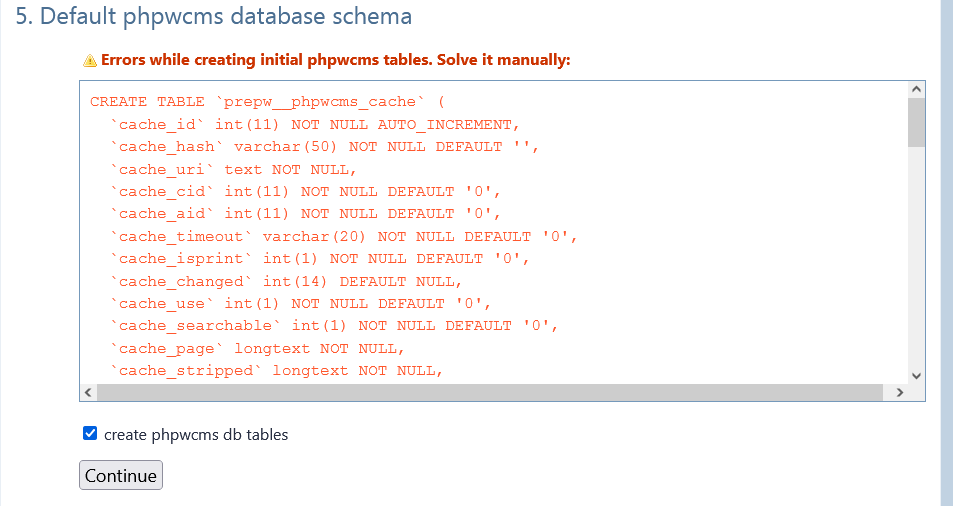
When I select checkbox on 'create phpwcms db tables' and click 'Continue' button following error is thrown i.e :
Errors while creating initial phpwcms tables. Solve it manually and following failed queries are shown inside the dialog box i.e :
CREATE TABLE `prepw__phpwcms_cache` (
  `cache_id` int(11) NOT NULL AUTO_INCREMENT,
  `cache_hash` varchar(50) NOT NULL DEFAULT '',
  `cache_uri` text NOT NULL,
  `cache_cid` int(11) NOT NULL DEFAULT '0',
  `cache_aid` int(11) NOT NULL DEFAULT '0',
  `cache_timeout` varchar(20) NOT NULL DEFAULT '0',
  `cache_isprint` int(1) NOT NULL DEFAULT '0',
  `cache_changed` int(14) DEFAULT NULL,
  `cache_use` int(1) NOT NULL DEFAULT '0',
  `cache_searchable` int(1) NOT NULL DEFAULT '0',
  `cache_page` longtext NOT NULL,
  `cache_stripped` longtext NOT NULL,
  PRIMARY KEY (`cache_id`),
  KEY `cache_hash` (`cache_hash`),
  FULLTEXT KEY `cache_stripped` (`cache_stripped`)
) DEFAULT CHARACTER SET utf8 COLLATE utf8_general_ci;

CREATE TABLE `prepw__phpwcms_file` (
  `f_id` int(11) NOT NULL AUTO_INCREMENT,
  `f_pid` int(11) NOT NULL DEFAULT '0',
  `f_uid` int(11) NOT NULL DEFAULT '0',
  `f_kid` int(2) NOT NULL DEFAULT '0',
  `f_is_variation` int(11) NOT NULL DEFAULT '0',
  `f_order` int(11) NOT NULL DEFAULT '0',
  `f_trash` int(1) NOT NULL DEFAULT '0',
  `f_aktiv` int(1) NOT NULL DEFAULT '0',
  `f_public` int(1) NOT NULL DEFAULT '0',
  `f_tstamp` timestamp NOT NULL DEFAULT CURRENT_TIMESTAMP ON UPDATE CURRENT_TIMESTAMP,
  `f_name` varchar(255) NOT NULL DEFAULT '',
  `f_cat` varchar(255) NOT NULL DEFAULT '',
  `f_created` int(11) NOT NULL DEFAULT '0',
  `f_changed` int(11) NOT NULL DEFAULT '0',
  `f_size` int(15) unsigned NOT NULL DEFAULT '0',
  `f_type` varchar(200) NOT NULL DEFAULT '',
  `f_ext` varchar(50) NOT NULL DEFAULT '',
  `f_svg` int(1) unsigned NOT NULL DEFAULT '0',
  `f_image_width` varchar(20) NOT NULL DEFAULT '',
  `f_image_height` varchar(20) NOT NULL DEFAULT '',
  `f_shortinfo` varchar(1000) NOT NULL DEFAULT '',
  `f_longinfo` text NOT NULL,
  `f_keywords` varchar(1000) NOT NULL DEFAULT '',
  `f_hash` varchar(255) NOT NULL DEFAULT '',
  `f_dlstart` int(11) NOT NULL DEFAULT '0',
  `f_dlfinal` int(11) NOT NULL DEFAULT '0',
  `f_refid` int(11) NOT NULL DEFAULT '0',
  `f_copyright` varchar(1000) NOT NULL DEFAULT '',
  `f_tags` varchar(1000) NOT NULL DEFAULT '',
  `f_granted` int(11) NOT NULL DEFAULT '0',
  `f_gallerystatus` int(1) NOT NULL DEFAULT '0',
  `f_vars` blob NOT NULL,
  `f_sort` int(11) NOT NULL DEFAULT '0',
  `f_title` varchar(1000) NOT NULL DEFAULT '',
  `f_alt` varchar(1000) NOT NULL DEFAULT '',
  PRIMARY KEY (`f_id`),
  KEY `f_granted` (`f_granted`),
  KEY `f_sort` (`f_sort`),
  KEY `f_pid` (`f_pid`),
  KEY `f_is_variation` (`f_is_variation`),
  FULLTEXT KEY `f_name` (`f_name`),
  FULLTEXT KEY `f_shortinfo` (`f_shortinfo`)
) DEFAULT CHARACTER SET utf8 COLLATE utf8_general_ci;
Also attaching screenshot of same for your reference :
When I manually execute those queries following error is thrown i.e :
MySQL said: 1214 - The used table type doesn't support FULLTEXT indexes
Are the MYSQL requirements changed ? . On the documentation page i.e :
https://github.com/slackero/phpwcms#server-system-requirements
I can see that minimum MYSQL 5.1 requirement is mentioned.
What could be the cause of this issue ?. Could you please try and replicate the issue at your end?.

Seems your MySQL doesn't support MyISAM. I cannot really test this. I would recommend also to check the my.cnf to have a more compatible setting. Newer MySQL is often too strict. Is it a productive system or for testing?

Hello @slackero ,
I am using Server version: 5.5.62 Source distribution. My server supports MYISAM.
This is the output of 'show engines' command on mysql prompt.
This is the screenshot for your reference.

Also strict mode isn't enabled :

The earlier version 1.9.30 installs fine without any such issues.
I see that the storage engine in the earlier version i.e 1.9.30, was explicitly set to 'MYISAM' which is commented in this version i.e 1.9.33,
/setup/inc/setup.check.inc.php on line 159 i.e this code :
mysqli_query($db, 'SET storage_engine=MYISAM');
so the storage engine picked up is INNODB, which is the default engine in my case, as you can see in the screenshot.
Could you please try and find a fix for this ?. Or any suggestions to make the script work on the environment?.
I need to check the whole database schema, as I wrote in the readme. I cannot rely on MYISAM any longer. As workaround for you remove the comment.
Hello @slackero ,
It would be really better if you could fix this by code, as many users would face the issue while installation on MYSQL 5.5, since the default storage engine in MYSQL is set to INNODB and full text indexes are only supported only by MYISAM before MYSQL 5.6 ,
Many users would have this same issue on the above environment.
I have tested on another server which has MYSQL 5.6 (with InnoDB as default engine), and there it works fine.
It would be better if you raise MYSQL requirements to MYSQL 5.6 and above and update them in docs or make changes in code to make it compliant with MYSQL 5.5.
Kindly let me know.