

 slackapi
radio buttons initial option isn't updating on first load
Description
I allow users to create another radio button option with a modal. When they submit that modal I want to add their new option to the radio buttons and set that new option as the initial option.
The new radio button does not pop up as selected even though I'm passing it as the initial option until I refresh the home page a 2nd time.
What type of issue is this? (place an x in one of the [ ])
- [x] bug
- [ ] enhancement (feature request)
- [ ] question
- [ ] documentation related
- [ ] example code related
- [ ] testing related
- [ ] discussion
Requirements (place an x in each of the [ ])
- [x] I've read and understood the Contributing guidelines and have done my best effort to follow them.
- [x] I've read and agree to the Code of Conduct.
- [x] I've searched for any related issues and avoided creating a duplicate issue.
Bug Report
Filling out the following details about bugs will help us solve your issue sooner.
Reproducible in:
package version: 3.2.0
node version:
OS version(s):
Steps to reproduce:
- Open a modal for a user to add a new option.
- Save that option when they submit the modal
- Refresh the home page with the new option pre-selected
Expected result:
What you expected to happen
Actual result:
What actually happened
Attachments:
Pre-selected radio button
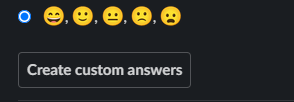
Modal where user creates new option choices

New radio button option pops up, but it's not selected as the initial option
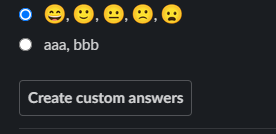
Proof that I'm passing the correct initial option when I refresh the home page screen

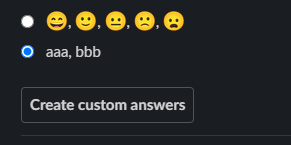
When I click away and back to the home page (manual refresh) it selects the correct initial option

Hi @MattB543 - Thanks for including your screenshots the description of the behavior - let me try to reproduce this behavior locally and get back to you. Are you able to share code snippets for the handlers you're using?

@MattB543 - I wasn't able to reproduce this behavior you're seeing. I played around with a simplified case of the behavior I think you're looking for here in case that is helpful.
@srajiang thanks for looking into this! I really appreciate it.
My code follows a similar flow to yours.
What does work: if there is no option already selected then the newly added option does pop-up as pre-selected.
What doesn't work: if I have already selected an option and then I add a new option, the previously selected option is still pre-selected, not the new option that pops up.
I am printing to my console the initial option parameter every time I re-render the home page and I see that I am passing the newly created option. However, the old initially selected option is staying selected.
If you try the above scenario with your code, does it work as intended?
Hey @MattB543 - yes, with the sample code setup, I'm able to provide an initial selected option, then add a new option via the modal, then have the new option popped up and selected. I've updated that replit with what I used!
I noticed that the value provided for initial_option needs to exactly match what's added to the options array. Is it possible that those values are not the same at the time of the home page update?
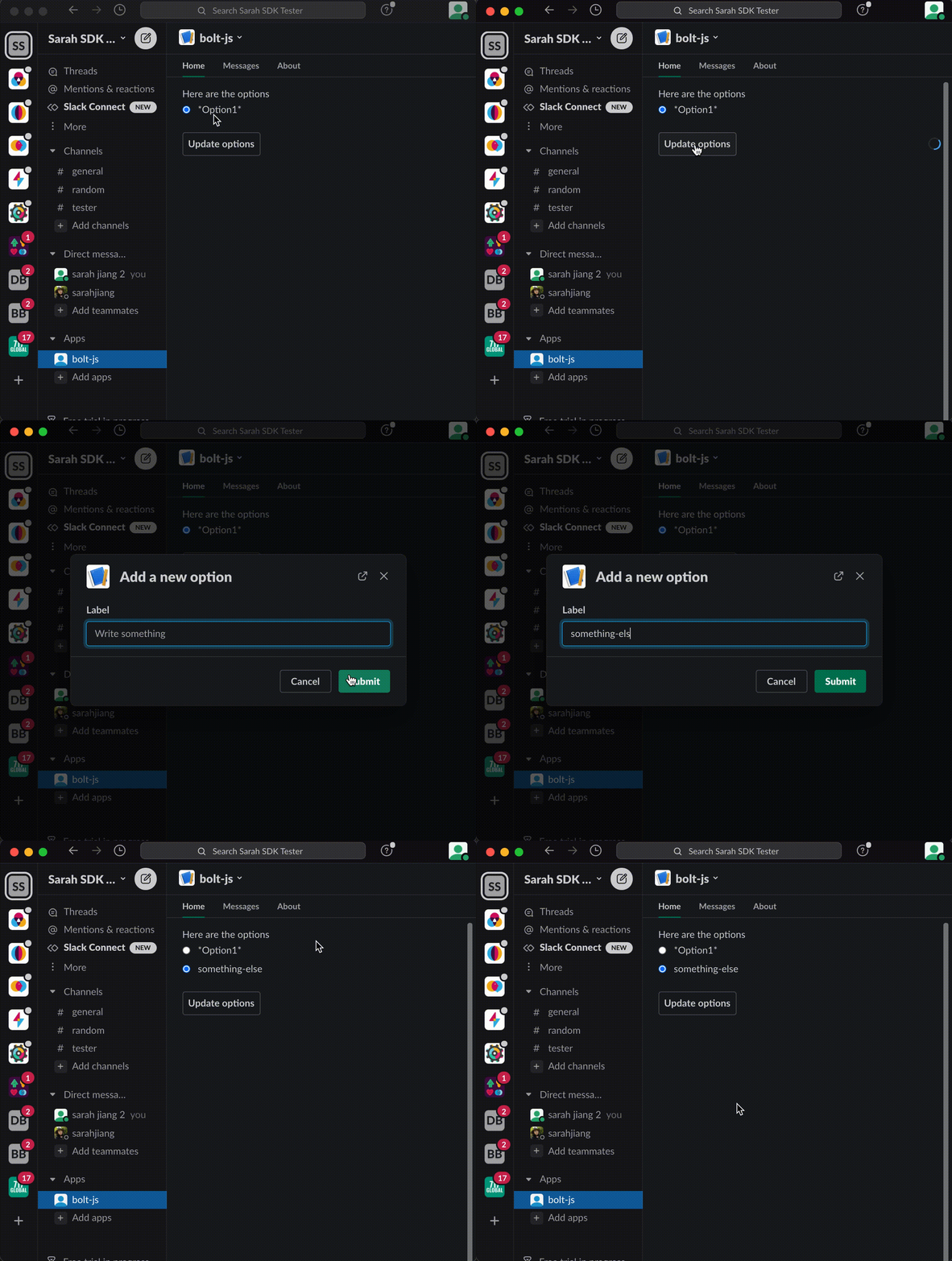
@srajiang I know I'm passing the exact option into the initial value because if you don't you get this error:

Your demo looks great so it's definitely my code... although I'm not sure how it's possible because I'm checking the home page blocks right before they're published and they look correct.
I'll just have to do some more testing. Thank you!
@srajiang I'm totally lost ☹️
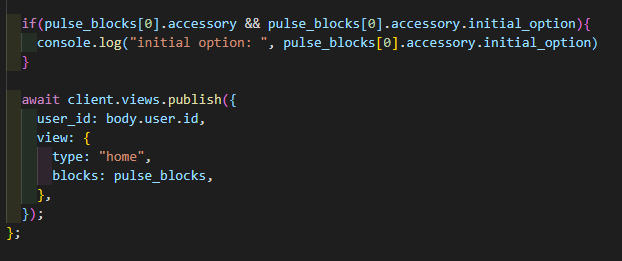
I am printing to my console the initial option right before I publish the updated home view as a sanity check.
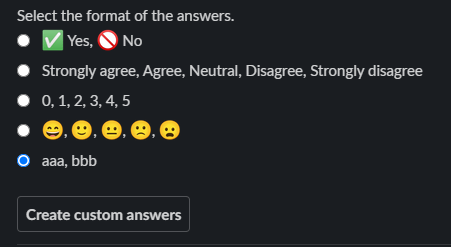
I select Yes No. When I leave the home page and come back it is initially selected as I expect. The console confirms this selection.
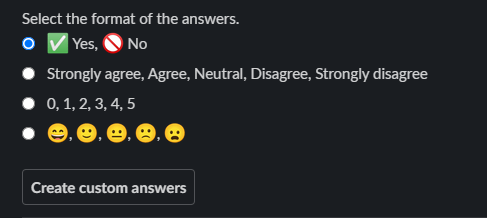
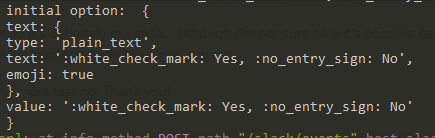
I then open a modal and submit a new option: "aaa, bbb". This choice is added as an option as I expect but is not initially selected when it is added.
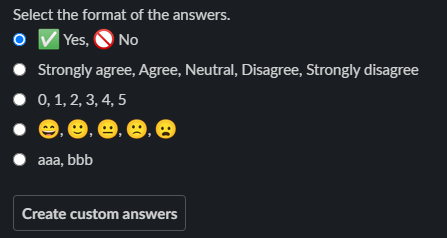
Even though my console is printing out the correct initial option for the blocks I am publishing

If I leave the home page and come back to re-publish the home page (nothing should change, it's just republishing what I had before). It selects the correct initial option this time and prints out the same exact thing to the console.

Is there anything about the home page regarding race conditions or that I should be using the hash of the home view or that it's caching or something else that I am missing?
@MattB543 That is super strange...can you check something for me?
If you're sending the exact same view to client.views.publish both after the user has submitted the modal (when you DON'T see the option selected) and after you refresh the app home view (and you DO see the option selected), you should also be getting the exact same response object both times, including the initial_option being provided each time. Is that the case?
@srajiang
I have compared the response to the client.view.publish when I don't see the option pre-selected and when I re-render the home page and I do see it selected. The only difference between the two outputs is the random block_ids, the initial option is exactly the same.
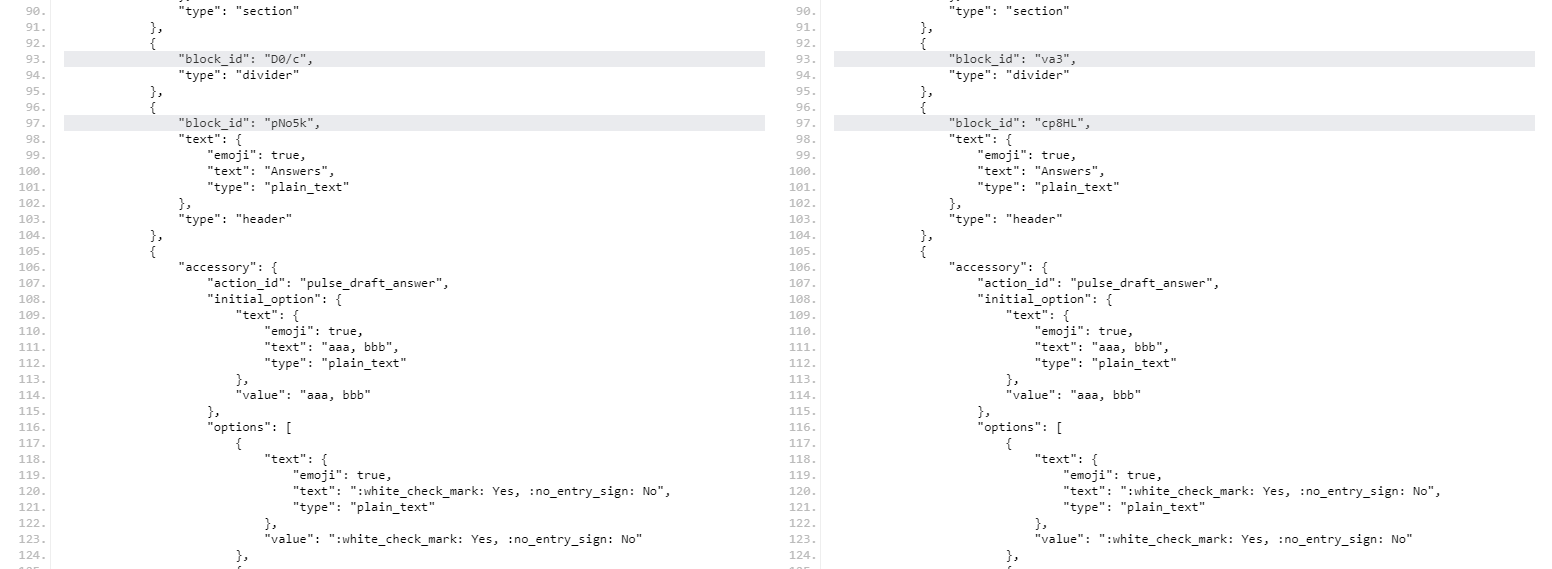
I'll print out the initial option from the view response:
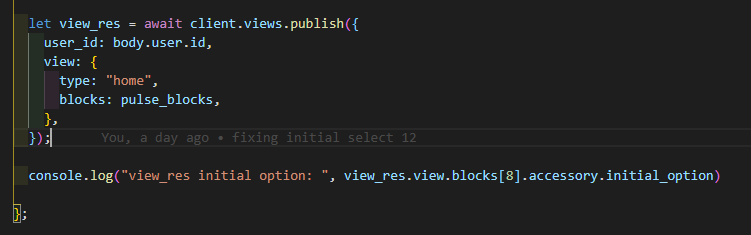
Here is a screen recording of what it looks like in Slack and the view response in the console: https://imgur.com/a/XGO2Dky
@MattB543 could you provide us with more of your code. We haven't been able to reproduce it.
To confirm, for the submission event handler, you are using client.views.open (not client.views.publish) and passing the trigger_id?

@stevengill for the custom answer modal I'm using client.views.open and passing the trigger ID, but once that modal is submitted I refresh the home page by using client.view.publish
So this is my entire flow:
1 - Load the home page, no answer is pre-selected
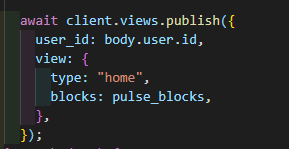
2 - When they click a button to write a custom answer choice, open a modal
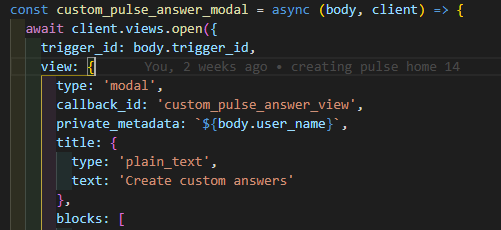
3 - When they submit the modal, I save the custom answer in my DB and refresh the home page.
When I'm refreshing the home page I'm checking if there is a custom answer submitted. If there is, it pushes this block which should add the custom answer to the end of the list and select it as the initial option. Weirdly, it adds the custom answer to the end of the list, but it doesn't pre-select it, even though I'm sending the same exact value for the initial option.
} else {
   //Custom answer selected
   pulse_blocks.push({
     type: "section",
     block_id: "pulse_answer",
     text: {
       type: "mrkdwn",
       text: "Select the format of the answers.",
     },
     accessory: {
       type: "radio_buttons",
       initial_option: {
         text: {
           type: "plain_text",
           text: `${pulse_draft.rows[0].answer_format.join(", ")}`,
           emoji: true,
         },
         value: `${pulse_draft.rows[0].answer_format.join(", ")}`,
       },
       options: [
         {
           text: {
             type: "plain_text",
             text: ":white_check_mark: Yes, :no_entry_sign: No",
             emoji: true,
           },
           value: ":white_check_mark: Yes, :no_entry_sign: No",
         },
         {
           text: {
             type: "plain_text",
             text: "Strongly agree, Agree, Neutral, Disagree, Strongly disagree",
             emoji: true,
           },
           value:
             "Strongly agree, Agree, Neutral, Disagree, Strongly disagree",
         },
         {
           text: {
             type: "plain_text",
             text: "0, 1, 2, 3, 4",
             emoji: true,
           },
           value: "0, 1, 2, 3, 4",
         },
         {
           text: {
             type: "plain_text",
             text: ":slightly_smiling_face:, :neutral_face:, :slightly_frowning_face:",
             emoji: true,
           },
           value:
             ":slightly_smiling_face:, :neutral_face:, :slightly_frowning_face:",
         },
         {
           text: {
             type: "plain_text",
             text: `${pulse_draft.rows[0].answer_format.join(", ")}`,
             emoji: true,
           },
           value: `${pulse_draft.rows[0].answer_format.join(", ")}`,
         },
       ],
       action_id: "pulse_draft_answer",
     },
   });
 }
@MattB543
What does work: if there is no option already selected then the newly added option does pop-up as pre-selected.
What doesn't work: if I have already selected an option and then I add a new option, the previously selected option is still pre-selected, not the new option that pops up.
Based on this, I'm wondering whether one place to investigate more is in how you're updating the initial_option field in the underlying blocks after the user's submit action finishes.
I noticed you're pushing a newpulse_answer section into pulse_blocks. When I've tried (unsuccessfully) to recreate what you're seeing, I've been only updating the initial_option field and the options array within the existing section. It really shouldn't make a difference if the two objects are exactly the same but for those fields, but I am running out of ideas myself.
@MattB543 I haven't found any bug report yet but this might be caused by a Slack client side issue. Did you experience this misbehavior with the Slack Desktop app?

@seratch, yes the Slack desktop app. But I just tried it on my Android for the first time and the issue is there as well.
👋 It looks like this issue has been open for 30 days with no activity. We'll mark this as stale for now, and wait 10 days for an update or for further comment before closing this issue out.
![github-actions[bot] avatar](https://avatars.githubusercontent.com/in/15368?v=4 "Published by a pub.dev verified publisher")
@MattB543 - The fact I wasn't able to figure out how to reproduce the issue you were seeing still really bugs me (and we all put so much effort in 😞 ) ! Any update on your end by any chance?
I'd like to keep this issue open, so I will flag for now that it not be closed by our triage automation. Or, if you were able to figure out what was going on, feel free to close as well!
Hi @srajiang! I wasn't able to figure it out, I'm still having the issue, unfortunately. If it would help, we could hop on a quick Zoom call sometime and I can show you what I'm seeing on my side.
Hi @srajiang it seems that I am able to re-produce this bug as well, this time using a modal. I have a dynamic list of radio buttons which is updated when changes are made to a multi_static_select on the same view:
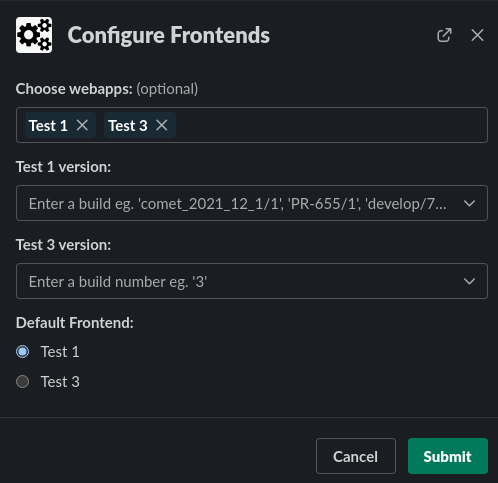
I have code to change the initially selected radio button based on business rules but the initial selection never changes, even if the original initial option is no longer in the list of radio buttons. For example, in this configuration 'Test 3' should be set as the initial option, Test 1 is not even there anymore:
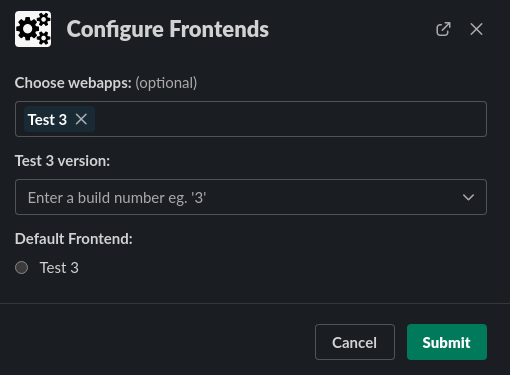
Interestingly I don't get this behaviour if there is no initial option set when the view is created; updates to the initial option work as expected.
I should note that I am using bolt-python so hopefully I am not hijacking the wrong thread.

Thanks @ben-nz for following up with your app's behavior as well.
Interestingly I don't get this behaviour if there is no initial option set when the view is created; updates to the initial option work as expected.
I am puzzled by this. From the test app code I shared above, I am able to set the initial option (in the home view mind you) then update the options with a different initial option properly selected. I have not tried with modals yet.
@MattB543 I missed your earlier message. Seeing if there's an email address we can share to get connected.
Hey @srajiang, if you'd like you can email me at [email protected] or just book a 30 min Zoom call with me here: https://calendly.com/matt-incognito/onboarding?month=2022-02
Thanks @srajiang for taking a look. I wonder if you still get the correct behaviour in your test code if the first initial_option is no longer in the list of radio buttons after the view update?
@ben-nz Nope, even if the option that was sent as the first initial_option is removed from options in the payload the second time that the home view is published (after the modal is submitted) , I still get the correct initial_option.
Here's an updated sample that's working for reference.
Hey @srajiang I ran into this issue again, this time updating a modal and with a text input.
If someone picks a new date in my modal I check the day of the week and update the modal title and the initial textbox value. The title of the modal updates perfectly and the modal claims it is updating the initial value (if I check the resulting modal blocks) but it does not change in the actual modal.
You can see I'm updating the modal title as well as the 5th element's initial value below.
The title updates perfectly but the initial_value does not, even though I see from the console.log it's passing into the view correctly and returning correctly once the view is updated.
Really seems to be a weird caching issue with initial options/values...
    modal_blocks[5].element.initial_value = message;

    await client.views.update({
      view_id: body.view.id,
      view: {
        type: "modal",
        callback_id: "view_callback",
        title: {
          type: "plain_text",
          text: `Feedback ${day_of_week}s`,
        },
        blocks: modal_blocks,
        close: {
          type: "plain_text",
          text: "Close",
          emoji: true,
        },
        submit: {
          type: "plain_text",
          text: "Save",
        },
      },
    });
@srajiang @ben-nz I'm still running into this (what I assume is caching issue) in more situations and it's quite annoying.
the block is defined as having initial value: ':slightly_smiling_face:, :neutral_face:, :slightly_frowning_face:'
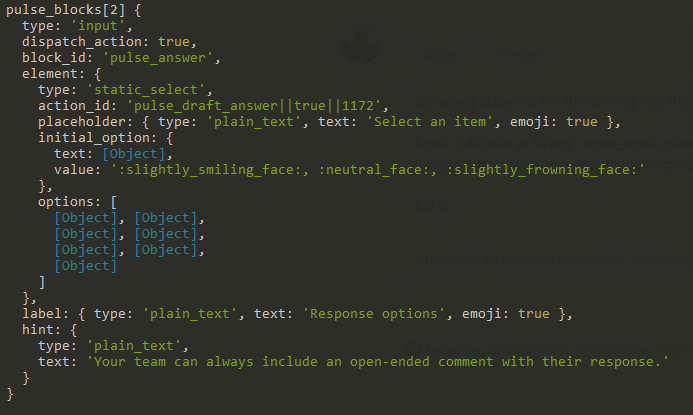
But it shows 'Custom Multiple Choice'
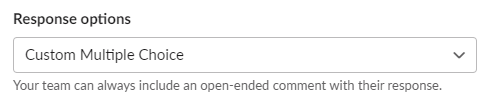
This issue is appearing after another view is pushed on top of this one and then submitted so the modal is going back to this view and the intial_option is passed correctly but not showing correctly.
@MattB543 @ben-nz - Looking at this again, and gonna loop in @filmaj as well since he's got 👀 on issues this week. I am so sorry this keeps being a poor experience for you.
So basically, at this point I figure this has gotta be a problem beyond Bolt JS, possibly to do with the Block Kit implementation of selects. I am going to escalate to the team I think could investigate this further internally.
@srajiang someone on the Slack API workspace seems to have solved it! https://community.slack.com/archives/C02C28Z3XA7/p1652815757214569
"This is the default/expected behavior - the client will keep the user's input if they have made a selection on an element, even if you update the options/initial_option. As long as the block_id is not changed"
In your examples were you setting a block id or was it random every time? I was setting my block id and never changing it.
Well I'll be... @MattB543 - Dare I ask if playing around with the block id has made the issue go away for you?
I was not explicitly setting a block id which would explain it.
@srajiang I haven't had time to try it out yet, but I'll likely try this week.
What's confusing to me is if I need to generate a new block id every time then how do I reference the block when I'm trying to get the value of the selected option?
Could you get a little sneaky and employ some regex or something to match against a block_id and use some kind of consistent prefix pattern as your test? Not exactly sure what you have implemented currently, so I am spitballing lol.
Keep us posted on whether updating the block_id helps with the initial issue!