
Docx-Viewer
 Docx-Viewer copied to clipboard
 skfrost19
VSCode extension to view docx / ODT files within the editor.
Docx Viewer Extension for Visual Studio Code






The Docx Viewer Extension for Visual Studio Code allows you to view Docx / ODT files directly within the editor. With this extension, you no longer need to switch between multiple applications or install a separate Word Processor or Libre Office Client to view your documents.
Features
- Preview Docx / ODT files within the editor
- Easy installation and setup
Usage
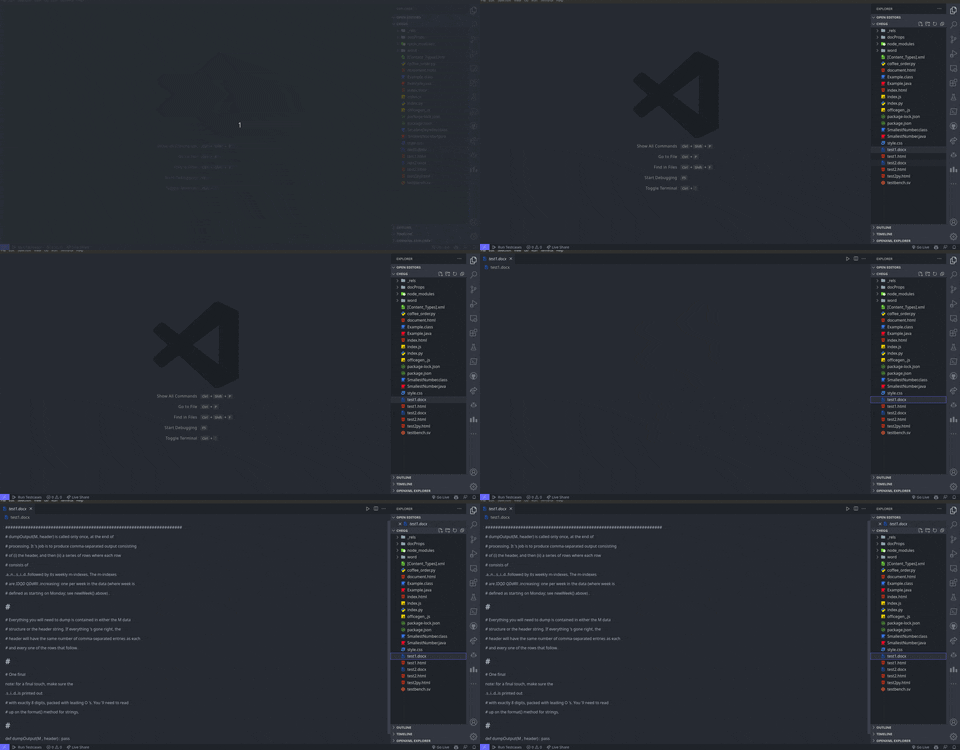
To open a Docx / ODT file, simply navigate to the file and click to open it.
Extension Settings
- To change the font, open the Command Palette (Ctrl + Shift + P or Cmd + Shift + P) and search for "Open Docx Reader Configuration".
- In the configuration file, change the font to your desired font.
How to Install
- Launch Visual Studio Code.
- Press Ctrl + Shift + X or Cmd + Shift + X to open the Extensions tab.
- Search for "Docx Viewer" or "ODT Viewer" and select it or follow this link.
- Click "Install".
- After the installation is complete, restart Visual Studio Code.
Requirements
This extension requires Visual Studio Code version 1.60 or higher to be installed.
Known Issues
- Some complex formatting may not be supported.
- Changes to the document may not be saved in the original Docx format.
- The extension may not work properly with extremely large documents.
Feedback and Contributions
- Feedback, bug reports, and contributions are always welcome!
- If you have any suggestions or issues, please open a new issue on the GitHub repository or submit a pull request.
Support
- Star the repository if you like the extension!
License
This extension is licensed under the MIT License.
 skfrost19