

 sitespeedio
Reports over multiple domains merge/muddle results
Running on Ubuntu 18.04 on a Jenkins slave headlessly.
    -b chrome \
    -n 3 \
    --chrome.timeline true \
    --visualMetrics true \
    --visualElements true \
    --pageCompleteCheckInactivity \
    --influxdb.host <host> \
    --influxdb.database sitespeed \
    --influxdb.annotationScreenshot true \
    --s3.bucketname <bucket> \
    --s3.acl public-read \
    --s3.removeLocalResult \
    --firstParty "..regex here.." \
    --resultBaseURL <base_url> \
    https://www.google.com https://www.duckduckgo.com
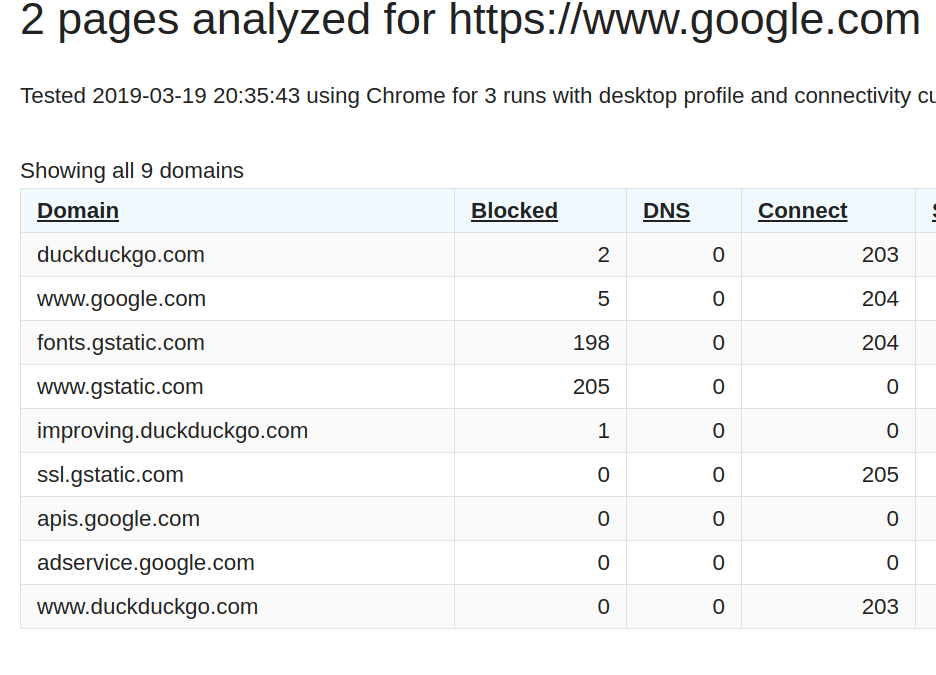
If you have any differing domains in the URLs passed to sitespeed, the results in the HTML report are mixed. e.g. the domains list contains all domains for both google and duckduck.
Expectation? Tossing out some ideas.
- Generate a report for each unique host passed to sitespeed
- Could throw an error/warning if html reports are enabled and more than one domain was passed into the tool.

I see that as a feature so that you actually can compare diff between two sites :) For me its not a biggie but maybe it is because I'm so used to it.

That does sound like a good feature. However, the view displayed above shows "for google.com" but shows all domains (for all URLs processed) in the table. I don't see that as a comparison.
Yeah the name in the header isn't perfect ... lets see if there's a way to fix that. At the moment you can give a name to your test with --name but it would be better if not only used the first URL you add.
I also discovered this while using sitespeed.io to benchmark several unrelated sites at the same time. The "Summary" page is showing median statistics (e.g. "Performance score") across every URL being analyzed, which isn't meaningful in my case. Example: analyzing my site and several competitor websites at the same time to see how my site compares.
A possible solution would be to add a drop-down at the top to toggle between showing aggregate stats for every page and just for a specific page. Kind of like the Grafana dashboards.

I would say it depends what you test, media for multiple sites is good if you wanna compare how you are doing against the median of all of them :) It's not ideal the way it is now, in 4.x (I think) we used to have one extra layer, so you could compare groups of URLs agains each other, that would probably solve it but needs some extra work to get done.