

 siteorigin
Introduce Widget Validation: `sowbForms.validateFields` & `sow_validate_widget_data` Event
This PR allows for widget validation. It introduces the sow_validate_widget_data event to allow other developers to validate things and introduces required support. This PR modifies the Widgets Block and admin LESS files so a build will be required to use changes.
You can set any field to required by setting required to true. Currently missing required fields are only communicated using a red border of the field but we could potentially introduce a notification similar to the data mismatch prompt we have for widgets.
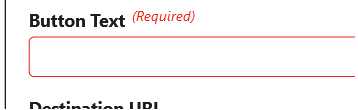
You can test this PR by adding the following on the line after this:
'required' => true,
Please test the required functionality in the following contexts:
- SiteOrigin Page Builder (the Classic Editor, Layout Builder and SiteOrigin Layouts Block. (requires https://github.com/siteorigin/siteorigin-panels/pull/1007)
- Legacy Widgets Page & new Widgets page.
- SiteOrigin Widgets Block.
- Customizer.
- SiteOrigin Widgets Settings.
You can test the sow_validate_widget_data event by adding one of the following snippets to the browser console.
Detect no SiteOrigin Button URL and reject submission:
jQuery( document ).on( 'sow_validate_widget_data', function( e, valid, form, id ) {
	if ( id == 'sow-button' ) {
		var values = sowbForms.getWidgetFormValues( form );
		if ( ! values.url.length ) {
			valid = false;
		}
	}

	return valid;
} );
Detect no SiteOrigin Button URL, and add one automatically:
jQuery( document ).on( 'sow_validate_widget_data', function( e, valid, form, id ) {
	if ( id == 'sow-button' ) {
		var values = sowbForms.getWidgetFormValues( form );
		if ( ! values.url.length ) {
			form.find( '[name*="url"]' ).val( 'https://siteorigin.com/' );
		}
	}

	return valid;
} );

Thanks, mate.
- If you don't enter a Button Title, are you able to exit the widget? I don't seem to be able to exit/close the widget.
- Should we change (Required) to an asterisk?

@AlexGStapleton
Please check:
- SO Widget Block in Block Editor:
ReferenceError: validationSetup is not defined - Button Widget in Block Widget Interface. Check if working, doesn't seem to for me.
- Widget Block in Block Widget Interface. Check if working, doesn't seem to for me.
- Customizer (insert Button Widget):
Uncaught TypeError: i.find is not a function
Thanks!
If you don't enter a Button Title, are you able to exit the widget? I don't seem to be able to exit/close the widget.
That's intentional. With this change, and a field being set to required, the user must enter Button Text. If they were able to close the widget, the field isn't directly required - it's just labeled as such. With that said, there may be better ways to communicate this - maybe click update, display notice, and then allow update regardless of value.
Should we change (Required) to an asterisk?
Changed.
Customizer (insert Button Widget): Uncaught TypeError: i.find is not a function SO Widget Block in Block Editor: ReferenceError: validationSetup is not defined
Unable to replicate. To confirm, did you make a build? Core JS and LESS files are modified by this PR. The other two things you asked me to test won't work for you due to these errors. Regardless, I've tried them and both work as expected for me. I've created a build and confirmed it works for me. You can download it by clicking here. The only change made in build not present in this PR was setting Button Text as Required for testing purposes.
I did notice an issue with clearing the required error after a field has been flagged for widgets added after the page has been setup. That's fixed by https://github.com/siteorigin/so-widgets-bundle/pull/1630/commits/31bd5d65cf418632e1fb7dc79a1a5c7c44f38aa2. I also noticed an issue when using sow_validate_widget_data that would prevent submission and that's fixed by https://github.com/siteorigin/so-widgets-bundle/pull/1630/commits/cbf9501469450927a42912761992bb4335a35277.
I've added an additional snippet for sow_validate_widget_data testing.
That's intentional. With this change, and a field being set to required, the user must enter Button Text. If they were able to close the widget, the field isn't directly required - it's just labeled as such. With that said, there may be better ways to communicate this - maybe click update, display notice, and then allow update regardless of value.
I'm not sure I'm following this functionality. What if I don't want to enter a title right now, but I'd like to go back to editing my page? The user can't escape.
There isn't a delete link in Page Builder so I can't backtrack. I have to refresh the page if I don't want to complete the required field.
With that said, there may be better ways to communicate this - maybe click update, display notice, and then allow update regardless of value.
Sounds good.
You can download it by clicking here. The only change made in build not present in this PR was setting Button Text as Required for testing purposes.
The link doesn't appear to be correct. Thanks, mate.
I'm trying to think of another way to handle exiting without saving with a required field not filled in. I think your suggestion is the way to go. Thanks!
Build link: https://drive.google.com/uc?id=1hPQziVvJMokZkLnxGW8_We1PSzz-Xq_P
I'm not sure I'm following this functionality. What if I don't want to enter a title right now, but I'd like to go back to editing my page? The user can't escape.
I agree it's not ideal, but there really are not many options we have for actually enforcing the required nature of the field. I think what I suggested in my last comment is the way to go but I'm open to ideas. That suggest isn't exactly ideal either as it can still result in a situation where the data is missing, but at the very least, we communicated the required nature and required the user to proceed. If nothing else comes to mind, I'll get started on this.
I'm trying to think of another way to handle exiting without saving with a required field not filled in
Existing widgets? Hm, yeah, that's tricky as enforcing required fields after the widget has been introduced is a lot. I guess I could modify the required parameter to support three options:
- True (full).
- Warn/soft (warn the user about the required nature but don't prompt them).
- False (off - default).
Thoughts?
I originally commented in Slack. I'll comment here to clean up our Slack chat.
We could offer full validation if there were a way of exiting a widget and leaving it in draft form until the validation has been satisfied. Or if there were a way of deleting a widget and exiting if you didn't want to complete the required field. Given how things are currently set up, I don't think we can reasonably offer full validation. (What if you insert a widget but no longer want to use it? Unless you refresh the page, you must fill in the field to continue editing.)
Soft and off sound good. Let me know how you want to proceed.
Implemented soft rejection via confirm in https://github.com/siteorigin/so-widgets-bundle/pull/1630/commits/467051f79f4454313e1359fbffdde13b310e59bd - there's now no hard rejection. No need for the optional required changes outlined in this comment.
Copy of my Slack comment:
I've been thinking about that change and while my previous suggestion was better than how it is now, I think the best way to proceed is be:
- User leaves required field empty
- User clicks save (or attempts to "close" the widget - the same thing)
- We prompt the user "you have empty required widgets. Are you sure you wish to continue" (or something like that).
- If user clicks yes, save as normal.
- If user clicks no, don't proceed.
This removes the need for double prompting and is much simpler (if you give the go ahead I can have it done very shortly and that'll allow for a PB release with this change). Prompt is a standard confirm (also used when you attempt to delete a repeater) .
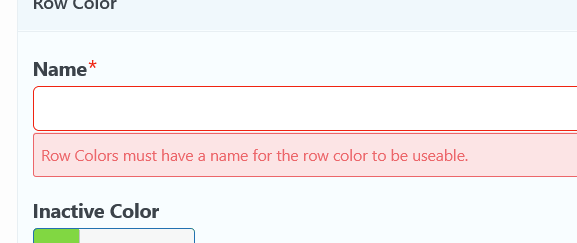
https://github.com/siteorigin/so-widgets-bundle/pull/1630/commits/2ea12482e7b10d5a6c6dd3228ade173927bdd8b8 allows for optional error messages for required fields. This is done by setting the error message to the required value rather than true. For example:
Thanks, mate.
- Are you encountering an error when inserting a SiteOrigin Widget Block with this branch as a build?
This block has encountered an error and cannot be previewed.
ReferenceError: validationSetup is not defined
- Block Widget Area:
- Legacy Widget: The SiteOrigin Button Widget doesn't have a Save button in this area.
- SiteOrigin Widget Block: Same error as the Block Editor.
I've updated the PR description to reference changes made after it was posted.
Are you encountering an error when inserting a SiteOrigin Widget Block with this branch as a build?
Resolved by https://github.com/siteorigin/so-widgets-bundle/pull/1630/commits/4464afba7c7514599a7c217b3c8ce394df6cfdfa. You'll need to make a new build to resolve this.
Legacy Widget: The SiteOrigin Button Widget doesn't have a Save button in this area.
As of https://github.com/siteorigin/so-widgets-bundle/pull/1630/commits/4464afba7c7514599a7c217b3c8ce394df6cfdfa this should be resolved as it's treated the same as the Block Editor (editor specific save button rather than widget level saving).
Thanks, mate.
- The legacy Button Widget in the Block Widget Area doesn't seem to work with validation. Not sure if we need to fix this unless it's easy.
- In the Block Widget area, the Widget Block seems to fire the validation immediately on insertion before I click the Save button. Insert the SiteOrigin Widget Block, select the Button Widget; during insertion the validation is fired.
Thanks, mate. I'm seeing the following error with the SiteOrigin Button Widget (legacy) in the Block Widget Area:
The "sow-button" block was affected by errors and may not function properly. Check the developer tools for more details.
Uncaught TypeError: Cannot read properties of undefined (reading 'blocks')
I'm also seeing Uncaught TypeError: Cannot read properties of undefined (reading 'blocks') when inserting a widget via a SiteOrigin Widget Block in the Block Widget area.
The last commit should resolve the issues with the new widget area, and the other notice.