
silx
 silx copied to clipboard
 silx-kit
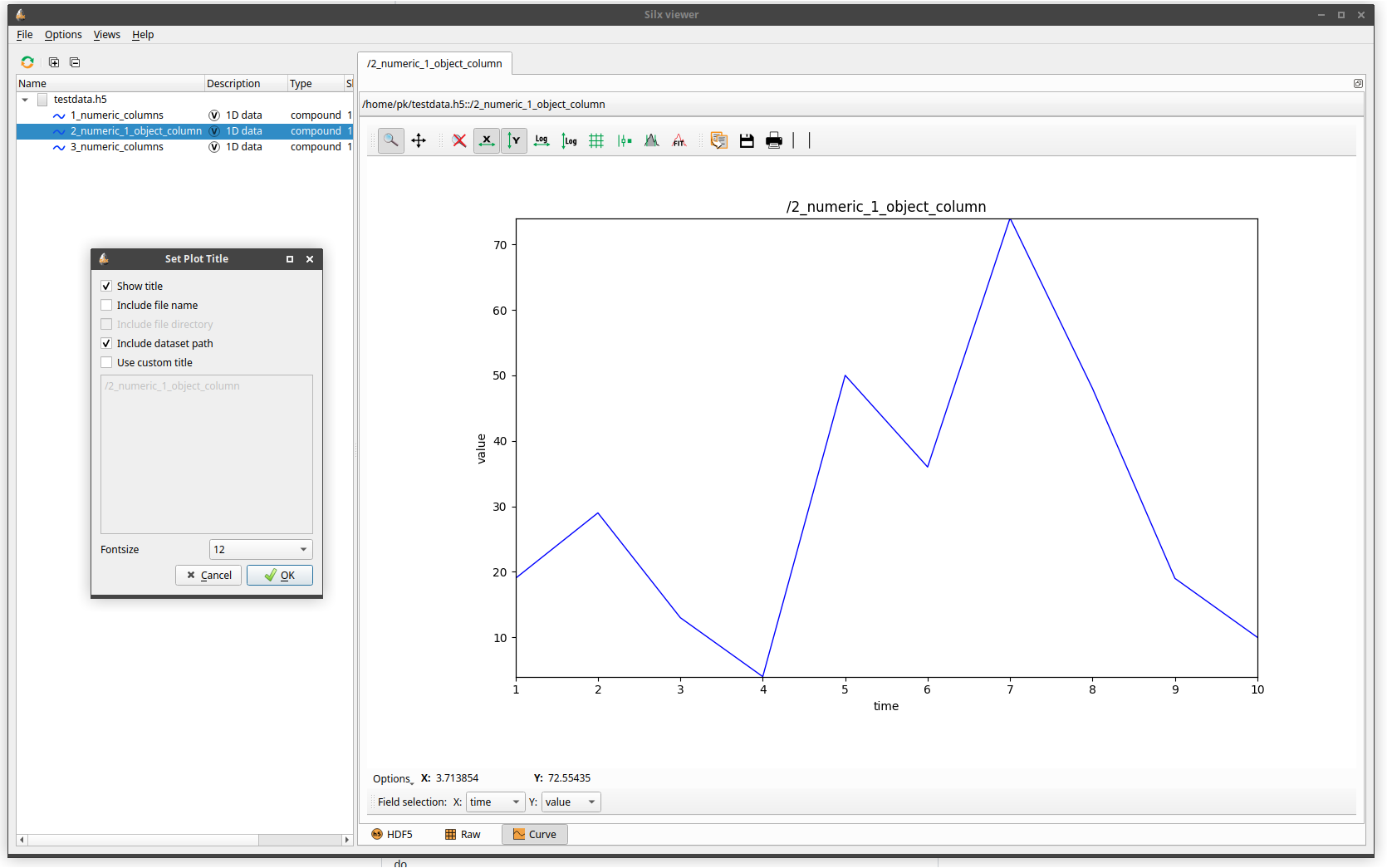
Added dialog to set a title for a plot. It is possible to add data pa…
…th, file name and dataset path to the title or use a custom title. Fontsize is also adjustable. By default, titles consist fo their dataset path with fontsize 12.
I did not know where the icons are from, so I could not add an suitable icon for the new set-plot-title-action. The current icon is only a placeholder and should be changed.

Hi. Could you please explain the main use case? And put a screenshot?
From a fast review i think most of the data propagation should not be done this way. For example, if you want to reach the h5 file name, i think it is already part of the data. Maybe not for slices. Else i think it is better to use a custom method name (most of your add an attribute which is not used).
For the font size, i think it is kind of the same thing. I think it should be a configuration field of the widget. I think we already have a structure to store this kind of stuff, like plot text color. @t20100?
But i did not try to execute it. So i can be fully wrong.
For icons, you can find them is silx/resources/gui/icons. We provide an API to reach them, check silx.gui.icons.getQIcon and examples.

BTW i am interest in displaying the title smaller, then i think it is a useful feature.
I patched your branch in order to fix the icon and remove the qtconsole import.
It was needed to make it work on my side. Feel free to squash it or what even.
I misunderstand that the resource was not existing, so i patched again the thing to use the icon from QApplication. I don't think it is needed to provide an icon here, but it should work.
Now i understand a little more what you want to do. I guess you did it to be able to print the plot with more info? Right? I think it will be quite tricky to provide something like that, as i feel it mixes application concepts and plot concepts in the same dialog, exposed in the end by the plot (the default toolbar). No idea what to do.
I guess you did it to be able to print the plot with more info? Right?
Yeah this way you have a title on the plot if you print it or make a snapshot, this is the main use case.
For example, if you want to reach the h5 file name, i think it is already part of the data.
If I understood your code right, setData receives data, which can be a h5 file or a ndarray. But I need a h5 file everytime to abstract file path, name and dataset path.I did not find a better way to do this, but maybe you can?
BTW i am interest in displaying the title smaller, then i think it is a useful feature.
It is possible to choose a smaller fontsize to make the title smaller, or do you want to edit the size seperatedly?
Screenshot:
I think it will be quite tricky to provide something like that, as i feel it mixes application concepts and plot concepts in the same dialog, exposed in the end by the plot (the default toolbar). No idea what to do.
@vallsv I don't think I fully understand why this should be a problem. Could you elaborate?

Could you elaborate?
Yes, basically the plot have to be used without HDF5 (that's in fact the main usecase). So i think the application should provide the extra action, not the plot itself.
It is possible to choose a smaller fontsize to make the title smaller, or do you want to edit the size seperatedly?
Yes. I mean the title text size should be a property of the plot. For example the PlotWidget stores self._foregroundColor. I think the title text size should use the same kind of API. And this could be a pull request by itself.
Yes, basically the plot have to be used without HDF5 (that's in fact the main usecase). So i think the application should provide the extra action, not the plot itself.
The DataViewer has the HDF5 anyway, so I could move the functionality from DataViews to there. Than I have to check if __currentView is a plot or not. But I am not sure if that is satisfying enough, because I dont know where you draw the line between the plot and the application.
Otherwise I am not sure how to keep the separation and would depend you how to go on with this
Because the file name and data path are displayed in the bar on top of the plot toolbar, this is not taken into account when the plot is saved or printed out, and so there is no title there (except when interpreting NeXus' s NXdata group).
That would be a good argument to use some or all of the following information: file directory, filename, dataset path, dataset name and eventually slicing information to make the plot title.
Yet, I don't think it is a good idea to provide that as a setting for each plot, it would be better as a general preference available for all plots in silx view and settable from the Option menu.
That could be done in steps, first putting a default plot title in silx view (e.g., dataset name or dataset fullpath) and then make it settable from the preferences.
Regarding the font size, it could also be changed through the Option menu and an API in PlotWidget. For the API it would need separated methods to get/set it and a bit of thinking to get ready to other similar tuning (font policoy, labels,...) and maybe consider having a style object (need to look at Qt to be consistent with it).

I think it's a good idea to have global "plot title preferences", but what about the case where the user wants to set a fully custom title that is unrelated to any filenames or datasets (e.g. "Experiment 42")? Shouldn't there be a way of overriding the defaults for individual plots?
For specific custom user title, i think it is not the aim of silx view. In this case i think you have to provide your own integration. Do you use silx view, or do you use the dataviewer integrated inside your own application?
In the second case, i can take a look, tune small things and provide to you an anchor to add your own actions (or to tune the views and the plots). So what you could reuse everything with your custom stuff.
For the second case, the library could foresee the application providing a callback to get the title. I think we have already implemented that approach at other places.

We use silx-view as an alternative to HDFView. A callback function for the library seems reasonable.
Anyway, how shall we proceed with this particular PR?
I will create a small example to see the feasibility of a script which can run a custom version of silx view. So you could run the same application but adding your own stuff on your side. It could be anyway useful for other things too. That's maybe enough on your side? Anyway a PR to allow to custom the title text size will be still needed. And maybe another PR to custom the default title based on a template can be useful too.
Here is a way to tune your own silx view https://github.com/silx-kit/silx/pull/2978. I still have to talk to my colleagues, but i think the main idea is fine.
To do what you want i think the dataset path must have to be propagated. I will maybe try if am still bored.
To me the use case of setting the title of the plot is outside the scope of silx view which primary goal is to browse and visualize data from HDF5 files not to prepare plots, so if the solution proposed by @vasole and @vallsv is OK for you to integrate it, that would be the way to go.
BTW, here are 2 more options:
-
For 1D plots only (including compound types), there is an
Optionsmenu at the bottom left of the plots which allows to open an IPythonConsoleattached to the plot where you can type:plt.setGraphTitle('New title')to set the plot title. -
if the title you want to put is known beforehand while writing the HDF5 file, you can describe a plot with the NeXus convention NXdata class and its
titleattribute, this is interpreted bysilx view.
For 1D plots only (including compound types), there is an Options menu at the bottom left of the plots which allows to open an IPython Console attached to the plot where you can type: plt.setGraphTitle('New title') to set the plot title.
I receive an error message when I try to open the console:
ERROR:silx.gui.qt._qt:<class 'TypeError'> object() takes no parameters File "/home/pk/projects/silx/build/lib.linux-x86_64-3.6/silx/gui/plot/PlotWindow.py", line 392, in _toggleConsoleVisibility parent=self)
Hi, I'm closing this PR because development on it is stalled and it has conflicts since PR #3991. Do not hesitate to rebase the branch and re-open the PR if needed.