

 silverbulletmd
Change keyboard shortcuts?
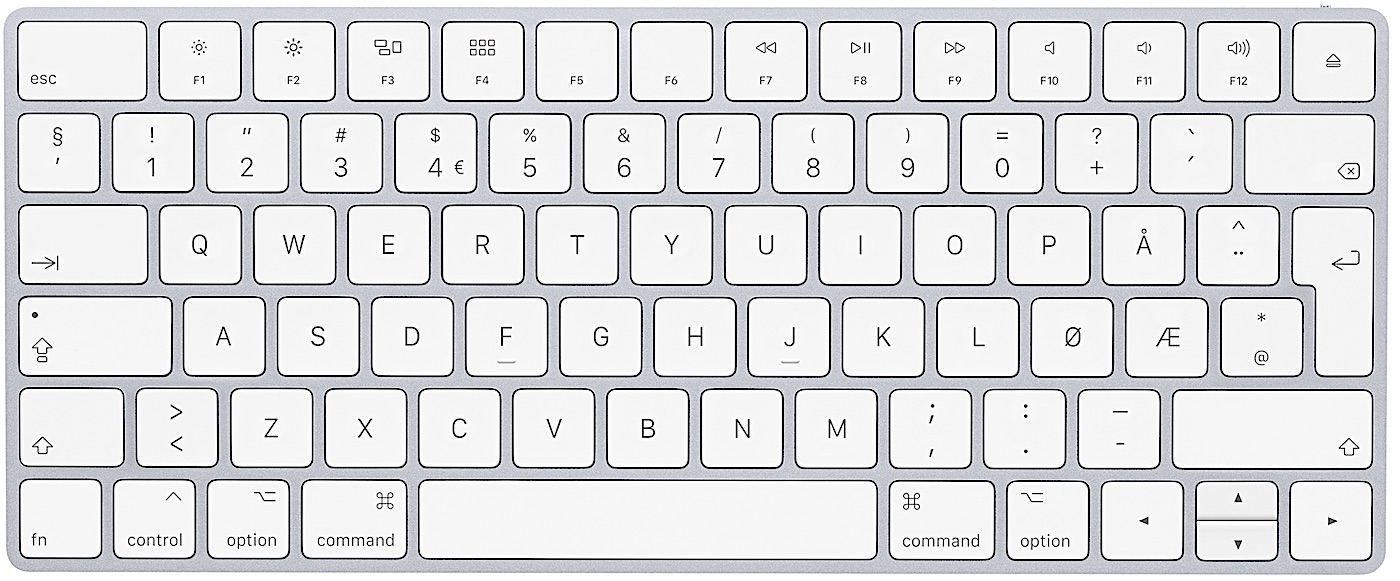
Is there any way to change the keyboard shortcuts by changing the config? I'm on a Norwegian keyboard, and our /-key is "hidden" behind shift + 7. Using cmd + shift + 7 does not work, so I'm forced using the mouse to click which influences the workflow in a negative way.
Bonus question: Is there possible to change the default font in the config, without overriding the CSS?

The answer to both of these for now is: no, not yet possible.
Regarding keyboard mappings: yeah, this is something I know we need to support at some point. I’m open to how to configure this though. Perhaps it would make sense to put this in YAML format in SETTINGS something along the lines of:
keys:
  “Command Palette”:
    mac: “Cmd-p”
    key: “Ctrl-p”
  “Page: Rename”:
    mac: “Cmd-r”
    # etc.
Command patte would have to be a special case because it’s not a command itself.
Another approach would be to mirror the structure of plug definitions themselves, but then allow specific overrides. This would be more flexible (you could override various other things), but probably harder to use (you’d have to look up function names for instance), e.g.:
overrides:
   core:
      renamePage:
        command:
            mac: “Cmd-r”
Basically this way, we’d merge whatever you keep under overrides and then the plug name (e.g. core) with what it pulls from e.g. https://github.com/silverbulletmd/silverbullet/blob/main/plugs/core/core.plug.yaml allowing you to override arbitrary attributes. This way you could also rename commands for instance, or even define basic new ones.
Regarding overriding fonts: also not possible right now. There’s a discussion on theming here, it just needs to be picked up: https://github.com/silverbulletmd/silverbullet/discussions/58 For now a lot of the lay-out working relies on monspaced fonts, so that will likely remain a restriction for some time.

As long as the documentation is on par, both should work. Especially if you map out the most common use cases, and explain how it's done.
Settings seems like a good place to put this, also makes it easier to migrate your settings+keybindings configs to another computer when necessary. I like the sioyek academic/vim PDF reader's approach to this, which has a default keybindings config file with tons of comments for EVERY keybinding used and a user keybindings config file that allows the user to override any of the defaults and add multiple keybindings per action (and they have the same default+user file pair option for all remaining settings). Super clear (basic documentation is inline and often suffices) and customizable.

Of course it most likely wouldn't include any vim keybindings since those are handled out of this project. In an ideal world I could see some sort of warning that pops up when you assign an action to a keybinding which is already used by 1) an existing Silverbullet action or 2) an existing vim action. Perhaps being able to provide this feedback is one reason why Obsidian has a dedicated UI for hotkeys and not a plain file... But I still think the file-based approach could work here.
Since CM6 needs this to be done programatically, and not just a config file, you'd need to write some sort of abstraction layer on top of it. I do think its sorely needed though, especially since I suffer from the same problem as the author of this issue does.
Start simple!

Alright, this is now implemented. However, it only allows you to override keyboard shortcuts for commands, not for the built-in two shortcuts for the command palette and page picker, everything else can be overridden, more than that, this even enables you to define custom commands and slash commands on the fly! I need to document that better, but there's some hints at the example SETTINGS here: https://silverbullet.md/SETTINGS