signalpoint
Injecting "Add Another" Fields into Custom Forms
I have a custom form that has a Select List element. After the user selects an item, I want to inject the same select list (and a X for removing an additional selected value) after the user selects a value. My select list has about 50 items.
Right now, I just have a button to tap for adding another select list. My two problems are (1) the additional field isn't in form.values on hook_form_submit, and (2) when selecting an item in the add another select list the value doesn't set and still just shows Any Group Keyword.
Am I going down the wrong road? Is there a drupalgap function to simplify this?
Here's the approach I have taken:
function addanother() {

  var sp1 = document.createElement('div');
  sp1.className = "ui-select";
  sp1.id = "edit-cr-addcontent-form-group-add-keywords2";
  sp1.innerHTML = "<div id='edit-cr-addcontent-form-group-add-keywords2-button' class='ui-btn ui-icon-carat-d ui-btn-icon-right ui-corner-all ui-shadow'><span>-- Any Group Keyword --</span><select id='edit-cr-addcontent-form-group-add-keywords2' value='' class=''><option value=''>-- Select Keyword --</option><option value='33066'>Green</option><option value='33064'>Red</option></select></div>";

  var sp2 = document.getElementById('edit-cr-addcontent-form-group-add-keywords').parentNode.parentNode;

  var parentDiv = document.getElementById('edit-cr-addcontent-form-group-add-keywords').parentNode.parentNode.parentNode;

  // the select list added on form create
  console.log(document.getElementById('edit-cr-addcontent-form-group-add-keywords')); // returns the element

  // the select list injected
  console.log(document.getElementById('edit-cr-addcontent-form-group-add-keywords2')); // returns null

  parentDiv.insertBefore(sp1, sp2.nextSibling);

}

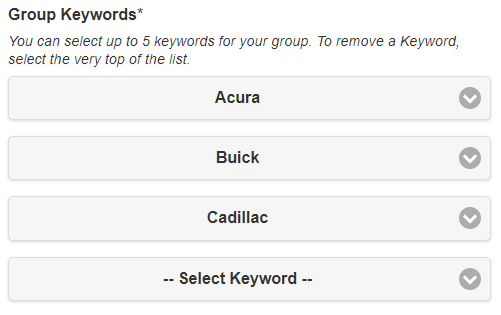
As a work around, I created 5 fields and use javascript to hide/show (during hook_form_alter) the Select List widget each time a term is select
form.elements['group_add_keywords_0'] = {
  title: 'Group Keywords',
  type: 'select',
  required: true,
  description: '<p class="field-form-description">You can select up to 5 keywords for your group. To remove a Keyword, select the very top of the list.</p>',
  description_display: 'before',
  options: options_group_keywords,
  attributes: {
    onchange: widget_group_keyword_onchange_0
  }
};

form.elements['group_add_keywords_1'] = {
  type: 'select',
  options: options_group_keywords,
  attributes: {
    onchange: widget_group_keyword_onchange_1
  }
};

form.elements['group_add_keywords_2'] = {
  type: 'select',
  options: options_group_keywords,
  attributes: {
    onchange: widget_group_keyword_onchange_2
  }
};

form.elements['group_add_keywords_3'] = {
  type: 'select',
  options: options_group_keywords,
  attributes: {
    onchange: widget_group_keyword_onchange_3
  }
};

form.elements['group_add_keywords_4'] = {
  type: 'select',
  options: options_group_keywords,
  attributes: {
    onchange: widget_group_keyword_onchange_4
  }
};