

 signalapp
App suggests unread messages even though no messages are unread
- [X] I have searched open and closed issues for duplicates
Bug Description
In a fresh installation of Signal Desktop, based on a backup of the messages in the old Chrome app, a contact list member has the notification for unread messages even though there are no unread messages.
Clicking the member does not change the indicator, which also appears in the window title, and restarting the application also does not resolve the issue.
This is made worse by #2898, which causes the chats to be sorted in what appears to be a random order, since knowing whether or not you have actually received any new messages becomes more painful, when the new messages can both appear several screens down, or, as in this case, be erroneous entirely.
Screenshots
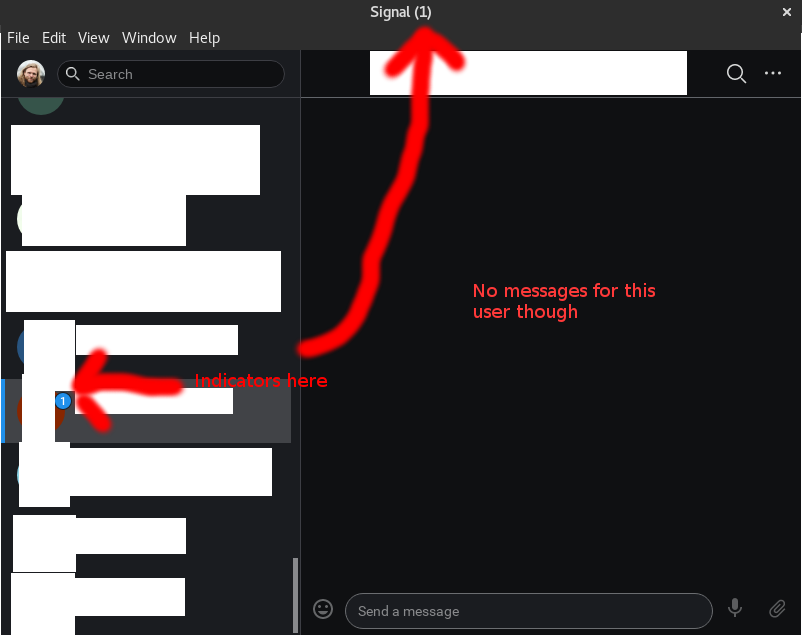
Platform Info
Signal Version:
1.27.4
Operating System:
Linux 4.9.0-11-amd64 #1 SMP Debian 4.9.189-3 (2019-09-02) x86_64 GNU/Linux
Linked Device Version:
Android 4.49.10

@fuglede What do you see on your phone for that conversation?

@scottnonnenberg-signal It looks normal on the phone; most recent activity is a collection of unsecure (SMS) messages.
The user exhibiting the issue deactivated their Signal account some time ago, prior to the import on the new Signal Desktop installation. Can't tell if that's relevant or not though.
Thanks for the additional information. I'd recommend choosing 'Delete Messages' in the top-right for that conversation.
Yep, that resets the indicators from the title bar, so that's good.
It does, however, also remove that user from the list on the left (intended?) making them harder to spot, and if you search for them and find them in "Conversations", the unread indicator is still a "1" as before.
I have this exact same issue with flatpak app on Fedora 40. It's been bugging me... Any way to manually walk the database and force the message read...

@purpleidea do any conversations show when you search for !unread in the conversation search box?

@purpleidea do any conversations show when you search for !unread in the conversation search box?
Indeed, I see that single one pop up. But clicking on it still shows it as unread but I've read everything there.
My Signal Desktop for Windows started showing an unread badge constantly, for one contact, even though there are no unread messages with that contact. I don't see the issue on my iPhone.
I've screenshooted the chat from both Desktop and iOS to show it (attaching to this post).
I've even tried looking through the main and app logs to see if there were something obvious, and while I do see some entries that show that the indicators/badges are set, I'm not really sure what to look for as to the cause.
Signal-Desktop
Signal-iOS
main.log
{
  "level": 30,
  "time": "2024-08-03T10:06:24.577Z",
  "msg": "System tray service: setting unread count to 1"
}
app.log
[
  {
    "level": 30,
    "time": "2024-08-03T10:06:24.258Z",
    "msg": "SocketManager: processing 1 queued incoming requests"
  },
  {
    "level": 30,
    "time": "2024-08-03T10:06:24.375Z",
    "msg": "onReadOrViewReceipt(type=Read, envelope=[REDACTED]175, envelopeId=[REDACTED]b09): Saving 1 sync tasks"
  },
  {
    "level": 30,
    "time": "2024-08-03T10:06:24.376Z",
    "msg": "onReadOrViewReceipt(type=Read, envelope=[REDACTED]175, envelopeId=[REDACTED]b09): Queuing 1 sync tasks"
  },
  {
    "level": 30,
    "time": "2024-08-03T10:06:24.489Z",
    "msg": "updateMessageWithReceipts(timestamp=1722610923490): batch processing 1 receipt"
  },
  {
    "level": 30,
    "time": "2024-08-03T10:06:24.569Z",
    "msg": "Flushing complete processReceiptBatcher for waitBatcher"
  },
  {
    "level": 30,
    "time": "2024-08-03T10:06:24.569Z",
    "msg": "onEmpty: All outstanding database requests complete"
  },
  {
    "level": 30,
    "time": "2024-08-03T10:06:24.571Z",
    "msg": "App loaded - messages: 1"
  },
  {
    "level": 30,
    "time": "2024-08-03T10:28:19.458Z",
    "msg": "Sending 1 read syncs"
  }
]

@briped Hi could you send a full debuglog for this device? https://support.signal.org/hc/en-us/articles/360007318591-Debug-Logs-and-Crash-Reports

@briped Hi could you send a full debuglog for this device? https://support.signal.org/hc/en-us/articles/360007318591-Debug-Logs-and-Crash-Reports
Logs have been sent to [email protected] with the subject "Logs for Signal-Desktop issue 3711 - App claims unread messages, even though no unread exists."
A few notes to the article... The article you linked either isn't up to date, or there's something different about my client. I can open Signal and all that, but I don't see any menu or settings option that in any way relates to "View" or "Debug". I do remember that it should be possible to view the File, View etc. menu, but I can't even find that.
The mail link in the article is formatted wrong. It lacks a mailto: in front of the mail address in the anchor element href attribute :)
@briped Did you happen to have a call in this conversation recently? If you scroll up to that call does the unread notification disappear?
@briped Did you happen to have a call in this conversation recently? If you scroll up to that call does the unread notification disappear?
Sure, there have been calls, and missed calls.
Scrolling way past the date where the issue started (which I believe was somewhere around 1. August 2024 (might be a few days earlier, or a day later) doesn't make the unread badge disappear.
Just scrolling one message back shows the "New messages below" badge with the 1 count. I just tried doing the same in the Call History, with same result (i.e. unread did not disappear). BUT.
I cleared the call history (as those aren't as important as the messages to me), and the unread badge disappeared.
I'm facing the same issue at the moment. Signal Desktop on Windows 10, version: 7.19.1
Unlink device and link it again didn't help. 2 of my contacts are marked with unread messages (only on Desktop) - It's all fine on mobile.

In my case, I was able to clear the unread count on Signal Desktop by scrolling the "Chats" pane on the left side all the way down. There were some stale group chats where a member recently left the group. I don't recall seeing the notification on my mobile.
Perhaps check to see if this is what's happening to you?


@Bruellberg could you try entering "!unread:" in the search bar on the left? Does anything pop up? If you manage to clear the unread message this way - please consider sending a debug log.

When searching for !unread this chats appears, but it's impossible to mark them as read... Whe. Opening and scrolling down - notification about unread messages isn't disappearing. They still there.
Same problem here as described by @briped and @Wadera. When searching for !unread the chat with the "unread" message appears, but it is impossible to mark as read. On my mobile, everything is fine and the chat is marked as red.

@Bruellberg could you try entering "!unread:" in the search bar on the left? Does anything pop up? If you manage to clear the unread message this way - please consider sending a debug log.
This does not work. The affected contact shows up, but there is no specific unread message. There is just the unread message indicator although there is no message below...

as per @robertsiegfried @briped @Wadera Same here, MacOS 7.23.0
No issues on android, only shows in my Mac client. !unread shows the chat, but cannot clear the notification
EDIT - I dont know how I missed it, but there was a missed call in that chat, I deleted the missed call message and it cleared the notification

We introduced a fix in 7.23.0 to try to address this. It might be related to call related messages. After clicking the Calls Tab to mark call history as read, then the unread chat indicator should go away.

Clicking on call history didn't help. I've cleared call history, then opened text chat with all "broken" users and all notifications are finally gone!
Didn't work for me! I see an unread message on my mac desktop app version 7.23.0. I tried mark as unread/read, deleting the message, clicking on call history as suggested, clear call history. Nothing helped, I still see an indicator for one message unread.
Update: Overnight the unread indicator suddenly disappeared.

Clicking on call history didn't help. I've cleared call history, then opened text chat with all "broken" users and all notifications are finally gone!

Can confirm! This also worked on my end.

Dear all,
I also have a problem with unread messages in only ONE chat windows and only on my windows client (all other devices show no unread messages)... I can't get rid of it...
I'm running Signal 7.24.1 on my Win 10 client...
Is there a trick to get rid of this bug? Non of the described suggestions in this chat worked...
Thank you!

@mlinko6 To be clear, you have already tried clearing all of your call history messages from the calls tab?
Could you please include a debuglog? https://support.signal.org/hc/en-us/articles/360007318591-Debug-Logs-and-Crash-Reports
@mlinko6 To be clear, you have already tried clearing all of your call history messages from the calls tab?
Could you please include a debuglog? https://support.signal.org/hc/en-us/articles/360007318591-Debug-Logs-and-Crash-Reports
Dear Jamie,
yes I've done that but it didn't help either:
https://debuglogs.org/desktop/7.24.1/b8058930c8f13ddaa652fdc2fe40e8b8a85d4940b7e84584fb67c874a7b76ac3.gz
Hope this helps!
KR Rok