

 signalapp
End Key not working when cursor is directly before or after an Emoji
- [X] I have searched open and closed issues for duplicates
Bug Description
When entering text in message field for a contact and then going back with the cursor, via mouse or keyboard, and one enters an emoji, the end key does not work to go to the end of the line, while being placed directly after the emoji.
When placing the cursor before the emoji, the end key only goes after the emoji, not to the end of the line.
EDIT: I noticed if there is a non-emoji character before the first emoji and the cursor is placed before the emoji, the end key works again!
Also, this bug occurs with the normal End key on qwerty and qwertz layout as well as with the normal End key and the End key on layer 4 on the key g on the Neo 2 layout.
END EDIT
Steps to Reproduce
- Enter emoji and text afterwards
- Place cursor right before or after emoji
- Press End Key (repeatedly) to go to end of line
Actual Result: Skips emoji or does nothing
Expected Result: Goes to end of line in both cases
Screenshots
Place cursor directly after
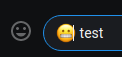 or before
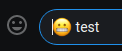 emoji
emoji
Platform Info
Signal Version: 1.27.4
Operating System: Arch Linux rolling latest
Linked Device Version: Signal Android 4.48.16
Link to Debug Log
Signal Desktop Debug log Signal Android Debug Log


Thanks for following up! The layer 4 end key in Neo2 and Noted as well as the qwertz end key is working in front of emojis in 7.48.0.
But now Ctrl + the layer 4 left-arrow (see hovering over "Ebene 4" in the image on the top right) isn’t working anymore, but previously worked. So, pressing Ctrl + (left or right layer 4, so qwertz-<> or AltGr Key) + qwerty-s isn’t behaving as Ctrl + Left-Arrow (it should to go one word to the left). But Ctrl + mod layer 4 + qwerty-f is still working correctly as Ctrl + Right-Arrow to go one word to the right. Even stranger, if adding Shift to the left combination to highlight one (or more for multiple key presses) word to the left, then it’s working. So Ctrl + Shift + mod layer 4 + qwerty-s (with potentially repeatedly pressing qwerty-s) is correctly highlighting the same way Ctrl + Shift + Left-Arrow does.
The same problem is the same in the very similar, and identical regarding keys relevant for this bug, Noted layout.
Hum, I don't have access to such a keyboard, but sorry to hear that. I recommend filing a different ticket.
You might be able to use the "Neo2, Qwerty" variant with a qwerty keyboard and press right alt + s or on a macOS keyboard, set Neo2 as the layout with Karabiner and use the right CMD for mod 4. Otherwise, I think level 4 is just not accessible without either <> or AltGr key which are on European QWERTY versions, QWERTZ, and AZERTY :/ You're probably right with the new ticket. Sorry if it is too off topic and feel free to ignore, but for filing the new issue, is there an easy way to test this with the official build if I'm usually using the flatpak build without messing up or splitting my actual message history? I couldn't find a good guide, maybe moving the whole config directory back and forth and not opening the other desktop variant, or is there a simpler way to test?
I thought a simple way to test it would be to use a text input in the dev tools console or DOM by starting it with --enable-dev-tools. But there, the bug isn’t present. Is there a similar test mechanism where you’d get a text input field without completely syncing one's phone to a new installation?