
Signal-Android
 Signal-Android copied to clipboard
 signalapp
Bubbling conversations does not work on Android 12 on Samsung devices
- [x ] I have searched open and closed issues for duplicates
- [ x] I am submitting a bug report for existing functionality that does not work as intended
- [x ] I have read https://github.com/signalapp/Signal-Android/wiki/Submitting-useful-bug-reports
- [ x] This isn't a feature request or a discussion topic
Bug description
Conversations don't bubble in Android 12 when using Samsung phones. Other apps do bubble properly so it's not that Samsung broke the feature.
When you open a conversation in Signal, clicking the 3 dots menu and then "create bubble" simply adds a notification about the conversation to the notification bar but doesn't actually pop out a bubble like other apps do. Notification can't be clicked (clicking it does nothing at all).
Steps to reproduce
- set Signal conversation to allow bubbling in notification settings (optional)
- open conversation in Signal
- click 3 dots > click Create bubble
- no bubble
Actual result: doesn't bubble Expected result: should create a floating bubble that can be tapped to open the conversation
Screenshots
Device info
Device: Samsung Galaxy Note 10+ 5G Android version: 12 Signal version: 5.35.3
Link to debug log
https://debuglogs.org/android/5.35.3/18c622d0d33388865f68d7f419463b736e17830e1ec0f317eb5997842c9802d1


Duplicate #12036
yeah .. but this person used the template ..so I would close the other one 🙂

Just got a new device and I have this issue as well. Galaxy S22+, OneUI 4.1.
Buggy as well when I select "Create a bubble" to manually create a bubble, in the conversation's overflow menu, inside Signal. It shows an empty, unclickable notification.
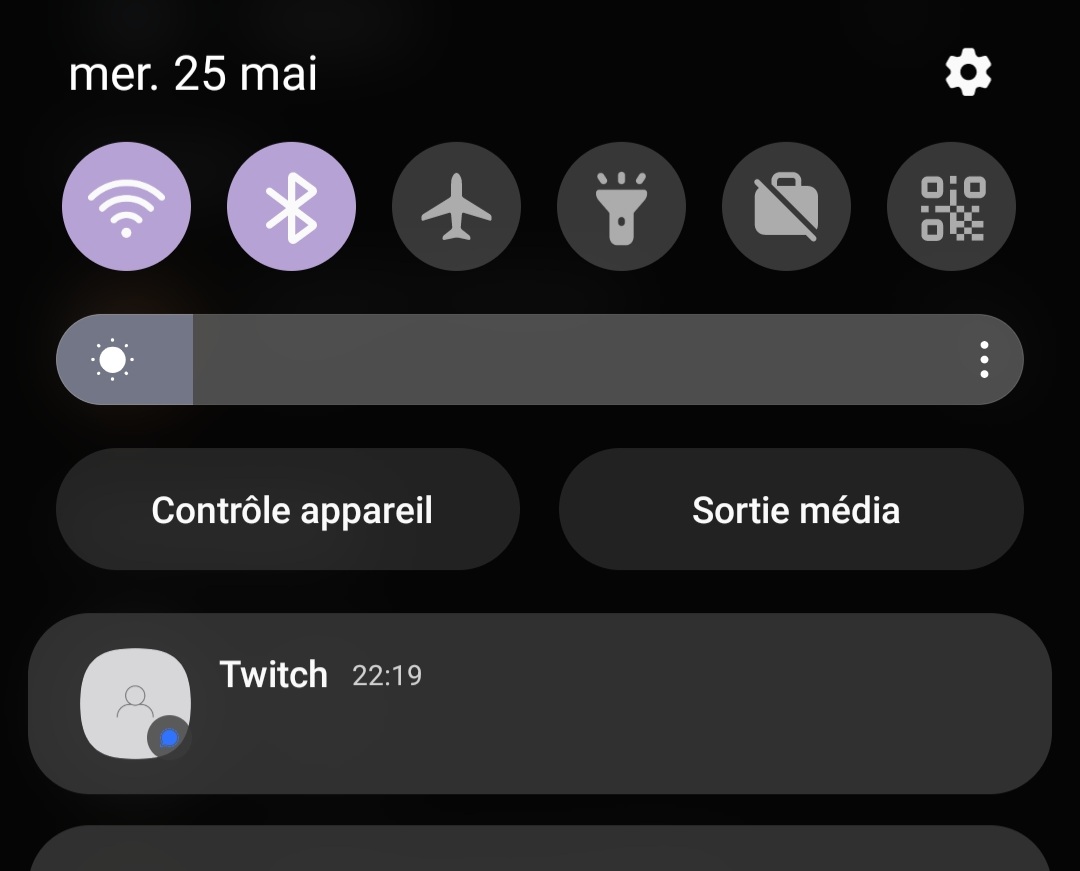
Unclear whether this is a Samsung issue or a Signal issue since this is the only app I use that's supposed to work with this feature. 😕

Well bubbling conversations works perfectly fine in Google Messages on the same Samsung device, so it doesn't seem to be a Samsung thing across the board.
On Wed, May 25, 2022, 3:22 PM Baptiste Candellier @.***> wrote:
Just got a new device and I have this issue as well. Galaxy S22+, OneUI 4.1.
Buggy as well when I select "Create a bubble" to manually create a bubble, in the conversation's overflow menu, inside Signal. It shows an empty, unclickable notification.
[image: Screenshot_20220525-221937_Signal.jpg] https://user-images.githubusercontent.com/490651/170360384-a1e1e67d-45ab-4e91-8046-7191390b2256.jpg
Unclear whether this is a Samsung issue or a Signal issue since this is the only app I use that's supposed to work with this feature. 😕
— Reply to this email directly, view it on GitHub https://github.com/signalapp/Signal-Android/issues/12178#issuecomment-1137812256, or unsubscribe https://github.com/notifications/unsubscribe-auth/ACFNGT4WFZFD4P7AX64QIZTVL2DXFANCNFSM5TZN4SAA . You are receiving this because you authored the thread.Message ID: @.***>

Ok, so I had to manually enable "Allow Bubbles" in the top-level system notifications settings, and then bubble again, which made a notification that I could then manually bubble... What a nightmare.
This doesn't work for me on my Samsung Galaxy Note10+ 5G on Android 12, unless you're describing something else.
- Notifications > Advanced Settings > Floating Notifications > Bubbles (selected)
- Signal's app notification settings are set to "Show as bubbles: All"
- Open conversation in Signal > 3 dots > Create bubble
- This creates a notification…but clicking on it does nothing, and long pressing on it doesn't give me the option to open a bubble.
So I'm not sure what you're saying you did to get this to work, but trying to replicate that based on what it sounds like doesn't change anything for me (in fact, all these settings were this way when I reported the bug, so this isn't any different from how things already were for me).
Message ID: @.***>
I've got one conversation/contact that can bubble, but the rest can't. Maybe I can provide some unique system logs or something to help resolve this issue?
I'm on an S22+ with the latest system updates.

@WindFreaker interesting, a debuglog after bubbling a conversation from an incoming message would be great.
We are in communication with various folks about this issue in an attempt to get it resolved.

I am also on S22+. This is the crash I get when trying to open a bubble. I can provide the rest of the log too if needed.
--------- beginning of crash
07-29 08:43:29.179 29520 29520 E AndroidRuntime: FATAL EXCEPTION: main
07-29 08:43:29.179 29520 29520 E AndroidRuntime: Process: org.thoughtcrime.securesms, PID: 29520
07-29 08:43:29.179 29520 29520 E AndroidRuntime: java.lang.RuntimeException: Unable to start activity ComponentInfo{org.thoughtcrime.securesms/org.thoughtcrime.securesms.conversation.BubbleConversationActivity}: java.lang.NullPointerException: Attempt to invoke virtual method 'void android.os.Bundle.unparcel()' on a null object reference
07-29 08:43:29.179 29520 29520 E AndroidRuntime: 	at android.app.ActivityThread.performLaunchActivity(ActivityThread.java:4035)
07-29 08:43:29.179 29520 29520 E AndroidRuntime: 	at android.app.ActivityThread.handleLaunchActivity(ActivityThread.java:4201)
07-29 08:43:29.179 29520 29520 E AndroidRuntime: 	at android.app.servertransaction.LaunchActivityItem.execute(LaunchActivityItem.java:103)
07-29 08:43:29.179 29520 29520 E AndroidRuntime: 	at android.app.servertransaction.TransactionExecutor.executeCallbacks(TransactionExecutor.java:135)
07-29 08:43:29.179 29520 29520 E AndroidRuntime: 	at android.app.servertransaction.TransactionExecutor.execute(TransactionExecutor.java:95)
07-29 08:43:29.179 29520 29520 E AndroidRuntime: 	at android.app.ActivityThread$H.handleMessage(ActivityThread.java:2438)
07-29 08:43:29.179 29520 29520 E AndroidRuntime: 	at android.os.Handler.dispatchMessage(Handler.java:106)
07-29 08:43:29.179 29520 29520 E AndroidRuntime: 	at android.os.Looper.loopOnce(Looper.java:226)
07-29 08:43:29.179 29520 29520 E AndroidRuntime: 	at android.os.Looper.loop(Looper.java:313)
07-29 08:43:29.179 29520 29520 E AndroidRuntime: 	at android.app.ActivityThread.main(ActivityThread.java:8669)
07-29 08:43:29.179 29520 29520 E AndroidRuntime: 	at java.lang.reflect.Method.invoke(Native Method)
07-29 08:43:29.179 29520 29520 E AndroidRuntime: 	at com.android.internal.os.RuntimeInit$MethodAndArgsCaller.run(RuntimeInit.java:571)
07-29 08:43:29.179 29520 29520 E AndroidRuntime: 	at com.android.internal.os.ZygoteInit.main(ZygoteInit.java:1135)
07-29 08:43:29.179 29520 29520 E AndroidRuntime: Caused by: java.lang.NullPointerException: Attempt to invoke virtual method 'void android.os.Bundle.unparcel()' on a null object reference
07-29 08:43:29.179 29520 29520 E AndroidRuntime: 	at android.os.Bundle.putAll(Bundle.java:293)
07-29 08:43:29.179 29520 29520 E AndroidRuntime: 	at org.thoughtcrime.securesms.conversation.ConversationIntents.createParentFragmentArguments(ConversationIntents.java:77)
07-29 08:43:29.179 29520 29520 E AndroidRuntime: 	at org.thoughtcrime.securesms.conversation.ConversationParentFragment.create(ConversationParentFragment.java:474)
07-29 08:43:29.179 29520 29520 E AndroidRuntime: 	at org.thoughtcrime.securesms.conversation.ConversationActivity.replaceFragment(ConversationActivity.kt:50)
07-29 08:43:29.179 29520 29520 E AndroidRuntime: 	at org.thoughtcrime.securesms.conversation.ConversationActivity.onCreate(ConversationActivity.kt:36)
07-29 08:43:29.179 29520 29520 E AndroidRuntime: 	at org.thoughtcrime.securesms.PassphraseRequiredActivity.onCreate(PassphraseRequiredActivity.java:73)
07-29 08:43:29.179 29520 29520 E AndroidRuntime: 	at android.app.Activity.performCreate(Activity.java:8290)
07-29 08:43:29.179 29520 29520 E AndroidRuntime: 	at android.app.Activity.performCreate(Activity.java:8270)
07-29 08:43:29.179 29520 29520 E AndroidRuntime: 	at android.app.Instrumentation.callActivityOnCreate(Instrumentation.java:1329)
07-29 08:43:29.179 29520 29520 E AndroidRuntime: 	at android.app.ActivityThread.performLaunchActivity(ActivityThread.java:4009)
07-29 08:43:29.179 29520 29520 E AndroidRuntime: 	... 12 more
07-29 08:43:29.180 29520 29520 E SignalUncaughtException: java.lang.RuntimeException: Unable to start activity ComponentInfo{org.thoughtcrime.securesms/org.thoughtcrime.securesms.conversation.BubbleConversationActivity}: java.lang.NullPointerException: Attempt to invoke virtual method 'void android.os.Bundle.unparcel()' on a null object reference
07-29 08:43:29.180 29520 29520 E SignalUncaughtException: 	at android.app.ActivityThread.performLaunchActivity(ActivityThread.java:4035)
07-29 08:43:29.180 29520 29520 E SignalUncaughtException: 	at android.app.ActivityThread.handleLaunchActivity(ActivityThread.java:4201)
07-29 08:43:29.180 29520 29520 E SignalUncaughtException: 	at android.app.servertransaction.LaunchActivityItem.execute(LaunchActivityItem.java:103)
07-29 08:43:29.180 29520 29520 E SignalUncaughtException: 	at android.app.servertransaction.TransactionExecutor.executeCallbacks(TransactionExecutor.java:135)
07-29 08:43:29.180 29520 29520 E SignalUncaughtException: 	at android.app.servertransaction.TransactionExecutor.execute(TransactionExecutor.java:95)
07-29 08:43:29.180 29520 29520 E SignalUncaughtException: 	at android.app.ActivityThread$H.handleMessage(ActivityThread.java:2438)
07-29 08:43:29.180 29520 29520 E SignalUncaughtException: 	at android.os.Handler.dispatchMessage(Handler.java:106)
07-29 08:43:29.180 29520 29520 E SignalUncaughtException: 	at android.os.Looper.loopOnce(Looper.java:226)
07-29 08:43:29.180 29520 29520 E SignalUncaughtException: 	at android.os.Looper.loop(Looper.java:313)
07-29 08:43:29.180 29520 29520 E SignalUncaughtException: 	at android.app.ActivityThread.main(ActivityThread.java:8669)
07-29 08:43:29.180 29520 29520 E SignalUncaughtException: 	at java.lang.reflect.Method.invoke(Native Method)
07-29 08:43:29.180 29520 29520 E SignalUncaughtException: 	at com.android.internal.os.RuntimeInit$MethodAndArgsCaller.run(RuntimeInit.java:571)
07-29 08:43:29.180 29520 29520 E SignalUncaughtException: 	at com.android.internal.os.ZygoteInit.main(ZygoteInit.java:1135)
07-29 08:43:29.180 29520 29520 E SignalUncaughtException: Caused by: java.lang.NullPointerException: Attempt to invoke virtual method 'void android.os.Bundle.unparcel()' on a null object reference
07-29 08:43:29.180 29520 29520 E SignalUncaughtException: 	at android.os.Bundle.putAll(Bundle.java:293)
07-29 08:43:29.180 29520 29520 E SignalUncaughtException: 	at org.thoughtcrime.securesms.conversation.ConversationIntents.createParentFragmentArguments(ConversationIntents.java:77)
07-29 08:43:29.180 29520 29520 E SignalUncaughtException: 	at org.thoughtcrime.securesms.conversation.ConversationParentFragment.create(ConversationParentFragment.java:474)
07-29 08:43:29.180 29520 29520 E SignalUncaughtException: 	at org.thoughtcrime.securesms.conversation.ConversationActivity.replaceFragment(ConversationActivity.kt:50)
07-29 08:43:29.180 29520 29520 E SignalUncaughtException: 	at org.thoughtcrime.securesms.conversation.ConversationActivity.onCreate(ConversationActivity.kt:36)
07-29 08:43:29.180 29520 29520 E SignalUncaughtException: 	at org.thoughtcrime.securesms.PassphraseRequiredActivity.onCreate(PassphraseRequiredActivity.java:73)
07-29 08:43:29.180 29520 29520 E SignalUncaughtException: 	at android.app.Activity.performCreate(Activity.java:8290)
07-29 08:43:29.180 29520 29520 E SignalUncaughtException: 	at android.app.Activity.performCreate(Activity.java:8270)
07-29 08:43:29.180 29520 29520 E SignalUncaughtException: 	at android.app.Instrumentation.callActivityOnCreate(Instrumentation.java:1329)
07-29 08:43:29.180 29520 29520 E SignalUncaughtException: 	at android.app.ActivityThread.performLaunchActivity(ActivityThread.java:4009)
07-29 08:43:29.180 29520 29520 E SignalUncaughtException: 	... 12 more
07-29 08:43:29.238 29520 29520 I JobManager: Successfully flushed.
07-29 08:43:29.276 29520 29520 I Process : Sending signal. PID: 29520 SIG: 9
07-29 08:43:29.516 23562 23562 E crime.securesm: Not starting debugger since process cannot load the jdwp agent.
07-29 08:43:29.517 23562 23562 E USNET   : USNET: appName: org.thoughtcrime.securesms
07-29 08:43:29.519 23562 23562 D ActivityThread: setConscryptValidator
07-29 08:43:29.519 23562 23562 D ActivityThread: setConscryptValidator - put

Just after commenting I noticed there was a new update (5.44.3). Installed it and now the bubbles work. 👍
Still broken for me on the same update; nothing has changed in functionality. Did you do anything fancy to get the bubbles to work?
I did activate "Multi window for all apps" under settings->Advanced features->Labs. Have your tried that?
Guess I spoke too soon. It's back to the old behavior, without anything having changed as far as I can tell. The Labs setting is enabled. But clicking "create bubble" just creates a blank notification that doesn't do anything when clicked.
EDIT: Now 5 minutes later it's working normally again. The inconsistent behavior does seem to be a bug still, but at least it's semi-working. I didn't even reboot my phone between my initial comment and this update; changed nothing, just tried it a fifth time.
@isommers1 can you submit a new debuglog right after trying to create a bubble?
@cody-signal Here's the debug log of a successful bubbling: https://debuglogs.org/android/5.44.3/8644c25cf990968adcfe84569e7aea39f94834fc2a7451862ad03add3bf90508
Haven't gotten it to fail again since my last comment but if I do I'll debug immediately and post that too.
Okay, it just failed to bubble again. Here's the debug log I took immediately after. https://debuglogs.org/android/5.44.3/722f0f4deb4c47102d02f9f4578421ca59d8866f04adaf07f70a93cea5cbff6f
Any update on this issue? The latest update 6.0.6 did nothing to resolve this on my end.
When I activate "Multi Window for all apps" under Settings->Advanced features->Labs, and then open a conversation in Signal > three dots > create bubble, it successfully creates the bubble for me. Android 12, OneUI 4.1, Galaxy Note10+5G.
When I activate "Multi Window for all apps" under Settings->Advanced features->Labs, and then open a conversation in Signal > three dots > create bubble, it successfully creates the bubble for me. Android 12, OneUI 4.1, Galaxy Note10+5G.
Wow, that worked perfectly for me. Thanks!
I have same issue for few days. I have enabled "Multi Window for all apps" and still doesn't work. Samsung Galaxy S22 ultra, android 13, oneUI 5.1.

Samsung does not make it easy to enable Bubbles for 3rd party apps. Here's the steps I had to take to get them to appear on my Galaxy A51 (Android 13):
- "Multi Window for all apps" in Labs is a must.
- In the operating system settings, enable bubbles for Signal. This can be tricky, but you can reliably get to it by doing this:
- Go to a specific chat
- 3-dot menu -> Chat Settings -> Sounds & notifications -> Custom notifications
- Turn on "Use custom notifications"
- Tap "Customize"
- You should now be in the operating system's Settings app.
- Tap "Bubble settings for this app"
- Change to "All" or "Selected only"
- Feel free to disable the custom notifications we enabled in step 3, it was just to allow the shortcut into the system settings.

I'm still having this. I've followed all these random ridiculous steps and nothing helps. I had the problem and it randomly started working one day, then recently OneUI got an update and it stopped working again. I've enabled bubbles for all messages, enabled them for specific messages, multi-window for all apps is enabled.... yet all I get is a blank notification that closes my screen and makes me unlock when I click it.

Just had this issue on my device as well. The only thing that fixed it was going into Signal privacy settings and disabling "Screen Lock - Lock Signal access with Android screen lock or fingerprint." As soon as I disabled that, bubbles work perfectly. I'm not sure if this is intended functionality.
