

 sienori
can't login google from edge
Short description
can't login google from edge to Enable cloud sync (Beta)
Steps to reproduce
- Start browser with clean profile
- Install Tab Session Manager
- Enable cloud sync (Beta)
- Edge browser closes itself
Expected result
Actual result
Platform information
- Platform (OS): Windows 10 Home
- Version of browser: Microsoft Edge 92.0.902.78
- Version of Tab Session Manager: 6.10.0
Additional context

I am facing this similar issue.... however the browser version number is different.
Platform (OS): Windows 10 Professional 64-Bit Microsoft Windows Version: 10.0.19043.1202 Version of browser: Microsoft Edge v93.0.961.38 (Official build) (64-bit) Version of Tab Session Manager: 6.10.0

I can't reproduce the problem. This may be a bug in Edge. Do you get the problem with the new clean profile?

Ok.... Let me list down the steps in multiple scenarios.
I am using new laptop, Fresh Win10 OS Installed, New Edge browser updated. Scenario 1 - I log into my profile in Edge and click Sync What happens:: Tab Session manager gets installed, but I am unable to sync old sessions. Why??? Ohh.. I missed out, logging into Google account. I reach out to settings option, scroll down to "Enable Cloud Sync (beta)" Click on "Sign in with Google" button
A popup turns up, "Tab Session Manager has asked for additional permissions. The extension could: Read and change your data in www.googleapis.com" Click "Allow" or "Deny" As I click allow, the browser closes.
Reopening the browser asks me to restore the tabs, which I guess is the normal behavior
Now, the same thing happens, when I remove and re-install Tab Session Manager within my Profile OR even If I log out of the profile. So, it is a fresh edge with no profile. I re-install Tab session manager Same behavior... I am unable to log into Google and Edge Browser closes... Like "Snap"... and out of sight. NO Error nothing..!!
Hope above thing helps you simulate the issue.
I have the exact same issue as reported by @GreZzLord . Using Version 94.0.992.38 (Official build) (64-bit)

Not sure if this helps but edge crashes out after line 25358 executes on the attached screenshot.
I think it errors when it calls the browser.runtime.sendMessage with the signInGoogle message.
const isSucceeded = await browser.runtime.sendMessage({
  message: "signInGoogle"
}
);
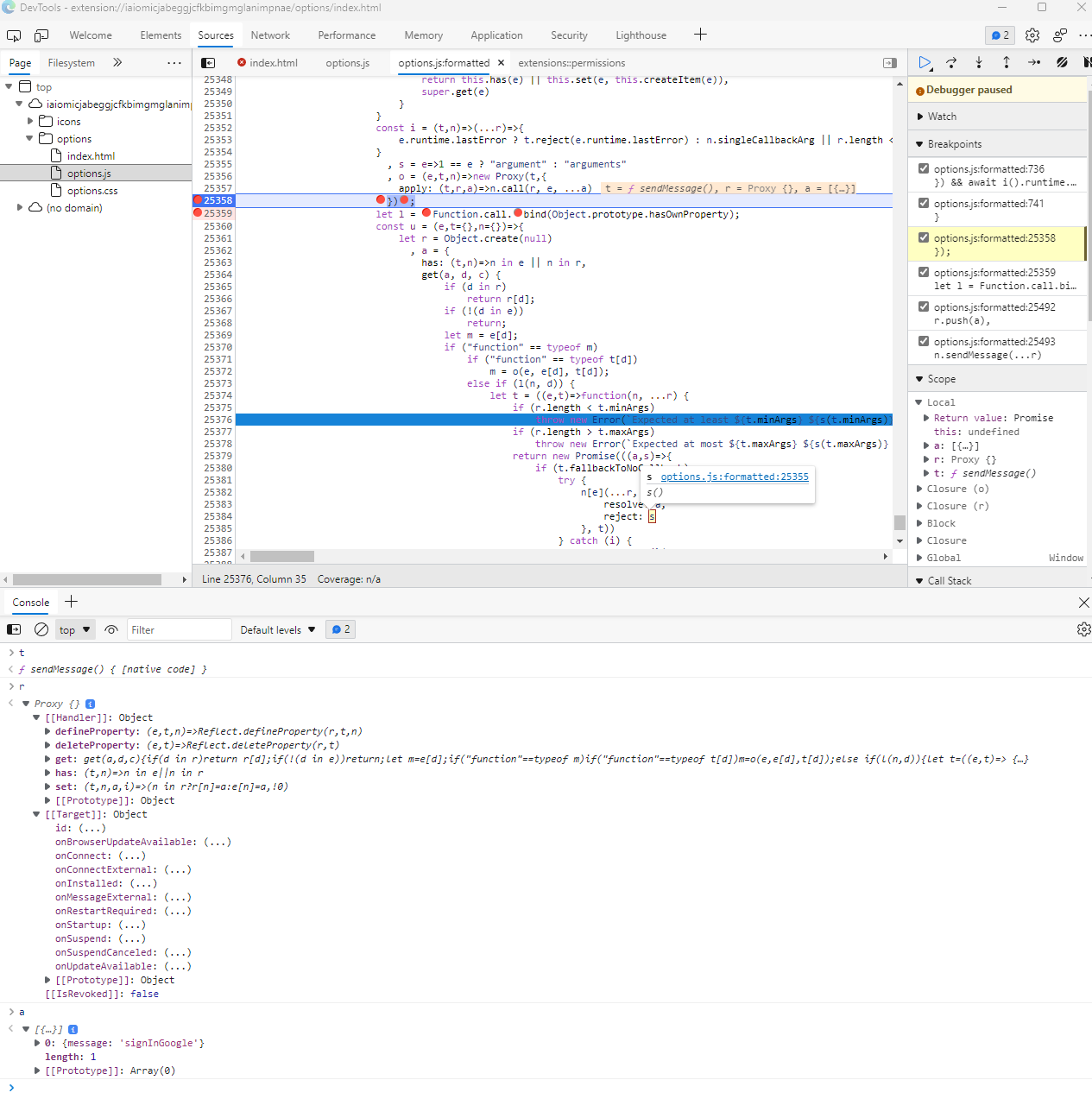
I think my report is related: https://github.com/sienori/Tab-Session-Manager/issues/900 I have reverted to Edge 93.0.961.52 which seemed more stable and blocked Edge updates. It seems stable with Sync off. I'll try enabling Sync later.
Update: Edge got around my update block and I now have 95.0.xxx. I think I will redo the revert to 93.0.961.52 1st and report back...

I managed to get cloud sync on Edge working on another laptop with the same version of windows and edge. But then still on my other device, it continues to crash.
I tried reinstalling edge and resetting all settings and still have the crash issues.
Any ideas on what else to try?
Could this be related? https://techcommunity.microsoft.com/t5/discussions/edge-stable-crashing-on-extension-function-chrome-identity/m-p/2904069
I am having the exact same issue with the following versions:
- Windows 10 - build 19044.1415
- Edge - 97.0.1072.55
It is working correctly on another laptop with the same versions. I have tried rebuilding my failing laptop and starting with a clean Edge profile - but the browser window keeps crashing when selecting the signin with google cloud-sync button.

This is working fine. I have have no problems since last update.. it is over 45 days now.