

 sienori
'open' in new window doesn't work in Firefox105
Hi,
if I saved open Tabs of a firefox-window and try to re-open this session later on, I never had a problem. But now klicking at 'open' does nothing anymore. The only possibility to return to my saved session is to rightklick and choose 'open in current window' or 'add to current window'
Steps to reproduce
If I restart ff with a new and clean profile, tab session manager works fine. But what could be the reason for this misbehaviour in my actual profile? There are no other activated add-ons. Cache and cookies are cleaned.
Actual result
each time I try to re-open a saved session, debug log shows an error 'an unexpected error occurred' - why?
debug log see: www.urlaub-in-sorgenlos.de/console-export.txt (file was too long to insert here)
Platform information
Windows10pro64 21H2 19044.2006 firefox 105.0.1 64bit Tab Session Manager 6.12.1
Any ideas?

Here I thought it was just me. This is also happening to me as well. Several uninstalls, profile deletions, addon deletion experiments, a second firefox install. If I change the setting to "open in current window" then it partially works. the first window tree will open but the second window tree does nothing.
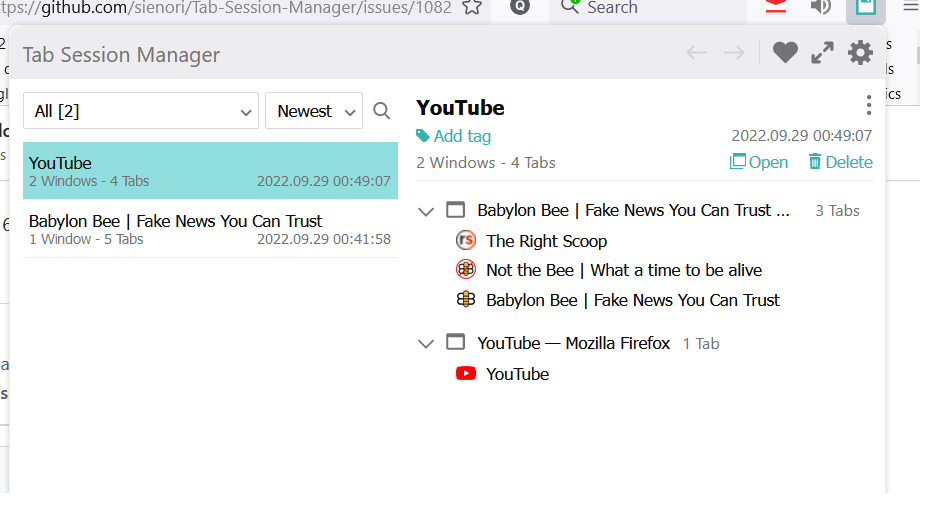

Hi All, seems the Tab-Session Manager does not work anymore. I updated to Firefox 105.0.1 (64-Bit) yesterday, and cannot open saved sessions anymore. When I click 'open' nothing happens. Restart Firefox and the computer did not help.

I'm researching this issue and can't reproduce it... Does the problem occur in Firefox 106.0beta or Firefox Nightly 107.0a1?

Hi @sienori
I just tried to install the 106.0 beta, but I still cannot open saved sessions.
Installing the nightly 107.0a1, which is automatically installed clean into a new folder without transferring any bookmarks or settings, leads to the possibility to open imported sessions.
Something wrong with my firefox-profile? What could be the reason?
@sienori
I think I got it... :-))
I just tried to create a new profile and to copy all my settings step by step into the new profile to see if there's a correlation to these files. But TSM didn't make any problem...
But as I tried to change my startup-page from firefox-standard to user-defined 'www.google.de' TSM showed exactly the numerously described behavior.
Please try to reproduce this.
@sienori
I think I got it... :-))
I just tried to create a new profile and to copy all my settings step by step into the new profile to see if there's a correlation to these files. But TSM didn't make any problem...
But as I tried to change my startup-page from firefox-standard to user-defined 'www.google.de' TSM showed exactly the numerously described behavior.
Please try to reproduce this.
@sienori
@docjochim is correct in that fact that if you set the user defined new window URL to be "www.google.com" this will cause TSM to throw the malformed URI exception. However, if you set that new window URL to be "http://www.google.com" this will still work. It looks like it needs the fully qualified domain. Previously I had my new windows URL to just be "www.google.com" and I'm expecting others to have this same issue.
I had updated to the beta channel but was still experiencing the problem. Once I started defaulting settings (which this was one of) then TSM started to work properly.
Hope this helps.

I changed my FF 105.0.1 homepage FROM www.google.com TO https://www.google.com/
This fixed the problem. I am now able to reopen sessions and new separate windows open properly. This is an odd error.
THANK YOU for finding the answer.
For me it showed up as firefox just cosing immediately after opening, so i was not able to change something. Had to open with CTRL-Icon (or shift?) and refresh FF and loose every opened tab in progress. Had to open the json with notepad++ and open every link manually.

It is 105.0.1. and @Quake1983 solution - changing the starting homepage
- fixed it.
Thank you very much
Am 01.10.2022 um 05:02 schrieb sienori:
I'm researching this issue and can't reproduce it... Does the problem occur inFirefox 106.0beta https://www.mozilla.org/en-US/firefox/106.0beta/releasenotes/ or Firefox Nightly 107.0a1 https://www.mozilla.org/en-US/firefox/107.0a1/releasenotes/?
— Reply to this email directly, view it on GitHub https://github.com/sienori/Tab-Session-Manager/issues/1082#issuecomment-1264212699, or unsubscribe https://github.com/notifications/unsubscribe-auth/ATIKB63DRRAPMLFWUFKHOCTWA6SVRANCNFSM6AAAAAAQYFB2QE. You are receiving this because you commented.Message ID: @.***>
Cross-posting my problem and solution here as it may be useful to others. See https://github.com/sienori/Tab-Session-Manager/issues/1085#issuecomment-1272279708 for the other, related issue.
I my case, I'm on Arch Linux and the problem also started since Firefox v105. My Firefox config for “homepage and new windows” had the string "cache". I think I typed some search some config at some point, but instead of typing in the search box, I accidentally typed it in there :sweat_smile:.
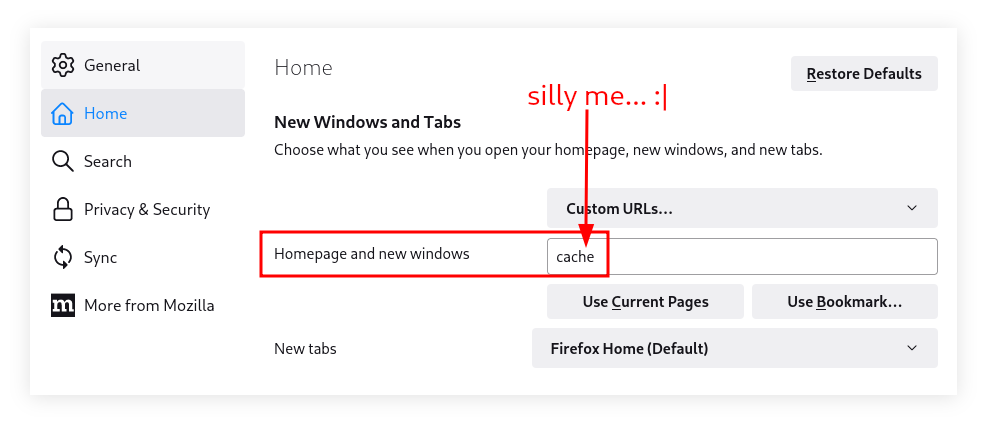
Just using default Firefox home page or a valid URL fixed the problem.
Still, for some reason the problem did not show up until Firefox v105. I'm glad your comments led me to finding it out. Thanks.
@sienori Thanks a lot for your work in this extension.

Just had the same problem (NS_ERROR_MALFORMED_URI exception, mentioning it to make this issue and its workaround easier to find), the workaround of adding "https://" to the startup page URL worked.

Just wondering, would it be possible to use a try catch for this exception and open a window with a blank page if it happens?