

 siemiatj
Dropdown flatlist items won`t render above selection for longer lists
If you use a bit bigger list for options, clicking on an item in dropdown causes a bug where everything above that selected option won`t render unless you scroll the flatList a bit. Here is a working example that demonstrates the bug. I tested this in React Native Web so I am not sure if this is a web-specific issue or it applies to all platforms.
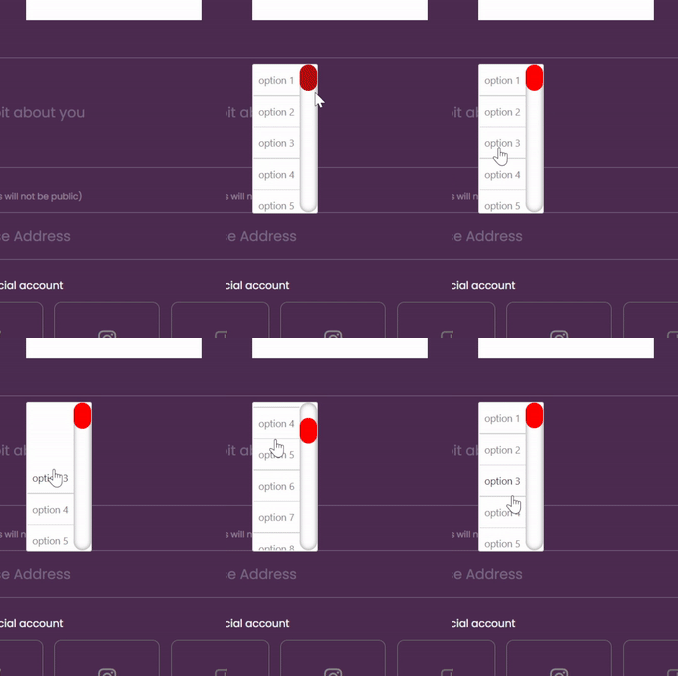
Steps to reproduce
click on the header to open the dropdown Click on option 3 for example, the list will automatically close Re open the list and you will see that everything above option 3 is not rendered initially.
// Define the following list
const DEMO_OPTIONS_1 = ['option 1', 'option 2', 'option 3', 'option 4', 'option 5', 'option 6', 'option 7', 'option 8', 'option 9', 'option 1', 'option 2', 'option 3', 'option 4', 'option 5', 'option 6', 'option 7', 'option 8', 'option 9', 'option 1', 'option 2', 'option 3', 'option 4', 'option 5', 'option 6', 'option 7', 'option 8', 'option 9'];
// Use this to draw the modal
<ModalDropdown
    style={{
        flex: 1,
        top: 32,
        left: 8,
    }}
    options={DEMO_OPTIONS_1}
>
    <View style={{ width: 200, height: 50 }}><Text>Show Dropdown</Text></View>
</ModalDropdown>

Yes I too faced the exact issue on both android and iOS so @Saikedo it is not specific to web. The view gets clipped to 10 items leaving the rest un-rendered both above and below. This seems to be a major issue if you are using this library for large lists.
Can someone please help in resolving this. It might be something to do with Flatlist used inside the library.


@Prakhar-64 we ended up using a customized, local version of the library. Just got rid of all the code that was trying to save the scrolling position in the list and the issue went away. Still hoping that there will be a better/permanent solution for this issue though.
For those who are stil struggling with that, you just need to remove the initialScrollIndex prop in ModalDropdown.js:
initialScrollIndex={saveScrollPosition ? selectedIndex : -1}
Alternatively here's a patch if you use patch-package, name it react-native-modal-dropdown+1.0.2.patch :
diff --git a/node_modules/react-native-modal-dropdown/components/ModalDropdown.js b/node_modules/react-native-modal-dropdown/components/ModalDropdown.js
index c7e4b4f..275b785 100644
--- a/node_modules/react-native-modal-dropdown/components/ModalDropdown.js
+++ b/node_modules/react-native-modal-dropdown/components/ModalDropdown.js
@@ -434,7 +434,8 @@ export default class ModalDropdown extends Component {
         data={options}
         ref={component => (this.flatList = component)}
         scrollEnabled={scrollEnabled}
-        initialScrollIndex={saveScrollPosition ? selectedIndex : -1}
+        // GitHub: https://github.com/siemiatj/react-native-modal-dropdown/issues/49
+        // initialScrollIndex={saveScrollPosition ? selectedIndex : -1}
         style={styles.list}
         keyExtractor={(item, i) => (`key-${i}`)}
         renderItem={this._renderItem}

This issue occurred for me even when the list wasn't long.
react-native: 0.71.6
react: 18.2.0
react-native-modal-dropdown: 1.0.2
Setting saveScrollPosition to false resolved the issue for me.
saveScrollPosition={ false }
