
ribbit
 ribbit copied to clipboard
 shd101wyy
An experimental, decentralized, lightweight social media web application WITHOUT CENTRAL SERVER based on Ethereum platform. 基于以太坊的去中心化,轻量级,无中心服务器的社交程序。
ribbit
Recommend to try this project on Ropsten Test Network.
An experimental, decentralized social media web application based on Ethereum platform.
实验性质的,基于以太坊的去中心化社交程序。
- English
- 中文
Demo:
- ribbit: http://shd101wyy.github.io/ribbit/
#{ribbit}topic (Ropsten): https://shd101wyy.github.io/ribbit/#/3/topic/ribbit
Smart Contract:
- Main Ethereum Network 0x34a435f70226fa44ddd81bb2a546077b7091cf66
- Ropsten Test Network 0xa7191b181ddb0654233554599be89d0fc09cce7d

Below is the obsolete documentation.
Please read this first:
- This project is still under development. We would recommend you to try this project on Ethereum
Ropsten Test Networkinstead ofMain Ethereum Network, because using Ribbit onRopsten Test Networkis completely free of charge, and we might deploy new smart contract in the future and deprecate the old one. We might also make changes to the smart contract onRopsten Test Network, so your posts might lose. Please use this project at your own risk. - You are responsible for whatever you post. Think twice before you make a post because your post will stay on the blockchain forever. It is unchangeable and undeletable. All your posts will stay public on blockchain, so please don't post sensitive data.
- We do not host media files for you. We only save your text written in
markdownto Ethereum blockchain.
- ribbit
- Usage
- Make a post
- Post to topic
- Mention a user
- Embed videos
- What will be saved to blockchain and what will not
- Developer section
- Development
- Deployment
- References
- License
Usage
- Install MetaMask in your Chrome browser and launch it. Follow the MetaMask instructions and create an account.
- Switch to
Ropsten Test Network. Visit the faucet website listed below and request test ethers. Don't worry, they are fake ether coins.- http://faucet.ropsten.be:3001/ and click
request 1 ether from faucet. - https://faucet.metamask.io/ and click
Send me 1 test ether!
- http://faucet.ropsten.be:3001/ and click
- Visit http://shd101wyy.github.io/ribbit/ to start using ribbit. The first time you visit ribbit website, it will ask you to finish a signup. Simply finish the form and then click
Publish profile to blockchainbutton to create your account. Wait for a few minutes until the transaction finishes, then refresh your browser.
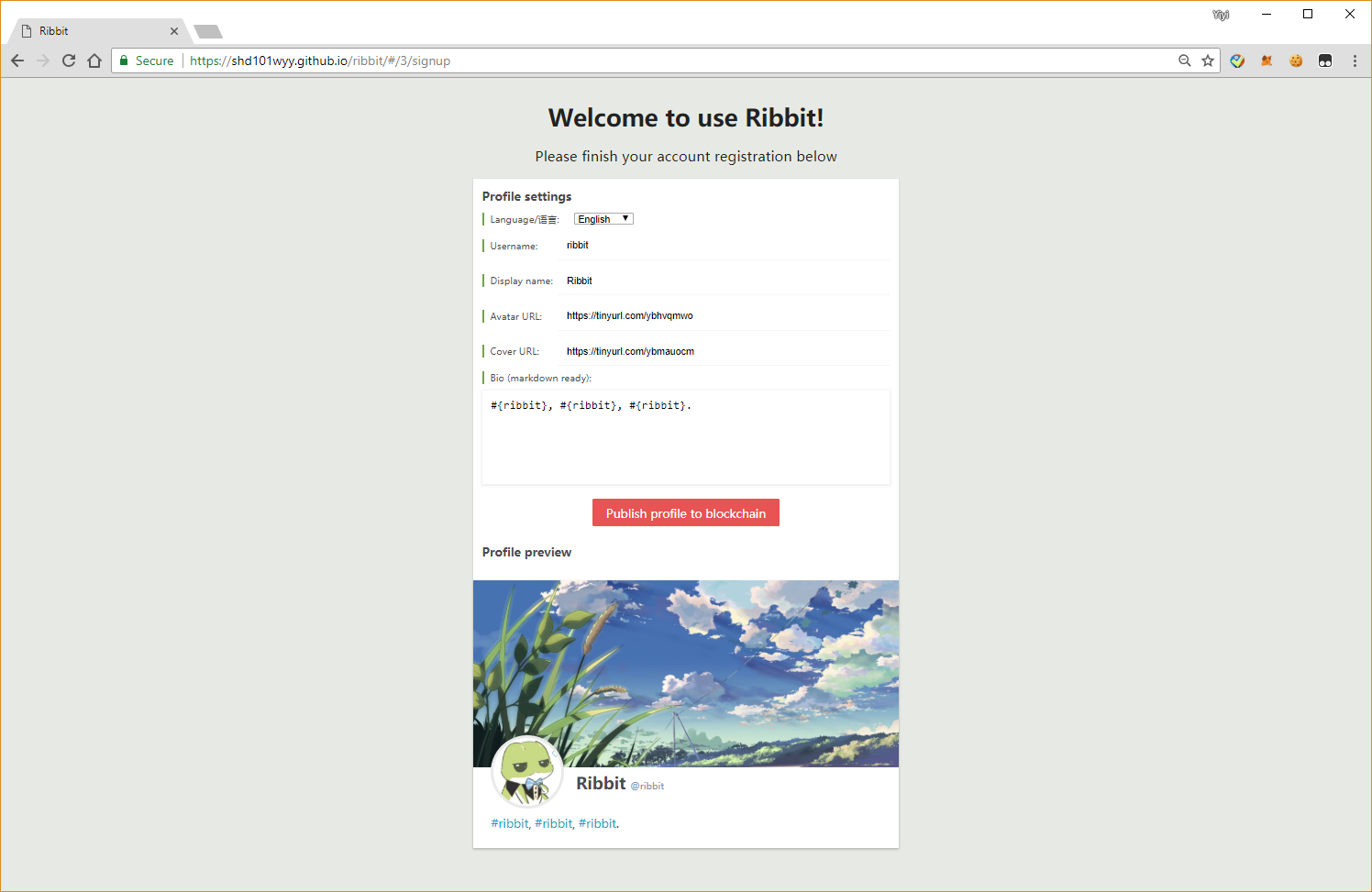
You may notice the
MetaMaskwindow pops up when you clickPublish profile to blockchainbutton, that is because writing data to blockchain isn't free. You would have to pay for the miner to execute the transaction. You only need to change theGas Pricefield in the MetaMask window. The higherGas Priceyou set, the faster the transaction will be executed.
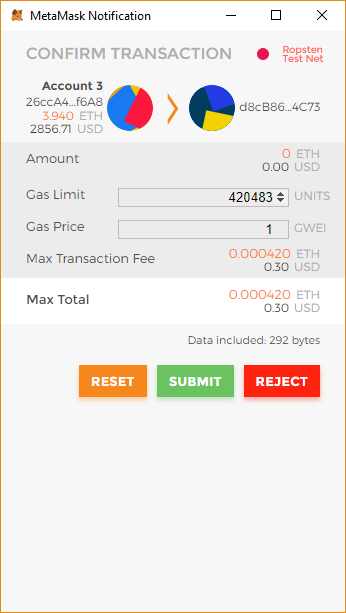
Make a post
To make post, click the green Ribbit button.
Posts in ribbit are written in Markdown. There are two types of posts now:
- Normal post
for example:
This is a normal post written in [markdown](https://github.com/adam-p/markdown-here/wiki/Markdown-Cheatsheet).
- Article post
for example:

# Article title
my content goes here
Post to topic
You can make a post to a topic by writing #{topic}.
For example:
Hello #{world} will post this to `world` topic
Mention a user
You can mention a person in your post by writing @{username}.
For example:
Hi @{ribbit} will notify the user `ribbit` this about post.
Embed videos
For example:
@[mp4](https://www.w3schools.com/html/mov\_bbb.mp4)
@[ogg](https://www.w3schools.com/html/mov\_bbb.ogg)
@[youtube](ZE2HxTmxfrI)
@[vimeo](269637018)
@[vine](5AZm7bleEj5)
@[bilibili](aid=23642605)
What will be saved to blockchain and what will not
Will be on blockchain:
- Your profile information like your username, bio, avatar url, and cover url.
- Your posts written in markdown.
Will not be on blockchain:
- Your media files written in your markdown post, such as images, videos, etc...
- Your followings, faviorite topics, setttings will be saved locally in your browser.
Developer section
Development
$ yarn                  # install necessary node modules for development
                        # on Windows, you might need to run the following in advance:
                        #   $ npm install --global --production windows-build-tools
$ yarn dev              # start building and watching.
                        # then open a new terminal and run =>
$ yarn serve            # start a static http server at address http://127.0.0.1:12345.
Deployment
$ yarn build
then copy ./dist to your server.
References
License
University of Illinois/NCSA Open Source License
 shd101wyy