

 shawnbot
itunes-data dependency "fast-csv" needs upgrade
I fetched [email protected] to my prj. But at this time I was node 8.x and npm 5.x. As result using itunes-data cased me to the issues well described here: https://github.com/npm/npm/issues/19989 . Here is my last. detailed comment: https://github.com/npm/npm/issues/19989#issuecomment-388317640
I did all what people suggested, so final state for me is node v10.1.0 and npm 6.0.1-next.0, but it didn't help me.
Then I realise, that something wrong with my prj, or my prj's dependencies. I discovered, that my project uses itunes-data nested dependencies of fast-csv, which it arrives together with itunes-data based on package.json for dependencies "fast-csv": "^0.4.0",.
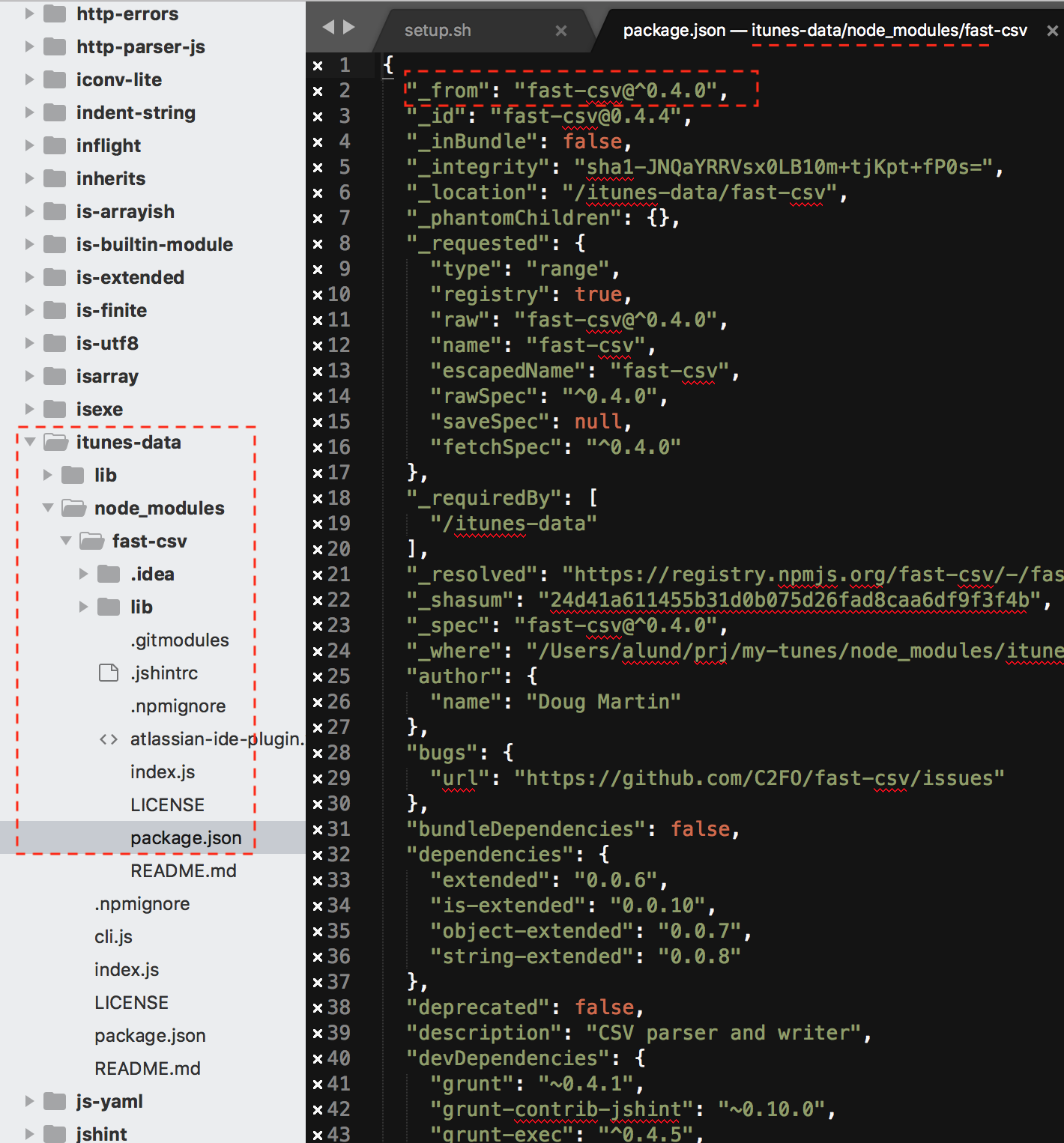
I simply removed that dependency from my-prj/node_modules/itunes-data/node_modules/fast-csv and did npm i fast-csv@latest (which is 2.4.1) in my-prj folder, and when I executed itunes-data command (in fact it's my-prj/node_modules/.bin/itunes-data) all goes well - no ERR_STREAM_WRITE_AFTER_EN error. In fact, when I simply reinstalled fast-csv on root level as 0.6.0 version it also works fine. But not 0.4.0 it still causes and error.
So as I understand correctly, recent node/npm changes, itunes-data should upgrade fast-scv version, so that people can use it in proper way considering they have new node/npm. Version should be at least 0.6.0, better 1.x, but ideal to keep up to date with latest version 2.x.
@shawnbot please consider this as an input for your research.
I cloned your repo, did npm install, executed node cli.js --tracks tracks.csv ~/Music/iTunes/iTunes\ Music\ Library.xml with [email protected] and it throws an error.
Here is proof:
➜  itunes-data git:(master) ✗ node cli.js --tracks tracks.csv ~/Music/iTunes/iTunes\ Music\ Library.xml
reading: /Users/alund/Music/iTunes/iTunes Music Library.xml (2677482 bytes)
events.js:167||||||||||||||||||||||||||||||||||||||] 100 %
      throw er; // Unhandled 'error' event
      ^

Error [ERR_STREAM_WRITE_AFTER_END]: write after end
    at writeAfterEnd (_stream_writable.js:243:12)
    at CsvTransformStream.Writable.write (_stream_writable.js:292:5)
    at CsvTransformStream.write (/Users/alund/prj/_forks/itunes-data/node_modules/fast-csv/lib/formatter.js:167:38)
    at CsvTransformStream._flush (/Users/alund/prj/_forks/itunes-data/node_modules/fast-csv/lib/formatter.js:188:14)
    at CsvTransformStream.prefinish (_stream_transform.js:141:10)
    at CsvTransformStream.emit (events.js:182:13)
    at prefinish (_stream_writable.js:633:14)
    at finishMaybe (_stream_writable.js:641:5)
    at endWritable (_stream_writable.js:652:3)
    at CsvTransformStream.Writable.end (_stream_writable.js:592:5)
Emitted 'error' event at:
    at writeAfterEnd (_stream_writable.js:245:10)
    at CsvTransformStream.Writable.write (_stream_writable.js:292:5)
    [... lines matching original stack trace ...]
    at CsvTransformStream.Writable.end (_stream_writable.js:592:5)
And after upgrade
➜  itunes-data git:(master) ✗ npm install [email protected]
+ [email protected]
updated 1 package in 1.592s
[+] no known vulnerabilities found [106 packages audited]

➜  itunes-data git:(master) ✗ node cli.js --tracks tracks.csv ~/Music/iTunes/iTunes\ Music\ Library.xml
reading: /Users/alund/Music/iTunes/iTunes Music Library.xml (2677482 bytes)

@shawnbot I see u merged #16 but I verified, and it's not working as I expected.
https://www.npmjs.com/package/itunes-data
I also see, that npm publish released v0.1.4 May-07-2018, and my PR merged May-11-2018. So I assume u either republished the same version, or didn't publish at all. That is why, after npm install I still have old version of itunes-data and fast-csv.
$ rm -rf node_modules
$ rm package-lock.json
$ npm cache clean -f
$ npm install itunes-data@latest --save

> [email protected] install /Users/alund/prj/my-tunes/node_modules/node-expat
> node-gyp rebuild

  CC(target) Release/obj.target/expat/deps/libexpat/lib/xmlparse.o
  CC(target) Release/obj.target/expat/deps/libexpat/lib/xmltok.o
  CC(target) Release/obj.target/expat/deps/libexpat/lib/xmlrole.o
  LIBTOOL-STATIC Release/libexpat.a
  CXX(target) Release/obj.target/node_expat/node-expat.o
  SOLINK_MODULE(target) Release/node_expat.node
npm notice created a lockfile as package-lock.json. You should commit this file.
npm WARN [email protected] No repository field.

+ [email protected]
added 35 packages from 47 contributors and audited 107 packages in 16.661s
found 0 vulnerabilities

$ npm ls
└─┬ [email protected]
  ├─┬ [email protected]
  │ ├─┬ [email protected]
  │ │ └─┬ [email protected]
  │ │   └── [email protected]
  │ ├─┬ [email protected]
  │ │ └── [email protected] deduped
  │ ├─┬ [email protected]

....
And I'm on node v10.11.0, npm v6.4.1.
@shawnbot UPD.
Latest version of fast-csv is 2.5.0. But continuing topic of this issue, even version 0.6.0 is OK.
But (see my previous comment), you either:
- publish
[email protected]or - let me know, and I will create new PR with upgrade to
[email protected], but in this case, I don't know much about breaking changes, u will need to test, or let me know how to verify itunes-daat work with such major fast-cv version change.
PS. I can confirm, that using [email protected] works OK.
├─┬ [email protected] (git+https://github.com/shawnbot/itunes-data.git#0e89c1db9053a0b45f7715ad84efbf2c8106fcd7)
│ ├─┬ [email protected]
│ │ ├── [email protected] deduped
so I install directly from github - master branch, and it's visible from npm ls, that it fetches [email protected]. Any my local test code of using it works fine:
setup.sh:
./node_modules/.bin/itunes-data --tracks data/tracks.csv "$FILE" # doesn't work with [email protected]
./node_modules/.bin/itunes-data --tracks data/tracks.tsv "$FILE" # doesn't work with [email protected]
./node_modules/.bin/itunes-data --tracks data/tracks.json "$FILE"
./setup.sh
reading: /Users/alund/Music/iTunes/iTunes Music Library.xml (2961056 bytes)
reading: /Users/alund/Music/iTunes/iTunes Music Library.xml (2961056 bytes)
reading: /Users/alund/Music/iTunes/iTunes Music Library.xml (2961056 bytes)