

 sharkdp
wrap=never doesn't respect --terminal-width
What steps will reproduce the bug?
I'm using bat as preview tool on a fzf sidepanel, and I'd like to avoid wrapping lines as otherwise reading the output is messier; unfortunately, I can't seem to be able to make bat truncate the lines and not wrap them, and not sure if this is not working correctly or if I'm just not using it properly
the easiest case I can replicate this with is by just having a 9 character file, using bat to display its contents, limiting the terminal width to just 5 characters and disable wrapping
echo 12345679 > testfile.txt
bat --terminal-width=5 --wrap=none --style=plain
# or
bat --terminal-width=5 --chop-long-lines --style=plain
What happens?
bat displays all 9 characters which overflows the limit of characters I've passed via arguments
123456789
What did you expect to happen instead?
bat should just display the first 5 characters, and truncate the rest, dropping them
12345
How did you install bat?
brew
bat version and environment
Software version
bat 0.23.0
Operating system
macOS 12.6 (Darwin 21.6.0)
Command-line
bat testfile.txt --terminal-width=5 --wrap=never --style=plain --diagnostic
Environment variables
SHELL=/usr/local/bin/fish
PAGER=<not set>
LESS=<not set>
LANG=en_GB.UTF-8
LC_ALL=<not set>
BAT_PAGER=<not set>
BAT_CACHE_PATH=<not set>
BAT_CONFIG_PATH=<not set>
BAT_OPTS=<not set>
BAT_STYLE=<not set>
BAT_TABS=<not set>
BAT_THEME=<not set>
XDG_CONFIG_HOME=~/.config
XDG_CACHE_HOME=<not set>
COLORTERM=truecolor
NO_COLOR=<not set>
MANPAGER=<not set>
System Config file
Could not read contents of '/etc/bat/config': No such file or directory (os error 2).
Config file
Could not read contents of '~/.config/bat/config': No such file or directory (os error 2).
Custom assets metadata
Could not read contents of '~/.cache/bat/metadata.yaml': No such file or directory (os error 2).
Custom assets
'~/.cache/bat' not found
Compile time information
- Profile: release
- Target triple: x86_64-apple-darwin
- Family: unix
- OS: macos
- Architecture: x86_64
- Pointer width: 64
- Endian: little
- CPU features: fxsr,sse,sse2,sse3,ssse3
- Host: x86_64-apple-darwin
Less version
> less --version
less 581.2 (POSIX regular expressions)
Copyright (C) 1984-2021  Mark Nudelman

less comes with NO WARRANTY, to the extent permitted by law.
For information about the terms of redistribution,
see the file named README in the less distribution.
Home page: https://greenwoodsoftware.com/less

According to the v0.23.0 changelog, -S and --chop-long-lines are an alias for --wrap=never,
https://github.com/sharkdp/bat/blob/e828d7840acc8abfd3f803e9f6b50d887cc547d7/CHANGELOG.md?plain=1#L23
It seems that --chop-long-lines is a bit of a misleading name for that flag, since bat doesn't actually have a mode for truncating lines. That being said, it shouldn't be too difficult to leverage the existing --wrap=character code to ignore subsequent lines instead of printing them. We could name it --wrap=truncate?
The only question left is: should we indicate truncated lines, and if so, how? A couple options:
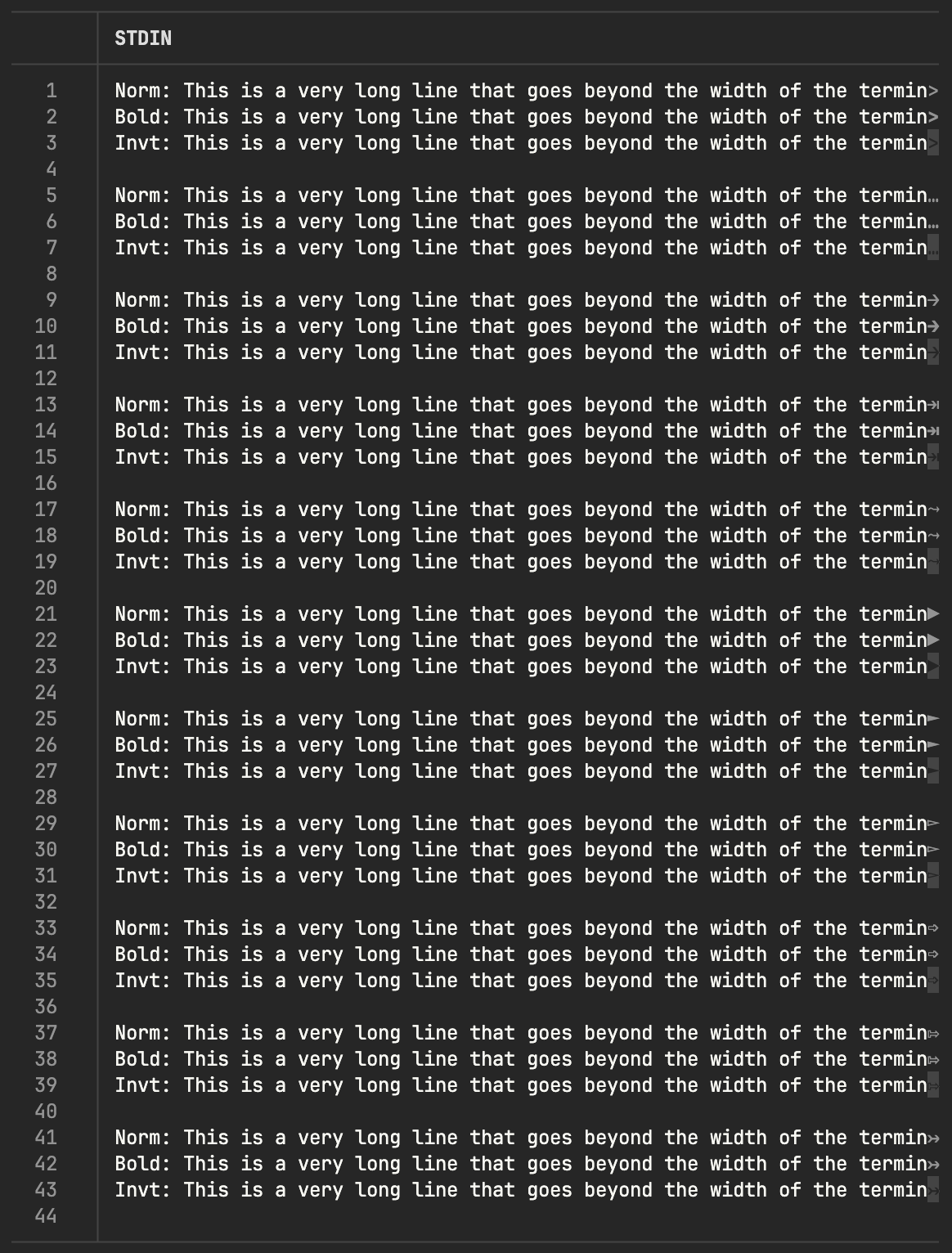
I'd probably say bold ellipsis … (line 6) is my pick, with regular squiggly (line 17) as my next favourite. If we need a symbol that isn't unicode, we could use inverted greater-than > (line 3) for that.
@sharkdp @Enselic @keith-hall, thoughts?

line 6 also looks the best in my opinion, thanks for clarifying this, the alias flag indeed misled me to think that I could truncate lines; it would be nice to have that option indeed
I was in the same boat—definitely thought --chop-long-lines would truncate the output lines so the line would fit in my terminal without wrapping.

