
react-native-video-processing
 react-native-video-processing copied to clipboard
 shahen94
Please update the README for iOS adding following
Please detail in the README the process of linking for iOS. Precisely, currently there is only "Import RNVideoProcessing.h into your project_name-bridging-header.h.". Which is far from obvious for those not familiar with bridging. Please indicate, first, what should be the contents of this file (this I found in other issues, but it took time). And still, I've followed every single instruction and was still getting 50+ compilation errors. Until I added the Objective-C Bridging Header in the Build Settings. AND I had to set the Swift language to 3.2, since under 4 there was a bunch of errors (I'm using the latest XCode).
To summarize, the additions I suggest:
Say that quite possibly you need to create the bridge file AppName-Bridging-Header.h in the main app folder.
Include in the docs the exact content of the bridge file. I guess it's something like (need to replace the AppName with the project name).
#ifndef AppName_Bridging_Header_h
#define AppName_Bridging_Header_h


#import <React/RCTRootView.h>
#import <React/RCTView.h>
#import "React/RCTBridgeModule.h"
#import "RNVideoProcessing.h"


#endif /* AppName_Bridging_Header_h */
Precise the need to set Objective-C Bridging Header in Build Settings to the name of the file created (AppName-Bridging-Header.h)
Precise the need to set Swift Language Version to Swift 3.2 (in Xcode 9).
Only after this I managed to make it all working for iOS. So I guess it will be helpful to others.
By the way, I was also having issues with the android setup, something Dex-related, but googling helped.

And one more thing that should be added to the text version of the manual. Otherwise having issues with running on real device, while on simulator everything is fine.
After adding frameworks to Linked Frameworks and Libraries, the next step is to add exclusively the GPUImage.framework under Embedded Binaries (shown at 2:37 of the video). Since it's only GPUImage that needs to be added, it's easy to keep this part unnoticed. Thanks @gcheong for this in his comment in #68
On Xcode 9, I could not see neither Objective-C Bridging Header nor Swift Language Version

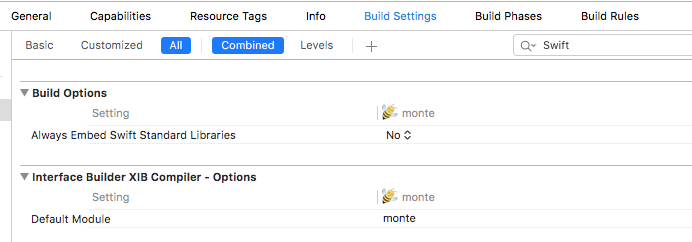
Please help

Solved the issue. I need to create an empty swift file for those options to be enabled.
I have the same issue - to the extent that I have to find another solution. That's a shame...

@amberv0 can you create a PR with those additions. Im sure @shahen94 would be happy to accept it.

@amberv0 can these setup steps being automated by react-native link after npm install?

@doodlewind - I can't comment on whether they can be automated but what I can say is that currently using react-native link will try and link the project and end up breaking it (for me at least). I had to undo this change with react-native unlink react-native-video-processing


I have followed these instructions TO THE LETTER and am still getting
error opening input file '/Users/me/Repo/AppName/node_modules/react-native-video-processing/ios/RNVideoProcessing-Bridging-Header.h' (No such file or directory)
- Where is AppName_Bridging_Header.h supposed to be located? What's in it?
- What's the value of the Objective-C Bridging Header in Build Settings?
- Why is it trying to access a file that doesn't exist in a path we have no real access to ( /ios/RNVideoProcessing-Bridging-Header.h which I understand should be /ios/RNVideoProcessing/RNVideoProcessing-Bridging-Header.h - which is a whole other eyebrow raiser...)?
And if I move the file from "ios/RNVideoProcessing/..." to just "ios/..." I get 98 compile errors, and 247... warnings
Seriously...? What's the solve here?

@vs-lance
- I have
AppName_Bridging_Header.hinsideAppRootDir/ios/HERE - Can't answer that I'm afraid - not an Objective-C dev - but it seems to work
- Looking at the Github source code, the file appears to be in the correct directory. Same result when I
npm installa fresh copy of it.
Be careful moving files - I think there is a difference between physically moving a file (with mv) and modifying where XCode is looking for it...
A couple of things to check:
- Do you ensure you clean the entire project after performing the above steps?
- Have you ever run
react-native link- undo this (react-native unlink react-native-video-processing) if you have (and in future only link the specific module)
Thanks!
I did cleaning as well as undoing react-native link. I'm starting with a clean project this morning, because I think the issue is related to another package which uses CocoaPods to install its dependencies. And I think they might be clashing somehow. If I learn anything useful I'll be sure to let everyone know!
On Thu, Mar 8, 2018 at 1:19 AM, Josh Mustill [email protected] wrote:
@vs-lance https://github.com/vs-lance
- I have AppName_Bridging_Header.h inside AppRootDir/ios/HERE
- Can't answer that I'm afraid - not an Objective-C dev - but it seems to work
- Looking at the Github source code, the file appears to be in the correct directory https://github.com/shahen94/react-native-video-processing/blob/master/ios/RNVideoProcessing/RNVideoProcessing.h. Same result when I npm install a fresh copy of it.
Be careful moving files - I think there is a difference between physically moving a file (with mv) and modifying where XCode is looking for it...
A couple of things to check:
- Do you ensure you clean the entire project after performing the above steps?
- Have you ever run react-native link - undo this (react-native unlink react-native-video-processing) if you have (and in future only link the specific module)
— You are receiving this because you were mentioned. Reply to this email directly, view it on GitHub https://github.com/shahen94/react-native-video-processing/issues/144#issuecomment-371428606, or mute the thread https://github.com/notifications/unsubscribe-auth/AivNiTEAyuQ6sUwCar6Rjt3K3R4Vs9cTks5tcPe0gaJpZM4Q7E_E .
It seems there is a conflict with react-native-image-crop-picker (ICP) which strongly encourages using cocoapods for its installation. I was starting from a fresh react-native init which installed RN 0.54, but ICP's cocoapods scripts insisted on RN 0.52 - and somewhere in this process a conflict arose with RNVideoProcessing.
Creating a brand new RN app and only installing RNVideoProcessing (again, following the above instructions) is currently working. I have not tried re-installing ICP.
So my recommendation is: if you're going to use RNVideoProcessing, install it early on in your project, run copious backups, and add other libraries very carefully (if at all...).
@vs-lance , I successfully installed both, though I have RN 0.52. I used pods for react-native-image-crop-picker and manual installation for RNVideoProcessing
Interesting. I actually installed both successfully about 2 - 3 months ago with RN 52.. Maybe the issue is with RN 54, or maybe it's the order I did things this time(I installed rn-image-crop-picker first), or maybe there's gremlins...
@vs-lance Did you found any solution to make this package work on RN 54? I keep getting problems with the RNVideoProcessing.h file. First it couldn't find the file, after some changes it started yelling about compile errors in the GPUImage framework...

Two ways worked for me. One was to start with a totally clean app and install RNVideoProcessing first. Then never ever use cocoa pods or 'react native link' without a package name.
The other was to start with RN52 follow the above process, then 'react-native-git-upgrade'
RN 54 has lots of potential, but it definitely doesn't feel ready for prime time...
On Thu, Mar 15, 2018 at 5:23 AM jeffreyhaen [email protected] wrote:
@vs-lance https://github.com/vs-lance Did you found any solution to make this package work on RN 54? I keep getting problems with the RNVideoProcessing.h file. First it couldn't find the file, after some changes it started yelling about compile errors in the GPUImage framework...
— You are receiving this because you were mentioned. Reply to this email directly, view it on GitHub https://github.com/shahen94/react-native-video-processing/issues/144#issuecomment-373358193, or mute the thread https://github.com/notifications/unsubscribe-auth/AivNiaGxIimtpncbhdZKCVky9H3KIUtVks5tel1agaJpZM4Q7E_E .
@vs-lance No luck so far. I've tried to make it work with a fresh RN52 and RN54 project. Followed every step in the manual and i tried multiple workarounds by including the RNVideoProcessing project. It keeps having some path issues. :(

I had to abandon ship. Sorry...
On Mon, Apr 16, 2018 at 9:03 PM, Aaron Vasquez [email protected] wrote:
Are there any updates? I haven't been able to get this to work :(
— You are receiving this because you were mentioned. Reply to this email directly, view it on GitHub https://github.com/shahen94/react-native-video-processing/issues/144#issuecomment-381830951, or mute the thread https://github.com/notifications/unsubscribe-auth/AivNiTIMdwrfYpqs4UOIw5CTgAhzHHIIks5tpWl-gaJpZM4Q7E_E .
@AaronVasquez @vs-lance I got it working. The key to success was to import the folder RNVideoProcessing and the file GPUImage.xcodeproj not as a reference. After that i was able to compile the project. I also had to add the GPUImage library as a Embedded Binary under the general projectsettings to make it work runtime (as shown in the video).
+1!
On Wed, Apr 18, 2018 at 5:48 AM, jeffreyhaen [email protected] wrote:
@AaronVasquez https://github.com/AaronVasquez @vs-lance https://github.com/vs-lance I got it working. The key to success was to import the folder RNVideoProcessing and the file GPUImage.xcodeproj not as a reference. After that i was able to compile the project. I also had to add the GPUImage library as a Embedded Binary under the general projectsettings to make it work runtime (as shown in the video).
— You are receiving this because you were mentioned. Reply to this email directly, view it on GitHub https://github.com/shahen94/react-native-video-processing/issues/144#issuecomment-382374553, or mute the thread https://github.com/notifications/unsubscribe-auth/AivNiX5FXvzkeiBqu3rMvsKUsswYzSp4ks5tpzYggaJpZM4Q7E_E .
Hmmm I ran into this problem today, the same node_modules/ios/RNVideoProcessing-Bridging-Header.h not found issue (not the AppName-Bridging-Header.h file). I tried importing the folder not as a reference (although Idk how to do that with the GPUImage.xcodeproj file since dragging it into XCode doesn't prompt anything).
<unknown>:0: error: error opening input file '/Users/omar/code/raha/mobile/node_modules/react-native-video-processing/ios/RNVideoProcessing-Bridging-Header.h' (No such file or directory)
I'm not sure what even requires that, but if you wanna look at my code it's here. Not sure how to continue :P

@osdiab Instead of dragging the folder/files into your project you should try right clicking your project and choose "Add files to 'MyProjectName'...". Then click "Options" for extra settings like picking targets and if you would like to create a reference or not. That should work. :)
Word, tried adding them that way and still getting the same issue though. really frustrating that there isn't a clear consensus for how to deal with this issue. but maybe the presence of cocoapods in our project is a problem, guess i can try incrementally reinstalling everything with this library first (quite the pain, given that we have a lot of other dependencies with custom install instructions themselves...)
Would appreciate a comment from @shahen94 or someone knowledgable of this issue if you have any insights, my inexperience with both react-native and the ios build system is making this pretty hard to debug independently.
error opening input file '/Users/mac/Desktop/React-Native-Sny/RNCameraSample/node_modules/react-native-video-processing/ios/RNVideoProcessing-Bridging-Header.h' (No such file or directory)
I have the same problem. I tried all the possibilities describe above. I Shows the wrong directory path.

@doodlewind - I can't comment on whether they can be automated but what I can say is that currently using
react-native linkwill try and link the project and end up breaking it (for me at least). I had to undo this change withreact-native unlink react-native-video-processing
Thank you @JoshM1994 , I highly recommend for anyone that's having the issue with
error opening input file '/Users/../node_modules/react-native-video-processing/ios/RNVideoProcessing-Bridging-Header.h' (No such file or directory)
to just try react-native unlink react-native-video-processing, since that's exactly what fixes this particular issue.

Anyone got it working? My project builds, but i get this error at runtime: "Cannot read property 'Constants' of undefined".

