

 shadcn-ui
Datepicker: There no way to select year. If we have enter our birth date just click click click until you reach your birth year

Please add a feature to select years and months directly from popover. It would be great


Indeed, it would be good to have year and month selection for the data picker when working with birthdate

I was able to come up with something custom… not sure it’s anywhere ready for mass adoption
On Fri, 9 Jun 2023 at 18:18, Destino Dello @.***> wrote:
Indeed, it would be good to have year and month selection for the data picker when working with birthdate
— Reply to this email directly, view it on GitHub https://github.com/shadcn/ui/issues/546#issuecomment-1584908497, or unsubscribe https://github.com/notifications/unsubscribe-auth/AIJNV52WFAEYWLLABIEWYXTXKNLFDANCNFSM6AAAAAAY4KJTTI . You are receiving this because you commented.Message ID: @.***>
I made an example of a date picker with shadcn + react-aria where it is possible to let the user fill the date manually
Installation
npm i react-aria react-stately @internationalized/date date-fns
npx shadcn-ui add popover
Copy date-picker.tsx and calendar.tsx files
Usage
<DatePicker label="Pick a date" />

// or

<DatePicker label="Pick a date">
  <DateField />
</DatePicker>
https://codesandbox.io/p/sandbox/long-snowflake-46xcs8?file=%2Fapp%2Fpage.tsx

@joaom00 I couldn't figure out how to select dates manually in this codesandbox example:
I find it the same default datepicker as usual, or is there something else I needed to run before seeing the output?
[image: Screenshot 2023-06-14 at 10.50.01.png][image: Screenshot 2023-06-14 at 10.49.47.png]
I had to create my own custom date picker with variants, this is a custom date of birth picker, it doesn't allow you to select future dates besides the current date but you can select past years and months
On Wed, Jun 14, 2023 at 5:37 AM Hemant @.***> wrote:
@joaom00 https://github.com/joaom00 I couldn't figure out how to select dates manually in this codesandbox example:
[image: image] https://user-images.githubusercontent.com/85151171/245676275-23c75841-f194-4f91-8ba1-ca49ca5c619d.png
I find it the same default datepicker as usual, or is there something else I needed to run before seeing the output?
— Reply to this email directly, view it on GitHub https://github.com/shadcn/ui/issues/546#issuecomment-1590454944, or unsubscribe https://github.com/notifications/unsubscribe-auth/AIJNV57K5GIJJKVFZZMUCU3XLE5XBANCNFSM6AAAAAAY4KJTTI . You are receiving this because you commented.Message ID: @.***>
Source code? Le mer. 14 juin 2023 à 12:14, Shahreaz Bin Alam @.***> a écrit :
[image: image] https://user-images.githubusercontent.com/92302555/245772881-19631ce9-68ca-40ed-a693-6f87b7a6d745.png
— Reply to this email directly, view it on GitHub https://github.com/shadcn/ui/issues/546#issuecomment-1590992612, or unsubscribe https://github.com/notifications/unsubscribe-auth/AC3A5XPDKSDSKOJQ5ZPFRILXLGMKHANCNFSM6AAAAAAY4KJTTI . You are receiving this because you commented.Message ID: @.***>
I had to create my own custom date picker with variants, this is a custom
date of birth picker, it doesn't allow you to select future dates besides
the current date but you can select past years and months
@filigreti Select is certainly better in terms of UX, but still, you will need to scroll to find your year and it is much more difficult than just entering it into input for example, as @joaom00 did

@filigreti Select is certainly better in terms of UX, but still, you will need to scroll to find your year and it is much more difficult than just entering it into input for example, as @joaom00 did
I originally wanted to use a search dropdown (combobox) where you can easily search for the year and month, but i ran through some issues with height and overflow, im currently working on making it a combobox, i just wanted something i could use for now
@filigreti can you please provide the code for this date picker
I had to create my own custom date picker with variants, this is a custom date of birth picker, it doesn't allow you to select future dates besides the current date but you can select past years and months
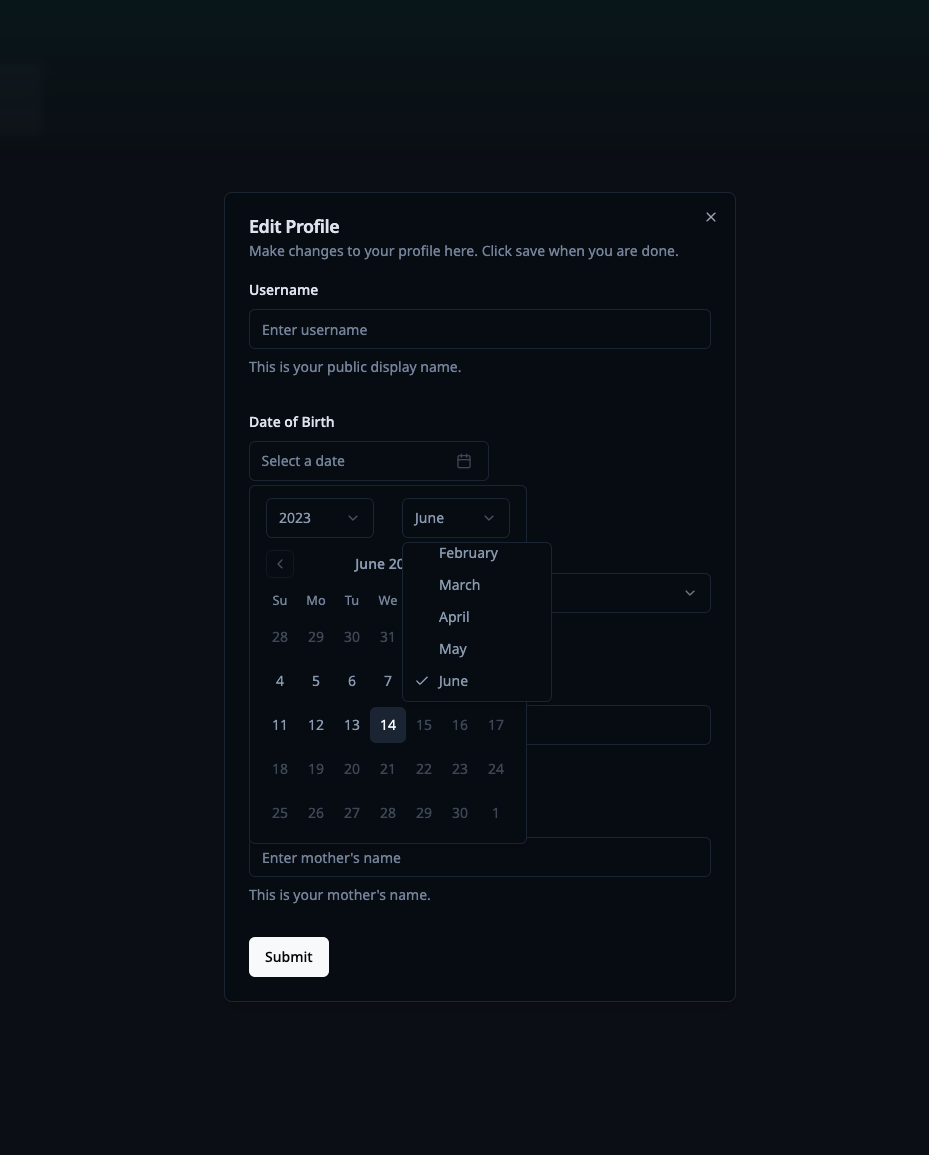
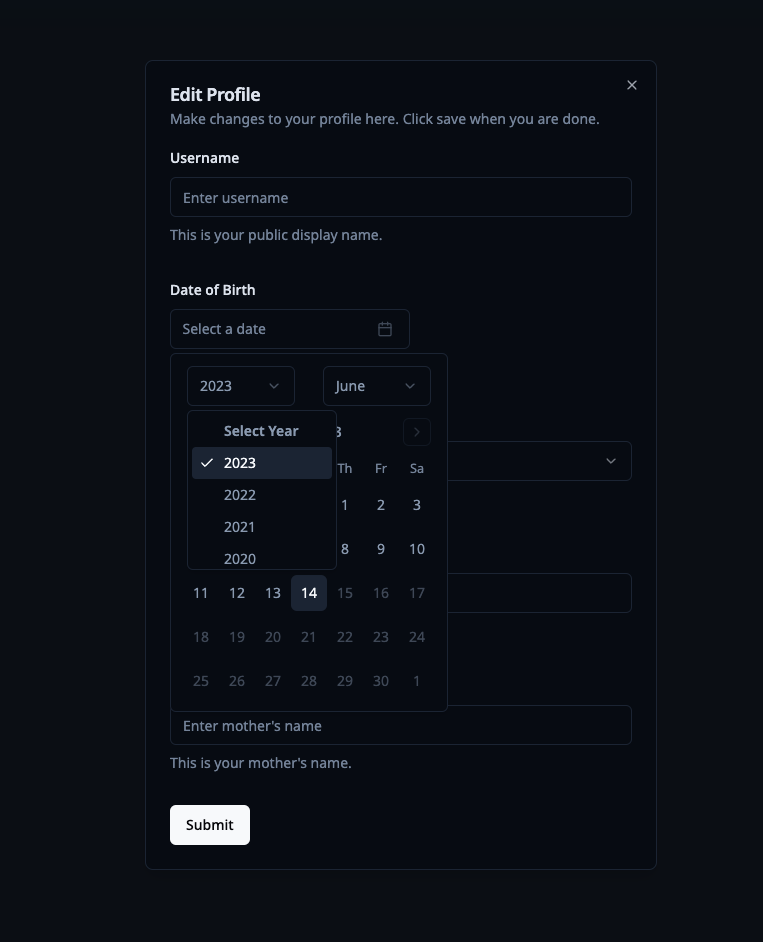
It is far from optimised, it works fine i guess, but the code isnt the best right now
Check out this: https://react-day-picker.js.org/basics/navigation#choosing-a-caption-layout
As this component is used to provide the calendar, just change the markup for your component and add captionLayout.

It is this part of the code
Place there these attributes for DayPicker:
captionLayout="dropdown" fromYear={2015} toYear={2025}
I have this simple code here if u guys are interested. the only downside is that you have to put this in the globals.css:
.rdp [aria-hidden="true"] {
  @apply hidden;
}

.rdp-vhidden {
  @apply hidden;
}

select::-webkit-scrollbar {
  display: none;
}

I have this simple code here if u guys are interested. the only downside is that you have to put this in the
globals.css:
https://gist.github.com/mjbalcueva/22abbcdaf8fe28dbf12d42e72f454b16
.rdp [aria-hidden="true"] { @apply hidden; }
.rdp-vhidden { @apply hidden; }
select::-webkit-scrollbar { display: none; }
This is great work. Please add me on discord elite_maw im working on projects for a client and think you could help.

I have this simple code here if u guys are interested. the only downside is that you have to put this in the
globals.css:https://gist.github.com/mjbalcueva/22abbcdaf8fe28dbf12d42e72f454b16
works beautifully

i made another version which uses shadcn's select and scroll area component --> https://gist.github.com/mjbalcueva/1fbcb1be9ef68a82c14d778b686a04fa
i made another version which uses shadcn's
selectandscroll areacomponent --> https://gist.github.com/mjbalcueva/1fbcb1be9ef68a82c14d778b686a04fa
This worked great for me.
One thing to note is adding overflow to the ScrollArea
<SelectContent position='popper'>
  <ScrollArea className='overflow-auto h-80'>
    {options.map((option, id: number) => (
    <SelectItem key={`${option.props.value}-${id}`} value={ option.props.value?.toString()
    ?? '' }>
      {option.props.children}
    </SelectItem>
    ))}
  </ScrollArea>
</SelectContent>
FYI when i tried to implement https://github.com/shadcn-ui/ui/pull/918 there are type errors and had issues rendering the caption/dropdown properly

Since shadcn uses React DayPicker you can also select the year through keyboard shortcuts. On windows press [Shift + Page Up/Down] and for macs [Shift + fn + Up/Down arrow keys].

@joaom00 I couldn't figure out how to select dates manually in this codesandbox example:
I find it the same default datepicker as usual, or is there something else I needed to run before seeing the output?
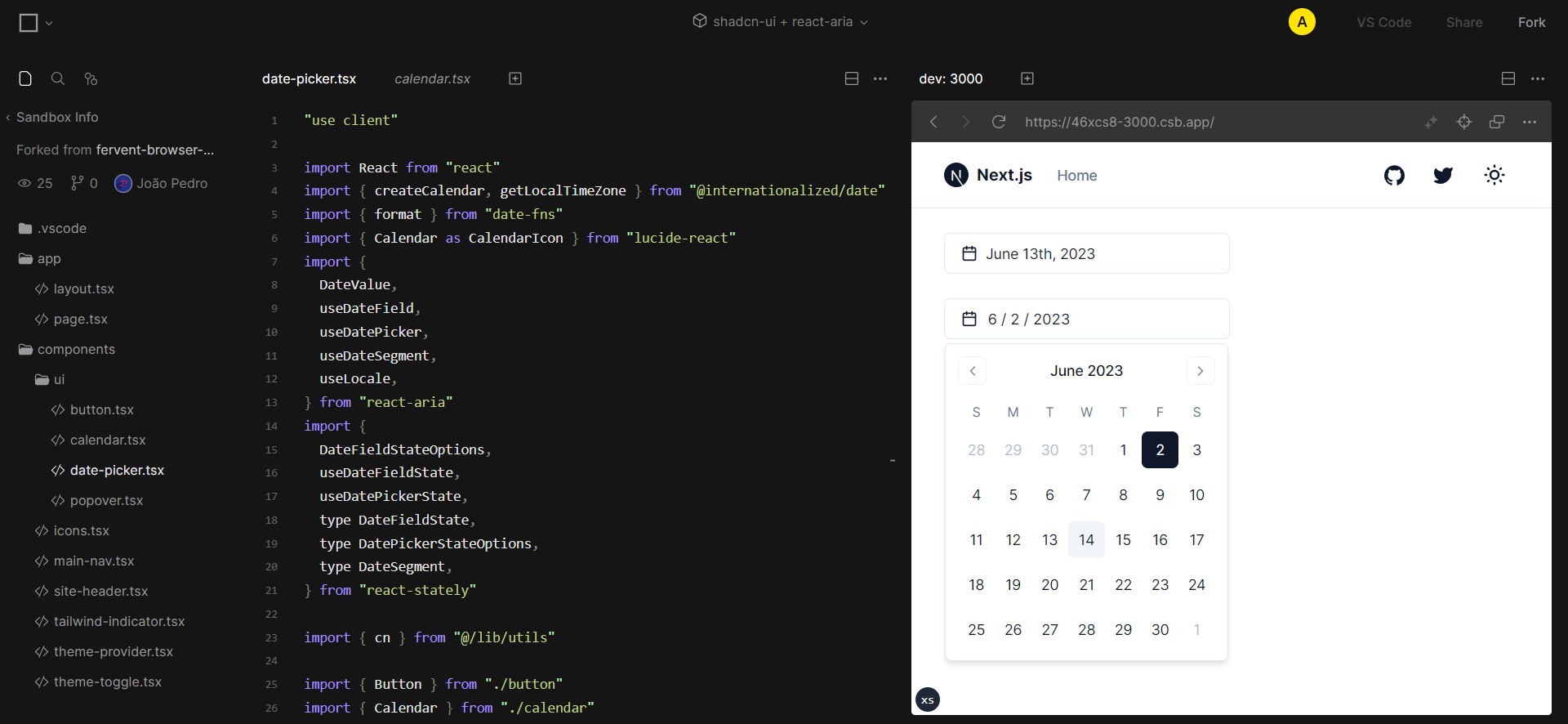
You just click on that input and start typing with keyboard

I made an example of a date picker with shadcn + react-aria where it is possible to let the user fill the date manually
Installation
npm i react-aria react-stately @internationalized/date date-fnsnpx shadcn-ui add popoverCopy
date-picker.tsxandcalendar.tsxfilesUsage
<DatePicker label="Pick a date" />

// or

<DatePicker label="Pick a date">
  <DateField />
</DatePicker>
https://codesandbox.io/p/sandbox/long-snowflake-46xcs8?file=%2Fapp%2Fpage.tsx
-
This works kinda ok. Nice that use can type in the date BUT to do that, user have to click exactly on the date number, its not possible to just click on the input and start typing.
-
Has to many wierd dependencies :/
But overall this apprach is the best so far.
I added custom component like below. you can also modify dropdown and other components too. though I wish they would support this by default like flowbite.
<Calendar
	mode="single"
	selected={date}
	onSelect={onDateSelect}
	initialFocus
	components={{
		CaptionLabel: SelectYear,
	}}
/>

@Basovs Nice solution. However I couldn't get the calendar popover to open using only my keyboard. It would only open if I clicked inside the calendar input but not on the "dd/mm/yyyy".
