

 shadcn-ui
feat: add close functionalitiy for dialog and sheet components

@keon is attempting to deploy a commit to the shadcn-pro Team on Vercel.
A member of the Team first needs to authorize it.
![vercel[bot] avatar](https://avatars.githubusercontent.com/in/8329?v=4 "Published by a pub.dev verified publisher")
The latest updates on your projects. Learn more about Vercel for Git ↗︎
| Name | Status | Preview | Comments | Updated (UTC) |
|---|---|---|---|---|
| next-template | ❌ Failed (Inspect) | Apr 15, 2023 3:00am |
We already have this. You can see it at https://ui.shadcn.com/docs/primitives/dialog
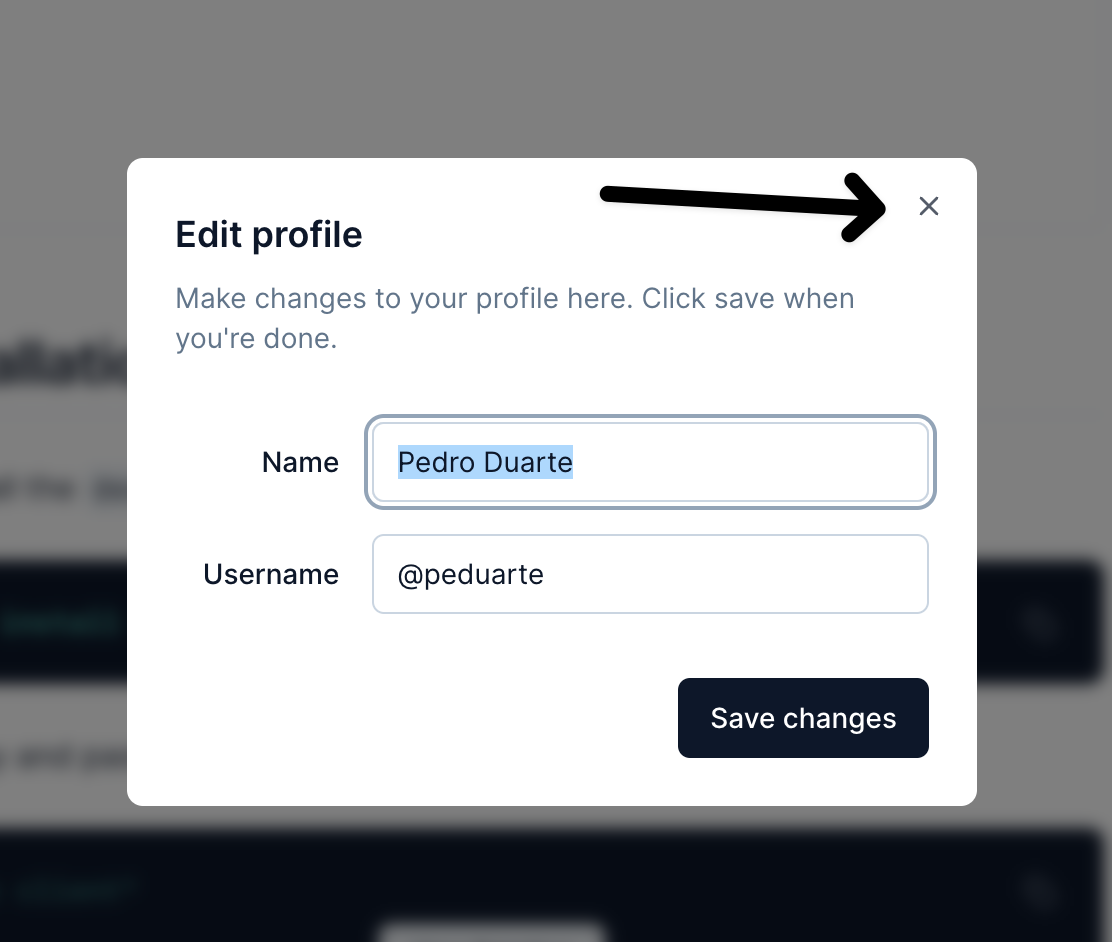
However, this has been reported by a few other people. So I wonder why it's not showing up. I'll take a look at it.

We already have this. You can see it at https://ui.shadcn.com/docs/primitives/dialog
However, this has been reported by a few other people. So I wonder why it's not showing up. I'll take a look at it.
@shadcn Yes the x button on the top right works - and it is not the issue here. DialogClose is still needed to create any close button in the content.
Slight issue on the topic of Closing the Dialog.
If you pass the prop open on <Dialog open={open}>
we also need something like onClose then.
The x at the top stops working and clicking outside the dialog also stops working.
But with the addition of DialogClose this would solve my problem if the submit button were to auto trigger a close.

Any updates here ? I want a custom value setup in through a parent component as props in <Dialog open={open}>

Slight issue on the topic of Closing the Dialog.
If you pass the prop open on
<Dialog open={open}>we also need something like onClose then.
The x at the top stops working and clicking outside the dialog also stops working.
But with the addition of DialogClose this would solve my problem if the submit button were to auto trigger a close.
I hope vercel team will provide a update on this son
But with the addition of DialogClose this would solve my problem if the submit button were to auto trigger a close.
According to Radix-UI:
`import React from 'react'; import * as Dialog from '@radix-ui/react-dialog';
const wait = () => new Promise((resolve) => setTimeout(resolve, 1000));
export default () => { const [open, setOpen] = React.useState(false);
return ( <Dialog.Root open={open} onOpenChange={setOpen}> <Dialog.Trigger>Open</Dialog.Trigger> <Dialog.Portal> <Dialog.Overlay /> <Dialog.Content> <form onSubmit={(event) => { wait().then(() => setOpen(false)); event.preventDefault(); }} > {/** some inputs */} </Dialog.Content> </Dialog.Portal> </Dialog.Root> ); };`
For the Sheet component should be:
<Sheet open={open} onOpenChange={setOpen}> ... </Sheet>

This would be an excellent addition for my use case where the save button doesn't actually trigget a submit since everything is being updated in realtime.

But with the addition of DialogClose this would solve my problem if the submit button were to auto trigger a close.
According to Radix-UI:
`import React from 'react'; import * as Dialog from '@radix-ui/react-dialog';
const wait = () => new Promise((resolve) => setTimeout(resolve, 1000));
export default () => { const [open, setOpen] = React.useState(false);
return ( <Dialog.Root open={open} onOpenChange={setOpen}> <Dialog.Trigger>Open</Dialog.Trigger> <Dialog.Portal> <Dialog.Overlay /> <Dialog.Content> <form onSubmit={(event) => { wait().then(() => setOpen(false)); event.preventDefault(); }} > {/** some inputs */} Submit </Dialog.Content> </Dialog.Portal> </Dialog.Root> ); };`
For the Sheet component should be:
<Sheet open={open} onOpenChange={setOpen}> ... </Sheet>
................... Thanks. it worked for me

I've recently started to work on some of my old projects and I've just done this to my DialogContent component in the auto generated dialog.tsx file.
// Update the forwardRef and added a handleClose
const DialogContent = React.forwardRef<
  React.ElementRef<typeof DialogPrimitive.Content>,
  React.ComponentPropsWithoutRef<typeof DialogPrimitive.Content> & {
    onClose?: () => void; // <------------
  }
>(({ className, children, onClose, ...props }, ref) => ( // <---------- added here as a prop
  <DialogPortal>
    <DialogOverlay />
    <DialogPrimitive.Content
      ref={ref}
      className={cn(
        "fixed left-[50%] top-[50%] z-50 grid w-full max-w-lg translate-x-[-50%] translate-y-[-50%] gap-4 border bg-background p-6 shadow-lg duration-200 data-[state=open]:animate-in data-[state=closed]:animate-out data-[state=closed]:fade-out-0 data-[state=open]:fade-in-0 data-[state=closed]:zoom-out-95 data-[state=open]:zoom-in-95 data-[state=closed]:slide-out-to-left-1/2 data-[state=closed]:slide-out-to-top-[48%] data-[state=open]:slide-in-from-left-1/2 data-[state=open]:slide-in-from-top-[48%] sm:rounded-lg md:w-full",
        className
      )}
      {...props}
    >
      {children}
      <DialogPrimitive.Close
        className="absolute right-4 top-4 rounded-sm opacity-70 ring-offset-background transition-opacity hover:opacity-100 focus:outline-none focus:ring-2 focus:ring-ring focus:ring-offset-2 disabled:pointer-events-none data-[state=open]:bg-accent data-[state=open]:text-muted-foreground"
        onClick={onClose} // <------------ added onClick handler
      >
        <Cross2Icon className="h-4 w-4" />
        <span className="sr-only">Close</span>
      </DialogPrimitive.Close>
    </DialogPrimitive.Content>
  </DialogPortal>
));
DialogContent.displayName = DialogPrimitive.Content.displayName;
This will allow the popup to close now, but does not solve closing the dialog when clicking outside of the popup.
I think these changes should be added to the PR both for Dialog & Sheet
Slight issue on the topic of Closing the Dialog. If you pass the prop open on
<Dialog open={open}>we also need something like onClose then. The x at the top stops working and clicking outside the dialog also stops working. But with the addition of DialogClose this would solve my problem if the submit button were to auto trigger a close.I hope vercel team will provide a update on this son
Many thanks. This worked for me

This will allow the popup to close now, but does not solve closing the dialog when clicking outside of the popup.
I think these changes should be added to the PR both for Dialog & Sheet
Not sure I understand sorry. but if you use like:
const [open, setOpen] = React.useState(false)

<Dialog open={open} onOpenChange={setOpen}>
  ...
</Dialog>
the X at the top and clicking outside still doesn't work?

This will allow the popup to close now, but does not solve closing the dialog when clicking outside of the popup. I think these changes should be added to the PR both for Dialog & Sheet
Not sure I understand sorry. but if you use like:
const [open, setOpen] = React.useState(false)

<Dialog open={open} onOpenChange={setOpen}>
  ...
</Dialog>
the
Xat the top and clicking outside still doesn't work?
If you update dialog.tsx as I did, here is what you can do. Since the onClose is a part of the DialogContent you need to pass it here
<Dialog open={open}>
  <DialogTrigger asChild>
  ...
  </DialogTrigger>
  <DialogContent onClose={() => setOpen(false)}>
   ...
  </DialogContent>
</Dialog>
Or if you followed the other example refer to that code.
This will allow the popup to close now, but does not solve closing the dialog when clicking outside of the popup. I think these changes should be added to the PR both for Dialog & Sheet
Not sure I understand sorry. but if you use like:
const [open, setOpen] = React.useState(false)

<Dialog open={open} onOpenChange={setOpen}>
  ...
</Dialog>
the
Xat the top and clicking outside still doesn't work?If you update
dialog.tsxas I did, here is what you can do. Since the onClose is a part of theDialogContentyou need to pass it here<Dialog open={open}> <DialogTrigger asChild> ... </DialogTrigger> <DialogContent onClose={() => setOpen(false)}> ... </DialogContent> </Dialog>Or if you followed the other example refer to that code.
but if you pass onOpenChange={setOpen} to <Dialog /> the X and clicking outside will work.
I fixed it and added examples on how to use it do the docs. See https://github.com/shadcn-ui/ui/pull/1753
Thanks everyone.