

 serverless
Maximum policy size of 10240 bytes exceeded for role for SLS enterprise logs feature
This issue doesn't related to https://github.com/serverless/serverless/issues/2508 because caused by internal SLS feature.
We have big stack with 130+ python functions migrating to SLS. All the issues with AWS limitations were solved but one persists and after some mess we found that it caused by embedded SLS log handling feature.
Please review this, confirm and fix as soon as possible because we definitely need SLS logs handling feature.
To reproduce this it will be enough 80+ functions (somewhere 74-75 actually) with enabled pro account for logs collection feature.
The only solution was to disable it with this option:
custom:
  enterprise:
    collectLambdaLogs: false
Without this option we were receiving Maximum policy size of 10240 bytes exceeded and it was sourced by this policy in cloudformation-template-update-stack.json
    "EnterpriseLogAccessIamRole": {
      "Type": "AWS::IAM::Role",
      "Properties": {
        "AssumeRolePolicyDocument": {
          "Version": "2012-10-17",
          "Statement": [
            {
              "Effect": "Allow",
              "Principal": {
                "AWS": "arn:aws:iam::802587217904:root"
              },
              "Action": "sts:AssumeRole",
              "Condition": {
                "StringEquals": {
                  "sts:ExternalId": "ServerlessEnterprise-e38c34db-75cd-49e9-bd12-780e5bdc2527"
                }
              }
            }
          ]
        },
        "Policies": [
          {
            "PolicyName": "LogFilterAccess",
            "PolicyDocument": {
              "Version": "2012-10-17",
              "Statement": [
                {
                  "Effect": "Allow",
                  "Action": [
                    "logs:FilterLogEvents"
                  ],
                  "Resource": [
                    {
                      "Fn::GetAtt": [
                        "ReferrerUnderscoremonitorNestedStack",
                        "Outputs.ReferrerUnderscoremonitorLogGroupArn"
                      ]
                    },
                    {...},
                    130+ functions here
Here is stack and versions:
 Serverless Error ----------------------------------------

  ServerlessError: An error occurred: EnterpriseLogAccessIamRole - Maximum policy size of 10240 bytes exceeded for role backend-experimental-EnterpriseLogAccessIamRole-BRXAIIZJ9IJP (Service: AmazonIdentityManagement; Status Code: 409; Error Code: LimitExceeded; Request ID: 5022ba0d-ef84-4b80-a93a-b045b8f93e5e; Proxy: null).
      at /home/ec2-user/code/deployer/2key-main/node_modules/serverless/lib/plugins/aws/lib/monitorStack.js:94:23
      at processTicksAndRejections (internal/process/task_queues.js:97:5)
      at async AwsDeploy.update (/home/ec2-user/code/deployer/2key-main/node_modules/serverless/lib/plugins/aws/lib/updateStack.js:144:5)

  Get Support --------------------------------------------
     Docs:          docs.serverless.com
     Bugs:          github.com/serverless/serverless/issues
     Issues:        forum.serverless.com

  Your Environment Information ---------------------------
     Operating System:          linux
     Node Version:              12.21.0
     Framework Version:         2.41.2 (local)
     Plugin Version:            5.1.0
     SDK Version:               4.2.2
     Components Version:        3.9.2

@pgrzesik please let me know if this is reviewed and confirmed at your side and possible easy solvable as it was for https://github.com/serverless/serverless/pull/7644 if you can point us with some input then we can help verify/fix it or create pull request

Hello @casualuser - sorry for not responding here sooner. I'm going to move this to https://github.com/serverless/dashboard-plugin repository as the actual functionality that generates the policy is located there. I'm going to dive into the cause and what the potential fix might be here.
As a potential workaround - do you have the ability to split the deployment into a few stacks with smaller number of functions?

Hi @casualuser - thanks for reaching out.
The workaround in this case is to create your own logs access role and pass it into the framework via the logAccessIamRole parameter:
custom:
  enterprise:
    logAccessIamRole: // your role
The role is easy to create, there are 3 parts. The policy, The role policy is:
{
    "Version": "2012-10-17",
    "Statement": [
        {
            "Action": [
                "logs:FilterLogEvents"
            ],
            "Resource": [
                // ARN of each log group for each function
            ],
            "Effect": "Allow"
        }
    ]
}
The trust relationship for our AWS account is: 377024778620
and the condition is:
stringEquals
key: sts:ExternalId
value: ServerlessEnterprise-<your org UID>
To find your org UID, inspect your browser request when app.serverless.com loads, and find the request with your Organization Name
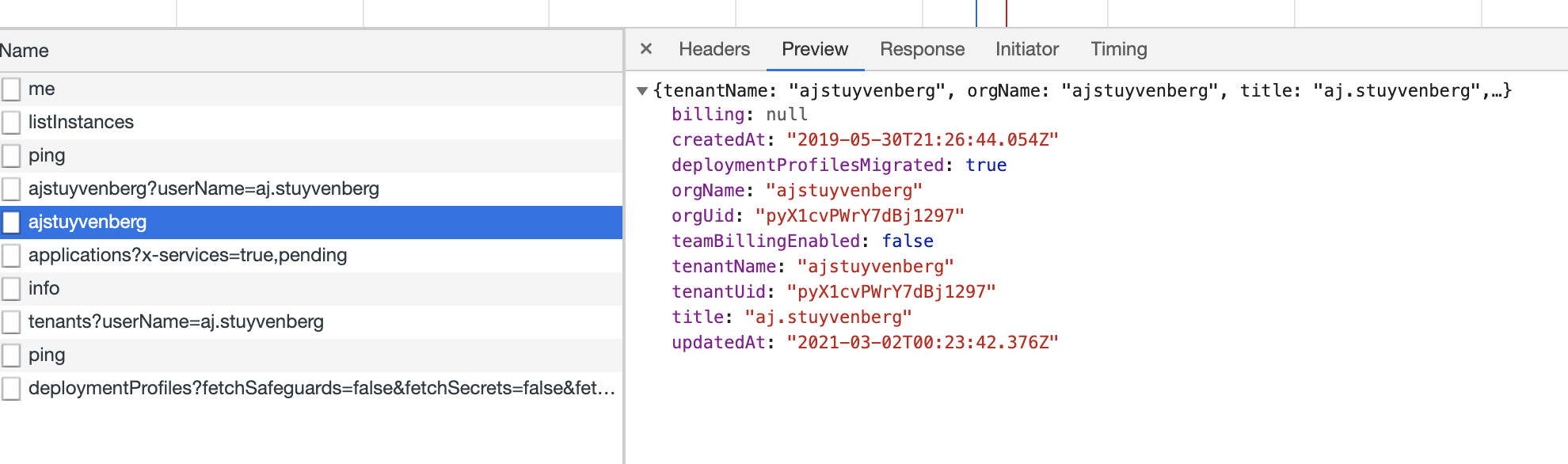
If you have any questions, feel free to contact the enterprise support team via the chat feature in the app, and we can address it that way.
As an aside, unfortunately 140 functions is a very large and complicated serverless application. Even using split stacks, you're likely going to soon run into several issues and AWS limitations. My strongest recommendation is to split your application up into separate logical domains, and consider using a monolambda for APIs (instead of one lambda per route or per REST action).
Thanks!


hi @astuyve
so we've tried to add policy in serverless.yml like this:
custom:
  enterprise:
    logAccessIamRole:
      Version: '2012-10-17'
      Statement:
        - Effect: Allow
          Action:
            - logs:FilterLogEvents
          Principal:
            AWS: 'arn:aws:iam::377024778620:root'
          Resource:
            - 'arn:aws:logs:us-east-1:<my-aws-account>:log-group:*:log-stream:*'
          Condition:
            StringEquals:
              'sts:ExternalId': 'ServerlessEnterprise-<my-org-uid>'
but the only observable result for a moment is a record in function logs like this:
SERVERLESS_ENTERPRISE {
    "c": true,
    "b": "H4sIAPHSxGAC/8VX62/TSBD/V3IWUqmEE6+9fgXxAVXlxEFPXBMQR1tF691J4qtft7tuG6r+7zfrR5s2SYEKdN+Sec9vZmfG15Z
...
1uh5w9pz2RwjN+YzST7l4N+1Gb+xbe4+a2/+A3CHEmlVDwAA",
    "origin": "sls-agent"
}
so can you comment on the way policy was added and this record in log? or should we create this policy manually via IAM and only reference in serverless.yml ?
please advice