

 serenity-js
Serenity/JS v2 - Support screenshots in non-screenplay style scenarios
In a non-Screenplay test suite where there are no Actors, the Photographer has no one to take the pictures of, which means that there are no screenshots in the reports unless one uses Actors.
Serenity/JS v1 had a concept of StandIns, so dummy Actors that would kick in if the developer has not defined any their own.
Serenity/JS v2 could have the same mechanism as it's quite handy to people who need to migrate legacy test suites to Serenity/JS Screenplay, but don't want to do it all in one go.
UPDATE: As of Serenity/JS 2.0.1-alpha.86, an Actor can TakeScreenshots, which simplified the original solution proposed in this post.
UPDATE: Updated the code samples to replace the deprecated APIs with the new versions.
Until automated support for non-Screenplay scenarios is in place, you can enable screenshots with Protractor and Cucumber as follows:
Define UI actors:
// features/support/screenplay/Actors.ts

import { Actor, Cast } from '@serenity-js/core';
import { BrowseTheWeb } from '@serenity-js/protractor';
import { protractor } from 'protractor';

export class Actors implements Cast {
    prepare(actor: Actor): Actor {
        return actor.whoCan(
            BrowseTheWeb.using(protractor.browser),
        );
    }
}
Engage the Actors:
// features/support/setup.ts

import { engage } from '@serenity-js/core';
import { Before } from 'cucumber';
import { Actors } from './screenplay/Actors';

Before(() => engage(new Actors()));
Add an After hook that instructs the actor to TakeScreenshot upon a failure:
// steps.ts
import { After } from 'cucumber';
import { actorCalled } from '@serenity-js/core';
import { Check, equals } from '@serenity-js/assertions';
import { TakeScreenshot } from '@serenity-js/protractor';

After(scenario => actorCalled('Inspector').attemptsTo(
    Check.whether(scenario.result.status, equals('failed'))
        .andIfSo(TakeScreenshot.of(scenario.pickle.name))
));

// Alternatively, take a screenshot after every scenario, regardless of their result

// After(scenario => actorCalled('Inspector').attemptsTo(
//     TakeScreenshot.of(scenario.pickle.name)
// ));
Add the ArtifactArchiver and SerenityBDDReporter to your protractor.conf.js:
// protractor.conf.js

const
    { ArtifactArchiver } = require('@serenity-js/core'),
    { Photographer, TakePhotosOfInteractions } = require('@serenity-js/protractor'),
    { SerenityBDDReporter } = require('@serenity-js/serenity-bdd');

exports.config = {
    framework:      'custom',
    frameworkPath:  require.resolve('@serenity-js/protractor/adapter'),

    specs: [ 'features/**/*.feature' ],

    serenity: {
        runner: 'cucumber',
        crew: [
            ArtifactArchiver.storingArtifactsAt('./target/site/serenity'),
            new SerenityBDDReporter(),
        ]
    },
// ... rest omitted for brevity

@jan-molak Thank you for the workaround! I really appreciate your effort. Unfortunately, screenshot generator is still not working properly in my project.
I added all files that you have described above.
This is my configuration file:

Project structure:
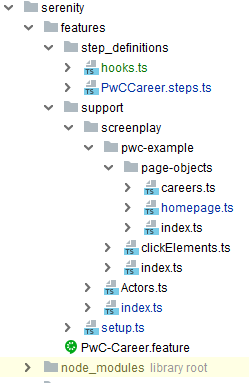
Step definitions: ( When(/(?:he|she|they) (?:goes?) to Global Careers from Menu/, is written as non-Screenplay for testing purposes)

homepage.ts

And the report:
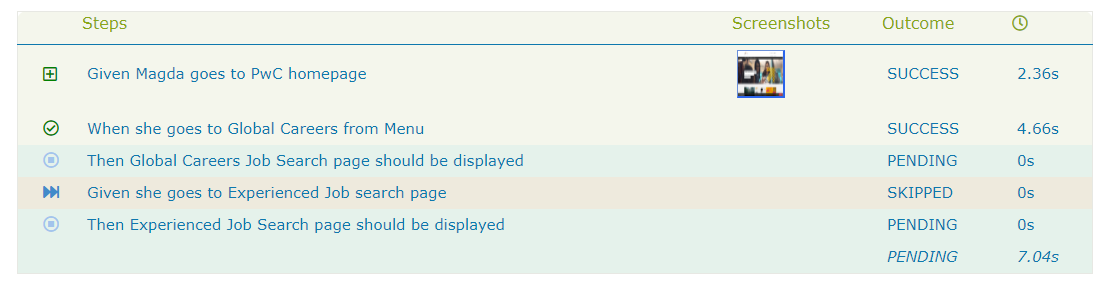
As you can see, the screenshot is not visible for step "When she goes to Global Careers from Menu" which is non-Screenplay
What am I doing wrong? Best regards, Magda

Hi,
You are not calling the Actor in your second step definition, i.e, 'When she goes to...'
so, i would suggest you to change your step definition to :
return this.stage.theActorInTheSpotlight().attemptsTo(...your action);
hopefully, this will enable serenity to take the screenshot...

@jan-molak , @abhinaba1080 Would it be possible to create an example repository showcasing screenshot capability for non-screenplay scenarios in a best practice way ? I tried to follow the instructions above, but wasn't able to capture the screenshots in the report.
Thanks

Hi,
You are not calling the Actor in your second step definition, i.e, 'When she goes to...'
so, i would suggest you to change your step definition to :
return this.stage.theActorInTheSpotlight().attemptsTo(...your action);
hopefully, this will enable serenity to take the screenshot...
Hi @abhinaba1080 Of course you are right, it will solve the issue, but I intentionally removed
return this.stage.theActorInTheSpotlight().attemptsTo(...your action);
from my code and used workaround shown above by Jan Molak to capture screenshot for non-screenplay scenario. Greetings, Magda
OK, so this is a bit more involved than I originally anticipated, but I'm still considering adding this feature. Stay tuned.
I've just added a new interaction that allows actors to take arbitrary screenshots at any point during the scenario (available as of 2.0.1-alpha.86). It doesn't address the issue raised by @magdalenaBartkowiakJowsa automatically yet, but could be used to capture screenshots using an after block of a non-Screenplay scenario.
For example (assuming that we have the stage set up):
// steps.ts
import { After } from 'cucumber';
import { actorCalled } from '@serenity-js/core';
import { Check, equals } from '@serenity-js/assertions';
import { TakeScreenshot } from '@serenity-js/protractor';

After(scenario => actorCalled('Inspector').attemptsTo(
    Check.whether(scenario.result.status, equals('failed'))
        .andIfSo(TakeScreenshot.of(scenario.pickle.name))
));
Hope this helps!
Update: I've updated the code sample to take advantage of the new actorCalled function
Thank you @jan-molak, once again, I appreciate your effort in solving this issue. I have implemented your solution into my project and it works great. Can't wait for the next release.:)
Anybody tried this with JavaScript? @jan-molak unfortunately, I am using JavaScript and not TypeScript.

@rakeshnambiar - it should work the same way:
// steps.js
const { After } = require('cucumber');
const { actorCalled } = require('@serenity-js/core');
const { Check, equals } = require('@serenity-js/assertions');
const { TakeScreenshot } = require('@serenity-js/protractor');

After(scenario => actorCalled('Inspector').attemptsTo(
    Check.whether(scenario.result.status, equals('failed'))
        .andIfSo(TakeScreenshot.of(scenario.pickle.name))
));
@jan-molak with my limited knowledge in JavaScript I did a try. Initially I ended up with the error Error: TypeError: After is not a function while using the above function as it is. Then I added this.After and the latest error is:
Step: After
   Step Definition: features\step_definitions\steps.js:17
   Message:
     TypeError: Cannot read property 'status' of undefined
         at World.After.scenario (C:\GitLAB\bdd-case-study\features\step_definitions\steps.js:18:39)
         at _combinedTickCallback (internal/process/next_tick.js:131:7)
         at process._tickCallback (internal/process/next_tick.js:180:9)
@rakeshnambiar - the code samples I provided above use Cucumber.js version 6, it feels like you're on version 1 where this solution won't work as that version of cucumber doesn't provide the scenario object when the After hook is called. I'd suggest upgrading to Cucumber.js v6.x, which should be relatively straight forward; have a look at step definition files in the template repo
@jan-molak - Yes, I have upgraded to the cuculber latest version 6.0.5 but after that it cannot detect the steps defenition files with the settings require: [ 'features'] or require: [ 'features/**/*.js']
The template project is mainly based on screenplay with TypeScript whereas I am using JavaScript without the Screenplay approach.
☕ImplementationPendingError: Step not implemented
@jan-molak - I am blocked, kindly help me with the screenshot issue. I will update the same project in case you want to try it yourself.
Hey @rakeshnambiar - Serenity/JS simply passes the configuration you specify in your protractor.conf.js to Cucumber CLI.
If you'd like to learn more about the configuration options, please refer to the Cucumber CLI docs.
Basically all you need to do to use JavaScript step definitions is to follow the Serenity/JS Cucumber template and simply replace:
    specs: [ 'features/**/*.feature' ],

    cucumberOpts: {
        require: [ 'features/**/*.ts', ],
        'require-module':   [ 'ts-node/register'],
        tags:    ['~@wip'],
        strict:  false,
    },
with:
    specs: [ 'features/**/*.feature' ],

    cucumberOpts: {
        require: [ 'features/**/*.js', ],
        tags:    ['~@wip'],
        strict:  false,
    },
Or even, since Cucumber by default loads all the .js files it finds under features:
    specs: [ 'features/**/*.feature' ],

    cucumberOpts: {
        tags:    ['~@wip'],
        strict:  false,
    },
Hope this helps!
@jan-molak I have copied all my files to the template project and now the test execution is working fine. However, there's no screenshot and it was the same case before I migrate to Cucumber.js version 6. I think for the screenshot, I should change all the steps in the screenplay pattern format.
Hey @jan-molak Issue #495 Actully i want take screen shot for each step.
In this case it will take screen shots when ever it fails
After(function (this: WithStage, scenario) { return this.stage.theActorCalled('Inspector').attemptsTo( Check.whether(scenario.result.status, equals('failed')) .andIfSo(TakeScreenshot.of(scenario.pickle.name)) ); });
and in this case it will take screen shots after the scenario
After(function (this: WithStage, scenario) { return this.stage.theActorCalled('Inspector').attemptsTo( TakeScreenshot.of(scenario.pickle.name) ); });
So is there any ways to take screen shots for each and every steps of the scenario

@RaghuGouda - yes, but that requires you to use the Screenplay Pattern. Otherwise, Serenity/JS has no way of knowing what you consider to be a "step". Check out the serenity-js-cucumber-protractor-template, which is in fact already configured to take a screenshot after every interaction.
Hey @jan-molak .
if we set the stage as suggested in the description of this issue, we get a message like:
serenity.callToStageFor(...) has been deprecated. Please use `actorCalled(name)` and `actorInTheSpotlight()` functions from @serenity-js/core to access the actors instead.
Can you please update the description area of this issue with correct setting stage codes?
Screenshots in each step are highly required. It was working fine in Serenity 1.x in Non-Screenplay scenarios. Is there any workaround to get it solved?
Hey @abhinaba1080 - good call about updating the description, I've just done it.
Now to answer your other question.
In both Serenity/JS 1.x and 2.x, Cucumber steps are reported the same way as Tasks.
However, there's an important difference between Serenity/JS 1.x and 2.x.
In 1.x a Photographer could take screenshots of both Tasks and Interactions which made it possible to take screenshots automatically in non-screenplay scenarios by providing a fake actor and relying on cucumber steps to trigger the task started / task finished events, which would then prompt the Photographer to kick in, the same way it would in a screenplay-style scenario.
This was all nice and well if you wanted to add Serenity/JS reporting to a legacy codebase. However, as soon as you started migrating the legacy tests to Screenplay Pattern, you'd end up in a situation where having the Photograper configured to take screenshots of all the tasks would result in nested tasks triggering multiple screenshots (since you'd get one screenshot per one Task).
If you were in that situation, you'd either have to re-configure the Photographer to:
- take screenshots of
Interactionsonly, which would disable screenshots for non-screenplay scenarios - take screenshots of all
TasksandInteractionsand take the performance hit - migrate the entire codebase in one go, which for large codebases with hundreds or thousands of tests was quite a challenge.
So in Serenity/JS I've abandoned this design completely and the Photographer only looks at Interactions which results in much more stable and much more performant test suite.
However, that doesn't solve the problem of automatically triggering screenshots after every Cucumber step, or after every failed step.
A possible solution
The way I was planning to solve it is by writing a separate Cucumber Listener that would work the same way the @serenity-js/cucumber listeners work, but instead of triggering the events, it would instantiate an actor and then tell it to take screenshots either after every step or after failed steps.
So something along the lines of:
import { actorCalled, engage, Cast } from '@serenity-js/core';
import { BrowseTheWeb, TakeScreenshot } from '@serenity-js/protractor'
import { protractor } from 'protractor';

Before(() => engage(Cast.whereEveryoneCan(BrowseTheWeb.using(protractor.browser))));

After(() => actorCalled('Inspector').attemptsTo(TakeScreenshot.of(scenario.pickle.name)));

// or
After(scenario => actorCalled('Inspector').attemptsTo(
    Check.whether(scenario.result.status, equals('failed'))
      .andIfSo(TakeScreenshot.of(scenario.pickle.name))
));
Of course, a proper Serenity/JS-quality solution would have to work with all the versions of Cucumber, be configurable, and be transparent so that you don't see the "check whether" and "take screenshot" tasks in the report. But the above snippet should be a good starting point.
@jan-molak I tried the solution which you had mentioned above. However, I am ended up with the below error.
[21:58:06] E/launcher - Error: C:\GITHUB\serenity-js-cucumber-protractor-template\script\node_modules\@serenity-js\assertions\src\Check.ts:1
import { Activity, Answerable, AnswersQuestions, PerformsActivities, Task } from '@serenity-js/core';
^^^^^^

SyntaxError: Cannot use import statement outside a module


//step.js

After(scenario => actorCalled('Inspector').attemptsTo(
    Check.whether(scenario.result.status, equals('failed'))
        .andIfSo(TakeScreenshot.of(scenario.pickle.name))
));

//imports

const { Given, When, Then, After} = require('cucumber');
const { actorCalled } = require('@serenity-js/core');
const { BrowseTheWeb, TakeScreenshot } = require('@serenity-js/protractor');
const { equals } = require("@serenity-js/assertions");
const { Check } = require("@serenity-js/assertions/src/Check");
@rakeshnambiar this is an issue with the test setup. What this error message is telling us is that Node.js tried to load a TypeScript file from a JavaScript file. If you look closely at the last line from your example, you'll see:
const { Check } = require("@serenity-js/assertions/src/Check"); // wrong, this is a TypeScript file
const { Check } = require("@serenity-js/assertions"); // correct, this will point to a transpiled JavaScript file
Maybe your IDE auto-imported from a wrong place?
Sorry - that's my bad - yes the IntelliJ auto-suggsted it. I have failed a test to check the screenshot generation but still it didn't work. Also the scenario step is unavailable on the report. Similarly how do I configure the screeenshot for both pass and fail? scenario.result.status, equals('failed')
In fact the scenario step also available on the report. The main issue is the screenshot which is currently displaying a white screen.
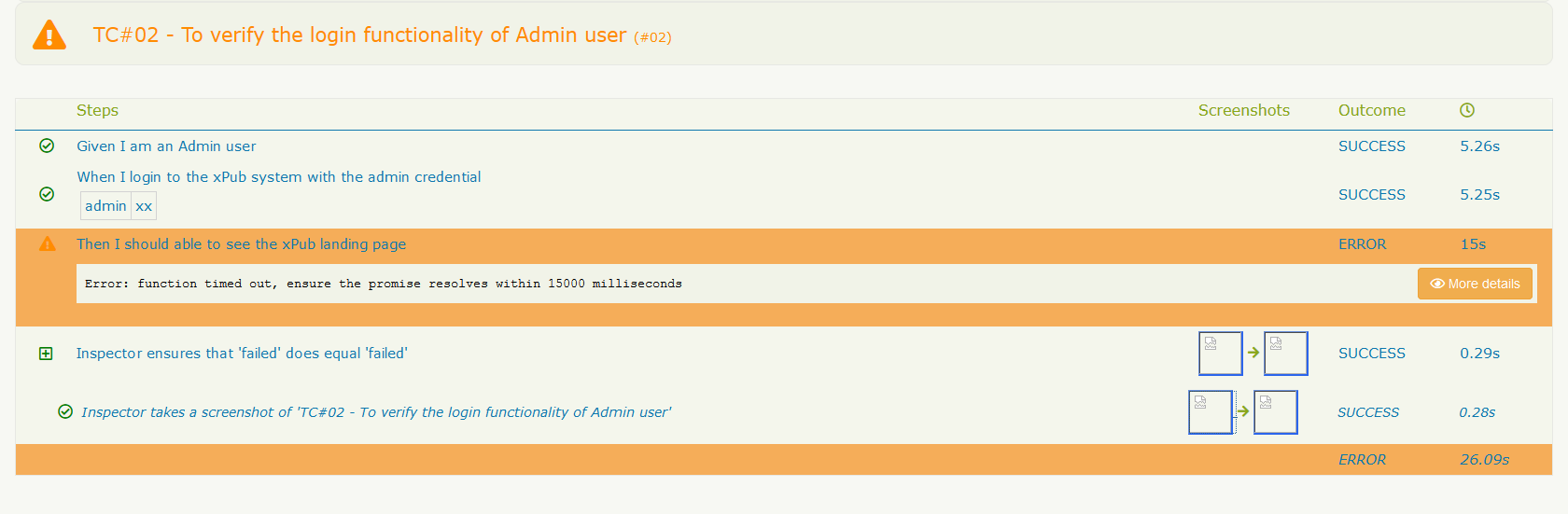
Also noticed when the actor is involved in the step definition then the screenshot working fine. Considering I haven't written the legacy script using screenplay pattern I am not sure what is next (to take the screenshot as a generic solution).
    actorCalled('Inspector').attemptsTo(
        Navigate.to('/'),);

I think in case there's an option to invoke the actor somehow using the before hook it might work. When I copy the above code it throwing some error ConfigurationError: Inspector can't BrowseTheWeb yet. Did you give them the ability to do so? and I am not sure how to assign/invoke the actor alone here @jan-molak
@jan-molak please could you help with this issue because this is a blocker for the script migration 😞
This issue can reproduce by using the sample project - https://github.com/rakeshnambiar/serenitjs-v2-js
@rakeshnambiar - you're on the right track, you have the Actors but you haven't told Serenity/JS to engage them.
Before(() => engage(new Actors()))
thanks @jan-molak however the issue still exists.
the changes I made:
//step.js
Before(() => engage(new Actors()));

After(scenario => actorCalled('Inspector').attemptsTo(
    Check.whether(scenario.result.status, equals('failed'))
        .andIfSo(TakeScreenshot.of(scenario.pickle.name))
));

//protractor.config
    serenity: {
        runner: 'cucumber',
        crew: [
            ArtifactArchiver.storingArtifactsAt('./target/site/serenity'),
            ConsoleReporter.forDarkTerminals(),
            Photographer.whoWill(TakePhotosOfInteractions),     // or Photographer.whoWill(TakePhotosOfFailures), tried both - TakePhotosOfInteractions
            new SerenityBDDReporter(),
        ]
    },
@jan-molak let me know in case you have any other thoughts and this is again a blocker for me to continue with the script migration 😢
What's the error you're seeing with the latest version? Also, you won't need the Photographer - that service is used for Screenplay scenarios
@jan-molak thanks for your reply. Apart from the error message Inspector ensures that 'failed' does equal 'failed' that appear on the report, I can't see any specific error and the step failurd as the login wasn't successuly (I did it purposefully to check the screenshot). I just tried without the Photographer option in that case none of the screenshot is capturing. With the photograpger and await actorCalled('Inspector').attemptsTo(Navigate.to('/'),); I am able to see the very first screenshot on the report.

@abhinaba-ghosh @RaghuGouda @magdalenaBartkowiakJowsa Please let me know in case the screenshot feature working for you with the above mentioned work-around. I am using JavaScript and still struggling 😞
Hey @rakeshnambiar the error message displayed by a failed assertion can be adjusted using .desribedAs, for example:
Check.whether(scenario.result.status, equals('failed').describedAs('...'))
One thing I did notice, however, is that the report suggests the step has timed out. Some things to check:
- Is the frontend of your system built on Angular? If not, make sure to disable Angular-specific synchronisation
- make sure that your actor navigates to the right page; is
baseUrlconfigured inprotractor.conf.js? What doesactor.attemptsTo(Log.the(Website.url()))report? Is the URL valid? Can you navigate to it manually? - is the screenshot file itself generated under
target/site/serenity?
@jan-molak It's a react application and I already disable the Angular-sync
    onPrepare: function() {
        browser.waitForAngularEnabled(false);
    },
I can see the image is generated on the target/site/serenity folder, but without the Photographer.whoWill(TakePhotosOfInteractions), setup it is not embedded in the report for the steps that are PASS (same as attached). Regarding the error Error: function timed out, ensure the promise resolves within 15000 milliseconds - that is due to the invalid login credential and I did it purposefully to check the screenshot is taking properly when the test fail.
I am not very sure about the import for actor.attemptsTo(Log.the(Website.url())) - as I never used the screenplay patterns.


@jan-molak sorry for pushing you too much on this issue, please let me know in case of any work-around for this.
@rakeshnambiar could you publish an example project demonstrating the issue on some public domain so I could try to reproduce? Also, please note that community support is provided on best effort basis and if you'd like your tickets to be resolved as a priority, please consider sponsoring our work.
@jan-molak I have pushed the latest changes to https://github.com/rakeshnambiar/serenitjs-v2-js.git the application URL/domain is publicly accessible. Regarding the sponsoring option I have been thinking the same and discuss with my manager and come back to you. Once again thank you so much for your wonderful suport.
@rakeshnambiar - thanks for the example; I can confirm that Serenity/JS itself works as expected.
The trouble is that the example project confuses JavaScript and TypeScript and imports TS from JS, which it shouldn't do. So this is why the compiler is complaining.
If you want Serenity/JS to take screenshots automatically in JavaScript, all you need is this step:
const { Given, When, Then, After, Before } = require('cucumber');
const { actorCalled } = require('@serenity-js/core');
const { BrowseTheWeb, TakeScreenshot } = require('@serenity-js/protractor');
const { equals, Check } = require("@serenity-js/assertions");
const { protractor } = require('protractor');

After(scenario =>
    actorCalled('Inspector')
        .whoCan(BrowseTheWeb.using(protractor.browser))
        .attemptsTo(
            Check.whether(scenario.result.status, equals('failed').describedAs('Failure reason by the end of the test'))
                .andIfSo(
                    TakeScreenshot.of(scenario.pickle.name)
                )
        ));
Or this step if you want to take a screenshot for every scenario, despite its result:
const { Given, When, Then, After, Before } = require('cucumber');
const { actorCalled } = require('@serenity-js/core');
const { BrowseTheWeb, TakeScreenshot } = require('@serenity-js/protractor');
const { protractor } = require('protractor');

After(scenario =>
    actorCalled('Inspector')
        .whoCan(BrowseTheWeb.using(protractor.browser))
        .attemptsTo(
            TakeScreenshot.of(scenario.pickle.name)
        ));
Also, you don't need the Photographer service, since it's needed only for Screenplay-style scenarios.
Thanks a lot @jan-molak I will try this and update you the results. I am sure that, this time it will defenitely works 😄
It still didn't like us 😢 I have committed the changes to the same repo https://github.com/rakeshnambiar/serenitjs-v2-js.git.
I can see the very first screenshot when I add the code:
await actorCalled('Inspector').attemptsTo(Navigate.to('/'));
and
Photographer.whoWill(TakePhotosOfInteractions),
@rakeshnambiar - that repo has too many moving parts, which might prevent you from getting it to work.
Here's a couple of suggestions:
- if you're writing test scenarios in JavaScript, remove any TypeScript code and disable ts-node, you don't need it in this scenario
- simplify, simplify, simplify. You'll need to simplify your tests to improve the signal to noise ratio. To prove that taking a screenshot works in an after step you need one passing scenario and one failing scenario. They each need one step that passes and one that fails, respectively.
- remove the
Photographerif your tests don't follow Screenplay, you don't need it - remove
Actors, they're implemented in TypeScript and you can't load that in a JavaScript file - remove any imports from your JavaScript files that try to load TypeScript files
- make sure you use the last code sample I gave you, so
actor.whoCan(...).attemptsTo(...); this removes the need to have anActorsclass
And don't worry, you've got this. Just need some more patience with debugging your code ☺️
Hello @jan-molak I have incorporated your suggestion above and now only the very first step in the scenario is executing and after that the test exit without much showing any error in the console. I have pushed the changes to the same github repository.
I debug a little bit to understand the issue. Right after the very first step, it's going to the postTest method and without any valid reason the test is marking as failed 😢
I can only see:
[17:28:50] I/launcher - Running 1 instances of WebDriver
[17:28:50] I/direct - Using ChromeDriver directly...
Application URL - https://beta.plus.europepmc.org/login
[17:29:00] I/launcher - 0 instance(s) of WebDriver still running
[17:29:00] I/launcher - chrome #01 failed 1 test(s)
[17:29:00] I/launcher - overall: 1 failed spec(s)
[17:29:00] E/launcher - Process exited with error code 1

Process finished with exit code 1
Hey @rakeshnambiar - a quick glance at the code makes me feel that the issue is with incorrect usage of async/await statements. For example, you don't need await before synchronous calls like console.log or in your assertions.
In fact, your Serenity/JS integration looks correct, it's just the other code that seems to misbehave.
Try to simplify your code even further; like I said earlier:
To prove that taking a screenshot works in an after step you need one passing scenario and one failing scenario. They each need one step that passes and one that fails, respectively.
All you need to have a passing Cucumber step is a definition like this:
Given('a step that passes', () => {})
A failing step could be as simple as this:
Given('a step that fails', () => {
  throw new Error('fail');
})
Once you get your tests working as expected and with the simplest possible step definition in place, you can think about additional logic.
Good luck!
@jan-molak thanks a lot for your quick response. You are right - some of my of code is causing the trouble and I commented out everything and just tried the simple steps are you recommended. Now the test is running and screenshot is generated. However, it's not embedded on the report. I tried with screenshot for all the step as well as for the failure step and report looks the same. I will commit the changes to the repo.

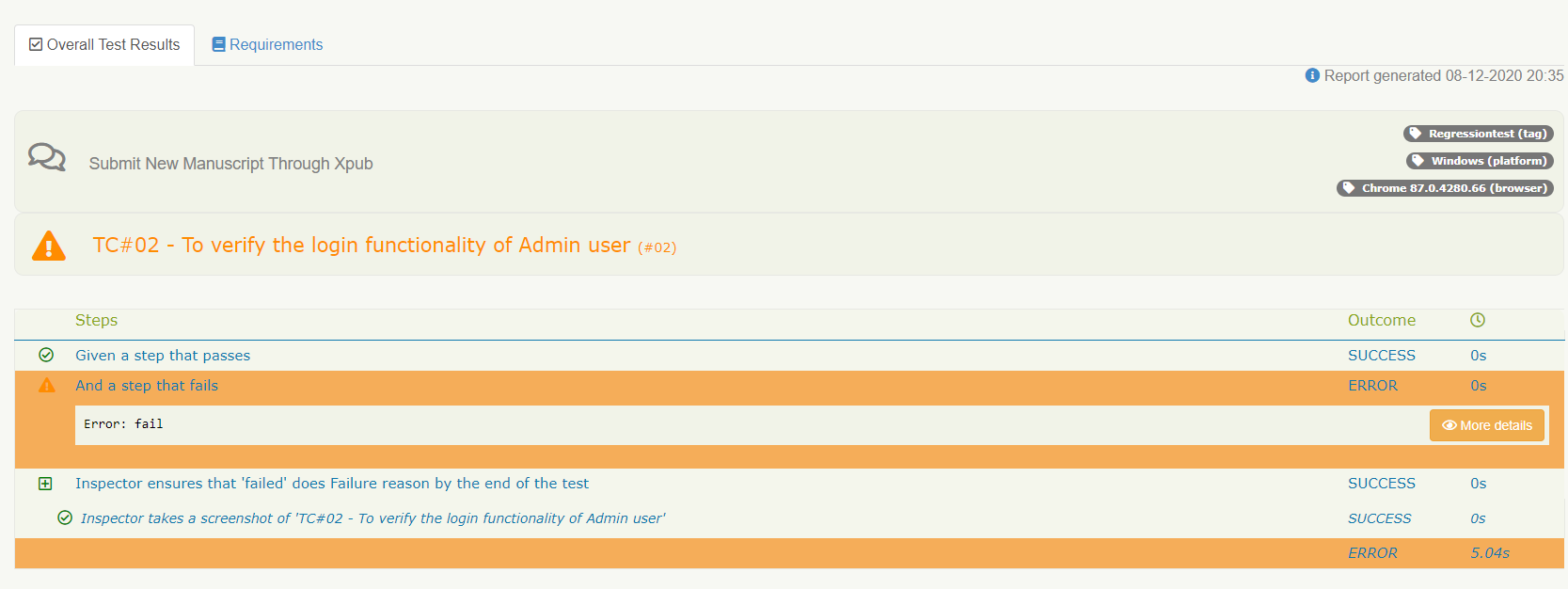
@jan-molak Please let me know the work around to continue with the script migration.