

 segmentio
Table.Head adding padding for non-existent scrollbar
I decided to close the other issue (#748) as it contained a lot of noise around what could have been causing this bug. Plus I've found a fix for my exact implementation.
This bug is reproducible on both Windows and Mac. I have tried toggling on/off the auto-hide scrollbar in my OS, but that doesn't seem to fix this, happens either way.
To demo this bug you can just go to the docs page for Table, and apply a filter so there are less rows than the height of the table - "aas" works.
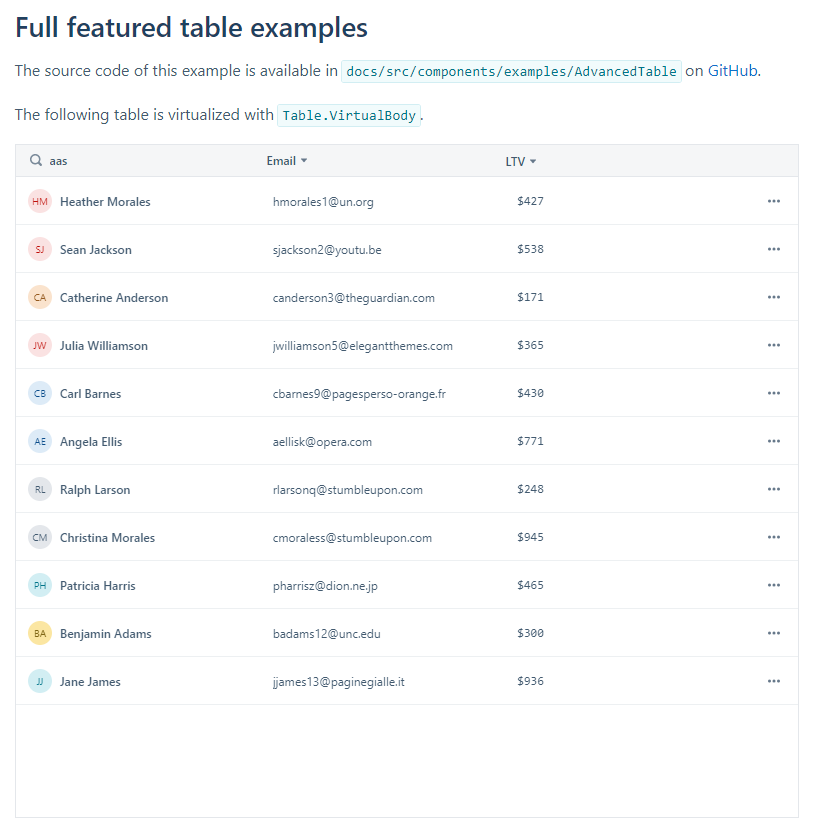
The table header adds padding for a scrollbar which throws off all the alignment with content rows. If you manually remove that padding in the inspector, it looks perfect again (below).

I think the issue is that ScrollbarSize assumes a scrollbar will always be displayed - it appears to calculate the width of the scrollbar not by looking at the actual table but by rendering a hidden fixed width div.
For my implementation I don't want to set a fixed height for my table, so it will just grow with the content and never have a scrollbar.
I didn't realise but I can pass in accountForScrollbar = false into the Table.Head. Which is perfect for me, but I think this is still a bug for users with fixed height tables where they don't have enough rows to meet the height.
The comment in the docs is slightly incorrect though:
This should always be true if you are using TableHead together with a TableBody. Because TableBody has
overflowY: scrollby default."
I actually don't know how this can be fixed without looking forward at the first row in the table and checking its width - it might not be something that can be fixed...
Perhaps it just falls back on the users of the library, and they will need to do their own calculations and toggle that accountForScrollbar value when required.
