securingsincity
Disable annotations (useWorker not working)
Heyo 👋 I'm having trouble disabling the annotations. After searching through some issues, I've tried out the following:
<AceEditor
  value={code}
  mode="javascript"
  theme="github"
  showLineNumbers
  readOnly
  editorProps={{
    $useWorker: false,
  }}
  setOptions={{
    useWorker: false
  }}
/>
As I understand it, setting either setOptions.useWorker or editorProps.$useWorker to false should disable annotations and linting entirely, but it just isn't working. Any ideas?
Thanks!

Try removing $useWorker: false from the editorProps. It looks like setting both of the options actually doesn't disable the linter. You just need useWorker: false in setOptions.


@SidneyNemzer @securingsincity I haven't had a chance to test it, I ended up going with a different component for my needs. Sorry!
For what its worth, I had gone through iterations of trying each one individually which didn't do the trick.
@securingsincity, I can confirm that @SidneyNemzer tip works:
<AceEditor
  mode="javascript"
  theme="monokai"
  onChange={this.handleChange}
  value={this.state.code}
  name="editor"
  setOptions={{ useWorker: false }}
  editorProps={{ $blockScrolling: true }}
/>
successfully disables the worker. Looking forward to the eslint babel-eslint change upstream.

Looking forward to the eslint babel-eslint change upstream
You've peaked my interest @mattblackdev. Has Ace switched to using ESLint? I haven't seen anything about that being completed on the Ace repo.
+1 The trick didn't work for me. It keeps trying to start worker. I wonder if I set useWorker false, does it stop trying to create a worker? Or it creates one but not use it.

{
  ...,
  setOptions: {
    useWorker: false
  }
}
is disabling all annotations for me

I also encountered the problem of disabled annotations not taking effect.
 Quick operations can still be used to annotate in development

Try removing
$useWorker: falsefrom theeditorProps. It looks like setting both of the options actually doesn't disable the linter. You just needuseWorker: falseinsetOptions.
yeah, this works

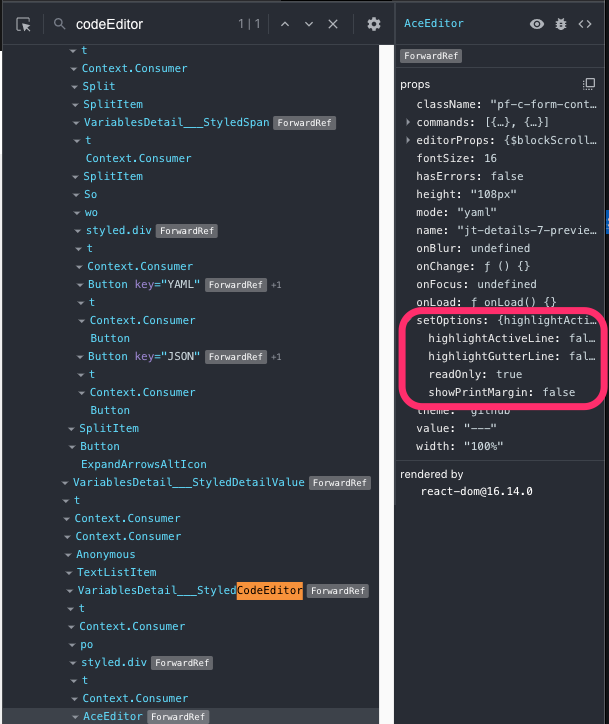
We are also encountering this issue in our codebase. We have the following component:
<AceEditor
    mode={aceModes[mode] || 'text'}
    className={`pf-c-form-control ${className}`}
    theme="github"
    onChange={debounce(onChange, 250)}
    value={value}
    onFocus={onFocus}
    onBlur={onBlur}
    name={`${id}-editor` || 'code-editor'}
    editorProps={{ $blockScrolling: true }}
    fontSize={16}
    width="100%"
    height={height}
    hasErrors={hasErrors}
    setOptions={{
        readOnly,
        highlightActiveLine: !readOnly,
        highlightGutterLine: !readOnly,
        useWorker: false,
        showPrintMargin: false,
    }}
    commands={[
    {
        name: 'escape',
        bindKey: { win: 'Esc', mac: 'Esc' },
        exec: () => {
        wrapper.current.focus();
        },
    },
    {
        name: 'tab escape',
        bindKey: { win: 'Shift-Tab', mac: 'Shift-Tab' },
        exec: () => {
        wrapper.current.focus();
        },
    },
    ]}
    ref={editor}
/>
However when I introspect from Chrome dev tools the useWorker prop is not present: