

 securefederatedai
Workflow Interface: AST parsing error can arise in jupyter notebooks
When using the new experimental workflow interface in a jupyter notebook, an error produced at any point during execution may lead to an AST parsing error when calling flow.run(). The error is thrown by metaflow's DAG generation code:
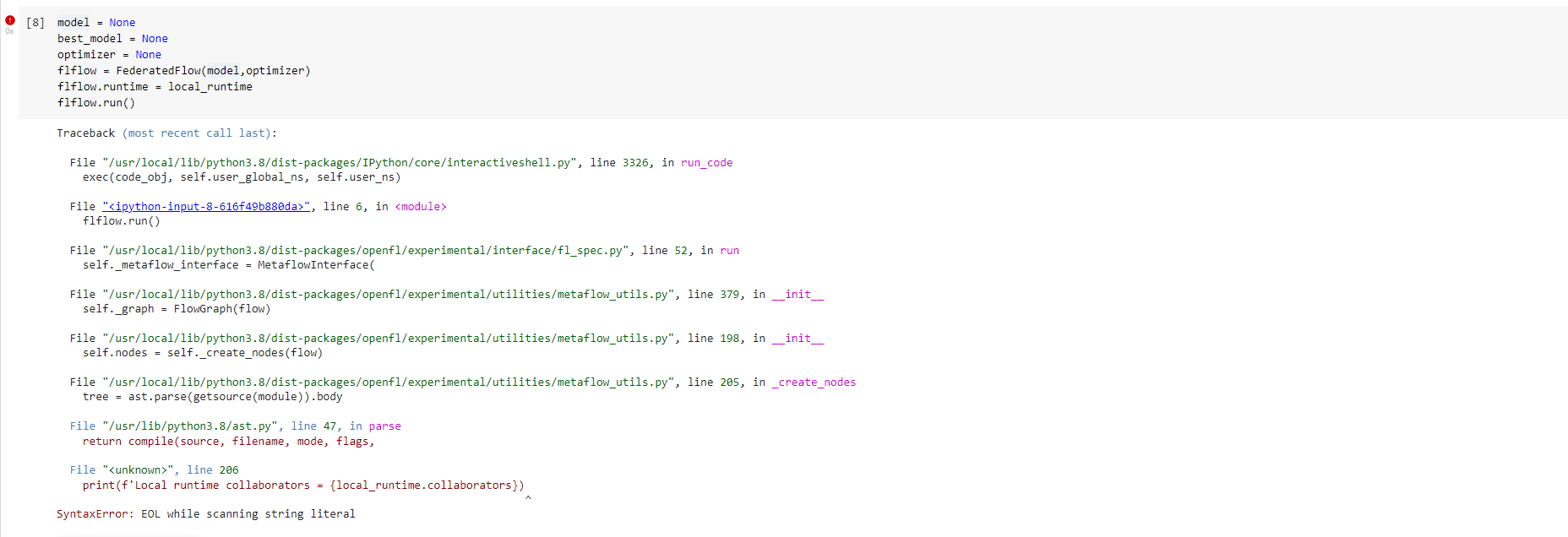
Because the error is generated at the metaflow level, I think the DAG UI genertion code should likely be disabled by default, and we should provide an argument to enable it instead.

STEPS TO REPRODUCE : - Add syntax error in any cell and run. Fix the error and rerun the cell. FlFlow.run() throws an error which is unexpected
ANALYSIS: - Issue seems to be caused in openfl/experimental/utilities/metaflow_utils.py: _create_nodes() function - Inside _create_nodes() function, the getsource(module) is not able to fetch the latest source code from the Jupyter notebook. It seems to fetch the source code when the iPython kernel was started / restarted and if this source code has an error this will result in parsing error
ADDITIONAL INFORMATION: - Issue is not observed if the IPython kernel is restarted after fixing the error
PROPOSALs: Step-1: Refactor FlowGraph from MetaflowInterface to InspectFlow - After this change user will not encounter issue with Graph generation during flflow.run(). Issue will be encountered only when the Graph is generated via InspectFlow() interface
Step-2:  Fetch only Source code for the Flow
	 - Current code is fetching the source for the entire module in which flow is defined (in this case jupyter notebook).
	    However source code   for  the Flow is enough for graph generation
	- This may also obviate the need to reload the Flow class
NEXT STEPS: - Working on changes described in Step-1 and Step-2. PR to be raised once basic sanity is done
