

 seba76
So how do I configure to connect?
Hello. I'm not very good at Linux, so I ask for help. I have DS713 + on Linux kernel 3.10.105 (Cedarview), DSM 6.2.3-25426 Update 3. I am installing virtualbox4dsm 6.0 and phpvirtualbox4dsm 6.0.8.
I don't understand how should I create a Windows virtual machine. I set everything up, start the virtual machine and see in a small preview window that the OS installation is starting. But I don’t understand how to connect to this machine. In the Display settings, I see that the address for connecting via RDP is local (127.0.0.1), in the settings you can only change the port and authorization method. It is clear that I cannot connect to the address 127.0.0.1, because virtualbox is physically launched on a different machine (NAS), and not on the one with which I log in (PC).
So how do I configure to connect?
I really hope that in your plans there is a desire to create virtualbox4dsm 6.1 for the Cedarview core.
And another question: how to add the Extension Pack or is it already there?

To access console you need to set the correct IP in display->remote display
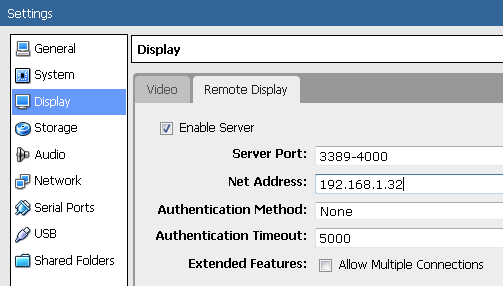 (ip should be the IP of your nas)
Extension Pack is included.

Imo Cedarview is to weak for running VM's, 1GB of RAM 713+ has is not enough for any Windows VM. You would be just slowing your NAS and VM would not be useful.
If it were that easy, I wouldn't ask for help.) Unfortunately, I do not have the "Net Address" line in the display settings.
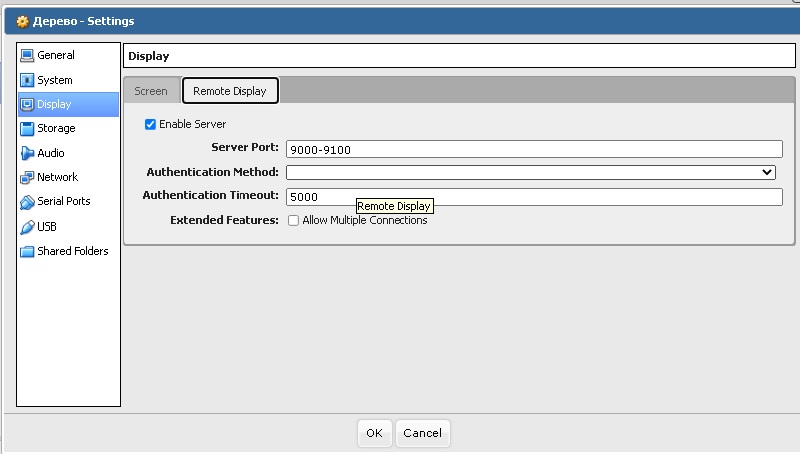
The memory of the 713+ can easily be increased to 6 GB, so I would not argue about its weakness.
Now I have VirtualBox shell running, Transmission is running, 3 Docker containers are running and 3% CPU and 29% RAM are occupied.
Therefore, I'm not the only one waiting and will gratefully accept the fresh assembly for 713+
Dear experts, how can I get access to the virtual machine if there is no "Network address" line in the settings?